dsh-workspace-icons
中文说明 · English
Give every project folder in the DSH Web sidebar its own icon — 160 bundled Hugeicons, each in its own colour, or an emoji, or an image. Projects you have not set up yourself get an icon chosen by reading the project and asking the AI, with a local rule engine as the fallback when no model is available.
Install
dsh plugin --profile <profile> add dsh-workspace-icons
<profile> is the profile you run the Harness with (desktop for the desktop app). The command adds the package to that profile's dependencies, appends it to dsh.profile.bundles (which is what inserts the Host line from cordis.patch.yml), and lets pnpm wire it up.
Restart the Harness so the Host half loads. After that you should see a Project icons page in Settings, and right-clicking a project row in the sidebar should open the icon picker.
Preview
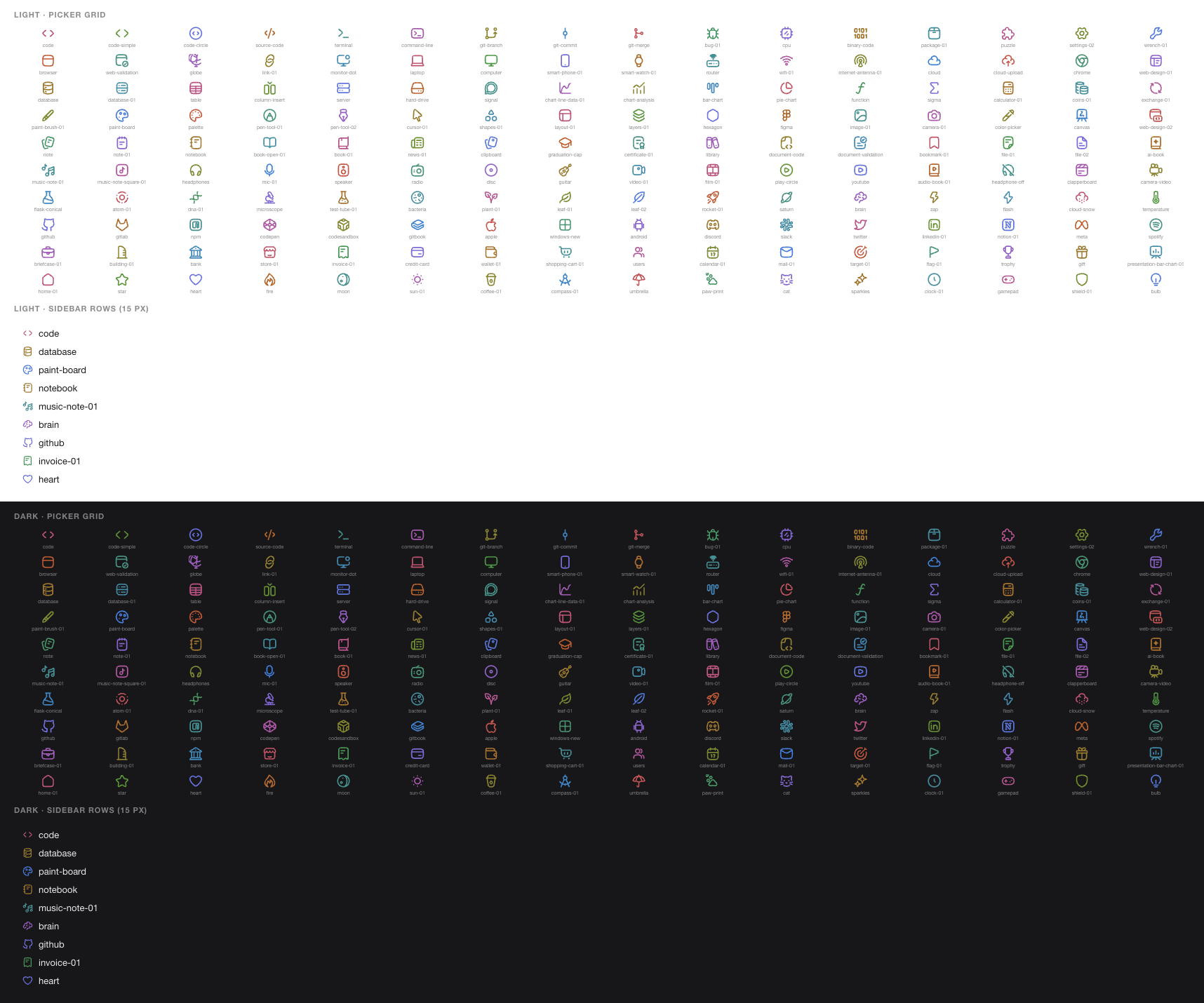

Both images are renders of what the plugin generates — the colour table from glyphColor(), the rows from buildCss() applied to mock project rows — not screenshots of the Harness window itself.
Usage
Two entry points, one shared store:
- Right-click a project row (recommended) — the icon picker opens on any project title in the sidebar. Pick an icon, paste a custom emoji, or enter an image URL; the change applies immediately. When there is an AI suggestion it appears first as "AI suggested · reason", which you can accept or re-run.
- Settings → Project icons — lists every project so you can set or clear icons one by one; the top of the page has the "Pick icons automatically" switch and a "Re-suggest all" button.
The picker has three tabs:
- Icons (default) — 160 bundled Hugeicons (free set, stroke-rounded), grouped into 10 categories (code / web / data / design / docs / media / science / brand / business / life), with a search box. Every icon has its own colour (see below).
- Emoji — a palette of 7 groups (60+ emoji) plus one slot for any single emoji you paste.
- Image —
https://…anddata:image/…only (javascript:,file:and friends are refused).
There is also Remove icon, which restores the default folder icon for that project.
Icon colours
Each of the 160 bundled icons gets a dedicated colour derived from its position in the catalog (hues spread with the golden angle) rather than assigned at random: the same icon is always the same colour, so you learn to recognise them. Colours are generated in OKLCH and written into the stylesheet as sRGB hex, so perceived lightness is even — yellow reads as clearly as blue, with no "washed out on white / too dark on black". Measured contrast is 3.7–4.3:1 on the light theme and 4.1–4.9:1 on the dark theme. Emoji and image icons are unaffected (an emoji keeps its own colours, an image keeps its own pixels).
AI suggestions
On by default. The rules are simple:
- only projects with no manual icon and no suggestion yet are analysed;
- a project is analysed at most once every 10 minutes, and after a failure the plugin waits 2 minutes before trying again;
- one request in flight at a time; the Host side runs at most 2 projects concurrently, with a 25 s per-project and 45 s per-request budget;
- a manual icon always wins; deleting it makes the previous AI suggestion take effect again.
What the Host half reads — always inside the project root, never a recursive scan:
| Source | What is taken |
|---|---|
package.json |
name / description / keywords / dependencies / scripts |
| other manifests | pyproject.toml, requirements.txt, Cargo.toml, go.mod, Gemfile, pom.xml, build.gradle(.kts), composer.json, Package.swift, pubspec.yaml, CMakeLists.txt, *.uproject (first 1.4 KB each) |
README* |
first 900 characters |
| top-level entries | up to 40, skipping node_modules, .git, dist, target, .venv…, and dotfiles |
| language mix | top-level files plus one level of at most 6 subdirectories, bucketed by extension |
The model is asked what the project is, not what stack it uses, and must answer with a single JSON object: {"glyph":"<name>","why":"<one line>"}, where glyph exactly matches an icon name and why follows the UI language. Any failure (no model, timeout, invalid output) falls back to local rules — dependencies → README/name keywords → dominant language → manifest type → generic folder icon — so it works offline and the answer is always one of the 160 icons.
Costs and boundaries: the project path, its name and those evidence snippets are sent to the default model configured in DSH (agentDefaultModel); file contents beyond the snippets, code bodies and any write to project files are not involved. Turn the switch off in the settings page to stop requests entirely (suggestions already stored keep showing; you can override or clear them one by one).
Where data lives
Both stores live in browser localStorage, keyed by project folder path (falling back to the workspace id when there is no path), so renaming a project keeps its icon:
dsh-workspace-icons.v1— manual icons;dsh-workspace-icons.auto.v1— AI/rule suggestions (with reason, source, timestamp) and the auto switch.
At most 500 entries are kept per store; when the cap is hit the oldest folders are dropped. Nothing is written to disk and nothing is synced between machines — clearing browser data clears the icons too.
How it works
The plugin has two halves.
Browser half (client.js) occupies two official slots:
settings.section— the "Project icons" settings page (order: 25);shell.overlay— the right-click picker (order: 40, positioned by a document-levelcontextmenulistener).
Both slots' standard props include useWorkspaces, so the project list needs no extra IPC. Drawing the icon has no official slot, so it goes through a structural selector:
[data-row-key="workspace:<id>"] > span:first-child > svg { display: none }   /* hide the native folder icon */
[data-row-key="workspace:<id>"] > span:first-child::before { … }              /* draw our own */
data-row-key is a stable semantic attribute on sidebar rows; the CSS-module class names are hashed, so they are deliberately not used.
Preset colours are computed once in the browser by glyphColor() and cached: OKLCH(0.60, ≤0.17, golden angle × index) → sRGB hex, painted through background-color under a mask; the same colour is used for sidebar rows, the picker and the settings previews.
Host half (index.js + lib/) does the one thing the browser cannot: read files and call the model. It registers one owner-authenticated route:
POST /api/workspace-icons/suggest
{ "language": "zh" | "en", "projects": [{ "key": "...", "path": "/abs/path", "title": "..." }] }
→ { "results": [{ "key", "path", "glyph", "why": { "zh"?, "en"? }, "source": "ai" | "rule" }], "route": "<model>" }
- absolute paths only, at most 24 projects, de-duplicated by key, request bodies capped at 64 KB;
- when a
workspaceRegistryservice is present, only folders registered as workspaces are read (422 unknown-workspaceotherwise); - the model call goes through
ctx.get('llm').stream(...)(createUserMessage+BlockAssemblerfrom@deepseek-ai/dsh-llm),maxTokens: 160, with anAbortSignal; that dependency is imported lazily, so an unresolved import leaves the local rules working instead of breaking the bundle; - model unavailable / error / timeout / invalid output → that row reports
source: "rule"and still gets an icon.
Upgrading from 1.x
1.x used Phosphor icon names (browser, sparkle, …); 2.0 moved to Hugeicons names (browser, sparkles, rocket-01, …), and the two sets are not interchangeable. Stored kind: "glyph" entries that fail the name check are silently dropped, so those projects fall back to the default folder icon (or an AI suggestion) — just pick again. The localStorage keys are unchanged, and emoji / image icons are unaffected.
Compatibility
- Built and tested against DSH 0.2.2-rc.1; it needs a Harness that ships the
connectionservice (Host route), thellmservice for AI suggestions (optional) and thesettings.section/shell.overlayslots. Node 20+. - Requires the sidebar provided by
@deepseek-ai/dsh-client-ui-workspace(the current implementation);workspace-treegrouping uses the sameworkspace:<workspaceId>row keys, so icons keep showing there. Theflatgrouping mode has no project rows at all, so there is nothing to draw on. - If a future DSH release changes the project row DOM (
data-row-keyor the first child's structure), icon drawing fails silently: the only effect is that icons stop showing, while the settings page keeps working and nothing else breaks. After a DSH upgrade,buildCss()andROW_PREFIXinclient.jsare the two places to look. - AI suggestions depend on the profile's default model; switching model or provider is picked up by the next analysis.
Development
npm run check          # syntax + glyph-table freshness + all three test suites
npm test               # tests only
npm run test:analyze   # evidence reading and fallback rules (pure, temp dirs as fixtures)
npm run test:host      # the Host route (fake Cordis context, fake model)
The icon table is generated code (the #region hugeicons-glyphs block in client.js) — do not edit it by hand. To add, remove or swap icons, edit the GROUPS list in scripts/build-glyphs.mjs (Hugeicons export names such as CodeSimpleIcon), fetch the source set once, then generate:
npm pack @hugeicons/core-free-icons --pack-destination /tmp/hugeicons
mkdir -p /tmp/hugeicons && tar -xzf /tmp/hugeicons/hugeicons-core-free-icons-*.tgz -C /tmp/hugeicons
npm run build:glyphs      # reads /tmp/hugeicons/package/dist/esm by default; use --source to point elsewhere
npm run build:glyphs -- --names   # only rewrite lib/glyphs.mjs (the Host-side name list); needs no source set
Generated ids drop the Icon suffix and go kebab-case: CodeSimpleIcon → code-simple, Bug01Icon → bug-01.
npm run check:glyphs validates without writing (for CI) and needs no source set.
Test coverage: both slot registrations and their arguments; the generated CSS (native icon hidden / glyph / emoji / image); localStorage round-trips and corrupt-data tolerance; the three icon validators; storage caps; right-click behaviour (session rows untouched); suggestion merging (manual wins); request dedupe and failure backoff; icon-table integrity; zh/en dictionary key parity; evidence reading (manifests / README / directory / language mix / missing folder tolerance); fallback rules (Next.js→browser, torch→brain, Rust→settings-02, empty→package-01, "language model" not treated as 3D); prompt shape and JSON parsing; the Host route (registration args, invalid body 400, relative paths refused, oversized body 413, unknown workspace 422, rule fallback, model success/invalid/throw/timeout, no default model, route disposal).
Layout:
client.js                    browser half (UI + generated icon table + suggestion state machine)
index.js                     host half (/api route, evidence, model call, fallback)
lib/analyze.js               evidence reading and local rules (pure, testable)
lib/glyphs.mjs               the 160 icon names (generated; used by the host half)
cordis.patch.yml             bundle patch: insert workspace-icons
locale/{zh,en}.json          UI copy
icon.svg                     plugin icon
scripts/build-glyphs.mjs     icon-table generator (client.js block + lib/glyphs.mjs)
THIRD-PARTY-NOTICES.md       Hugeicons' MIT licence
test/contract.test.mjs       browser-half contract tests
test/analyze.test.mjs        evidence and fallback-rule tests
test/host.test.mjs           Host route tests
Uninstall
dsh plugin --profile <profile> remove dsh-workspace-icons
Then check that ~/.dsh/profiles/<profile>/package.json has no leftover entry in dsh.profile.bundles (delete it if so) and restart the Harness. Uninstalling does not clear localStorage; to wipe it completely, run this in the browser console:
localStorage.removeItem('dsh-workspace-icons.v1')
localStorage.removeItem('dsh-workspace-icons.auto.v1')
Licence
MIT — see LICENSE. The bundled icon set is Hugeicons' free set (MIT); its notice is in THIRD-PARTY-NOTICES.md.
No comments yet. Be the first to write one.