dsh-agent-team-presets
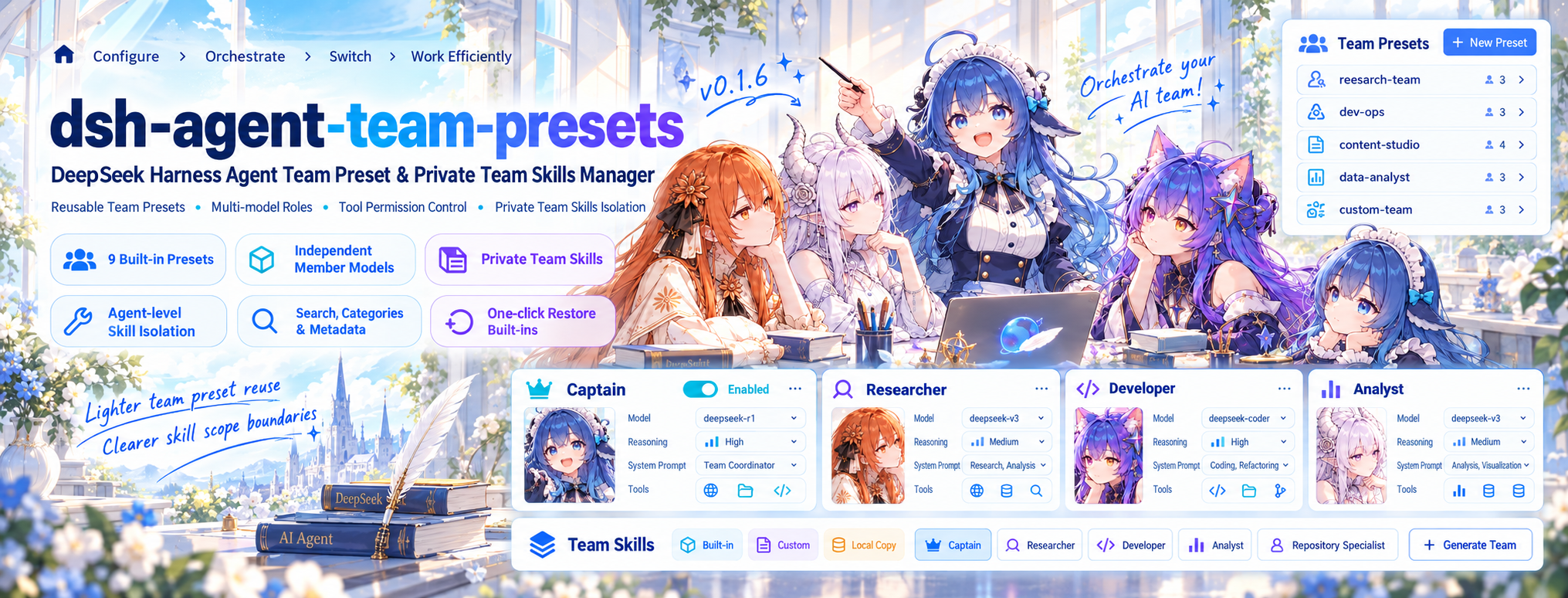
Concept illustration. See Screenshots for the plugin interface; the captain uses the conversation's selected model.
English | 中文
Community plugin v0.1.9 · Tag
This release targets DeepSeek Harness 0.2.2-rc.1 and adds individual member chat: hover a Team in the composer, then select one member to run the Session as that member with its own role card, tools, Team Skills, and model route. It also moves member routing to
agent.model.select()and per-step tool admission. Requires Agent Teams; keep 0.1.8 on older hosts. Prebuilt artifacts are included.
What's new in 0.1.9
- Talk to one member directly. The composer's Team picker now shows a member panel on hover. Selecting a member injects its role card, tool policy, Team Skills, and model route into the current Session; selecting the captain keeps the Session model unchanged.
- DeepSeek Harness 0.2.2-rc.1. Member routes are recorded through
agent.model.select()and tool admission is evaluated per step. The plugin refuses an unusable member route before applying anything instead of falling back to the captain. - Custom tool policies are native-only. On PTC presets the plugin preserves the deployment's executor and explicitly refuses custom allow-lists; PTC still works with the all-tools mode.
- Built-in troubleshooting skill. The global
agent-team-presets-troubleshootingskill explains Team application, member creation, route evidence, Team Skill visibility, and install/upgrade failures.
Overview
dsh-agent-team-presets is a visual Team preset and private skill manager for DeepSeek Harness. Configure a Team once, assign per-agent isolated skills, then select it from the conversation composer whenever you need it.
A Team contains a captain and any number of member roles:
- The captain uses the conversation's selected model, with its own role description, system prompt, and tool policy.
- Each member can have an independent provider, model, reasoning effort, system prompt, tool policy, and assigned Team Skills.
- The captain summons members through
spawn_team_member; native Agent Teams provides messaging, the shared task board, and runtime coordination.
This is a community plugin, not the Harness's bundled @deepseek-ai/dsh-experimental-agent-team-presets development package.
Why this plugin?
DeepSeek Harness already ships Agent Teams with multi-agent collaboration. In the Harness versions this plugin supports, per-Team configuration, skill isolation, and reuse are still left to the user, which is what this plugin addresses:
- Teams are hard to reuse. In those versions, native teams focus on runtime creation and collaboration, with no visual preset management; this plugin saves, duplicates, categorizes, and reuses named presets.
- Role setup is repetitive. Each role's name, description, system prompt, and tool policies are configured once instead of re-described every time.
- Splitting work across models is awkward. Every member picks its own model and reasoning effort, so one Team combines models by task, while the captain keeps leading on the Session's model.
- Tool permissions have no fine-grained entry point. In those versions the native tool surface offers no per-role allow-list; here the captain and each member carry their own, so roles differ in what they may use.
- Skills lack per-agent scope isolation. Shipped or user skills are typically registered globally, making all skills visible to every agent; this plugin provides a private Team Skill library where skills are discovered only by the specific Agent they are assigned to.
- Switching teams is inconvenient. Pick a preset Team directly from the composer instead of rebuilding roles by hand.
Design principle: native Agent Teams owns collaboration at runtime; this plugin owns configuring, managing, isolating, and reusing teams and their skills.
Features
- Reusable Teams: create, duplicate, edit, select, and delete named presets.
- Per-member model routes: assign models and reasoning effort to individual roles without changing the captain's model.
- Individual member chat: hover a Team in the composer to inspect its captain and members; select one member to inject that member's role card, tool policy, Team Skills, and model route into the current Session.
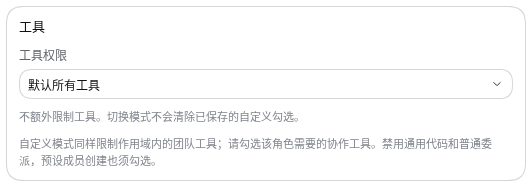
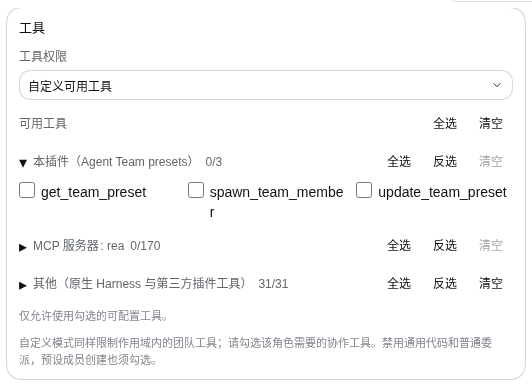
- Independent tool policies: choose all available tools or a custom allow-list for the captain and each member.
- Nine built-in presets across two series: three software development scale teams (Lightweight, Standard, Full-Stack) and six specialized work-mode teams (Discovery, Planning, Workflow, Engineering, Security Audit, Research).
- Display metadata: attach summary, tags, use cases, quick prompts (suggested tasks), and notes per Team. Strictly presentation-only: never injected into the runtime LLM context, saving context tokens.
- Local categories and search: organize presets into custom categories via a dedicated category manager; instantly search over name, summary, tags, and use cases in both Settings and the Composer picker.
- Private Team Skill library: import skill folders or ZIP archives into a plugin-owned store (
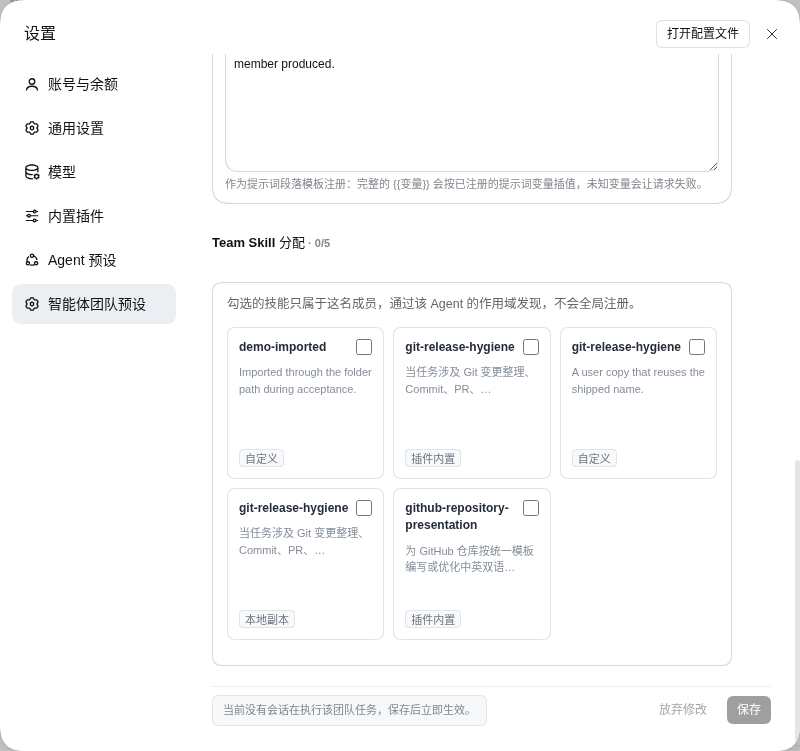
~/.dsh/agent-team-presets/team-skills), completely isolated from global host skills. - Per-agent skill isolation: a 3-column assignment grid on member pages assigns skills to specific roles. Assigned skills are registered strictly in that Agent's scope when summoned—never leaked globally.
- Official built-in skills & local overrides: ships two delivery skills (
github-repository-presentation,git-release-hygiene) and two method skills (grilling,research), materialized into the private library and pre-bound to engineering, discovery, and research roles. Create local editable overrides and one-click restore them to the built-in copy (恢复为插件内置版本). - Plugin-level troubleshooting skill: installing the plugin registers the global runtime skill
agent-team-presets-troubleshooting(not a Team Skill, not per-Agent isolated). It covers Team application, member creation, tool-policy refusals, model-route evidence, Team Skill visibility, and install/upgrade failures. - Guarded deletion with blocker modal: deleting a skill bound to any role, in use by an active member, or required as a dependency is refused, with a confirmation modal detailing every blocking holder.
- Dependency verification & MCP boundaries: checks declared CLI executables against host
PATH(flags found/missing and refuses assignment when absent) and reports declared MCP servers (declarative display; never auto-connected or hard-blocking). - Agent-facing tools: root sessions provide
list_team_skills,assign_team_skill,unassign_team_skill, andremove_team_skillalongsideget_team_presetandupdate_team_preset. - Live settings feedback: see whether a Team is idle, busy, or awaiting an update in an online Session.
- Theme integration: robust light and dark mode adaptation across all cards, dialogs, inputs, and dropdowns.
Contents
- Overview
- Why this plugin?
- Features
- Screenshots
- Requirements
- Install and upgrade
- Configure and use a Team
- Display metadata, categories, and search
- Private Team Skills and per-agent isolation
- Share presets
- Agent-facing tools
- Tool permissions and security
- Troubleshooting and limitations
- How it works
- Development and contributing
- Related resources
- License
Screenshots
The first screenshots show the 0.1.9 composer with individual member chat. The rest illustrate the settings interface, Team Skill management, and the earlier composer flow. Every provider, model, Team, and member name below is placeholder data from an isolated demo profile, not a real deployment.
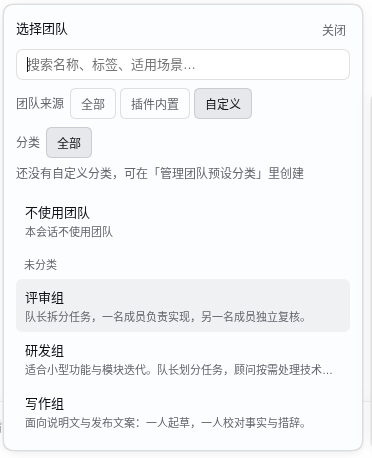
Browse and filter Teams in the composer
Hover a Team to open its member panel: captain, members, model route, and description
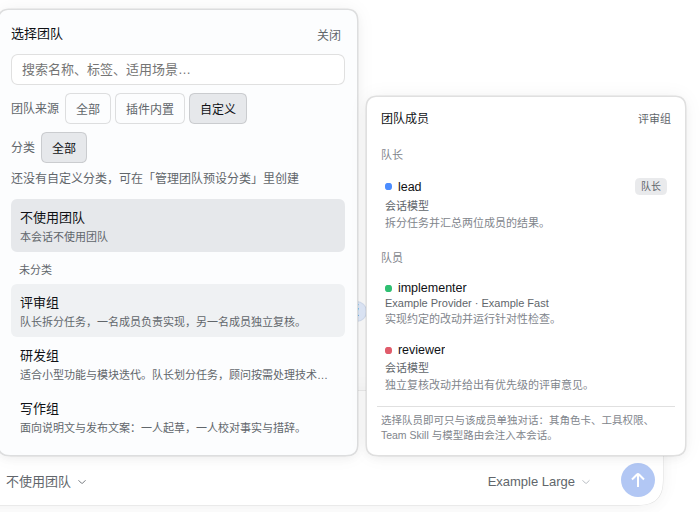
Hovering a row never changes the selection. The captain row carries the captain badge and session model; each member row shows its own provider and model, or session model when it follows the Session.
Click a member to talk to it alone: the trigger names it and the Session model follows its route

The member's role card, tool policy, Team Skills, and model route are injected into this Session. The Team trigger reads Team · member, and the model control switches to the member's configured route — Example Fast here.
Click the captain to select the Team normally: the Session model is left alone

The captain always follows the Session, so selecting it changes the Team and the role card but never the model. The chip above keeps Example Fast from the previous member selection.
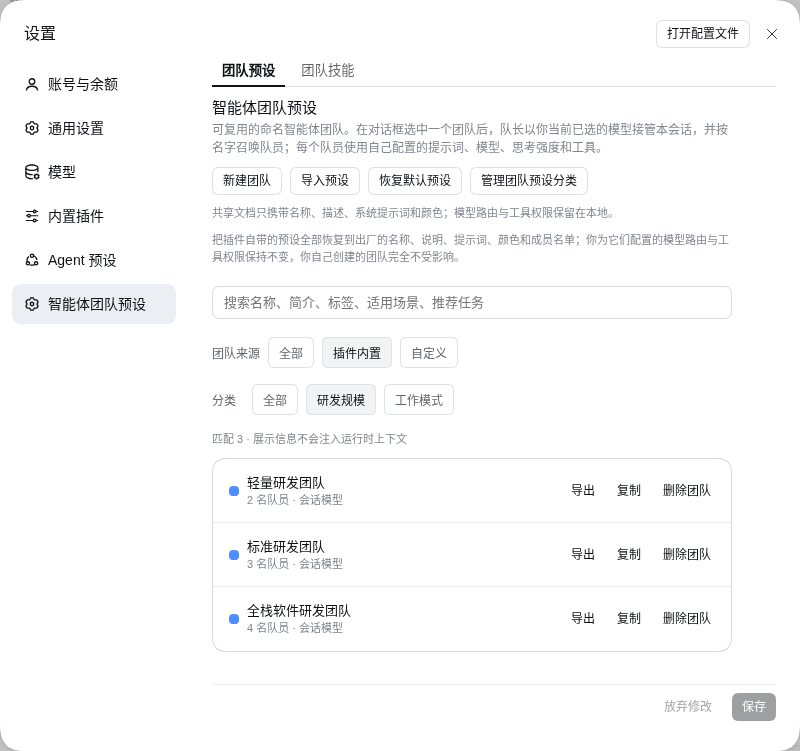
Manage Teams: tabs, search, source and series filters (settings layout carried over from v0.1.8)
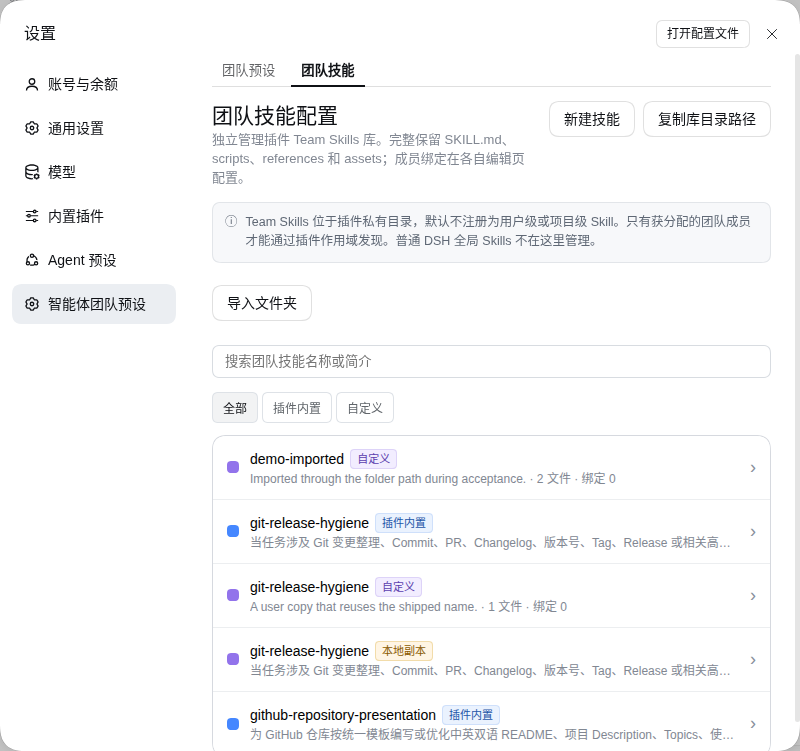
Private Team Skill library with origin badges and actions
Assign Team Skills to a member role
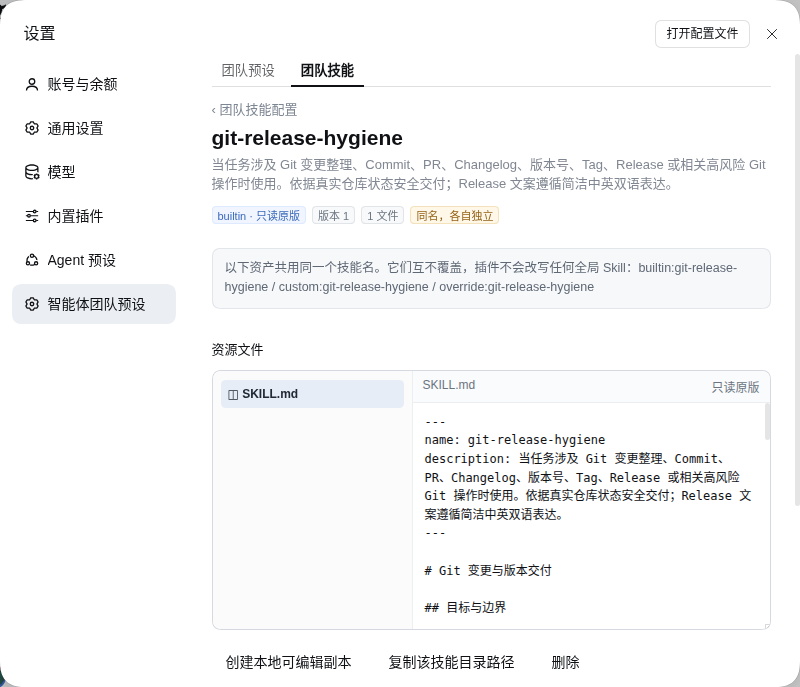
Skill details: file tree, editor, and local copy actions
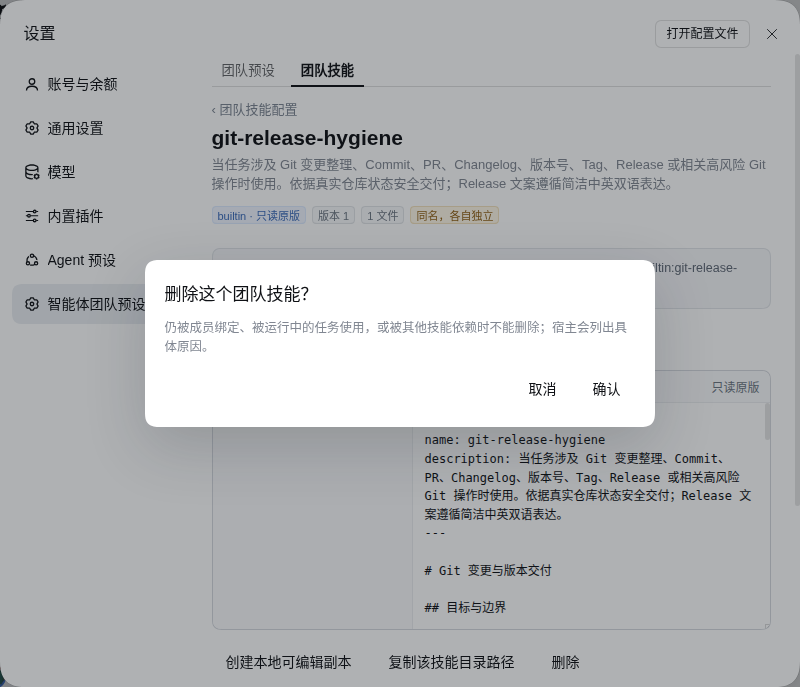
Guarded skill deletion with blocking holders modal
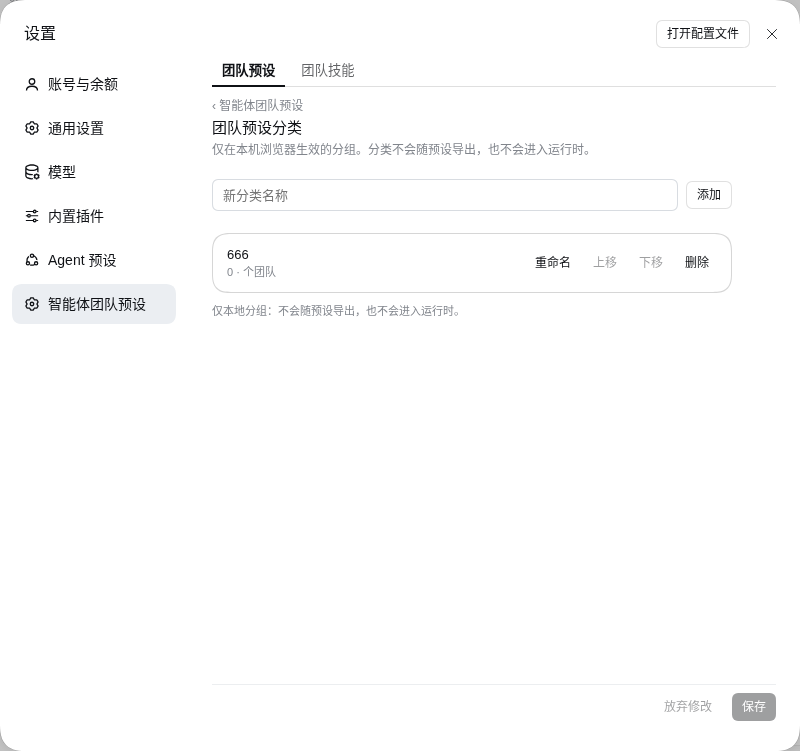
Manage custom preset categories
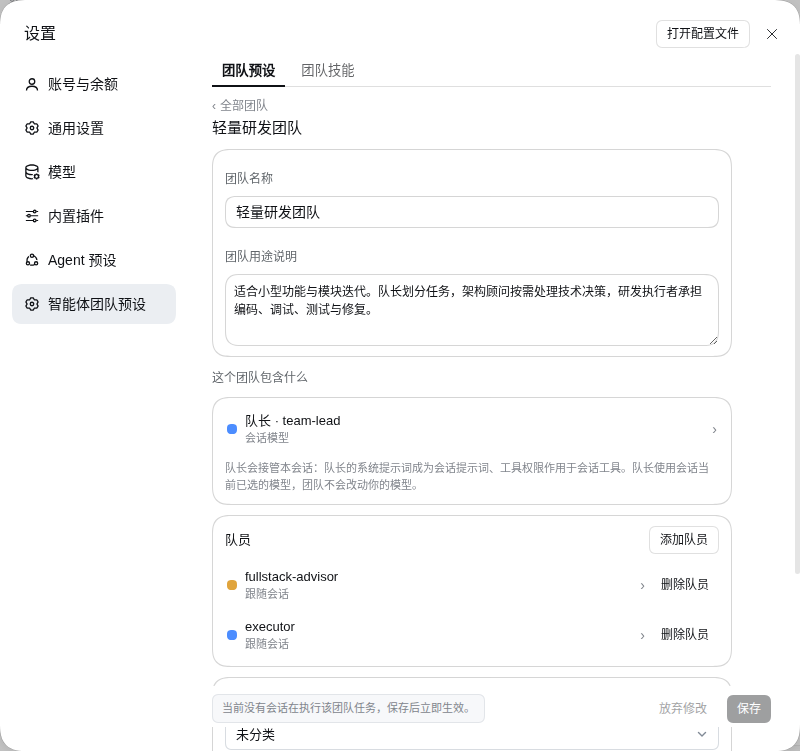
Team editor: display metadata, category picker, and status notices
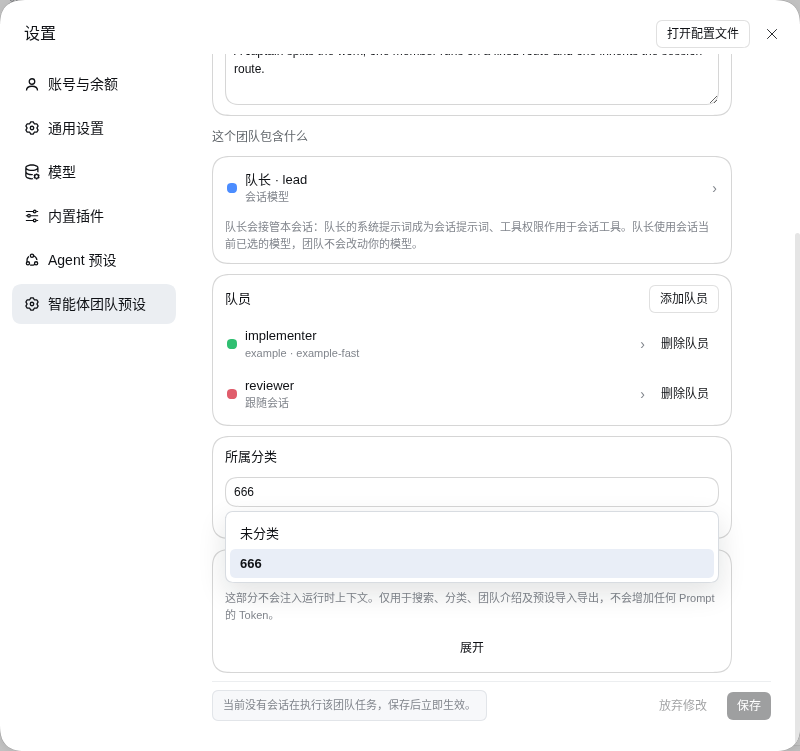
Category dropdown in Team editor
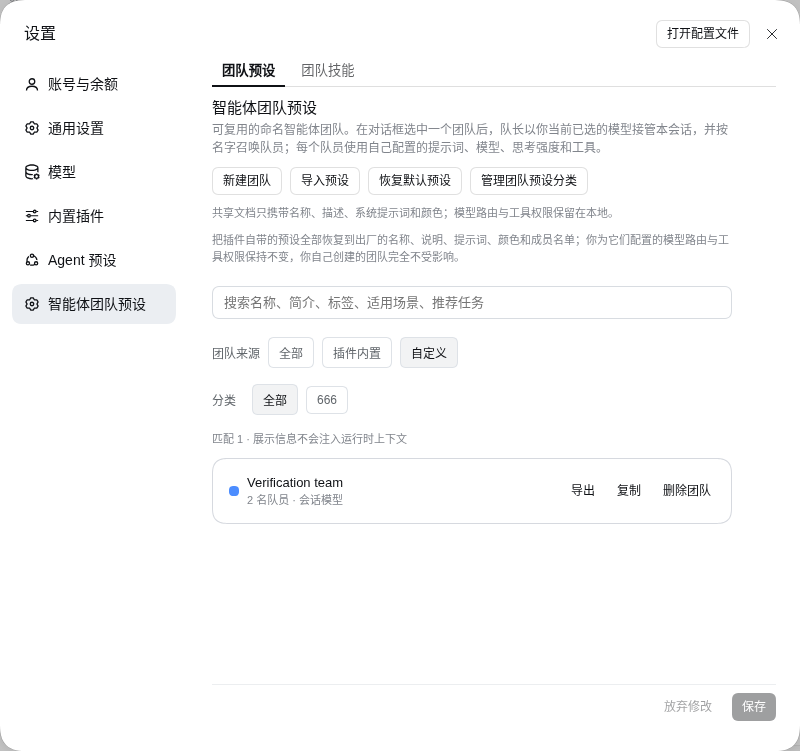
Filter Teams by custom source
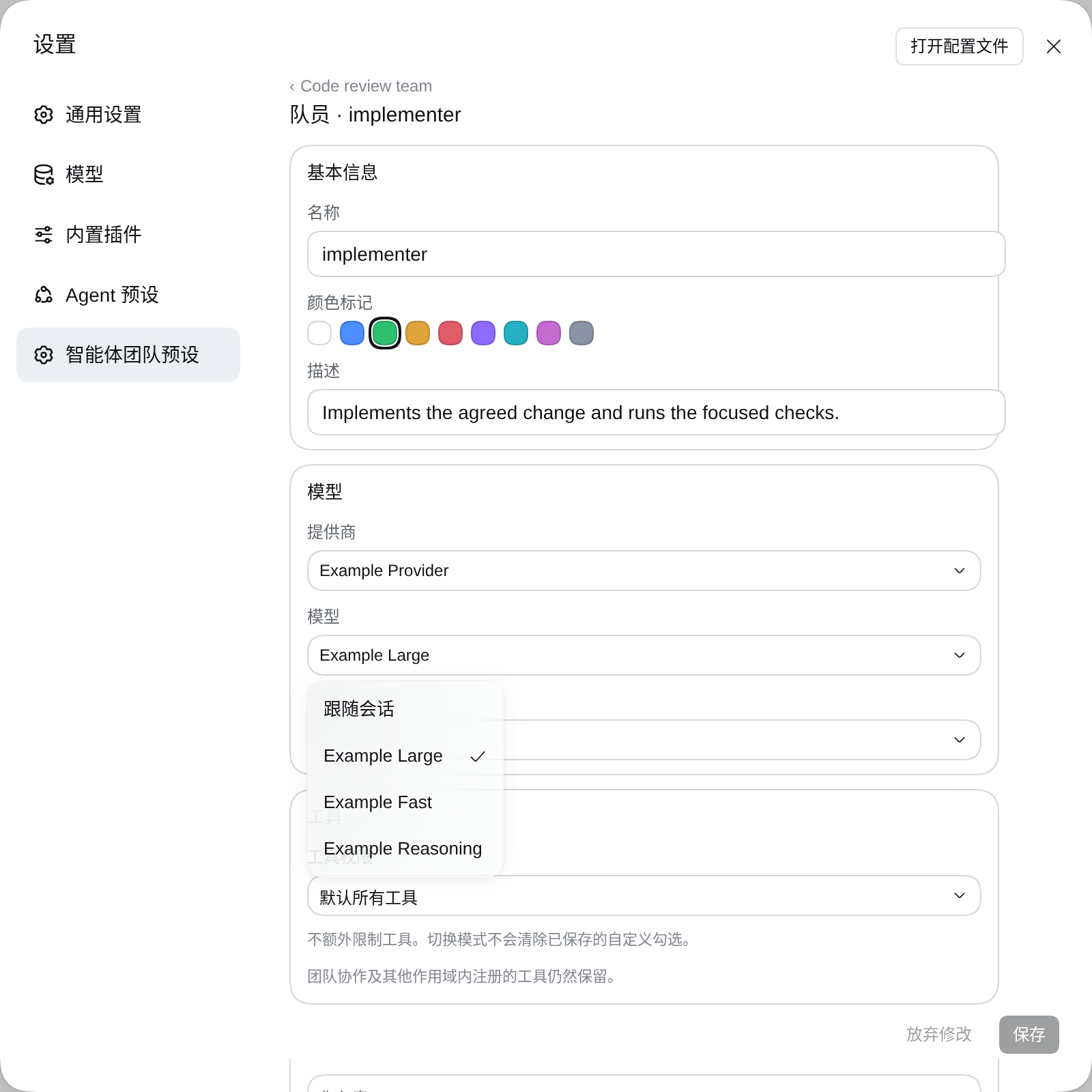
Configure member models and reasoning effort
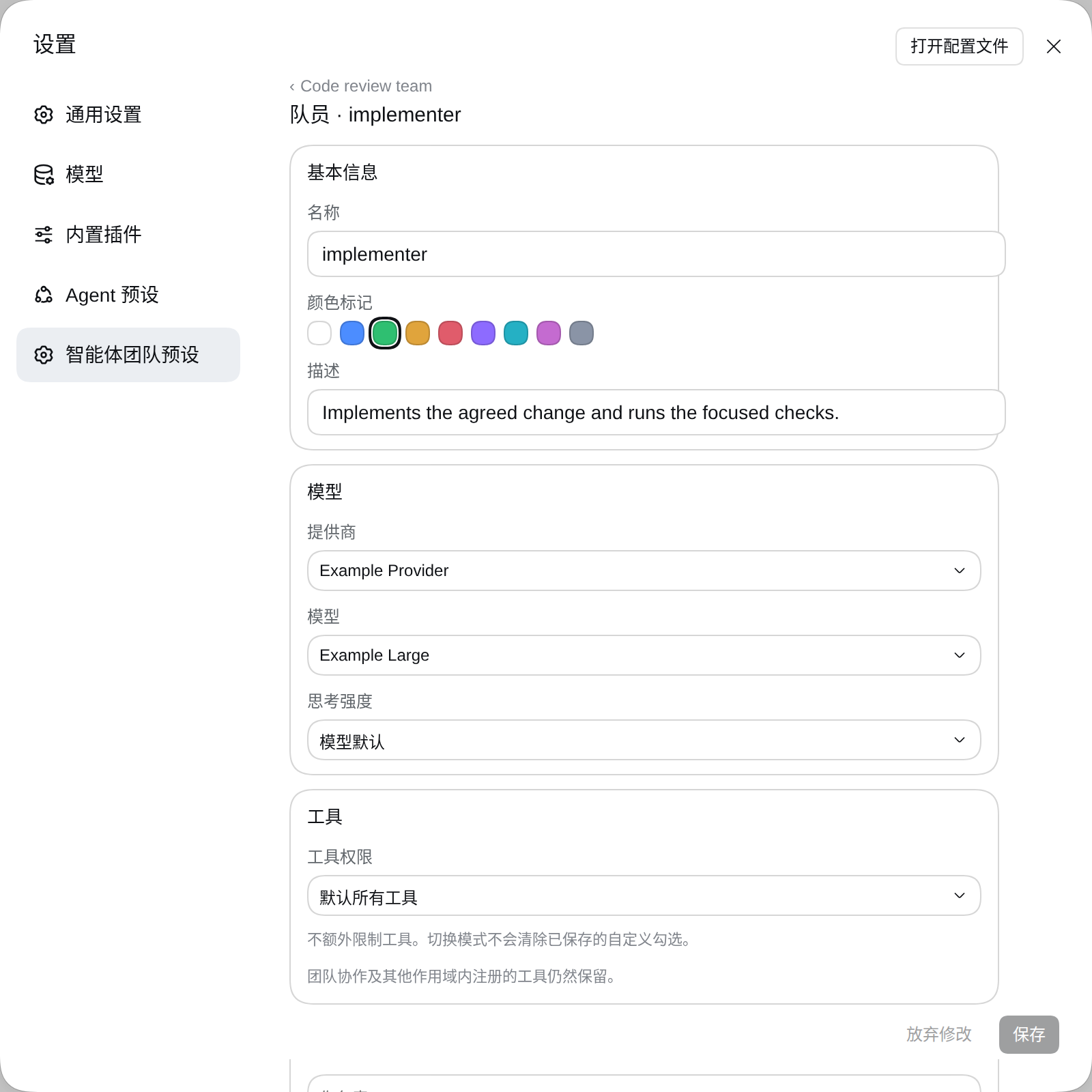
Model picker
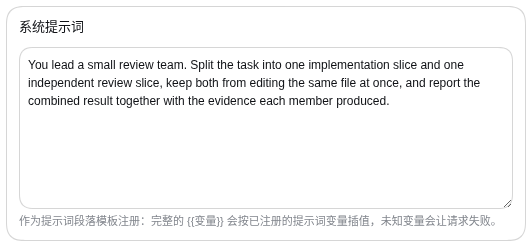
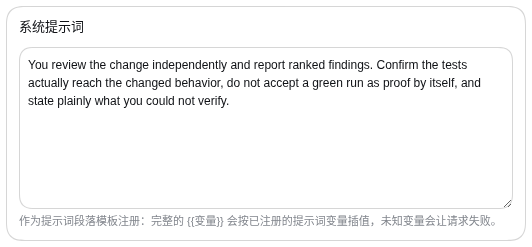
Captain and member system prompts
Tool policy controls
Requirements
- DeepSeek Harness
>=0.2.2-rc.1 <0.3.0. Verified against0.2.2-rc.1. Each member's route is recorded throughagent.model.select()for fresh, forked, and cold-resumed execution; the captain keeps the conversation's model selection. The plugin manager enforcesengines.dshfrom package.json. - Custom tool allow-lists require a native Agent preset (standard or cordis). This Host cannot restore an inherited executor after a temporary override, so the plugin preserves the deployment's executor and explicitly refuses custom policies on PTC. PTC remains available with the all-tools mode. Select a native Agent preset before using custom policies.
- Agent Teams enabled in the target profile. The standard integration is
@deepseek-ai/dsh-experimental-agent-team-profile, which supplies the Team service, tools, and Web roster. This plugin configures and manages Teams; it does not replace that subsystem. - A Web or Desktop profile with Settings and the required client services. Install into the profile you actually use, typically
webfor the Web GUI ordesktopfor Desktop. - Durable storage and a continuable subagent backend for member execution. Member creation is refused if the storage domain or selected execution backend is unavailable. The default backend names are
spawnandfork.
The plugin version (0.1.9) and the Harness version (0.2.2-rc.1, for example) are separate version lines.
Install and upgrade
Install and upgrade
Option 1 — npm package (recommended; receives update prompts)
Open Global panels → Plugins → Add plugin, paste the line below into Package name or address, and click Install:
dsh-agent-team-presets
Or install it from the CLI:
dsh plugin --profile <profile> add dsh-agent-team-presets
Replace <profile> with your active profile (e.g. web or desktop):
dsh plugin --profile web add dsh-agent-team-presets
The plugin manager compares the installed version against npm's latest dist-tag, so every later release is offered as an update.
Option 2 — floating GitHub install
Tracks the repository's default branch; an update is offered when package.json on that branch moves to a higher version:
dsh plugin --profile <profile> add github:bloodarea/dsh-agent-team-presets
Option 3 — reproducible pin (no update prompts)
dsh-agent-team-presets@0.1.9
dsh plugin --profile <profile> add github:bloodarea/dsh-agent-team-presets#v0.1.9
A fixed version or tag reproduces exactly one release. A #tag GitHub spec is only ever compared against that same tag, so the market never reports an update for it — upgrading means editing the spec by hand. Use this form only when you need a frozen install.
Install notes
- Registry selects which npm source the download comes from. Default registry uses pnpm's own configuration. Pick Official npm registry to bypass a mirror, or Custom address for an internal or cloud mirror.
- The field accepts package names,
name@version,github:owner/repo, tarball URLs, or absolute filesystem paths. - This package declares
dsh.bundle, so the plugin manager automatically registers it as a profile bundle layer; do not add a loader entry by hand. - Once installed, reinstalling the same package identity is blocked. To switch sources (e.g. from GitHub to npm), uninstall first, then install the new spec.
- GitHub and npm are separate release channels, so check the version this install would fetch before switching channels:
npm view dsh-agent-team-presets version
- After installation, reload or restart as prompted.
Verify and upgrade safely
After installation, follow the plugin manager's reload/restart prompts and navigate to Settings → Agent team presets. Verify that details display dsh-agent-team-presets, version 0.1.9, and a running component.
- Back up profile settings, Team definitions, and Session selections before upgrading.
- When migrating from a development link, remove
@deepseek-ai/dsh-experimental-agent-team-presetsfirst before enabling the community package. - Restart Harness after switching package identities, then refresh the GUI.
Install the bundle; do not add a second loader declaration. The package already supplies its own bundle patch. Duplicate hand-written declarations in profile patches can prevent settings from saving. See Configuration writes are overridden.
Configure and use a Team
- Open Settings → Agent team presets.
- Select a built-in Team, duplicate an existing one, or click New Team.
- Configure its name, purpose, display metadata, category, captain, and member roles.
- For each member, configure its provider/model route, reasoning effort, tool policy, and assigned Team Skills.
- Press Save in the shared footer. Edits remain staged drafts until saved.
- Select the Team from the conversation composer's Team control, then prompt the captain to coordinate the task.
Example prompt for a Team with execution and review roles:
Use the selected Team. Have the executor implement the agreed changes and regression tests, then ask the reviewer to inspect them independently. Summarize changes, test results, and remaining risks.
A preset role is a template. Summoning creates an instance with a unique target such as executor or executor-2. Use send_message with the returned target to continue working with an existing instance rather than spawning a new one.
Selecting No team disarms the Team application once the captain and teammates become idle, restoring standard session contributions without changing the active model.
Talk to one member directly
Hover a Team row in the composer picker to open its member panel. The captain is listed first with the Session model route; every member follows with its configured provider · model and role description.
- Selecting the captain applies the Team normally: the captain leads, may summon members, and keeps the model the Session already selected.
- Selecting a member starts an individual conversation with that member. Its role card (name, role description, and standing system prompt) becomes the Session persona, its tool policy and assigned Team Skills apply, and the captain briefing plus
spawn_team_memberare not installed. The Session model switches to that member's configured provider/model and reasoning effort. A member with no configured route keeps the Session's current model. - Switching back to the captain does not restore an earlier model: the captain always follows whatever model the Session currently has selected.
- Role and model changes wait for a running task to reach its boundary, exactly like a Team change. A selection naming a member that no longer exists is refused and the Session stays locked rather than silently falling back to the captain.
Fields
| Field | Purpose |
|---|---|
| Team name and purpose | Identify the preset and explain what work it handles. |
| Category | Assign the Team to a local category for organization in lists and picker. |
| Display metadata | Summary, tags, use cases, quick prompts, and notes. Purely presentation-only; never injected into LLM context tokens. |
| Captain | The lead agent. A nonempty captain prompt replaces its persona prefix; the captain keeps the conversation's model. |
| Members | Reusable role templates the captain can summon. |
| Name | Role display name and target base. ASCII letters/digits and hyphens (max 64 chars, not lead). |
| Description | Role responsibilities for the captain to select appropriate members (max 200 chars). |
| Color | Accent color distinguishing the role in settings and the roster. |
| Provider / Model | Members only. Route from the deployment's model catalog. |
| Reasoning effort | Members only. Options depend on model support; empty uses route default. |
| Allowed tools | Independent all-tools or custom allow-list policy. |
| Team Skills | Assigned private skills, registered exclusively in this Agent's scope upon creation. |
| System prompt | Standing role instructions. {{variable}} denotes prompt template variables. |
Built-in presets
A fresh installation seeds nine editable Teams across two series:
研发规模系列 (Classic Development Scale)
| Preset | Roles | Intended use |
|---|---|---|
轻量研发团队builtin-lightweight |
Captain, fullstack-advisor, executor | Small features and module iterations. Captain plans and verifies, architecture advisor handles cross-layer technical contracts on demand, executor writes code, tests, and debugs. Pre-bound with official delivery skills. |
标准研发团队builtin-standard |
Captain, system-architect, executor, code-reviewer | Standard software projects. Captain coordinates, system architect establishes interface contracts and module boundaries, executor develops and tests, independent code reviewer inspects quality. Pre-bound with official delivery skills. |
全栈软件研发团队builtin-fullstack |
Captain, backend-architect, ui-designer, executor, reviewer | Complex full-stack engineering across Web, Desktop, and Android. Captain leads, backend architect and UI designer provide technical/UX contracts, reviewer enforces quality gates, executor implements. Pre-bound with official delivery skills. |
工作模式系列 (Work Modes)
| Preset | Roles | Intended use |
|---|---|---|
需求探索builtin-discovery |
Captain, demand-analyst, solution-explorer, independent-challenger | Open-ended ideas where goal, technical path, or product direction is still exploratory; read-only research with independent challenge. |
架构规划builtin-planning |
Captain, system-architect, technology-evaluator, compliance-auditor | Settled goals where systems, module boundaries, and cross-module contracts must be designed. |
既定工作流执行builtin-workflow |
Captain, workflow-coordinator, task-executor, delivery-verifier | Established workflows where user specifies next task, and team implements, verifies, and delivers it. |
工程研发协作builtin-engineering |
Captain, architect-advisor, executor, code-reviewer, repository-specialist | Feature development, cross-layer implementation, UI/UX, and debugging, with a dedicated repository delivery specialist (repository-specialist). Pre-bound with official delivery skills. |
独立代码与安全审计builtin-audit |
Captain, vulnerability-expert, security-auditor, compliance-inspector | Independent read-only review of specified code, vulnerabilities, security configurations, and dependency compliance. |
科研协作builtin-research |
Captain, domain-researcher, experiment-analyst, rigor-reviewer | Literature review, experiment design, scientific computing, data analysis, and academic rigor inspection. |
Default presets are seeded once per profile. Deleting or editing a built-in preset is respected across restarts. Restore defaults restores shipped fields and official rosters while preserving local member model routes and tool policies.
Display metadata, categories, and search
Presentation-only display metadata
Each Team preset supports rich metadata:
- Summary: One-line description shown on cards and intros.
- Tags: Keyword chips for filtering and categorization.
- Use cases: Recommended project scenarios.
- Quick prompts: Ready-to-use task templates shown when selecting the Team.
- Notes: Operational reminders or cautions.
Token economy: Display metadata is stored in the preset document and used by the UI for search, grouping, and cards, but is never injected into the runtime LLM prompt context.
Local categories and hierarchical filtering
- Category manager: Click 管理团队预设分类 in the Settings list to open a dedicated management page. Create, rename, reorder, and delete categories, and inspect team counts per category.
- Local isolation: Categories and team-category bindings are saved in profile settings and are never exported with shareable preset documents.
- Two-level filters: The Teams list provides two independent filter rows:
- 来源 (Source): 全部 (All), 插件内置 (Built-in), 自定义 (Custom).
- 分类 (Category): For built-in teams, filters by official series (研发规模 / 工作模式); for custom teams, filters by user-created categories.
- Instant search: A responsive search box searches team names, summaries, tags, use cases, and quick prompts with real-time matched count reporting.
- Composer integration: The conversation composer's Team picker mirrors these source filters and search capabilities, with
不使用团队pinned to the top.
Private Team Skills and per-agent isolation
Private store and scope isolation
Traditional skills in Harness are typically registered into the global environment, exposing every skill to every agent. This plugin introduces a Private Team Skill subsystem:
- Private library: Skills live in a plugin-managed directory (
~/.dsh/agent-team-presets/team-skillsor storage domain), isolated from host and profile skills. - Per-Agent registration: When a Team member is summoned, its assigned skills are registered exclusively inside that member's Agent scope. Other members and the captain cannot see or invoke them unless explicitly assigned.
- Official built-in skills: four shipped skills: delivery (
github-repository-presentation,git-release-hygiene) and method (grilling— clarify before acting;research— primary sources only). Default bindings: engineeringexecutor/repository-specialistreceive the delivery skills; the Discovery captain receivesgrilling, itstechnical-scout/product-scoutand the Researchevidence-scoutreceiveresearch. - Local overrides & one-click restore: Built-in skills are read-only by default. Users can create an editable local copy ("本地副本"). If the built-in skill updates in a new plugin version, an
updateAvailablestatus is displayed, and users can restore to the built-in copy (恢复为插件内置版本) with one click. - Origin labels and badges: Skills display clear color-coded origin tags across all views:
- 插件内置 (Built-in, blue)
- 自定义 (Custom, purple)
- 本地副本 (Override, amber)
Import, directory scan, and dependencies
- Folder and ZIP import: Import external skill folders or
.zippackages directly in the Web GUI. - Directory scan: Scans candidate folders in the import path, reporting eligibility and reasons for any rejected folder. Users can copy the absolute library path with one click.
- Dependency checks and MCP boundaries:
- CLI executables: Declared CLI executables in
SKILL.mdare resolved against hostPATH, usingPATHEXTon Windows. Directories and non-executable files do not satisfy the dependency. Missing required executables are flagged and assignment is refused (dependency-missing). - MCP servers (declarative only, not auto-connected): Declared MCP servers are strictly declarative dependencies displayed in the UI (
skillsDeclared). The plugin never connects, launches, or manages external MCP servers automatically (their lifecycle belongs to the Harness environment and profile). Because MCP connectivity is an environment-level fact, declared MCP servers are reported asunverifiedrather than hard-blocking role assignment. When an MCP server is configured and running in the Harness profile, its exposed tools (mcp__<server>__<name>) appear under the MCP tool group in the role's tool configuration and can be authorized via tool policies.
- CLI executables: Declared CLI executables in
- Guarded deletion: Deletion is strongly guarded. If a skill is currently bound to any team role, used by a running member, or required by another skill, deletion is blocked. The confirmation dialog explicitly lists every holding team and member role (e.g.
标准研发团队 → executor), keeping the confirm button disabled until bindings are cleared.
Share presets
Export saves one Team as a JSON document (format version 2). Import preset reads the document and stages it in the editor.
- Shared fields: Team name, purpose, display metadata (summary, tags, use cases, quick prompts, notes), captain/member names, descriptions, prompts, and colors.
- Local fields: Model routes, reasoning effort, tool permissions, and local category bindings are never exported. Documents containing them are rejected on import.
- Name collisions: Choose between replacing the existing preset or creating a renamed copy. Replacement preserves local routes and tool policies on matched roles.
- Review imported prompts before executing tasks, especially when using documents from third parties.
Agent-facing tools
Root sessions register tools allowing agents to inspect and update presets and skills programmatically, subject to tool policies:
Team preset tools
get_team_preset: Reads the active or specified Team preset, returning its purpose, role descriptions, prompts, roster, and settings revision.update_team_preset: Updates team/captain descriptions and member prompts/descriptions using compare-and-set revision checks. Requires direct human turn and Host approval. Returnsteam-busyif affected members are currently active.
Team Skill tools
list_team_skills: Lists installed private Team Skills, origins, dependencies, and role assignment status.assign_team_skill: Assigns one Team Skill to a role in a Team (isolated to that agent scope).unassign_team_skill: Removes a Team Skill assignment from a role.remove_team_skill: Deletes a Team Skill from the library, enforcing blocker checks.
Tool permissions and security
Policy modes
- Default: all tools: No allow-list restriction beyond deployment permissions and role rules.
- Custom allowed tools: Permits only selected tool names. Coordination tools (
send_message,list_agents,team_task_*) must be explicitly allowed if needed. - Captain and member policies are independent. Granting a tool to the captain does not grant it to members.
- The
skilltool is always admitted, and is not offered as a choice. It publishes the catalog and loads instruction text rather than granting a capability, and the Host withholds that whole catalog from an Agent that cannot see it. A custom allow-list therefore cannot remove it, and the settings page does not list it: a checkbox for it would be a control that can never do anything. Documents written by an earlier version that still name it keep loading unchanged — the entry is admitted implicitly, never reported as unavailable, and never needs removing.
What a member's first turn guarantees
An assigned Team Skill is only useful if the member can load it on the turn that asks for it, so the plugin makes the registration part of member creation rather than a background step:
- Members: the creation edge awaits that Agent's own registration before it completes. A role that holds assigned Team Skills but whose deployment cannot publish them — no skill service composed, the private library unreadable, or the registration refused — is refused at creation with the reason, instead of starting with an empty catalog while every surface says the skill is bound. Roles with no assignment keep working on deployments that compose no skill service.
- The captain: the same registration is performed inside the Session's creation edge, after the Team application it depends on. A captain whose assignment cannot be published does not refuse the Team — a Session that is already running must not lose its capability policy — and the failure is reported at the Agent identity.
- Unreadable library is not an empty library. When the private store cannot be opened the plugin cannot even enumerate a role's bindings, so it refuses member creation rather than reading the unknown as "no assignment". Repair the library path (or start again) to recover.
Known limitation: Windows verification
The path-separator and executable-resolution fixes are exercised by unit tests that normalize separators and by ENOTDIR cases, but no Windows machine was available here. Junction handling across volumes, PATHEXT resolution against a real PATH, and the full native build chain still need a Windows run before the release is described as Windows-verified.
Security boundaries
- The allow-list is not a filesystem, process, or network sandbox. Allowed tools (such as bash) retain their native capabilities. Maintain appropriate Harness sandbox and approval policies.
- Custom policy mode disallows general-purpose
run_codeand ordinarysubagent/workflowdelegation to preserve strict policy contracts. Use preset Team members for delegation. - Managed members require their durable configuration on resume. Missing or corrupted records are refused loud rather than falling back to unrestricted defaults.
Troubleshooting and limitations
Configuration writes are overridden
If saving or selecting a Team reports:
Configuration for "agent-team-presets" is overridden by a home patch or command-line overlay
Check profile patches, $DSH_HOME/cordis.patch.yml, and --patch overlays for duplicate hand-written agent-team-presets declarations. Remove duplicate declarations while preserving Host-managed settings rows.
Built-in troubleshooting skill
The plugin registers agent-team-presets-troubleshooting on the global skill layer as soon as the profile composes the skill service. It is a host-level skill, not part of the private Team Skill library and not isolated per Agent: every Session can load it with the skill tool. Use it when a Team does not apply, a member cannot be summoned, a tool is refused, a member's model route is questioned, a Team Skill is invisible, or an install/upgrade behaves unexpectedly. The guide also states the evidence order: configuredRoute, model/selection, request/header.config, and the member snapshot route outrank subagent/descriptor or roster display values.
Common issues
| Symptom | What to check |
|---|---|
| Settings page is absent or plugin pending | Confirm profile type, peer dependencies, Agent Teams enablement, and client services. |
| Skill deletion button is disabled | The skill is protected: inspect the blocker list in the modal (bound roles or dependencies must be unassigned first). |
Skill assignment refused (dependency-missing) |
A required executable declared by the skill is absent from host PATH. Note that declared MCP servers are reported for visibility and do not block assignment; ensure MCP servers are configured in your profile. |
| Member creation refused | Check storage domain availability, subagent execution backend (spawn/fork), model quota, and concurrency limits. |
| Model route display mismatch | list_agents.model can return an inherited or fallback model even when the member actually runs on its configured route. Verify actual routing via spawn_team_member's configuredRoute, model/selection, the first request/header.config, and the member snapshot route. |
| A selected member's route is unusable | The Host refuses the application and keeps the Session's previous composition and model instead of falling back to the captain. Correct that member's provider/model (and reasoning effort) in Settings → Agent team presets, then reselect it. The composer reports missing members but does not display a Host refusal; check the member route and the deployment's provider catalogue. |
How it works
The plugin integrates via Cordis and Harness lifecycle extension points without patching host source code:
- Profile configuration: Stores Team presets, display metadata, local categories, and active session selections.
- Session application: Installs the captain persona, tool policy, and
spawn_team_memberat Agent scope. Selecting one member instead installs that member's role card and tool policy, omits the captain briefing and member tool, and selects the member's configured model route on the Session. - Member creation & skill scoping: Validates route and delegation limits, persists an instance snapshot, and launches the subagent. The serial
agent/createdhook injects model selection, persona, tool filters, and assigned Team Skills strictly into that member's Agent scope. - Private skill manager: Encapsulates skill storage (
~/.dsh/agent-team-presets/team-skills), crash-recovery journaling, dependency resolution, and guarded deletion.
Source navigation
| Area | Source |
|---|---|
| Plugin lifecycle and settings reconciliation | src/index.ts, src/settings-reconcile.ts |
| Built-in team catalog and series | src/builtin-teams.ts, src/team-catalog.ts |
| Team application and member tool | src/application.ts |
| Member snapshots and runtime injection | src/member-store.ts, src/member-identity.ts, src/member-runtime.ts |
| Private Team Skills subsystem | src/team-skills/store.ts, src/team-skills/manager.ts, src/team-skills/service.ts, src/team-skills/tools.ts |
| Tool policies and presentation | src/tool-policy.ts, src/presentation.ts |
| Preset tools and transfer | src/preset-tools.ts, src/preset-transfer.ts |
| Browser client UI | src/client/ |
Development and contributing
Source development requires a compatible, dependency-installed Harness checkout with its Host types and generated Typert Remote artifacts built first (the Harness build:lib:host pipeline provides them):
export DSH_CHECKOUT=/absolute/path/to/deepseek-harness
npm test
npm run typecheck
npm run bundle
Bug reports and pull requests are welcome at GitHub Issues and Pull requests.
Thanks to 张灏焱 for contributing the grilling and research method Team Skills (PR #2), and to Matt Pocock for the upstream skills they adapt (MIT, see NOTICE).
Related resources
- DeepSeek Harness — Host and plugin architecture.
- Built-in preset documents — Shipped team JSON definitions for reference or custom imports.
- Bundled skill documents — Shipped skills (
SKILL.mdbundles) materialized into the private library. - Method skill upstream — Source of
grillingandresearch(MIT; pinned commit recorded in NOTICE). - GitHub Releases — Published release packages.
License
MIT. Bundled dependency notices are in THIRD-PARTY-NOTICES.txt; source and MIT attribution for the bundled method skills are in NOTICE.
No comments yet. Be the first to write one.