dsh-session-dashboard
A DeepSeek Harness Web GUI plugin: an always-visible session status card in the left sidebar (above Settings), so recent session activity is visible without opening a page.
English | 中文
Features
- Persistent card in the left sidebar; when the sidebar collapses to its 56px rail it becomes an icon button with a "Needs you" badge
- One row per session: status glyph, title, current activity (Waiting for approval / Working / Completed unread / Idle) and relative time
- Filters All / Needs you / Running / Done with live counts; the card keeps the same height when switching filters
- Click a row to open that session;
+starts a new session - Click the card header (disclosure caret) to collapse or expand it; the collapsed header keeps the current status counts, and the state is remembered in this browser
- 5 rows by default, expandable to 10
- Settings → Sessions card section: card language (English / 中文) and default row count
- Needs-you, running and unread-completed sessions are listed first; running rows have a sweep animation
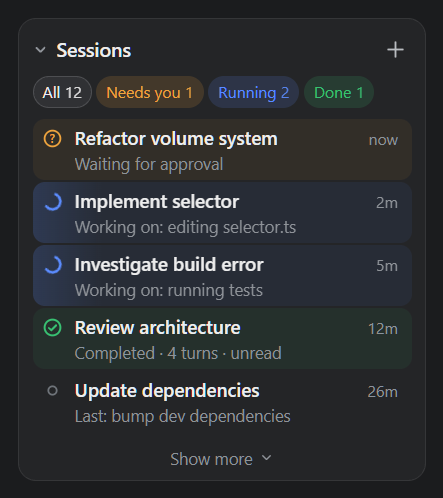
Session titles in the screenshot are sample data.
Verified on DSH 0.2.1-rc.2 (Web profile) and 0.2.1-rc.3 (Desktop profile): installed with the official dsh plugin command, --dump-config shows the # == dsh-session-dashboard layer, client-modules serves the bundle, card placement/filters/navigation/new-session/rail badge all work, and the console reports no plugin errors.
Official plugin form
This is a standard DSH bundle, not a private extension of the host:
| Official requirement | This package |
|---|---|
dsh.bundle.patch points at the config layer |
./cordis.patch.yml inserts the package into the Loader by name |
dsh.client.platform: "web" + exports["./client"] |
points at client/client.js (prebuilt __ModuleLoader__ factory) |
engines.dsh compatibility range |
>=0.2.0 <0.3.0 (passes on 0.2.1-rc.2 / rc.3) |
Installed into the profile's bundles list |
dsh plugin add appends it automatically |
| Prebuilt artifact, no install-time build | plain JS, no prepare/build script, so git/tarball/npm installs need no build approval |
license, icon, files |
MIT, icon.svg, complete publish file list |
Official docs: Package and install a plugin.
Install
The plugin is browser-only: no Host service, no configuration, no background work. Install and uninstall go through the official dsh plugin command (pnpm + profile manifest); no hand-edited profile or node_modules.
1. Build the release artifact
Run inside the plugin directory:
pnpm pack --pack-destination <output dir>
# produces dsh-session-dashboard-<version>.tgz
2. Desktop profile
The desktop profile belongs to the Electron app and the global npm CLI refuses to manage it; use the command runtime bundled with the desktop app:
$dsh = "<DeepSeek Harness install dir>\resources\runtime\cli\bin\dsh.cmd"
& $dsh plugin --profile desktop add <output dir>\dsh-session-dashboard-<version>.tgz
& $dsh plugin --profile desktop --dump-config   # optional: should show "# == dsh-session-dashboard"
Installation records the artifact under the profile's dependencies (file:...tgz) and appends the bundle to dsh.profile.bundles; pnpm materializes it into node_modules. Keep the tarball: the profile dependency points at it, and moving or deleting it requires another add.
Upgrade: bump version → pnpm pack again → run add with the new tarball. Uninstall:
& $dsh plugin --profile desktop remove dsh-session-dashboard
Reload the desktop window (Ctrl+R) or restart the app; a live patch reload only needs a page refresh.
3. Web profile
dsh plugin --profile web add <plugin dir>
dsh --profile web --dump-config
dsh plugin --profile web remove dsh-session-dashboard
dsh plugin resolves the local package as a pnpm link: dependency and appends the bundle automatically; restart dsh web (or refresh the page) to apply.
Data sources
The card requests nothing from the Host and stores no session state. It occupies the root-scoped sidebar footer seat and reads the standard seats the slot system provides to every root slot:
| Seat / data | Used for |
|---|---|
useSessions |
session catalog, displayTitle, updatedAt, blank/origin, projectionsBySession |
useSessionStatus |
running, pendingInteraction (approval / plan-review / question), completionUnread |
useWorkspaces |
archivedSessionIds (archived sessions are hidden by default) |
projectionsBySession[*].values |
todos (current todo), turnOutline (current prompt and turn count), sessionStats |
Opening a session uses ctx.uiWorkspace.openSession(id), starting one uses ctx.uiWorkspace.startSession(), and the collapsed-rail icon uses ctx.layout.toggleSidebar().
Structure
package.json          # dsh.bundle.patch + dsh.client (platform: web) + engines.dsh
cordis.patch.yml      # inserts this package as a Loader entry in the profile
lib/index.js          # empty Host-half plugin (keeps a Loader fiber so client-modules serves the browser half)
client/client.js      # the whole UI: __ModuleLoader__ factory + React card + themed CSS
icon.svg              # icon shown by the plugin manager
LICENSE               # MIT
docs/sidebar-card.png    # screenshot (sample data)
docs/limitations.md   # known limitations
docs/limitations.zh.md # known limitations (Chinese)
client/client.js is a hand-written CJS-in-loader factory (window.__ModuleLoader__.load({ id, factory })) and needs no build: edit it and refresh. Its only runtime dependency is react from the platform baseline; styling uses the host's --dsw-alias-* theme tokens, so light and dark themes both work.
Known limitations: docs/limitations.md.
No comments yet. Be the first to write one.