dsh-wechat-collector
A DSH-native control panel and tool set for collecting WeChat Official Account articles, analyzing an explicitly selected creator with DeepSeek, reviewing local reports, and handing source cards to ContentStudio.
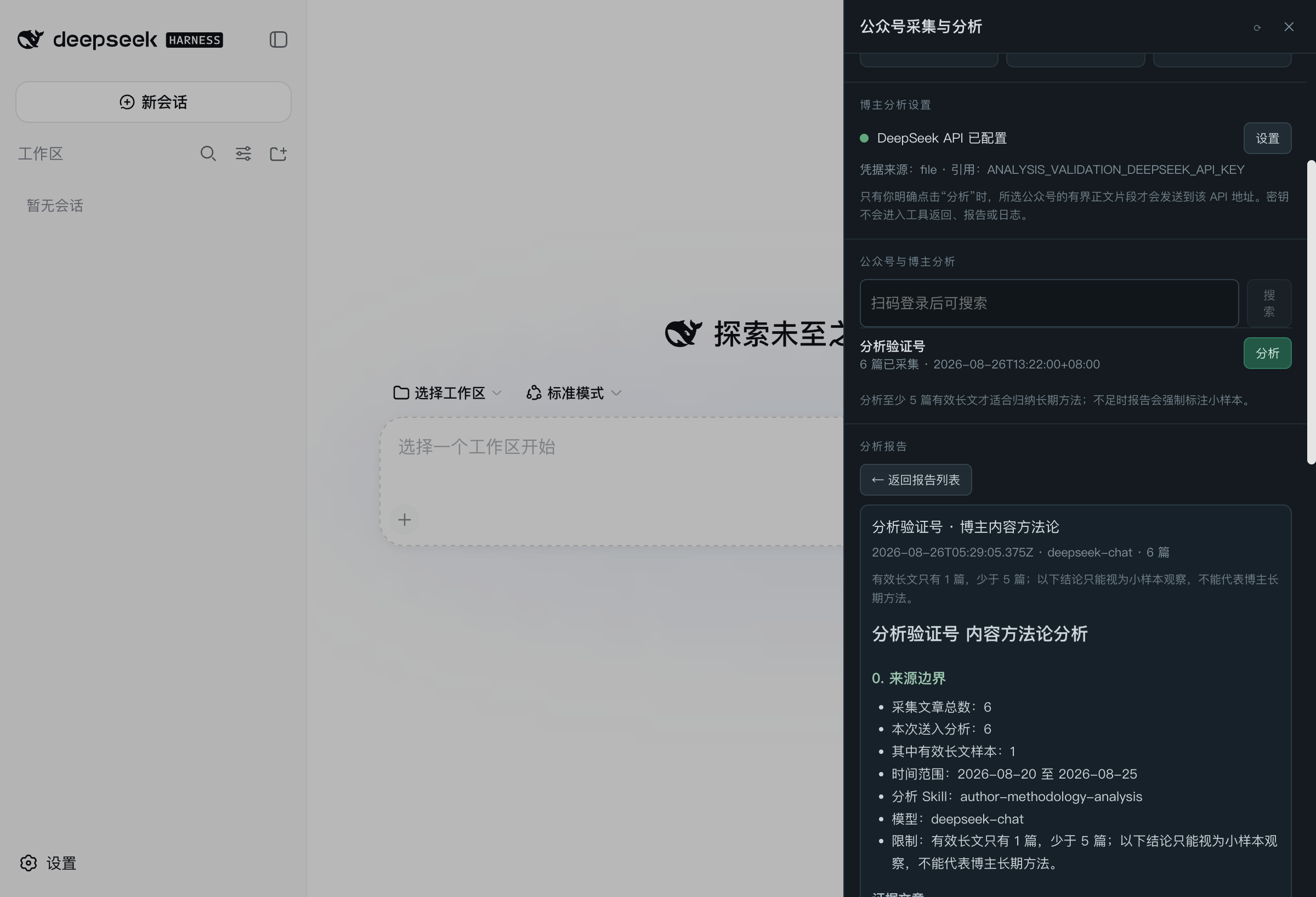
The plugin is the DSH layer. It provides the right-edge panel, agent tools,
first-run setup, QR-login flow, collection controls, feedback writeback, and
ContentStudio import. The bundled Python runtime is a sanitized subset of
pika-weixin-collection.
Install
The curated market listing is pending. Until it is merged, install the public GitHub source directly:
dsh plugin --profile web add github:bescriptkiddie/dsh-wechat-collector
Restart the managed DSH web process if your running profile does not hot-load the new bundle. The right edge of DSH will show 公众号.
First run on macOS
Open 公众号 and choose 安装本地运行时. Before doing anything, the panel discloses the exact local changes and asks for confirmation. The action then:
- downloads uv
0.12.6from Astral's GitHub Release and verifies its pinned SHA-256; - deploys the credential-free, user-data-free runtime bundled in this package
under
~/.local/share/dsh-wechat-collector; - creates a current-user launchd service bound to
127.0.0.1:8000; - verifies the local API before reporting success.
No install or postinstall lifecycle script performs this setup automatically.
The built-in runtime currently supports Apple Silicon and Intel Macs. On other
platforms, the plugin can still connect to an already running compatible API
through its collectorBaseUrl setting.
What it provides
wechat_collector_runtime— inspect, explicitly install, start, stop, or unconfigure the local runtime.wechat_collector_login— start or inspect local QR login; QR image data is confined to the loopback panel route.wechat_collector_account— search, add, list, or remove tracked accounts.wechat_collector_crawl— start collection, manage its daily schedule, and tune the request pacing policy (per-account/per-page delays, jitter, freq-control cooldown).wechat_collector_credentials— list, switch, or remove stored credential profiles; profiles are created only by QR login and never expose token/cookie.wechat_collector_sources— manage external sources (article RSS, podcast, Bilibili); article RSS acts as a second water source that keeps updating while the official-account API is rate limited.wechat_collector_items— read recent source candidates and previews.wechat_collector_feedback— write a real human decision back to the source item.wechat_collector_analysis_config— inspect the secret-safe analysis setup or test the configured DeepSeek-compatible endpoint.wechat_collector_author_analysis— run, list, or read local evidence-bounded creator-analysis reports.wechat_collector_import_to_studio— idempotently create ContentStudio source cards and a JSON receipt.studio_wechat_collect— compatibility entry for the ContentStudio workflow.
The panel also exposes the normal path: install/start → QR login → add account → collect → configure DeepSeek → select account and analysis skill → review the report → import source cards.
Credential profiles and rate-limit protection
Each QR login stores the credential as a named profile that can be switched at any time from the panel or tools; the active profile cannot be deleted and credential values never enter DSH. Crawling follows a configurable pace (20s between accounts and 8s between pages by default, with jitter). When WeChat returns freq control, the run stops immediately and enters a configurable cooldown during which manual and scheduled crawls are rejected (HTTP 429), so repeated requests cannot aggravate the penalty window.
External sources (second water source)
The runtime supports rss_feed article sources: any article RSS/Atom feed
(typically a local WeWe RSS subscription for WeChat official accounts) enters
the unified content pool as regular account articles and shares the same
pipeline. While the official-account API is rate limited, this source keeps
updating independently; the two sources back each other up.
Creator analysis
The panel stores the API key through DSH credentials under the
DEEPSEEK_API_KEY reference. Plugin settings and reports never contain the key.
The built-in analysis skills cover full author methodology, topic/title focus,
and structure/expression focus.
Analysis runs only after an explicit account-level action. At most 6,000
characters per article and 60,000 characters total are sent to the configured
DeepSeek-compatible endpoint. Reports stay under
~/.local/share/dsh-wechat-collector/analysis/reports and are viewable in the
panel. Fewer than five substantial articles are always labelled as a small
sample.
Evidence and publishing boundary
Collected previews are source leads, not verified facts, and not personal voice samples. Creator analysis extracts methods and structures; it does not clone identity, private experience, proprietary resources, data, or signature wording. The plugin does not publish to WeChat. Formatting, draft-box upload, and final publication stay in the separate ContentStudio publishing workflow with human confirmation.
Data and uninstall
WeChat credentials and collected data stay under
~/.local/share/dsh-wechat-collector/data. DeepSeek credentials stay in DSH's
credential provider, while analysis settings and reports stay under
~/.local/share/dsh-wechat-collector/analysis. They are not included in the npm
package and credentials are not returned by agent tools.
Before removing the plugin, choose 停用常驻服务 in the panel or explicitly
run wechat_collector_runtime(action=unconfigure). This stops launchd and moves
its plist into a recoverable backup. Plugin removal intentionally preserves
credentials, collected articles, and runtime files. See PRIVACY.md
and SECURITY.md.
Development
Requires Node.js 22.19 or newer.
npm install --ignore-scripts
npm run check
npm test
npm pack --dry-run
The package ships prebuilt JavaScript and Python source. It has no install-time build step.
License
MIT. The vendored runtime source and its provenance receipt are under
runtime/.
No comments yet. Be the first to write one.