description: "24PA (24私助) is a self-hosted AI personal assistant for Feishu/Lark, built as a dsh plugin: agent skills, schedules, calendars, todos, memory, handwriting review, and WeCom integrations." kind: "package-bundle"
24PA (24私助) — AI Personal Assistant for Feishu / Lark




From “remind me” to “prepare my week” — turn conversations into organized, reviewable action without giving up control.
@benz-ai-x/dsh-24pa is a self-hosted AI personal-assistant plugin for dsh. Local DSH sessions and a Feishu bot coordinate seven business workers in one owner-bound workspace; the desktop workspace adds sixteen capability cards for agent skills, scheduled tasks, calendars, todos, structured memory, handwriting review, and delivery evidence.
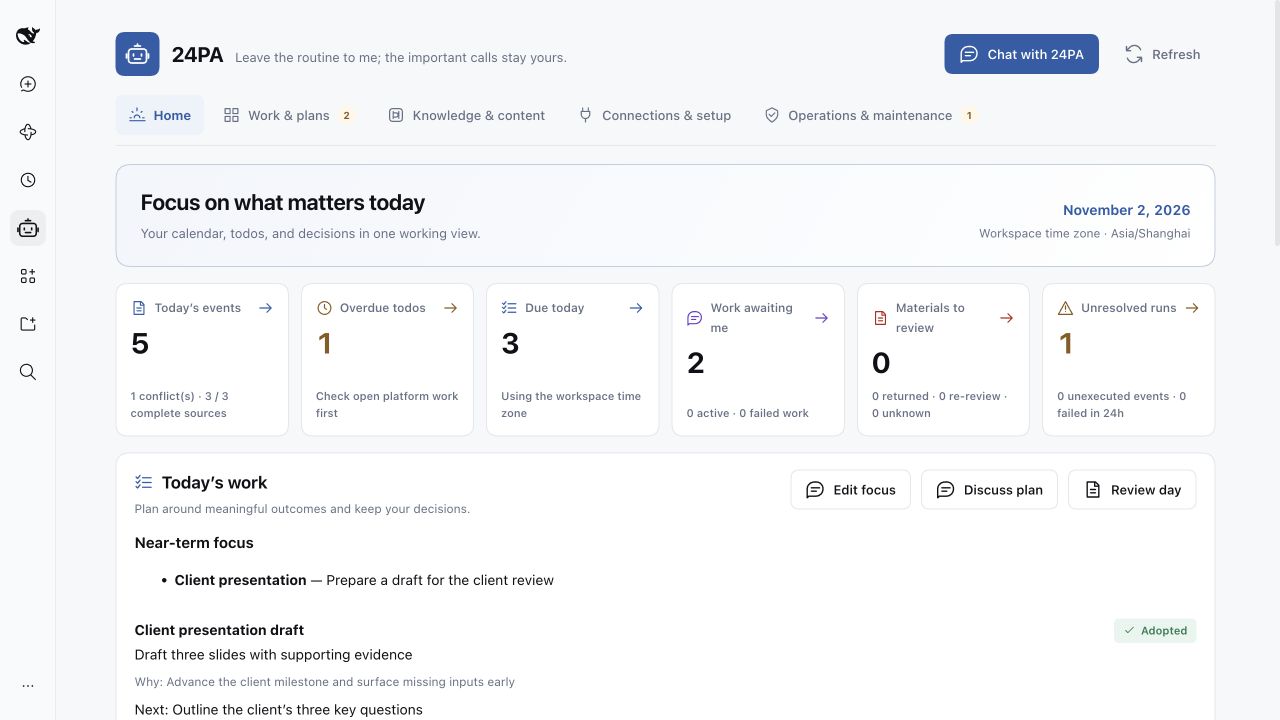
English desktop interface with sample data.
0.2.2-rc.1.8 fixes complete numbered plan confirmations, accurate notification previews for paused plans, and recovery of manually closed or multiple WeChat inputs (#279). The original plan identity, on/off choice, voice, and delivery channel remain intact; closed inputs are not revived. Previous query validation and scoped Host tool permission fixes remain included. Owner QR binding, private text requests, and common plan management are included. Scheduled WeChat notifications are deferred. See the WeChat setup guide. Owner QR binding, the help reply, and a read-only todo query result have been confirmed in WeChat; real numbered continuation and plan confirmation remain pending in #279. Protocol and isolated test evidence is recorded in PR #282.
This fix requires dsh 0.2.2-rc.1 and its native tool execution guard. Older hosts must use their matching plugin version in the table below.
Why 24PA?
- More than a chatbot. Move from a request to a work item, a Skill run, a platform object, and a traceable result — with schedules and follow-through built in.
- Keep the tools you already use. Work with original Feishu calendars, todos, documents, and notifications, plus WeCom calendars, todos, and one-way notifications — without forcing another source of truth.
- Automation you can actually govern. Inspect Skill packages and versions, preview permissions, separate execution from delivery, and keep human approval distinct from action authorization.
- A personal-assistant surface that can grow. Cards organize focused capabilities on one shared workspace and runtime, so new scenarios can be added without creating another disconnected bot.
Card-based assistant architecture
The bundle combines one assistant preset with a host plugin. Conversational coordination and the desktop card surface share the same owner identity, role boundaries, Skill and schedule runtime, work records, storage, and delivery evidence.
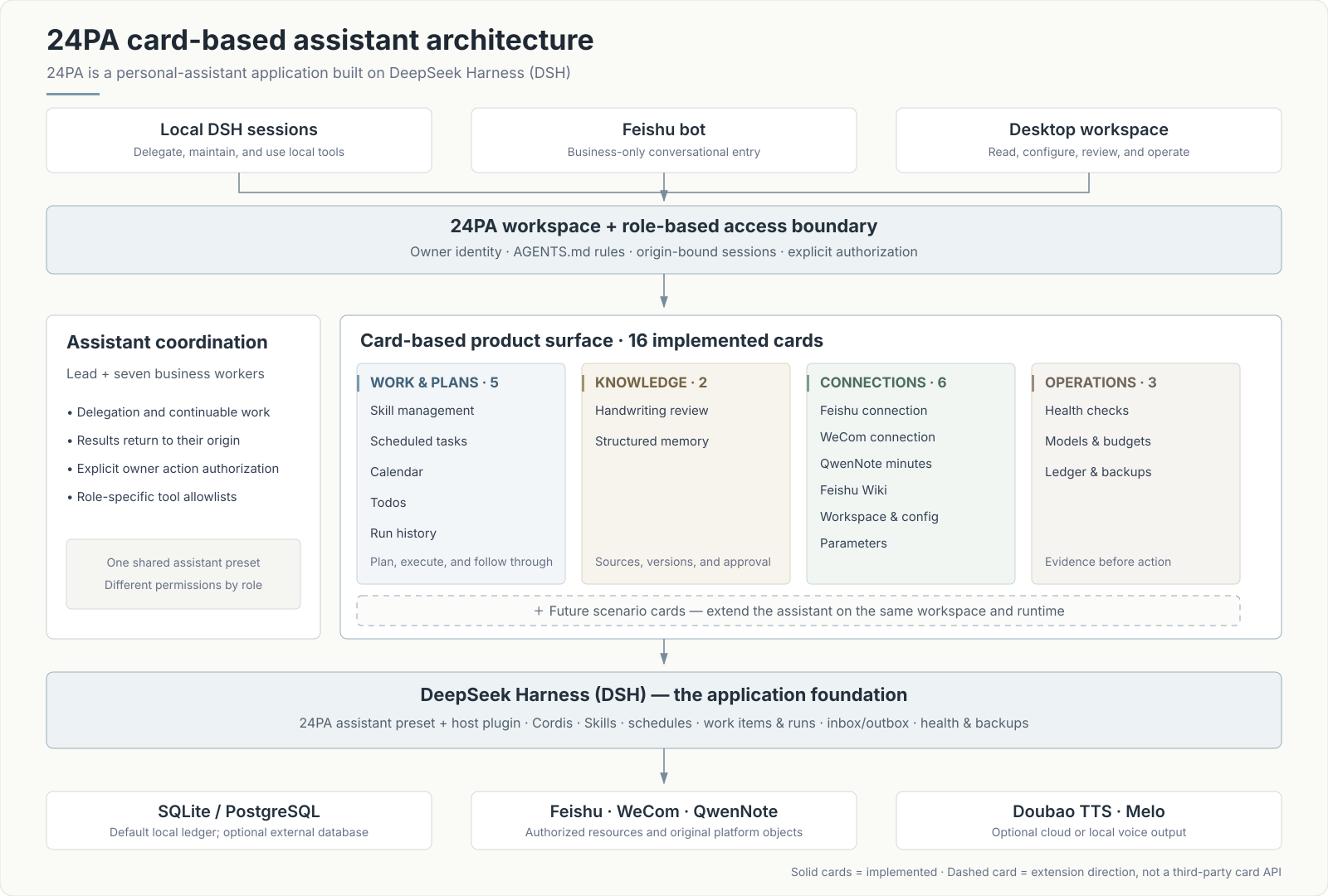
Cards are the product's extension unit. A new personal-assistant scenario can add a focused card while reusing the same workspace, permissions, plans, run history, and operational foundation. The sixteen solid cards below are implemented today; the dashed card is an extension direction, not a claim that this release already exposes a third-party card SDK.
Sixteen implemented cards
Every card below is part of the current product. Ordinary browsing is read-only and does not silently start a model, create a platform object, or run a task.
Work & plans — 5 cards
| Card | What it helps you do | Included capabilities |
|---|---|---|
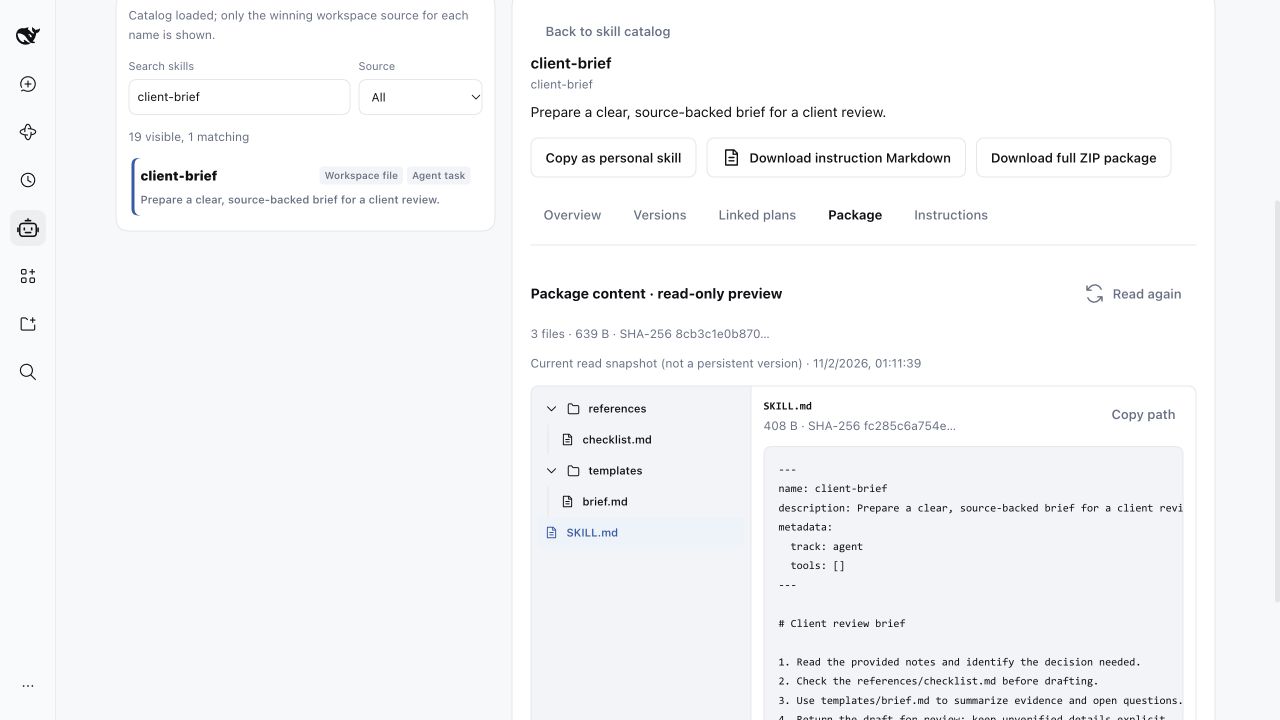
| Skill management | Turn reusable know-how into controlled assistant capabilities. | Create/import Markdown or ZIP; edit and copy; complete package tree and read-only file preview; immutable versions; linked plans; test, run, disable, roll back, delete, and download. |
| Scheduled tasks | Put one-off and recurring work on a persistent timeline. | Blank, preset, or copied plans; Skill parameters, fixed time zone, approved targets and delivery; occurrence preview; enable, pause, resume, run now, delete, restore, and history. |
| Calendar | Understand and manage schedules across registered calendars. | Today and next-event views; source filters, conflicts and query completeness; platform verification; conversation-based create/change; native reminders; original-event links. |
| Todos | Manage real platform work without confusing it with assistant execution. | Overdue, today and open views; multi-source aggregation; five role scopes; conversation-based create, complete, postpone, edit and cancel; original-object links and related work items. |
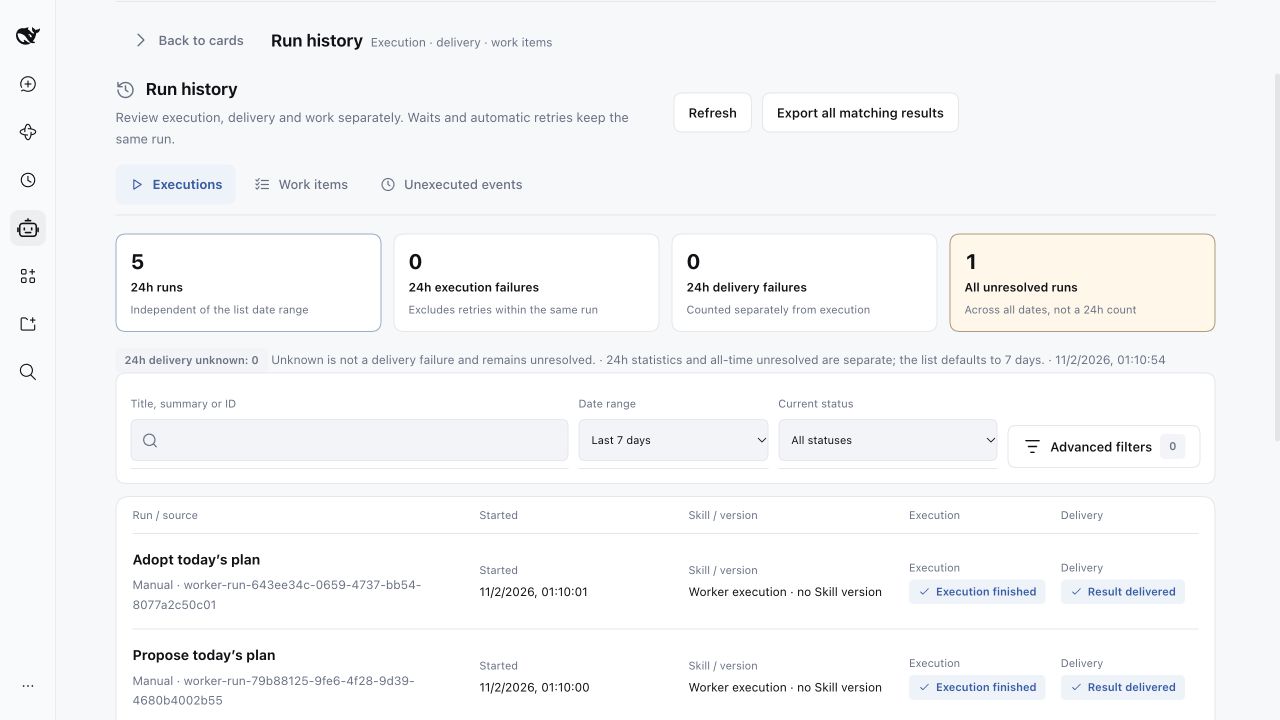
| Run history | See what ran, what resulted, and what was actually delivered. | Separate executions, work items and unexecuted events; filters and export; diagnostics and reconciliation; retry delivery or rerun; supplement, stop, continue and accept work items. |
Knowledge & materials — 2 cards
| Card | What it helps you do | Included capabilities |
|---|---|---|
| Handwriting review | Turn handwritten material into reviewable content and explicitly authorized next actions. | Source comparison, draft editing, version publishing and diffs; Feishu review entry; verification and resend; candidate actions remain separate from content approval. |
| Structured memory | Keep long-term facts, preferences and decisions traceable. | Full text, sources, confirmation evidence, scope, validity, conflicts and revisions; query/filter; local create, edit, deactivate, delete, restore and undo; JSON remains the editable authority. |
Connections & setup — 6 cards
| Card | What it helps you do | Included capabilities |
|---|---|---|
| Feishu connection | Know whether the owner, app and required capabilities are really connected. | Owner, CLI, app and profile identity evidence; send/receive, review callback and resource checks; read-only diagnostics, explicitly triggered tests, cleanup and configuration links. |
| WeCom connection | Operate selected WeCom resources without adding another inbound bot. | Separate calendar, todo and one-way push evidence; identity and authorization checks; renewal, independent tests and configuration links; no inbound chat. |
| QwenNote minutes | Use recordings and meeting notes as traceable source material. | Local-only, on-demand list/transcript/minutes reading; connection evidence; source-backed summaries and candidate actions that still require review and authorization. |
| Feishu Wiki | Choose where memos and handwriting-review documents belong. | Destination, node, permission and related-document checks; configure, verify and open; save through material workflows without moving old documents or silently changing destinations. |
| Workspace & config | Keep each owner's rules, data and sessions attached to the right workspace. | Directory and binding status, configuration source, effective version and differences; bind, switch, reload, inspect effective config and enter parameter editing; failed reloads keep the current environment. |
| Parameters | Change everyday behavior through one controlled configuration surface. | Business parameters, source mappings, model routes, voice and budget settings; edit, validate, save, reset and locate errors; write-only secrets and separate saved/effective feedback. |
Operations & maintenance — 3 cards
| Card | What it helps you do | Included capabilities |
|---|---|---|
| Full-app health checks | Find what needs attention before it blocks work. | Module status, evidence time and scope, impact and next steps; full or per-module read-only checks; distinguish disabled, unchecked, unverified and failed states; diagnostics and repair links. |
| Models & budgets | Understand model consumption and stop new managed requests at explicit limits. | Actual model routes, token/request usage and pricing evidence; daily/monthly limits and warning thresholds; one-run permit after review; unknown cost is never reported as zero. |
| Ledger & backups | Protect the state needed for recovery and prove what was checked. | SQLite/PostgreSQL status; create backups, inspect manifests and verify real copies; isolated restore checks; secrets excluded; restore drills remain separate from authorized production cutover. |
See the Manticore delivery and acceptance record for module ownership and verification evidence.
Inside the workspace
| Skill package management | Auditable run history |
|---|---|
 |
 |
Quick start
Requirements
- Node.js
^22.19.0or>=24.0.0(the default SQLite ledger uses built-innode:sqlite). - dsh
0.2.2-rc.1for the current release line. - No Feishu credentials are needed for the initial demo. PostgreSQL is optional.
Install the current release
npm install -g @deepseek-ai/dsh@0.2.2-rc.1

dsh plugin --profile <name> add @benz-ai-x/dsh-24pa@0.2.2-rc.1.8 --registry=https://registry.npmjs.org
Restart the same Profile, open the 24PA workspace, and choose the「24私助」preset. Installation and startup must use the same DSH_HOME; the official npm registry is recommended because some mirrors lag behind.
Setting up a new instance? Follow the step-by-step initialization guide for the isolated instance directory, workspace, launch script, expected pnpm build approval, token URL, and demo verification. After the demo works, tell the local assistant「帮我接通飞书」or use the bundled Feishu setup guide.
Using an older dsh host? Recommended version pins24PA versions follow <dsh baseline>.<serial>. Use the release line matching your host instead of installing the newest package everywhere.
| dsh host | 24PA package |
|---|---|
0.2.2-rc.1 |
0.2.2-rc.1.8 (current) |
0.2.1-rc.5 |
0.2.1-rc.5.8 (line frozen here) |
0.2.1-rc.4 |
0.2.1-rc.4.2 |
0.2.1-rc.3 |
0.2.1-rc.3.2 |
0.2.1-rc.2 |
0.2.1-rc.2.9 |
0.2.1-rc.1 |
0.2.1-rc.1.2 |
0.2.1-alpha.2 – 0.2.1-alpha.5 |
0.2.1-alpha.5.1 |
0.2.1-alpha.1 |
0.2.1-alpha.1.6 |
0.2.0-rc.2 |
0.2.0-rc.2.3, plus the two schedule companions described in the initialization guide |
Architecture and safeguards
- One preset, role-specific permissions. Local sessions can use the standard coding toolset; Feishu entry sessions and business workers receive business-only allowlists. Managed Skill runs use their saved package and permission snapshots.
- Local-first ledger. SQLite is the zero-service default at
data/pa24.dbin the workspace; explicitly configured PostgreSQL is also supported. Durable inbox/outbox records preserve origin and delivery targets. - No blind replay of external writes. An unknown platform result is reconciled against the original object before any retry. A successful action is not repeated merely to repair a local record or delivery.
- Secrets stay out of prompts and backups. Use server environment values or the write-only workspace secret store (
.24pa/secrets.json, mode0600); environment values take precedence.AGENTS.mdstores rules and non-secret configuration. - Review is not execution. Approving a handwriting version does not execute its candidate actions. Notes, documents, minutes, web content, and subagent replies are material, not authorization.
- Calendar-native clock reminders. Feishu or WeCom owns the native alert; the ledger keeps backup and reconciliation records. Actual device delivery still depends on the platform and verified account configuration.
Read the package reference for configuration fields, storage ownership, failure recovery, permission details, and the source map.
Documentation
- Initialization guide — new instance, demo verification, optional PostgreSQL, voice, and QwenNote setup.
- Feishu setup and WeCom setup — authoritative connection workflows.
- Manticore backup and recovery — verification, isolated restore drills, and manual cutover boundaries.
- Product specification and overall design — behavior, flows, and trade-offs.
- ADR-0001 — workspace, session, and permission boundaries.
- GitHub Issues — questions, bug reports, and delivery tracking.
Known boundaries
- The desktop management UI is not a mobile-responsive product. Native Feishu and WeCom apps retain their own platform behavior.
- Real-account permissions, broader tenant/Lark-region compatibility, actual device reminder delivery, QwenNote OAuth and recording-card transcripts, and source verification require environment-specific verification.
- Model usage, prices, and budget estimates are not vendor bills. Reconcile actual provider usage and billing differences; budgets do not promise an exact invoice cap.
- Handwriting recognition accuracy is not yet quantified; the visual model route must be configured explicitly.
- Backup verification and an isolated restore check do not prove production recovery. Credentials, remote objects, pending actions, deliveries, plans, and budgets must be reconciled before a separately authorized cutover.
- External Codex/Claude Code delegation and QwenNote tools require their providers and explicit workspace opt-in; they are not silently enabled.
FAQ
Does 24PA require PostgreSQL?
No. SQLite is the default and needs no separate database service. PostgreSQL remains an explicit option for existing or preferred deployments.
Can I customize routines without changing plugin code?
Yes. Use built-in or workspace Skills and scheduled tasks. Markdown files under .dsh/skills/ are hot-reloaded; managed packages add versioning, review, execution, and rollback controls.
Do clock reminders need the model or 24PA host to stay online?
They are written to the native calendar with an alert, so the model is not the reminder engine. Platform acceptance, device delivery, and read status are different facts; 24PA does not claim one proves another.
Package: @benz-ai-x/dsh-24pa · Current release: v0.2.2-rc.1.8
Everyday work methods
Confirm 1–3 near-term outcomes in chat, then ask 24PA to plan your day. Proposals explain priorities, next actions, and tradeoffs. An adopted plan remains available for the evening review; Home shows the same records and provides reviewable chat drafts. Clear small requests proceed directly; consequential tradeoffs prompt a discussion.
The daily-planning and daily-review agent Skills use the model. Run them on demand or explicitly enable a schedule. In workspace settings, enable the Skill worker and calendar or digest role, and add the selected names to the business Skill allowlist. Existing digest templates are retained. Adopting a daily plan does not create calendar events; time blocks require separate explicit adoption.
The intelligent morning brief starts with how to organize today, connecting prior progress, calendar commitments, deadlines and up to three proposed outcomes. Scheduled tasks → Morning preset selects daily-planning and states that it uses the model. Leave the work date blank to use the scheduled occurrence date. Yesterday's review is paired with its original adopted plan revision; missing records or older reviews keep their actual dates.
Chat and the panel manage the same plan: view it, change timing, pause/resume, or change per-plan voice. Chat previews creation, resumption and settings changes; reply with the displayed “Confirm plan …” text to apply them. Select the intended plan when several match, or explicitly request another plan. In the panel, use Adjust timing and voice, preview, and confirm. Legacy plans support these operations without migration, retaining their time zone, weekdays, skill, voice and history. Execution and delivery have separate statuses.
Existing template plans remain unchanged. Pause a managed plan, choose Use intelligent morning brief, preview and save, then Verify new skill and enable. Confirm the updated capabilities and delivery target while retaining the same plan, timing, time zone, channel and history. Legacy digest plans first use their original skill for migration, then follow the same switch. Saving a proposal does not adopt it or change external calendar events or tasks.
No comments yet. Be the first to write one.