DSH 会话交互折叠功能 · DSH Session Turn Accordion



30 秒理解:把 DSH 会话里每一轮对话折叠成一行(时间胶囊 + 问题摘要),只保留最新一条展开。纯客户端插件,不改核心。
兼容 DSH Desktop / Web;安装见下方「安装」,卸载见「卸载」。
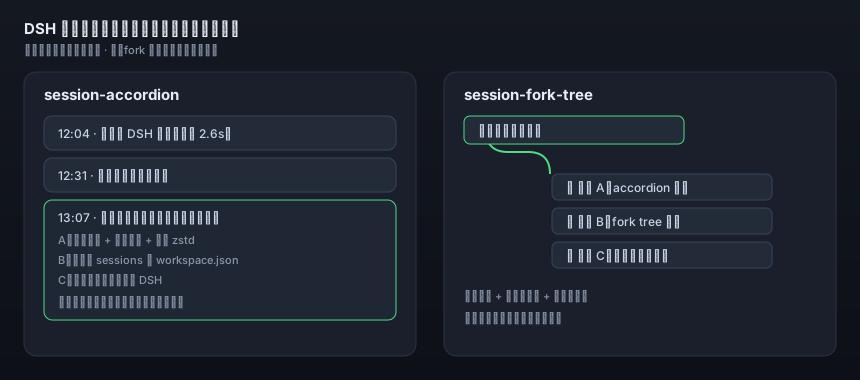
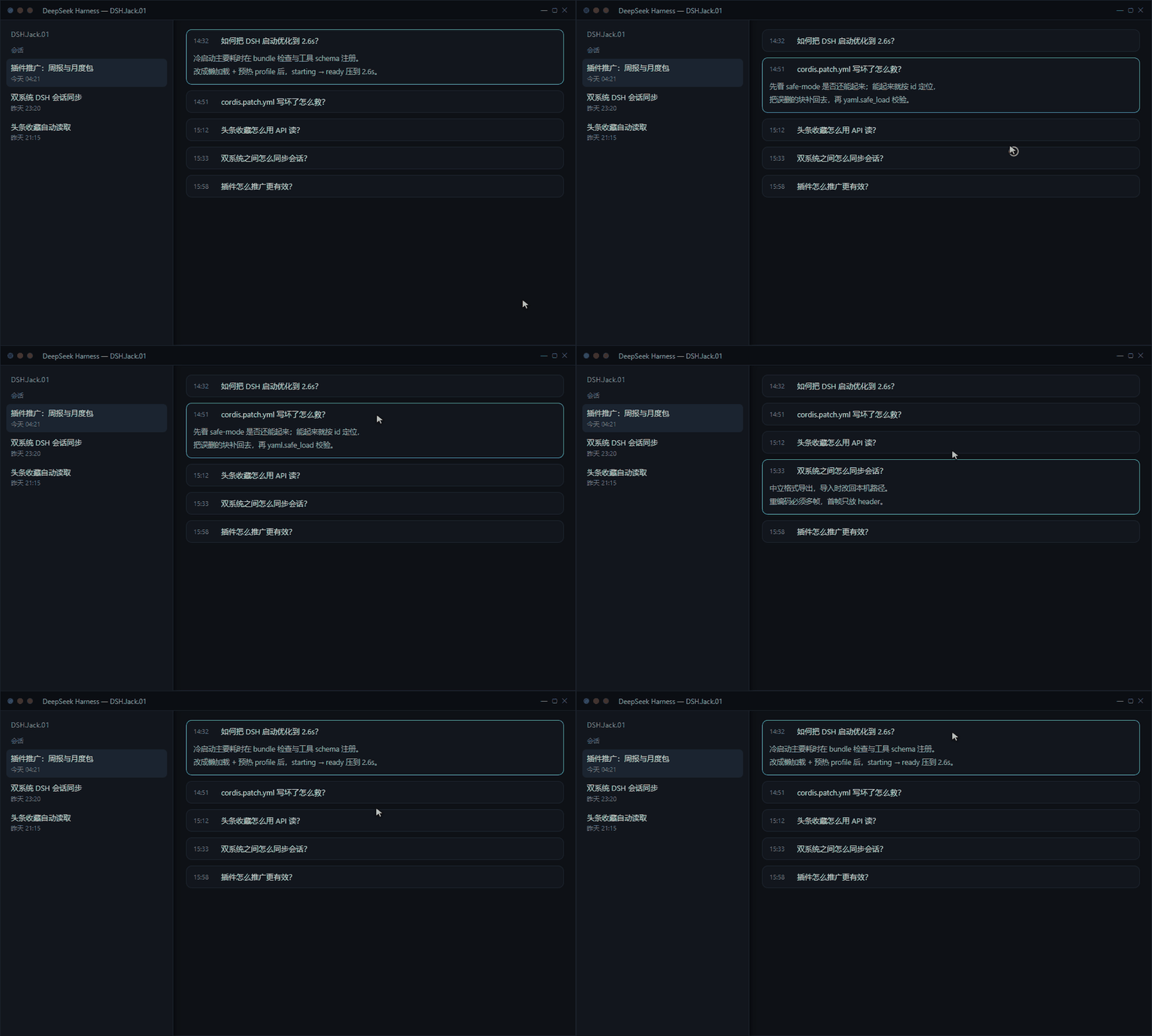
会话折叠
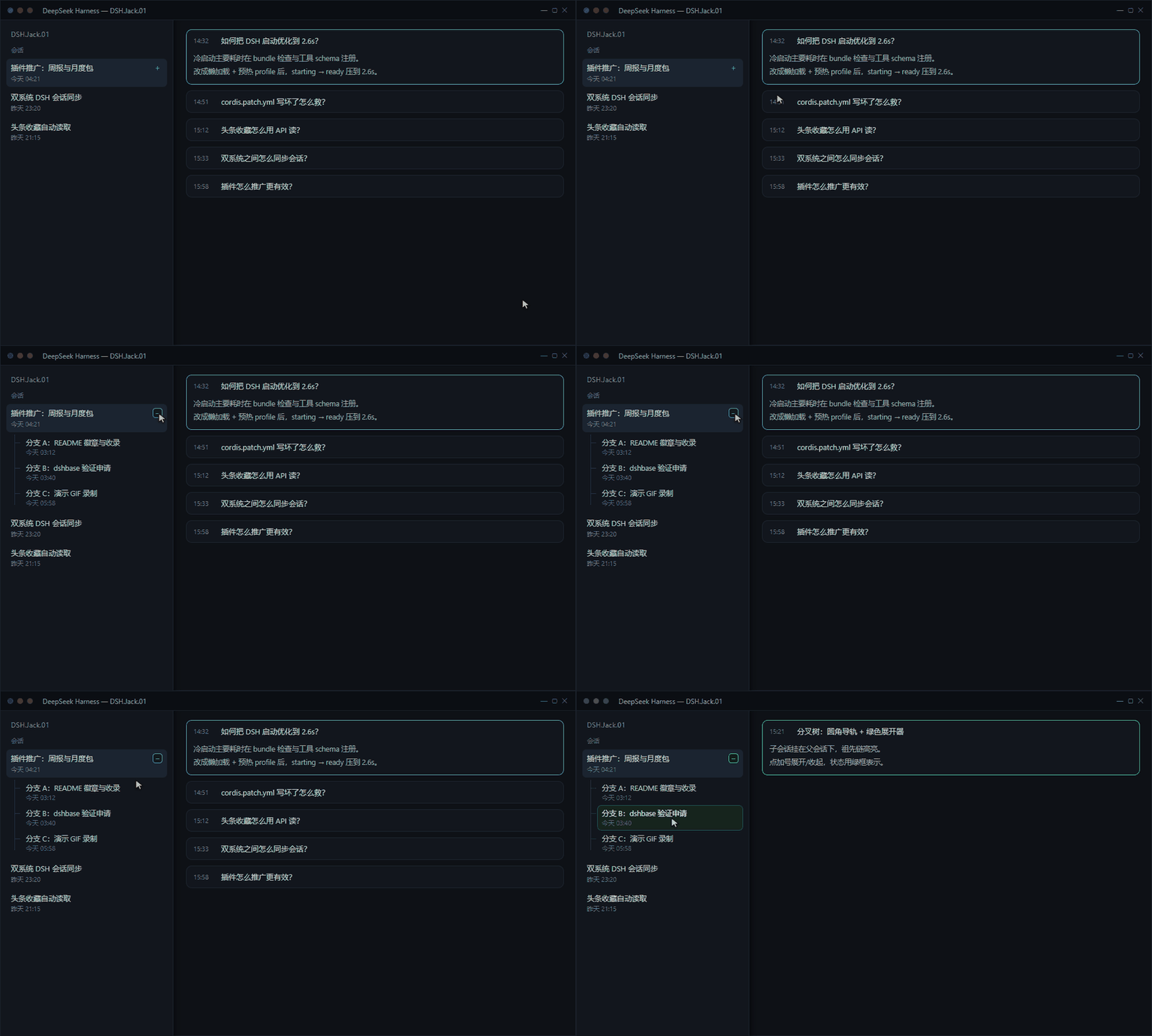
分叉树排列
平台支持与路线图
| 平台 | 状态 |
|---|---|
| Windows 11(DSH Desktop) | ✅ 稳定运行(当前版本) |
| Ubuntu | 🧪 测试中,尚未承诺稳定 |
| macOS | 📋 计划中 |
修复与功能调整的优先级按评论 / 留言的反馈量排序——遇到问题请直接开 issue 或留言, 同类反馈越多越先修。欢迎提交你所在平台的环境信息。
相关插件
- dsh-session-fork-tree —— 分叉会话以树状排列在侧边栏
- awesome-dsh-plugin —— DSH 插件精选列表
把 DSH Web 会话里的每一次交互压成一行,只保留最近一次展开;点提问行展开,执行过程另行单独点开。
Fold every interaction in a DSH Web chat into a single line and keep only the latest one open. Click a question row to expand it; the execution process opens only when you click its own header.
中文
这是什么
一个 DSH(DeepSeek Harness)客户端插件。它不修改 app.asar、不碰核心 UI 源码,只在渲染层做三件事:
- 每个历史交互整轮收起,折叠成固定一行:左侧时间胶囊
MM-DD HH:mm+ 单行提问摘要(超出省略)。 - 只保留最近一次交互展开;打开任何会话、切换工作区/会话、产生新交互,都会把展开态重置到最近一条(之前手动展开的也会被收起)。
- 点折叠行 → 该轮展开,同时把其它已展开的轮收起;再点提问 → 收回去。
执行过程(思考、工具调用、步骤)不跟着展开:核心本身在回答结束时会收起过程,只有你单独点「过程摘要」那一行才会展开。
效果
┌──────────────────────────────────────────────────────────┐
│ 10-28 13:12   把这批日志按时间排序、去重,然后…        › │   ← 折叠(一行)
├──────────────────────────────────────────────────────────┤
│ 10-28 12:58   帮我看下 esp32 的引脚冲突                  › │
├──────────────────────────────────────────────────────────┤
│ 你的提问(全文)                                          │   ← 展开(最近一次)
│ …回答正文…                                                │
│ ▸ 12 步 · 思考 8s · 工具 4 次(点开才展开)               │
└──────────────────────────────────────────────────────────┘
安装
npm(推荐)
# 桌面版(profile=desktop)
dsh plugin --profile desktop add dsh-session-accordion@2.5.5

# 或免全局安装
npx -y @deepseek-ai/dsh plugin --profile desktop add dsh-session-accordion@2.5.5

# Web UI(profile=web)
dsh plugin --profile web add dsh-session-accordion@2.5.5
安装后完全退出 DSH 再启动;卸载:
dsh plugin --profile desktop remove dsh-session-accordion
以下为源码方式(开发 / 离线环境):
前置:能跑 DSH Web UI 的宿主 —— Windows / macOS 桌面版,或 Linux 上的 dsh web。profile 名随宿主不同:桌面版默认 desktop,dsh web 默认 web,自定义 profile 用你自己的名字。
Windows(PowerShell)
git clone https://github.com/ayuanxx-max/dsh-session-accordion.git
$repo = (Resolve-Path .\dsh-session-accordion).Path
$nm = "$env:USERPROFILE\.dsh\profiles\desktop\node_modules"
New-Item -ItemType Junction -Path "$nm\dsh-session-accordion" -Target $repo
Linux / macOS(bash)
git clone https://github.com/ayuanxx-max/dsh-session-accordion.git
repo="$(cd dsh-session-accordion && pwd)"
profile="${DSH_PROFILE:-web}"        # 桌面版改成 desktop
mkdir -p "$HOME/.dsh/profiles/$profile/node_modules"
ln -sfn "$repo" "$HOME/.dsh/profiles/$profile/node_modules/dsh-session-accordion"
符号链接必须是绝对路径:相对路径在 profile 目录变化后会失效。 也可以一条命令完成(含 package.json 备份与合并):
bash scripts/install.sh --profile web --apply。 Windows 对应:powershell -ExecutionPolicy Bypass -File scripts\install.ps1 -Profile desktop -Apply。
方式 B:直接装 Release 包(无符号链接,Linux 下最省事)
# pnpm 会把这枚 tarball 复制进 profile,不依赖符号链接 / junction
dsh plugin --profile web add /path/to/dsh-session-accordion-2.5.3.tgz
# 再把 "dsh-session-accordion" 加进 dsh.profile.bundles,重启 DSH
升级时下载新 tarball 再执行一次即可,不需要
git pull。
登记到 profile(三种系统相同)
// ~/.dsh/profiles/<profile>/package.json
{
  "dependencies": {
    "dsh-session-accordion": "link:/absolute/path/to/dsh-session-accordion"
  },
  "dsh": {
    "profile": {
      "bundles": ["dsh-session-accordion"]
    }
  }
}
- 完全退出 DSH 再启动(profile 层改动,刷新网页无效)。
- 设置 → 对话 → 工作步骤收起时机 = 回答结束后(插件依赖这个前置,过程才会自动收起)。
复制进
node_modules也能用,但链接方式升级最省事:git pull后重启即可。
卸载
- 从
package.json的dependencies与dsh.profile.bundles中删掉dsh-session-accordion。 - 删掉链接:Windows
Remove-Item node_modules\dsh-session-accordion;Linux/macOSrm ~/.dsh/profiles/<profile>/node_modules/dsh-session-accordion(只删链接,不动源码)。 - 重启 DSH。
工作原理
| 关键点 | 说明 |
|---|---|
| 挂载点 | 客户端插件(dsh.client,platform: web,immediately: true),随 Web 应用加载一次,天然覆盖所有工作区与会话 |
| 轮次分组 | 聊天流容器 [data-slot="conversation.chat.flow"] 下,每个渲染节点带 [data-chat-turn="<turnId>"];同 turnId 归为一轮 |
| 提问识别 | 轮内包含 class 以 _bubble 结尾的元素(用户/steering 气泡共用)的节点 |
| 过程识别 | data-chat-flow-kind="turn-process" 的节点,其内部 button[aria-expanded] 是核心原生折叠开关 |
| 折叠方式 | 给整轮除提问外的节点打 data-ac-hidden(display:none),提问行用伪元素画时间胶囊与摘要,原内容 visibility:hidden |
| 状态 | 按 turnId 存在内存 Map;未知轮次默认「最后一轮展开」,因此切换会话、历史回看都自动收敛 |
| 时间 | 优先读 React fiber 上的 props.node.data.time(不受悬停影响),退回原生时钟文本,都没有就不显示 |
| 自愈 | MutationObserver + 1.5 秒兜底巡检,React 重渲染后重新贴状态 |
设计取向:只叠加,不侵入。核心的折叠状态、流式输出、滚动锚定都不接管;结构认不出时插件什么都不做,只在 console 打一条 warn。
诊断
页面 DevTools Console:
__acReport()
输出每一轮的 id / expanded / stamp / summary / items。结构变化(DSH 升级后 DOM 改名)时,看这个能立刻定位是「分组失败」还是「时间取不到」。
兼容性
| 平台 / 引擎 | 状态 | 说明 |
|---|---|---|
| Windows(DSH 桌面版,Electron/Chromium) | ✅ 主力验证 | 本轮开发基准 |
| macOS(桌面版;Tauri/WebView 需较新内核) | ✅ 设计兼容 | 只用标准 mask-image + 内联 SVG,无平台 API |
| Ubuntu / Debian 等 Linux(Chrome / Edge / Chromium) | ✅ CI 验证安装链路 | 安装脚本、打包、安装冒烟测试跑在 ubuntu-latest 上 |
| Linux 上的 Firefox | ⚠️ 未实测 | 用到 mask-image(Firefox 支持无前缀写法);最坏情况只失去渐隐,不影响折叠 |
- 时区:时间胶囊用浏览器时区。Linux 服务器多为 UTC,此时显示的是 UTC;在 Console 执行
window.__dshAccordion = { timeZone: 'Asia/Shanghai' }后刷新页面即可覆盖。 - 动态效果:尊重系统"减少动态效果"(
prefers-reduced-motion),开启后不播放展开淡入。 - 字体:时间胶囊与摘要列按像素定宽,Ubuntu / SF 字体下宽度略有差异,不影响布局。
已知限制
- 依赖 DSH 聊天面板的内部 DOM 属性(
data-chat-turn等),属非公开契约,上游改版可能失效;失效时插件静默不动作,不会破坏界面。 - 折叠行是自绘的一行,行内链接需先展开再点。
- 时间取自提问节点的事件时间;极少数节点没有
time时不显示时间,只显示摘要。 - 未发布到 npm,按上面的本地 link 方式安装。
同类项目
DSH 生态里已有若干「回合折叠」插件,取舍不同:
| 项目 | 形态 | 与本项目的差别 |
|---|---|---|
| a179-sanae/dsh-auto-collapse | 把正文之间的思考/工具/上下文合成二级折叠,保留原生回合摘要 | 答案始终可见;不限制同时展开的轮数 |
| leon-zym/dsh-fold-turns | 完成回合折成一行 Worked for …,保留用户消息与回答 |
已标记弃用(DSH 0.1.5+ 原生支持过程折叠) |
| tntcannon5000/dsh-chat-fold | 在最终回答上方插入 disclosure | 回答不隐藏;不是手风琴 |
| 本项目 | 整轮(提问 + 回答 + 过程)压成一行,只允许一条展开 | 空间优先:点开才看该轮内容 |
选择建议:想「一眼扫完所有答案」用上面那类;想「一屏看完整个会话骨架、按需展开」用本项目。
许可证
MIT,见 LICENSE。
English
What it is
A client plugin for DSH (DeepSeek Harness). It never edits app.asar or any core UI source; it only layers three behaviours on top of the rendered transcript:
- Every finished interaction collapses into one fixed line: a time pill (
MM-DD HH:mm) plus a single-line summary of your question, ellipsized when long. - Only the latest interaction stays open; opening any session, switching workspace/session, or starting a new turn resets the open state to the newest turn (manual expansions are folded too).
- Clicking a collapsed row expands that turn and folds any other open turn; clicking the question again folds it back.
The execution process (thinking, tool calls, steps) does not expand with the turn: DSH folds it when the answer completes, and it opens only when you click its own summary row.
What it looks like
┌──────────────────────────────────────────────────────────┐
│ 10-28 13:12   Sort these logs by time, dedupe, then…   › │   ← folded (one line)
├──────────────────────────────────────────────────────────┤
│ 10-28 12:58   Check the ESP32 pin conflicts             › │
├──────────────────────────────────────────────────────────┤
│ Your full question                                       │   ← expanded (latest)
│ …answer body…                                            │
│ ▸ 12 steps · 8s thinking · 4 tool calls (click to open)  │
└──────────────────────────────────────────────────────────┘
Install
Prerequisite: a host that runs the DSH Web UI — the Windows/macOS desktop app, or dsh web on Linux. The profile name depends on the host: desktop for the desktop app, web for dsh web, or your own name for a custom profile.
Windows (PowerShell)
git clone https://github.com/ayuanxx-max/dsh-session-accordion.git
$repo = (Resolve-Path .\dsh-session-accordion).Path
$nm = "$env:USERPROFILE\.dsh\profiles\desktop\node_modules"
New-Item -ItemType Junction -Path "$nm\dsh-session-accordion" -Target $repo
Linux / macOS (bash)
git clone https://github.com/ayuanxx-max/dsh-session-accordion.git
repo="$(cd dsh-session-accordion && pwd)"
profile="${DSH_PROFILE:-web}"        # use desktop for the desktop app
mkdir -p "$HOME/.dsh/profiles/$profile/node_modules"
ln -sfn "$repo" "$HOME/.dsh/profiles/$profile/node_modules/dsh-session-accordion"
The symlink must use an absolute path; a relative target breaks as soon as the profile directory moves. One-shot alternative (backs up and merges
package.json):bash scripts/install.sh --profile web --apply. Windows equivalent:powershell -ExecutionPolicy Bypass -File scripts\install.ps1 -Profile desktop -Apply.
Option B: install the release tarball (no symlink / junction)
# pnpm copies the tarball into the profile; no symlink or junction involved
dsh plugin --profile web add /path/to/dsh-session-accordion-2.5.3.tgz
# then add "dsh-session-accordion" to dsh.profile.bundles and restart DSH
To upgrade, download the new tarball and run the command again; no
git pullneeded.
Register in the profile (same on every OS)
// ~/.dsh/profiles/<profile>/package.json
{
  "dependencies": {
    "dsh-session-accordion": "link:/absolute/path/to/dsh-session-accordion"
  },
  "dsh": {
    "profile": {
      "bundles": ["dsh-session-accordion"]
    }
  }
}
- Quit DSH completely and start it again (profile-layer change; refreshing the page is not enough).
- Settings → Chat → When to collapse work details = On completion. The plugin relies on this so the process folds by itself.
Copying the repo into
node_modulesalso works, but a symlink keeps upgrades togit pull+ restart.
Uninstall
- Remove
dsh-session-accordionfromdependenciesanddsh.profile.bundles. - Remove the link: Windows
Remove-Item node_modules\dsh-session-accordion; Linux/macOSrm ~/.dsh/profiles/<profile>/node_modules/dsh-session-accordion(the link only; the source directory stays). - Restart DSH.
How it works
| Point | Detail |
|---|---|
| Mount | A client plugin (dsh.client, platform: web, immediately: true) loaded once with the web app, so it covers every workspace and session |
| Turn grouping | Inside [data-slot="conversation.chat.flow"], each rendered node carries [data-chat-turn="<turnId>"]; nodes sharing a turn id form one turn |
| User node | The node whose subtree contains an element with a class ending in _bubble (user and steering bubbles share it) |
| Process node | The node with data-chat-flow-kind="turn-process"; its button[aria-expanded] is the built-in fold control |
| Folding | Marks every non-user node of the turn with data-ac-hidden (display:none); the user row draws its pill and summary with pseudo-elements while the real bubble is visibility:hidden |
| State | An in-memory Map keyed by turnId; unknown turns default to "last one expanded", which is why session switches and history reloads converge on their own |
| Timestamp | Read from the React fiber (props.node.data.time) first, then the native clock text; nothing is invented if neither exists |
| Self-healing | MutationObserver plus a 1.5 s safety sweep re-applies state after React re-renders |
Design stance: layer, never invade. Core folding, streaming output and scroll anchoring stay untouched; when the structure cannot be recognised the plugin does nothing and logs a single warn.
Diagnostics
In the page DevTools console:
__acReport()
It prints id / expanded / stamp / summary / items per turn. After an upstream UI change this tells you immediately whether grouping failed or the timestamp went missing.
Compatibility
| Platform / engine | Status | Notes |
|---|---|---|
| Windows (DSH desktop, Electron/Chromium) | ✅ primary target | Development baseline |
| macOS (desktop app; Tauri/WebView needs a recent engine) | ✅ designed to work | Standard mask-image plus inline SVG only, no platform APIs |
| Ubuntu / Debian and other Linux (Chrome / Edge / Chromium) | ✅ install path verified in CI | installer, packaging and install smoke test run on ubuntu-latest |
| Firefox on Linux | ⚠️ not exercised | uses mask-image (Firefox ships the unprefixed property); worst case the fade is lost, folding still works |
- Time zone: the time pill uses the browser time zone. A Linux server is often UTC, so rows show UTC;
run
window.__dshAccordion = { timeZone: 'Asia/Shanghai' }in the console and reload to override. - Motion: respects
prefers-reduced-motion; the expand fade is skipped when it is enabled. - Fonts: pill and summary columns are pixel-sized, so Ubuntu/SF fonts shift widths slightly without breaking the layout.
Known limitations
- Relies on internal DOM attributes of the DSH chat panel (
data-chat-turn, …). That is a private contract and may break on an upstream redesign; the plugin then fails safe by doing nothing. - The folded row is self-drawn, so links inside a question need one click to expand first.
- Timestamps come from the question node's event time; the rare node without
timeshows a summary only. - Not published to npm; install it through the local link shown above.
Similar projects
The DSH ecosystem already has a few turn-folding plugins. They make a different trade-off:
| Project | Shape | Difference from this one |
|---|---|---|
| a179-sanae/dsh-auto-collapse | Merges reasoning/tool/context blocks between prose into a secondary disclosure, keeping the native turn summary | The answer always stays visible; several turns can be open at once |
| leon-zym/dsh-fold-turns | Folds a completed turn into a Worked for … row, keeping the user message and answer |
Marked deprecated (DSH 0.1.5+ folds processes natively) |
| tntcannon5000/dsh-chat-fold | Inserts a disclosure above the final answer | The answer stays visible; not an accordion |
| This project | Folds the whole turn (question + answer + process) into one row and allows only one open turn | Space first: click a row to read that turn |
Pick the former if you want to skim every answer at once; pick this one if you want the whole session skeleton on one screen and open turns on demand.
License
MIT, see LICENSE.
No comments yet. Be the first to write one.