dsh-music-code-mv
Render music videos by writing code. / 把一支 MV 写成代码。
A DeepSeek Harness plugin that turns a storyboard into a deterministic, frame-accurate video. No video-generation model, no stock footage, no timeline editor — every frame is drawn by Canvas2D or Three.js code, captured in headless Chrome, and encoded with ffmpeg. 一个 DeepSeek Harness 插件:把分镜表变成逐帧确定的视频。不用视频生成模型、不用素材库、不用时间线编辑器——每一帧都由 Canvas2D 或 Three.js 代码画出,无头 Chrome 逐帧截取,ffmpeg 合成。
dsh plugin --profile demo add dsh-music-code-mv
dsh --profile demo



仓库已打上
dsh-plugin话题(GitHub 话题页会收录本插件);收录进 awesome-deepseek-agent 的条目见 docs/awesome-deepseek-agent-entry.md。 The repo carries thedsh-plugintopic, and a ready entry for awesome-deepseek-agent lives in docs/awesome-deepseek-agent-entry.md.
中文优先 / Chinese-first. 工具卡片与返回文本以中文为主、英文并列;浏览器端的操作面是对话视图环里的「MV 工坊」原生标签页——首屏就是「一键进入子代理」,状态、清晰度/风格/帧率预设、联系表直渲与风格画廊全在其中,不内嵌任何网页;右侧边栏另有一块只读的原生状态镜像(无 iframe),也仍可直接用浏览器打开工作室地址。 Tool cards and returned text lead with Chinese; the browser half ships a Chinese MV Studio page in the DSH right sidebar, also reachable directly in a browser.
Why code / 为什么是代码
| video model / 视频生成模型 | music-code-mv | |
|---|---|---|
| reproducibility / 可复现 | none, every run differs / 没有,每次都不一样 | every frame is a pure function of t / 每帧都是 t 的纯函数 |
| iteration / 迭代 | re-generate the whole clip / 整段重抽 | frame cache: only changed frames re-render / 帧缓存:只重渲变过的帧 |
| typography / 排版 | unreliable, text gets mangled / 不可靠,文字会糊 | text is text / 文字就是文字 |
| resolution / 分辨率 | model-limited / 受模型限制 | any size, up to 4K60, plus HDR10 / 任意尺寸,最高 4K60,另支持 HDR10 |
| cost / 成本 | per-generation billing / 按次计费 | your own CPU/GPU / 用你自己的 CPU/GPU |
The core constraint that buys all of this: renderAt(t) is a pure function. Same t, same pixels, in any order.
换来这一切的核心约束:renderAt(t) 是纯函数。同一个 t 就是同样的像素,与调用顺序无关。
Features / 功能
Rendering / 渲染
- Deterministic virtual-time rendering — no
requestAnimationFrame, no wall clock / 虚拟时间确定性渲染——不用requestAnimationFrame,不读墙钟 - Canvas2D stage with the code-MV look baked in (scanlines, bloom, chroma split, slice glitch, grain, vignette) / Canvas2D 舞台内置代码 MV 质感(扫描线、bloom、色差分离、切片故障、颗粒、暗角)
- Optional Three.js shots via import map, with
preserveDrawingBufferhandled for you / 可选 Three.js 镜头(import map 接入),preserveDrawingBuffer已替你处理 - Per-scene FX override so flat UI shots skip the expensive post passes / 按场景覆盖后期开关,扁平 UI 镜头可跳过昂贵的后期链
Performance / 性能 (all measured on an Intel Core Ultra 5 125H + Arc iGPU / 全部实测于 Intel Core Ultra 5 125H + Arc 核显)
- Parallel frame rendering across N Chrome workers — measured 8.9× at 4K (71.3s → 8.0s for 60 frames) / 并行分帧渲染:N 个 Chrome worker,4K 实测 8.9×(60 帧 71.3s → 8.0s)
- Hardware GL with an automatic blank-frame probe that falls back to software / 硬件 GL:自动探测,画面全黑则回退软件渲染
- Hardware encoding — auto-selects QSV → NVENC → AMF → x264. QSV AV1 measured better than software x264 (PSNR 43.59 vs 42.91 avg) and produced a smaller file / 硬件编码:自动选择 QSV → NVENC → AMF → x264。QSV AV1 实测优于软件 x264(PSNR 43.59 vs 42.91 平均)且文件更小
- Incremental re-render — a frame is reused when its render signature is unchanged. Signatures come from the scene's own file plus its transitive import graph, so editing scene A never invalidates scene B, but editing a shared module invalidates everything that imports it / 增量重渲——签名不变就复用帧。签名取自场景自身文件加它的传递 import 图:改 A 场景不会波及 B,改共享模块才会让它全部失效
- Real-time progress bar with throughput and ETA / 实时进度条:吞吐与 ETA
- HDR10 output: 10-bit HEVC, Rec.2020, PQ — with a real SDR→PQ conversion (
zscale), not just re-tagging / HDR10 输出:10-bit HEVC、Rec.2020、PQ——走真实的 SDR→PQ 变换(zscale),不是只打标签 - HDR10 ✓ / HDR Vivid ✗ — HDR10 is delivered: 10-bit HEVC, Rec.2020, PQ and static mastering metadata (QSV cannot embed mastering metadata, so the renderer warns and
--encoder=libx265gives a compliant master). HDR Vivid (CUVA TU-068 dynamic metadata) is not supported: the stock ffmpeg build here ships no CUVA encoder — an external CUVA toolchain would be required — so no doc or video copy claims it. / HDR10 ✓ / HDR Vivid ✗——HDR10 已交付:10-bit HEVC、Rec.2020、PQ 与静态母版元数据(QSV 无法嵌入母版元数据,渲染时会告警,合规母版请用--encoder=libx265)。HDR Vivid(CUVA TU-068 动态元数据)不支持:本机 stock ffmpeg 没有 CUVA 编码器,需外部 CUVA 工具链,因此任何文档与视频文案都不声称支持。
图形界面 / GUI (0.2.0)
- 右侧边栏「MV 工坊」页面:首次自动打开一次,之后从标签栏的
+里选 / a right-sidebar MV Studio page, auto-opened once, re-openable from the tab strip's+ - 对话视图环标签页「MV 工坊」:与「对话」「轨迹」平级的原生标签(
conversation.view,仅激活时挂载),首屏是「一键进入子代理」主色大按钮 + 当前预设回显,没有标题栏小按钮、没有右下角悬浮窗 / a native tab in the conversation view ring (peer of 对话/轨迹, mounted only while active) whose first screen is the primary one-click subagent button plus the current-preset readout — no title-bar chip, no floating dock - 工程浏览:自动扫描工作区里的 MV 工程(project.json + index.html),显示分辨率、帧率、时长、场景数、缓存帧数 / project discovery with resolution, fps, duration, scene and cached-frame counts
- 预览:联系表 PNG 直接看,成片 MP4 带 Range 流式播放(拖动进度不用整段下载)/ contact sheets inline, films streamed with range requests
- 渲染:联系表 / 静帧 / 视频三种模式,宽高、时长、关键帧、并行数都能改;进度条 + 实时日志 + 取消 / render from the panel with live progress, log and cancel
- 文本:一键读 storyboard.md 与 lyrics.lrc / one click to read the storyboard and lyrics
- 全部中文,纯手写浏览器包(无构建步骤);
file://环境下自动退化为「在浏览器打开」提示 / Chinese copy, hand-written browser bundle with no build step, graceful fallback underfile://
Authoring / 创作
- Timeline with overlapping scenes and local-vs-global time made explicit / 时间线支持场景重叠,局部时间与全局时间界限明确
- Seeded PRNG (no
Math.random()in draw code) andhash1/hash2helpers / 种子化 PRNG(绘制代码里没有Math.random())与hash1/hash2工具 - LRC lyric parsing with karaoke-ready timing / LRC 歌词解析,自带卡拉 OK 级时间精度
- Contact-sheet self-check loop — the highest-value step in the whole pipeline / 联系表自检循环——整条管线里回报最高的一步
Requirements / 依赖
Node.js ≥ 18 · Google Chrome or Edge · ffmpeg
npm install three puppeteer-core ffmpeg-static
⚠️ Recent npm versions block lifecycle scripts by default and will silently skip the
ffmpeg-staticbinary download. Either runnpm approve-scripts ffmpeg-static, or install@ffmpeg-installer/ffmpeg, which ships a prebuilt binary and needs no install script. 新版 npm 默认拦截生命周期脚本,会静默跳过ffmpeg-static的二进制下载。用npm approve-scripts ffmpeg-static,或改装自带二进制的@ffmpeg-installer/ffmpeg。
Install / 安装
git clone https://github.com/ayst-z/music-code-mv
cd music-code-mv
dsh plugin add .
dsh --profile demo --dump-config | grep dsh-music-code-mv   # should show a "# == dsh-music-code-mv" layer
# Windows / Windows 下等价写法:
# dsh --profile demo --dump-config | findstr /C:"dsh-music-code-mv"
dsh --profile demo
This package ships plain JavaScript, so there is no build step and no allowBuilds authorization prompt.
本包发布的是纯 JavaScript,没有构建步骤,也不会触发构建授权提示。
Other routes / 其他方式:
dsh plugin --profile demo add github:ayst-z/music-code-mv#<sha>  # from git, pinned / 从 git,锁 commit
pnpm pack && dsh plugin --profile demo add ./dsh-music-code-mv-0.2.0.tgz   # from a tarball / 从 tarball
dsh plugin --profile demo remove dsh-music-code-mv                   # uninstall / 卸载
Tools / 工具
The plugin registers seven tools on ctx.tools. / 插件在 ctx.tools 上注册七个工具。
music_mv_guide
Read the bundled authoring guide. Call this before directing a video. / 读取内置创作指南。指导一支视频之前先调它。
| param | type | required | description |
|---|---|---|---|
topic |
string | no | skill (default) · styles · techniques · threejs · environment · lineage / 主题,默认 skill |
music_mv_probe
Check the machine: Node, Chrome/Edge, ffmpeg, puppeteer-core, three.js, and a live WebGL context. Prints READY or names exactly what is missing. / 检查本机环境:Node、Chrome/Edge、ffmpeg、puppeteer-core、three.js 与真实 WebGL 上下文。打印 READY,或明确列出缺什么。
| param | type | required | description |
|---|---|---|---|
projectDir |
string | no | directory to probe for a local node_modules / 要探测 node_modules 的目录,默认当前目录 |
music_mv_init
Scaffold a project: timeline, seeded PRNG, Canvas2D stage, lyric parsing, and a working 21-second six-shot demo. / 生成工程骨架:时间线、种子化 PRNG、Canvas2D 舞台、歌词解析,以及可直接跑的 21 秒六镜头 demo。
| param | type | required | description |
|---|---|---|---|
dir |
string | yes | project directory to create / 要创建的工程目录 |
force |
boolean | no | overwrite a non-empty directory / 覆盖非空目录 |
music_mv_render
Render a contact sheet, stills, or a full MP4. Frames are cached, so a re-run resumes instead of starting over. / 渲染联系表、静帧或完整 MP4。帧有缓存,重跑是续渲而不是从头开始。
NumPy 引擎的 hi-res / HDR 通道(render-np.py,与上表同契约):
| 能力 | 命令 | 说明 |
|---|---|---|
| 流式输出 | --stream |
帧直管道给 ffmpeg,frames/ 零字节(4K120 一次渲省 17–18 GB);代价是不能断点续渲 |
| hi-res | --w=3840 --h=2160 --fps=120 --format=jpeg |
CLI 覆盖工程参数;frames/.renderpass 档位指纹防止复用错档缓存;jpeg 比 png 快约 3 倍 |
| HDR10 | --depth=10 --hdr10 |
强制走流式:v*257 → rgb48le → yuv420p10le + BT.2020/PQ + libx265 |
| HDR Vivid | --hdr-vivid |
自动升 10-bit,逐帧算动态元数据写 <out>.hdrvivid.json(本机 ffmpeg 无 CUVA 编码器,SEI 由下游合入) |
实测:4K120 HDR10 流式 51 ms/帧、落盘 0;apply_fx 优化后 76→16 ms(bloom 走 1/4 分辨率)。详见 skill/reference/numpy-pillow.md。
| param | type | required | description |
|---|---|---|---|
projectDir |
string | yes | project directory containing index.html / 含 index.html 的工程目录 |
mode |
string | no | contact (default) · stills · video · sheet / 渲染模式,默认 contact |
out |
string | no | e.g. out/video.mp4 / 输出路径,如 out/video.mp4 |
stills |
string | no | comma-separated timestamps, for mode=stills / 逗号分隔的时间戳,配合 mode=stills |
width height |
number | no | frame size / 帧尺寸 |
fps duration |
number | no | timing / 帧率与时长 |
keys |
number | no | keyframes in a contact sheet (default 12) / 联系表关键帧数,默认 12 |
audio |
string | no | audio file to mux / 要合入的音频文件 |
force |
boolean | no | ignore the incremental cache / 忽略增量缓存 |
keepFrames |
boolean | no | keep the frames directory (it is the cache) / 保留帧目录(它就是缓存) |
workers |
number | no | parallel Chrome processes, default 1 / 并行 Chrome 进程数,默认 1 |
gl |
string | no | auto(default) · gpu · soft / GL 探测策略,默认 auto(仅 chrome 引擎) |
engine |
string | no | chrome(default) · node / 渲染引擎;node = 无浏览器 skia 快速路径(需 @napi-rs/canvas) |
format |
string | no | jpeg(default) · png / 帧容器格式;jpeg 快约 3×,png 无损 |
quality |
number | no | 1-100,默认 95 / JPEG 质量 |
orientation |
string | no | landscape · portrait / 未同时给宽高时的 4K 方向默认 |
depth |
number | no | 8(default) · 10 · 12 / 输出色深;12 = HEVC main12(自动切 libx265) |
music_mv_lyrics
Write lyrics into a project and point project.json at them. Malformed LRC reports the line number; zero cues refuses to write. / 把歌词写进工程并把 project.json 指向它。畸形 LRC 报出具体行号,0 条 cue 拒绝写盘。
| param | type | required | description |
|---|---|---|---|
projectDir |
string | yes | directory containing project.json / 含 project.json 的工程目录 |
lrc |
string | yes | full LRC text, one [mm:ss.xx] cue per line / LRC 全文,一行一条时间标签 |
mode |
string | no | replace(default) overwrites lyrics.lrc; append adds cues / 覆盖或追加 |
Output: { path, cues, firstCue, lastCue } (times in seconds) / 输出:路径、cue 数、首尾时间(秒)。
music_mv_diff
Determinism / difference check between two rendered frames: sha1 byte-compare first, then PSNR. Missing frames name the exact file. / 两帧之间的确定性与差异校验:先 sha1 字节比较,再算 PSNR;缺帧会报出具体文件名。
| param | type | required | description |
|---|---|---|---|
projectDir |
string | yes | directory containing frames/ / 含 frames/ 的工程目录 |
a |
number | yes | first frame index (non-negative) / 第一帧帧号(非负整数) |
b |
number | yes | second frame index / 第二帧帧号 |
Output: { frameA, frameB, identical, psnr, note } — identical frames return psnr: null / 输出:帧号、是否一致、PSNR;完全一致时 PSNR 为 null。
music_mv_studio
「MV 工坊」图形界面的入口:返回工作室地址、挂载状态、工程数量与当前渲染任务。 / The MV Studio entry point: returns the studio URL, mount state, project count and the current render job.
| param | type | required | description |
|---|---|---|---|
action |
string | no | status(默认摘要)· url(只要地址)· job(只看当前任务)/ status · url · job |
没有 webServer 的 profile(例如只装 @deepseek-ai/dsh-base)里,图形界面不挂载,工具会说明原因;七个工具本身照常可用。
In a profile without webServer the GUI is not mounted and the tool says so; the other tools keep working.
图形界面 / MV Studio GUI
宿主半边把工作室挂在 DSH 自带 webServer 的 /music-mv 前缀上;浏览器半边注册一个右侧边栏页面类型,主体是原生 DOM 的状态镜像(工程数、渲染状态、离线交接),不含 iframe、不调 window.open——所有交互都在 codeMV 弹层里完成。
The host half registers the studio under /music-mv on the DSH webServer; the browser half adds one right-sidebar page type whose body is a native-DOM status mirror (project count, render state, offline hand-off) with no iframe and no window.open — every interaction happens inside the codeMV popup.
| route | 作用 / purpose |
|---|---|
GET /music-mv/studio |
中文工作室页面 / the Chinese studio page |
GET /music-mv/api/state |
工作区 + 工程列表 + 当前任务 / workspace, projects, current job |
POST /music-mv/api/probe |
跑一次环境自检 / run the environment probe |
POST /music-mv/api/render |
开始渲染({ project, mode, width, height, duration, keys, workers })/ start a render |
POST /music-mv/api/cancel |
取消当前任务 / cancel the running job |
GET /music-mv/api/job |
任务快照(进度 + 日志尾部)/ job snapshot with progress and log tail |
GET /music-mv/api/file?path=<rel> |
预览联系表 / 成片(支持 Range、download=1)/ preview or download an artifact |
GET /music-mv/api/text?path=<rel> |
读 storyboard.md、lyrics.lrc 等文本 / read a text file |
控制面板 / the control panel(全新)—— 对话视图环标签页「MV 工坊」:首屏 hero「一键进入子代理」主色大按钮 + 四级降级说明 + 当前预设回显;下面依次排开三节:总览(状态:工作区 / 工程数 / 任务·进度·速度·预计·状态五条分条)、工程进度(每个工程一行:缩略图 + 名称规格 + 右侧原生进度条与「61% · 386/630 帧」;正在渲染的行描主色边;算不出就显示「—」不画假条——进度口径是「运行中→任务实测 pct,否则→帧缓存覆盖率 frames÷(时长×帧率)」)、渲染状态(全局进度条),再加预设区(清晰度含自定义档、风格 17 档、帧率 6 档、⇄ 横竖屏)与钉底三动作(渲染联系表 / 风格画廊 / 复制路径):
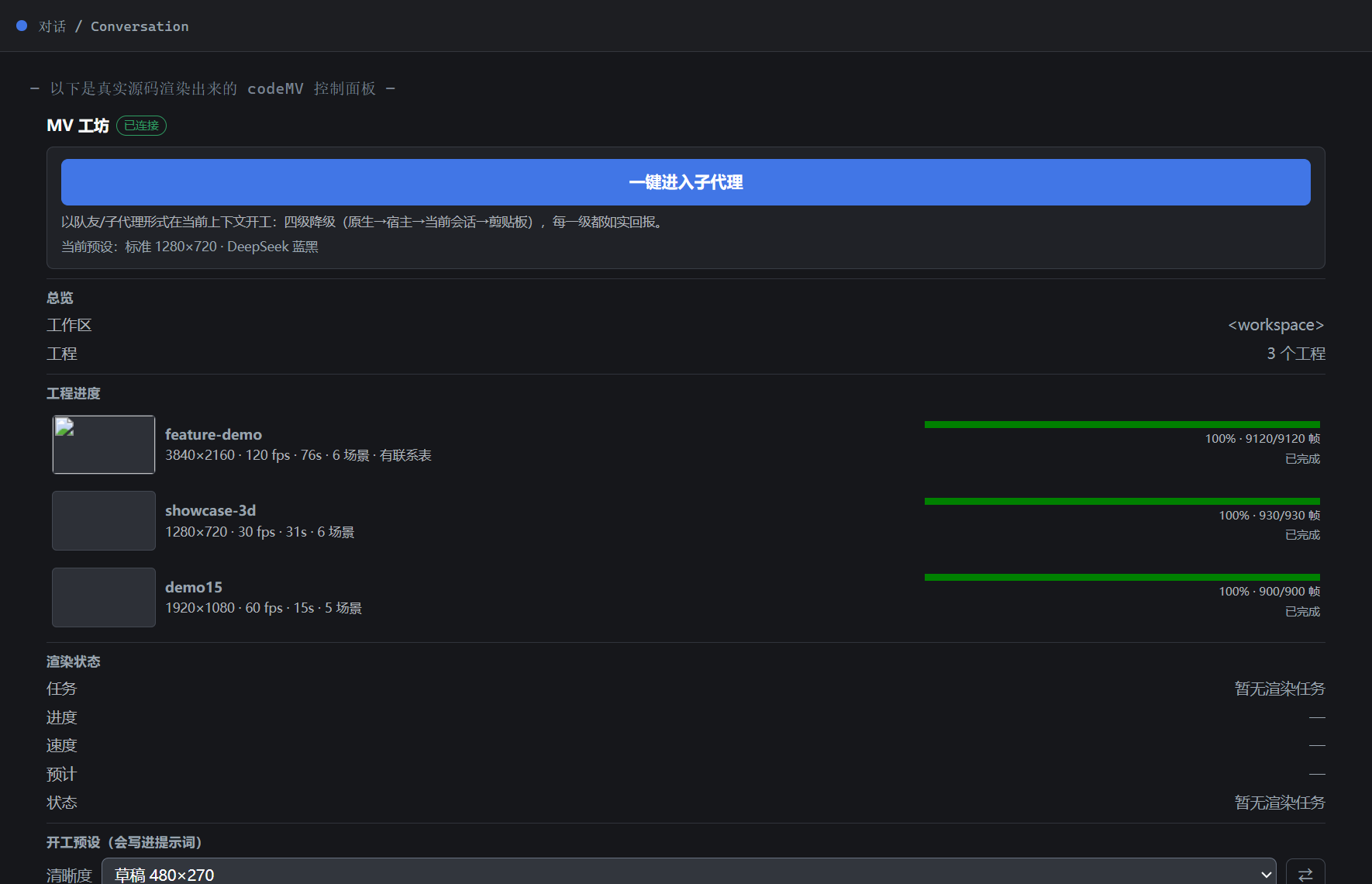
这张图是
node tools/make-panel-shots.mjs用真实lib/client.js组件(连样式都由真实代码ensureEntryStyle()注入)经迷你 React 运行时挂载后截的——结构、文案、CSS 全部来自仓库源码;状态数据是写死样例(工作区路径掩码为<workspace>、无渲染任务),所以它是组件渲染图,不是运行中 GUI 的抓图。可复现:同一条命令重跑即得。 Captured from the real component (the shot tool mountslib/client.jswith a minimal React runtime and lets the real code inject its own CSS), so structure, copy and styles come from the repository's source. The state is a fixed sample with a masked workspace path — a component render, not a live-shell capture.
工作室 HTTP 面 / studio HTTP surface(深色 / 浅色,配色跟随 DSH 的 DeepSeek 主题):
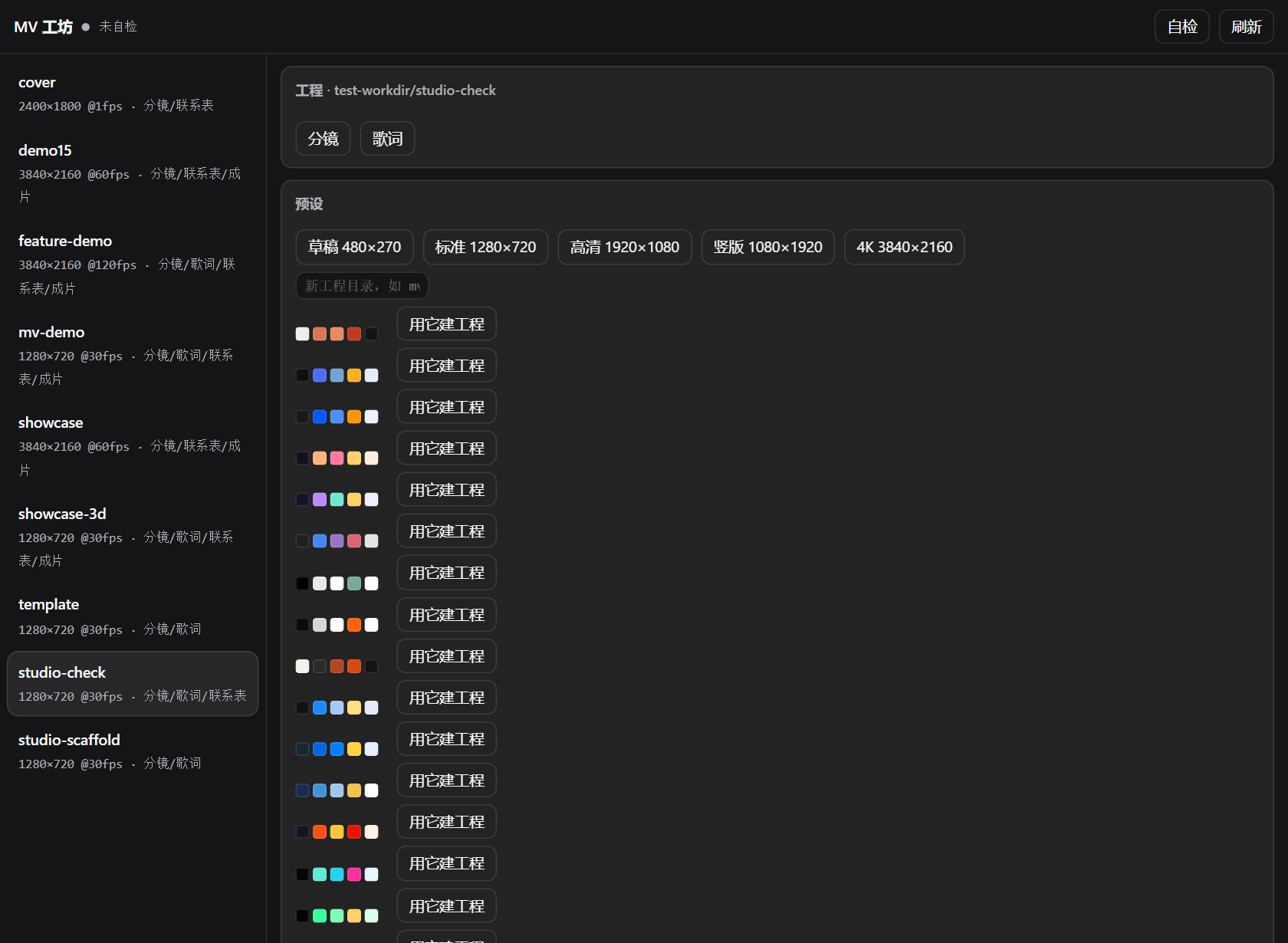
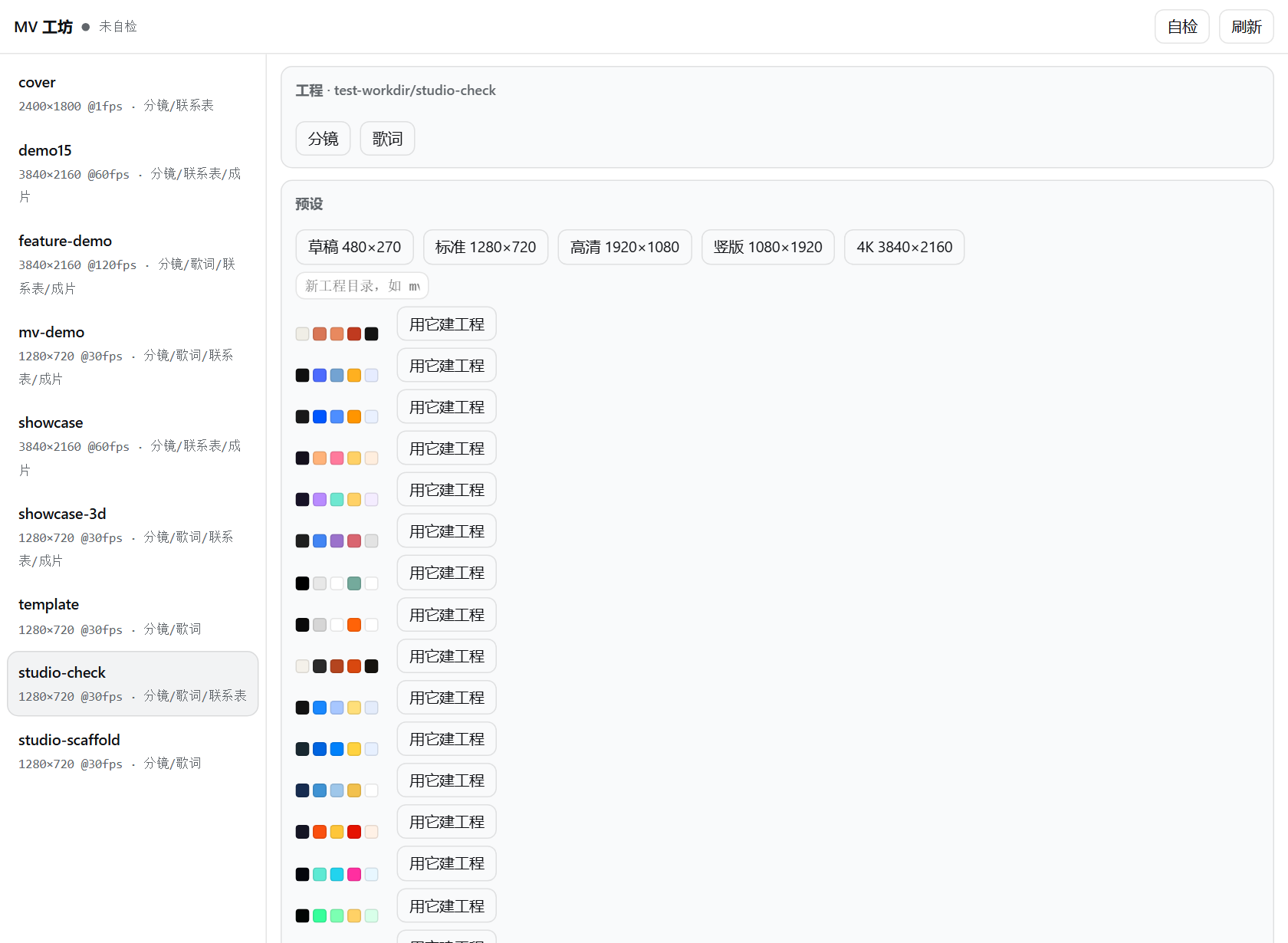
操作面只有一个:标签页 / one working surface: the tab。对话视图环里的「MV 工坊」标签页(role="region",标题即 type.label)承载全部交互——没有标题栏小按钮、没有右下角悬浮窗,也不需要展开/收起外壳:标签页本身就跟对话、轨迹平级,铺满视图区。全部用标准 DOM 标签 + DSH 设计令牌实现,不创建自定义元素、不内嵌网页。
第一屏是 hero 主舞台:**「一键进入子代理」**主色大按钮 + 「四级降级…每一级都如实回报」说明行 + 当前预设回显(如 当前预设:标准 1280×720 · DeepSeek 蓝黑 · 30 帧/秒,未选时如实写「按工程默认开工」)。点之前就知道会用什么参数开工。
状态区读 /music-mv/api/state 的实测值;接口不可达就如实写「离线」,不摆占位数据。动作:
| 动作 | 位置 | 降级链 / fallback chain |
|---|---|---|
| 一键进入子代理(hero 主按钮) | 首屏 | 宿主原生 agentTeams.spawnTeammate → POST /music-mv/api/kickoff → 当前会话发出「以子代理/队友形式开工」→ 复制开工指令到剪贴板;每一级都如实回报走到哪一级,绝不谎报成功 |
| 渲染联系表 | 钉底 | 插件自己 POST /music-mv/api/render(不经模型);没有工程就说没有,失败就报失败,渲完同源 <img> 直接预览 |
| 风格画廊 | 钉底 | 17 套预设的离线内置展示图(384×216 WebP data-URI,零网络零路由);回落链:内嵌图 → 宿主真实配色渐变 → 灰块+如实标注,绝不编颜色 |
| 复制工作区路径 | 钉底 | 剪贴板被拦时如实报「复制失败」 |
预设区:清晰度(含自定义档,宽/高 16–7680,localStorage 记忆)、风格(17 档,中文名三级回落:宿主 title 中文段 → 内置中文名 → 英文 id)、帧率(跟随工程 / 24 / 25 / 30 / 60 / 120),下拉右侧 ⇄ 横竖屏切换(先尝试对上内置档,对不上落自定义;非法输入不写进开工提示词)。三者都会写进开工提示词。
The tab is the only working surface — no title-bar chip, no floating dock, no shell to expand: it sits alongside 对话/轨迹 in the conversation view ring and fills the view. Its first screen is a hero stage with the one-click subagent button, the four-stage fallback note and a readout of the presets that will be used, so you see the parameters before you click. Below it live the measured /music-mv/api/state values (or an honest offline), the preset controls and three pinned actions.
两处原生入口 + 一处只读镜像 / two native surfaces plus a read-only mirror:
- 对话视图环标签页「MV 工坊」 —— 注册进宿主
conversation.view(order:20,与「对话」「轨迹」并列),标签条按注册项自动生成、宿主activateView切换、仅激活时挂载;role="region"、不劫持焦点,铺满视图区,全部交互都在这里。 - 右侧边栏「MV 工坊」 —— 只读原生状态镜像(无 iframe),首次激活自动打开一次;提示文案指向标签页。
- (另可浏览器直连)
http://127.0.0.1:<port>/music-mv/studio,或让模型调music_mv_studio拿地址。
标题栏没有小按钮、右下角没有悬浮窗——源码有反向断言防止回归。
The only interactive surface is the MV 工坊 tab in the conversation view ring (conversation.view, order:20, mounted only while active, role="region", never steals focus); the sidebar stays a read-only native status mirror, and the HTTP studio URL remains available for browsers and the music_mv_studio tool. Reverse assertions in the tests keep the title-bar chip and the floating dock from coming back.
无服务也能用 / works without the service:没有 webServer 的 profile(headless、TUI、纯 base)里,工作室状态拿不到,侧栏状态镜像与弹层自动进入离线模式——不轮询、不发请求,「把要求交给模型」用一段以 /music-code-mv 开头的交接提示走队友/子代理降级链;渲染完成后联系表会作为图片直接回到对话里。HTTP 路由只是给状态与直渲加速的可选项,不是插件的必需品。
In a profile without webServer the studio page is absent and the sidebar body switches to offline mode: no polling, no requests, actions go straight to the model (kickoff still falls back through the teammate/subagent chain), and contact sheets return to the chat as image blocks. The HTTP routes are an optional accelerator, never a requirement.
边界 / boundaries:所有路径都解析到工作区内,.. 越界一律 403;只允许读,不在界面上改工程源码;同一时刻只跑一个渲染任务。界面路由直接挂在 webServer 上,因此只监听回环地址(127.0.0.1)。
Every path resolves inside the workspace root and .. escapes are rejected with 403; the GUI never edits project sources; one render job at a time. The routes sit on the loopback-only webServer.
预设 / Presets
17 个开箱即用的预设:一条命令拿到配色、后期、时长、分镜与占位歌词,生成即可渲染。4 个氛围 + 12 个主流 AI 模型品牌配色 + 1 个角色智能体(品牌色取自官网 CSS 与官方 logo SVG),下面是全部的实拍联系表。 17 ready-to-use presets: one command yields palette, post-processing, duration, storyboard and placeholder lyrics. Four mood presets, twelve mainstream AI-model brand palettes and one character agent (brand colours pulled from official CSS and logo SVGs); below are real renders of all of them.
claude 橙白 |
deepseek 蓝黑 |
doubao 蓝橙 |
dusk-lofi 落日低保真 |
|---|---|---|---|
 |
 |
 |
 |
gemini 渐变 |
gpt 黑白 |
grok 黑橙 |
ink-paper 纸墨 |
 |
 |
 |
 |
kimi 蓝 |
llama Meta 蓝 |
midjourney 墨蓝 |
mistral 暖橙 |
 |
 |
 |
 |
neon-rain 霓虹雨夜 |
phosphor 磷光终端 |
qwen 紫 |
zhipu 智谱 三色 |
 |
 |
 |
 |
角色智能体预设 / character agent preset —— 配色 + 风格 + 性格一次配齐,既是色表也是一位能对话的创作伙伴(persona 字段写死特质、说话方式、外形约束与工作规矩):
fairy 仙灵 / Fairy |
|---|
 |
node skill/scripts/init.mjs my-mv --preset=deepseek  # 套用预设 / apply a preset
node skill/scripts/init.mjs --list-presets           # 列出 17 个预设 / list all 17
node tools/make-docs-images.mjs                      # 重出上面这些图 / regenerate these images
python skill/scripts/audit-presets.py                # 配色纪律测试 R1–R4 / palette discipline test
细节见 skill/reference/presets.md。
展示短片 / Showcase short
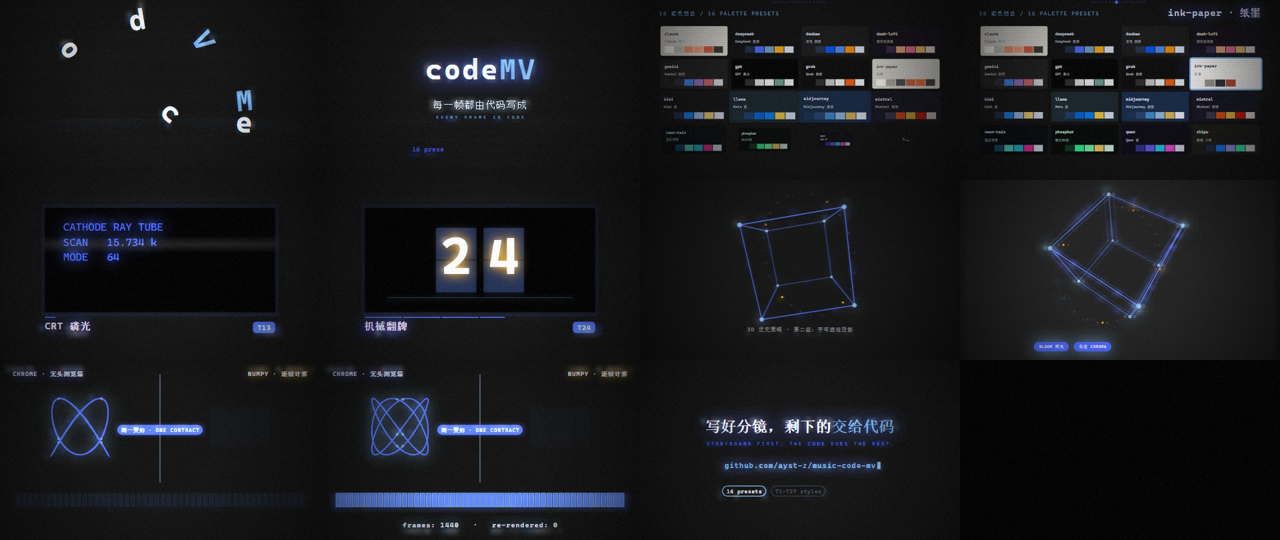
feature-demo 是一支 76 秒的全功能巡礼短片:开场 codeMV 字标弹性归位 → 16 预设色卡巡游 → 显示器家族六连拍(CRT 磷光 / VFD 荧光 / LED 点阵 / 机械翻牌 / 电子墨水 / VHS)→ 手写透视 3D 与后期通道逐个点亮 → 双引擎分屏同绘 → CRT 关机塌缩收尾。旁白由 MiMo TTS 六段合成,每段都先合成、量到真实时长再排分镜,最后按镜头起点摆位混成一条音轨。
规格 / spec —— 母版 3840×2160 · 120fps · AV1 + AAC · 76.00s(953 MB,属渲染产物,不入库);下面是派生的文档小样 1280×720 · 30fps · h264 · 2.2 MB,已按体积纪律放进 reference/video/。
分镜联系表(12 张等距关键帧,自检用)/ storyboard contact sheet:
node skill/scripts/init.mjs feature-demo --preset=deepseek            # 脚手架 / scaffold
node skill/scripts/tts.mjs --batch=narration.json                     # 六段旁白 / six narration clips
node skill/scripts/render.mjs --project=feature-demo --contact --w=480 --h=270   # 自检 / self-check
node skill/scripts/render.mjs --project=feature-demo --out=out/video.mp4 \
  --audio=narration/track.wav --workers=10                            # 成片 / master
机器自检会把三处分开报:webgl(能力门)、gpu (hardware GL)(实际在用的显卡)、encoder (live test)(真编一帧后的编码器)。详见 skill/reference/techniques.md 的 GPU 加速一节。The probe reports WebGL capability, the GPU actually in use, and the encoder after a real test frame — see the GPU section in techniques.md.
3D 能力展示 / 3D capability showcase
showcase-3d 是一支全 3D 的 31 秒短片,用新的 fairy 预设配色,按 reference/threejs.md 的豪华场面清单逐条打底——共享渲染器 + EffectComposer + UnrealBloom,2D 只负责排版与收边(fx: FX3D 关掉重复的 bloom/色差/扫描线):
Six shots, all WebGL: ① 30k-particle nebula with an expanding shock ring → ② 120 instanced emissive pillars over a mirrored floor, lit wave sweeping through → ③ a glowing ring tunnel with a gate flash → ④ a metallic knot with two sweeping lights → ⑤ seven halos snapping into alignment under a crisp codeMV title → ⑥ 24k particles collapsing to an ember, then a clean power-off.
| # | 镜头 / shot | 事件 / the one event |
|---|---|---|
| 1 | 粒子星云 swarm | 金色冲击环从中心扩出 |
| 2 | 发光柱林 pillars | 点亮波沿 z 推进,柱子逐根亮起 |
| 3 | 发光隧道 tunnel | 相机穿过的门环炸亮 |
| 4 | 金属结 knot | 高光扫过表面 |
| 5 | 光环阵 halo | 七环对齐到同一平面 |
| 6 | 坍缩 collapse | 塌成一点余烬 → 关机 |
3D 联系表 / storyboard contact sheet:
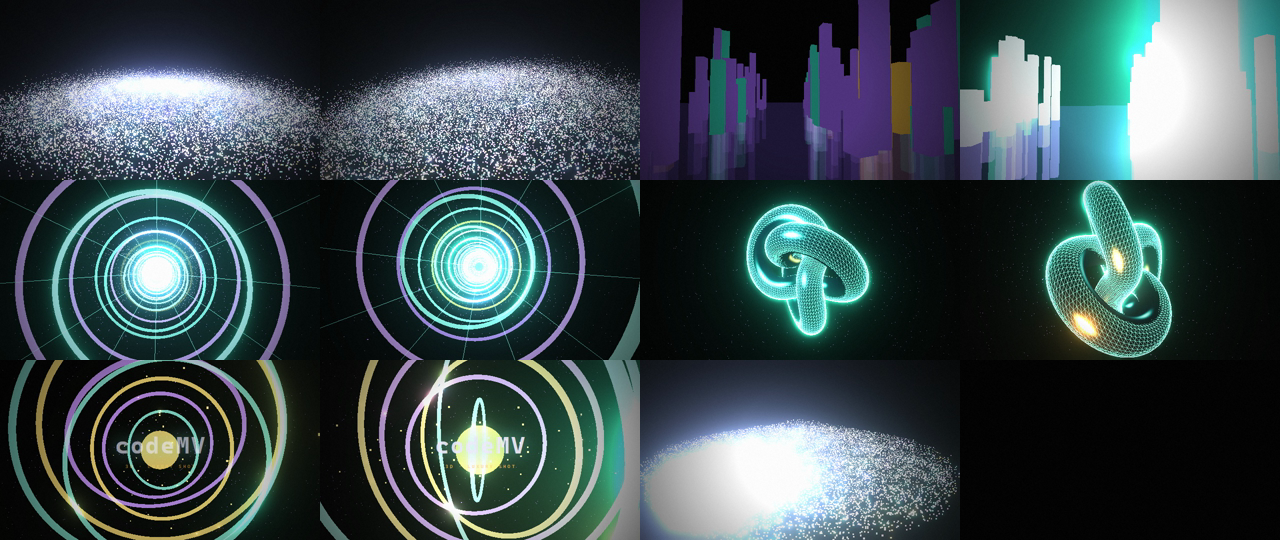
实测性能 / measured performance:930 帧 720p → 17.3s(8 workers,约 54 fps 吞吐、18.5 ms/帧),编码器日志自动带 [hardware verified — test frame encoded]。同一分辨率下 Canvas2D 全 FX 约 255 ms/帧——走硬件 GL 的 3D 反而更快,因为 FX3D 把重复的2D 后期关掉了,辉光在 GPU 上由 UnrealBloom 一次做完。930 frames of 720p in 17.3s (8 workers, ~54 fps, 18.5 ms/frame) versus ~255 ms/frame for Canvas2D with the full 2D FX chain — hardware-GL 3D is the faster path here, not the expensive one.
发布 / Releases:小样走 Release(母版超 git 的 100MB 上限)—— https://github.com/ayst-z/music-code-mv/releases/tag/v0.2.0 含 4 支预览共 10.1 MB(feature-demo 720p、720p-v2 高码率、9:16 竖版、3D 展示 640×360)。派生命令与分类见 docs/GITHUB.md §6。
隐私 / Privacy
结论:插件不联网、不埋点、不读工程以外的文件。 完整审计与复查清单见 docs/PRIVACY.md。 Verdict: the plugin makes no outbound requests, ships no telemetry, and never reads outside your projects. Full audit and review checklist: docs/PRIVACY.md.
| 边界 / boundary | 做法 / how |
|---|---|
| 出网 / outbound | 运行时代码零外部 URL、零遥测 SDK;fetch 只打自己的同源 /music-mv/api |
| 界面访问 / studio access | 只服务回环地址;跨站请求(Sec-Fetch-Site)一律拒;/api 需要 x-music-mv: studio 头,跨域预检拿不到许可 |
| 文件读取 / file reads | 只允许已发现工程目录内的文件,隐藏文件(.env、.git)一律 403,路径穿越 403 |
| 跨源使用 / cross-origin use | 不发任何 Access-Control-Allow-Origin,响应带 Cross-Origin-Resource-Policy: same-origin |
| 消息 / postMessage | 只发同源目标,且监听端先核对 event.origin(绝不通配);弹层不发任何跨源消息 |
改过渲染内核或配色后,跑这两条就够 / after touching the render kernel or palettes, run:
node test/privacy.test.mjs   # 出网 / 个人路径 / 确定性 / 工作室契约 / 预设完整性
node test/studio.test.mjs    # 真起服务,含隐私边界断言
收录 / Listing
- GitHub 话题:仓库已打
dsh-plugin、deepseek-harness、deepseek、dsh、music-video、canvas、threejs、ffmpeg→ 出现在 https://github.com/topics/dsh-plugin。 awesome-deepseek-agent:该列表收录的是"agent/harness"整体,本插件以 DeepSeek Harness 的插件身份投稿,条目草稿已写好:docs/awesome-deepseek-agent-entry.md(一条表格行 + 一份docs/deepseek_harness.md指南草案)。
CLI / 命令行
The same engine is usable directly — this is what the tools call. / 同一套引擎可以直接用 CLI 调——六个工具底层调的就是它。
node skill/scripts/render.mjs --project=mv --contact          # self-check sheet / 自检联系表
node skill/scripts/render.mjs --project=mv --stills=1.5,4,9   # specific frames / 指定帧
node skill/scripts/render.mjs --project=mv --out=out/video.mp4 \
  --w=3840 --h=2160 --fps=60 --workers=8 --gl=auto --encoder=auto \
  --format=jpeg --audio=track.m4a
Every flag below is read by skill/scripts/render.mjs as documented. / 下表每个 flag 都在 skill/scripts/render.mjs 的参数解析里真实存在。
| flag | meaning / 含义 |
|---|---|
--project=<dir> |
project directory (or pass it as the first positional argument) / 工程目录,也可作第一个位置参数 |
--contact |
contact sheet of N evenly spaced keyframes — the self-check step / N 张等距关键帧拼一张自检联系表 |
--stills=1.5,4,9 |
write these timestamps as images / 把这些时间戳导出成图片 |
--sheet |
rebuild the contact sheet from frames already in the cache / 用缓存里的帧重建联系表 |
| (no mode flag) | default: render every frame, then encode the video / 默认模式:渲全部帧再编码成片 |
--out=<path> |
output file — out/video.mp4 for video, out/contact.png for sheets / 输出路径,默认见括注 |
--w= --h= --fps= --dur= |
overrides for project.json / 覆盖 project.json 里的值 |
--start=<f> --end=<f> |
frame range; partial renders compose / 帧区间,分段渲可以拼起来 |
--workers=<n> |
parallel Chrome workers (biggest single win) / 并行 Chrome 进程数,单项收益最大 |
--gl=auto|gpu|soft |
auto probes hardware GL and falls back if the frame is blank; soft forces software / auto 探测硬件 GL、全黑则回退;soft 强制软件 |
--encoder=<id> |
auto (default) walks av1_qsv → hevc_qsv → h264_qsv → hevc_nvenc → h264_nvenc → hevc_amf → h264_amf → libx264; any encoder id your ffmpeg build offers also works (e.g. libx265) / auto 按此顺序择优,也可显式指定 ffmpeg 支持的任意编码器(如 libx265) |
--hdr10 |
10-bit HEVC + Rec.2020 + PQ + mastering metadata / 10-bit HEVC + Rec.2020 + PQ + 母版元数据 |
--crf=<n> --preset=<p> |
encoder tuning, defaults 17 / medium; hardware families map crf to -global_quality / -cq / -qp / 编码调参,默认 17 / medium |
--format=jpeg|png --quality=<1-100> |
jpeg is ~3× faster to write at 4K; the CLI defaults to png, the plugin passes frameFormat: jpeg / 4K 下 jpeg 写盘快约 3 倍;CLI 默认 png,插件按 frameFormat 传 jpeg |
--audio=<file> --audio-codec=<c> --audio-bitrate=<b> |
mux audio, defaults aac / 192k / 合入音轨,默认 aac / 192k |
--keys=<n> --cols=<n> --keyw=<px> |
contact-sheet layout: keyframes 12, columns 4, tile width 320 / 联系表排布:关键帧数、列数、单格宽度 |
--chrome=<path> --ffmpeg=<path> |
binary overrides (the chromePath / ffmpegPath config keys pass these) / 指定二进制路径,配置里的 chromePath / ffmpegPath 就是它们 |
--force |
ignore the incremental cache / 忽略增量缓存 |
--clean |
purge the frame cache after encoding / 编码完成后清掉帧缓存 |
--keep |
accepted for keepFrames; frames are kept unless you pass --clean anyway / 供 keepFrames 使用:帧本来就默认保留,只有 --clean 会清 |
--verbose |
page console output and per-worker lines / 打印页面 console 与各 worker 的输出 |
--quiet |
suppress [render] progress lines (used internally by the supervisor) / 静默 [render] 进度日志(主进程内部使用) |
Configuration / 配置
- id: music-code-mv
  name: dsh-music-code-mv
  config:
    projectsDir: mv        # schema default for where music_mv_init scaffolds / 脚手架默认落点
    softwareGl: true       # reserved: force software WebGL / 预留:强制软件 WebGL
    frameFormat: jpeg      # png | jpeg → passed to the renderer as --format / → 渲染器的 --format
    chromePath: ''         # optional override → --chrome=<path> / 覆盖 Chrome 路径
    ffmpegPath: ''         # optional override → --ffmpeg=<path> / 覆盖 ffmpeg 路径
    studioRoot: ''         # 图形界面扫描工程的工作区根,默认 process.cwd() / studio workspace root
Live today: frameFormat, chromePath, ffmpegPath — they become --format, --chrome, --ffmpeg on every render. ⚠️ projectsDir and softwareGl are declared in the schema but not yet read by apply(): pass dir explicitly to music_mv_init, and use --gl=soft on the CLI when you need software rendering. Every knob lives in the schema rather than in code; config changes hot-replace the plugin.
当前生效的是 frameFormat、chromePath、ffmpegPath——它们会变成每次渲染的 --format、--chrome、--ffmpeg。⚠️ projectsDir 与 softwareGl 只在 schema 里声明、尚未被 apply() 读取:music_mv_init 请显式传 dir,需要软件渲染时在 CLI 上用 --gl=soft。所有可调项都在 schema 里而不是散落在代码中;改配置会热替换插件,无需重启。
Workflow / 工作流
1. storyboard    shots, seconds, lyric cues, palette — before any code / 分镜先行:镜头、秒数、歌词点、配色
2. scaffold      music_mv_init / 起工程骨架
3. build         one scene module per shot / 一个镜头一个场景模块
4. check         music_mv_render mode=contact  →  LOOK at the sheet / 联系表自检:真的去看图
5. iterate       fix, re-check (sheets take seconds) / 改完再查,一张表几秒
6. render        music_mv_render mode=video    →  MP4 / 出片
7. finish        mux audio, verify, deliver / 合音轨、校验、交付
Step 4 is the one that matters. An agent that renders a contact sheet and actually reads it catches its own broken shots; one that does not ships empty frames. In building this plugin, the self-check caught a shot that rendered nothing at all because the scene read local time where it needed global time. 第 4 步是关键。会看联系表的 agent 能自己发现坏镜头;不看的会交出空帧。本插件开发过程中,正是自检抓出了一个"整镜全黑"的 bug——场景读的是局部时间,而它需要的是全局时间。
Performance / 性能
Measured on Intel Core Ultra 5 125H (14C/18T) + Intel Arc iGPU, headless / 实测环境:Intel Core Ultra 5 125H (14C/18T) + Intel Arc 核显,无头渲染:
| configuration / 配置 | 4K frame time / 单帧耗时 |
|---|---|
| 1 worker, software GL / 单进程、软件 GL | 1.19 s |
| 8 workers, hardware GL, QSV AV1 / 8 进程、硬件 GL、QSV AV1 | 0.13 s |
| encoder / 编码器 | PSNR avg vs source / 平均 PSNR | file size (20 frames @1080p) / 体积 |
|---|---|---|
QSV AV1 (-global_quality 17) |
43.59 | 632 KB |
libx264 (-crf 17 -preset medium) |
42.91 | 735 KB |
A 94-second 4K60 film (5640 frames) goes from a projected ~70 minutes (1 worker, software GL) to minutes: on this machine the whole 5640-frame set was written in ≈2.8 min and the MP4 landed ≈6 min after the first frame — measured from the frames/*.jpg and out/*.mp4 modification times.
94 秒 4K60(5640 帧)从单进程软件渲染的预计约 70 分钟降到分钟级:本机实测 5640 帧全部写入约 2.8 分钟,从首帧到 MP4 落盘约 6 分钟——依据是 frames/*.jpg 与 out/*.mp4 的文件修改时间。
Architecture / 架构
index.js                plugin entry — registers the seven tools / 插件入口,注册七个工具
lib/runner.js           spawns the bundled scripts with the host's Node / 用宿主的 Node 拉起内置脚本
lib/studio.js           图形界面宿主半边:工程扫描 + 渲染任务 + /music-mv 路由 / GUI host half
lib/studio.html         中文工作室页面(自包含,无构建)/ the Chinese studio page, self-contained
lib/client.js           浏览器半边:右侧边栏「MV 工坊」页面类型(手写 ModuleLoader 包)/ GUI client half
locale/zh.json          插件清单中文标题与描述 / localized package meta
locale/en.json          English package meta
cordis.patch.yml        the layer this bundle contributes / 本组合包贡献的层
skill/
  SKILL.md              authoring guide the agent reads first / agent 先读的创作规范
  reference/            styles, techniques, threejs, environment, lineage / 风格、技法、Three.js、环境、源流
  scripts/
    render.mjs          CLI entry: supervisor + worker / CLI 入口:主进程 + 工作进程
    probe.mjs           environment check / 环境自检
    init.mjs            scaffolding / 工程脚手架
    lib/progress.mjs    progress bar with ETA / 带 ETA 的进度条
    lib/signature.mjs   incremental signatures + import-graph hashing / 增量签名与 import 图哈希
    lib/encode.mjs      encoder selection + HDR10 packaging / 编码器择优与 HDR10 封装
  template/             the project skeleton music_mv_init copies / music_mv_init 复制的工程骨架
test/plugin.test.mjs    工具契约与真实渲染(模拟 Cordis 上下文)/ tool contract + real render
test/studio.test.mjs    图形界面宿主半边:真起 HTTP 服务跑一遍 / the GUI host half over a real HTTP server
test/client.test.mjs    浏览器半边:假 ModuleLoader + 假 React / the client half without restarting DSH
test/studio-shot.mjs    给工作室页面截图做目视检查 / screenshots the studio page for visual review
sync-skill.mjs          copies skills/music-code-mv -> skill/ (single source of truth; frames/out/caches excluded) / 同步 skill 源到 skill/(唯一事实来源,排除渲染产物与缓存)
Supervisor / worker split. With --workers=N, render.mjs re-executes itself N times, each worker owning the frames where frame % N === index. Workers emit ##PROGRESS and ##STATS lines; the supervisor aggregates them into one bar and merges per-worker signature shards afterwards.
主进程 / 工作进程分离。 --workers=N 时,render.mjs 会把自己重新拉起 N 次,每个 worker 负责 帧号 % N === 序号 的帧。worker 输出 ##PROGRESS 与 ##STATS 行,主进程汇总成一条进度条,并在结束后合并各 worker 的签名分片。
Incremental rendering. A frame's signature covers size/fps, project.json, and every scene live at that frame — where a scene's contribution is the hash of its file plus everything it imports, transitively. Reuse requires both the signature match and the frame file present, which is why frames are kept by default and purged with --clean.
增量渲染。 每一帧的签名覆盖分辨率/帧率、project.json,以及该帧上活跃的所有场景——每个场景的贡献值是"它自己的文件 + 它递归 import 的所有文件"的哈希。复用要求签名一致且帧文件存在,所以默认保留帧,用 --clean 清理。
Development / 二次开发
node test/plugin.test.mjs      # 工具契约 + 真渲染(含图形界面路由断言)
node test/studio.test.mjs      # 图形界面宿主半边:页面、状态、范围请求、越界、真跑一张联系表
node test/client.test.mjs      # 浏览器半边:注册页面类型 / 字典 / 槽位 / 自动打开
node test/studio-shot.mjs      # 截图到 test-workdir/shots/,用读图工具看
node sync-skill.mjs --check    # 同步后的 skill 与唯一事实来源一致
The suite loads the plugin against a mock Cordis context, verifies each tool against the documented defineTool contract, then actually executes probe → init → contact-sheet render. There is no test framework and no stub directory: the host packages resolve from the workspace node_modules.
测试套件用模拟的 Cordis 上下文加载插件,按官方 defineTool 契约校验每个工具,然后真实执行 probe → init → 联系表渲染。没有测试框架,也没有 stub 目录:宿主包直接从工作区 node_modules 解析。
Adding a style — add a scene module under skill/template/src/scenes/, register it in index.js, and document it in skill/reference/styles.md. Scenes receive local time; anything spanning shots must read env.t.
新增风格 —— 在 skill/template/src/scenes/ 加一个场景模块,在 index.js 注册,并在 skill/reference/styles.md 记录。场景拿到的是局部时间,跨镜头的逻辑必须读 env.t。
Adding a tool — register it in apply() with defineTool and declare inject = ['tools']. Add an assertion in test/plugin.test.mjs.
新增工具 —— 在 apply() 里用 defineTool 注册,并声明 inject = ['tools'],同时在 test/plugin.test.mjs 补一条断言。
Troubleshooting / 故障排查
| symptom / 现象 | cause / 原因 | fix / 处理 |
|---|---|---|
| frames are black / 全黑帧 | WebGL buffer not preserved / WebGL 缓冲未保留 | preserveDrawingBuffer: true;模板已设置 / 模板里已经设好 |
| a text shot renders nothing / 文字镜头空无一物 | scene used local time to look up global lyrics / 用局部时间查全局歌词 | read env.t, not the t argument / 读 env.t,别读 t 参数 |
ffmpeg not found |
ffmpeg-static install script was blocked / 安装脚本被 npm 拦截 |
npm approve-scripts ffmpeg-static or use @ffmpeg-installer/ffmpeg / 或改装 @ffmpeg-installer/ffmpeg |
| hardware GL gives blank frames / 硬件 GL 出空帧 | driver/headless incompatibility / 驱动与无头环境不兼容 | --gl=soft (the auto probe usually catches this) / 自动探测通常已能兜住 |
| render is slow / 渲染慢 | serial workers and/or software GL / 单进程和(或)软件 GL | --workers=8 --gl=auto --format=jpeg |
| re-render redoes everything / 重渲全部重来 | frames were purged / 帧缓存被清了 | don't pass --clean; keep the frame cache / 别加 --clean,留着帧缓存 |
License / 许可
MIT
No comments yet. Be the first to write one.