
REA for DeepSeek Harness
Reverse Engineer Anything, inside DeepSeek Harness.
One installable plugin: REA's MCP server, its workflow skill, and a live readiness panel in the left sidebar.




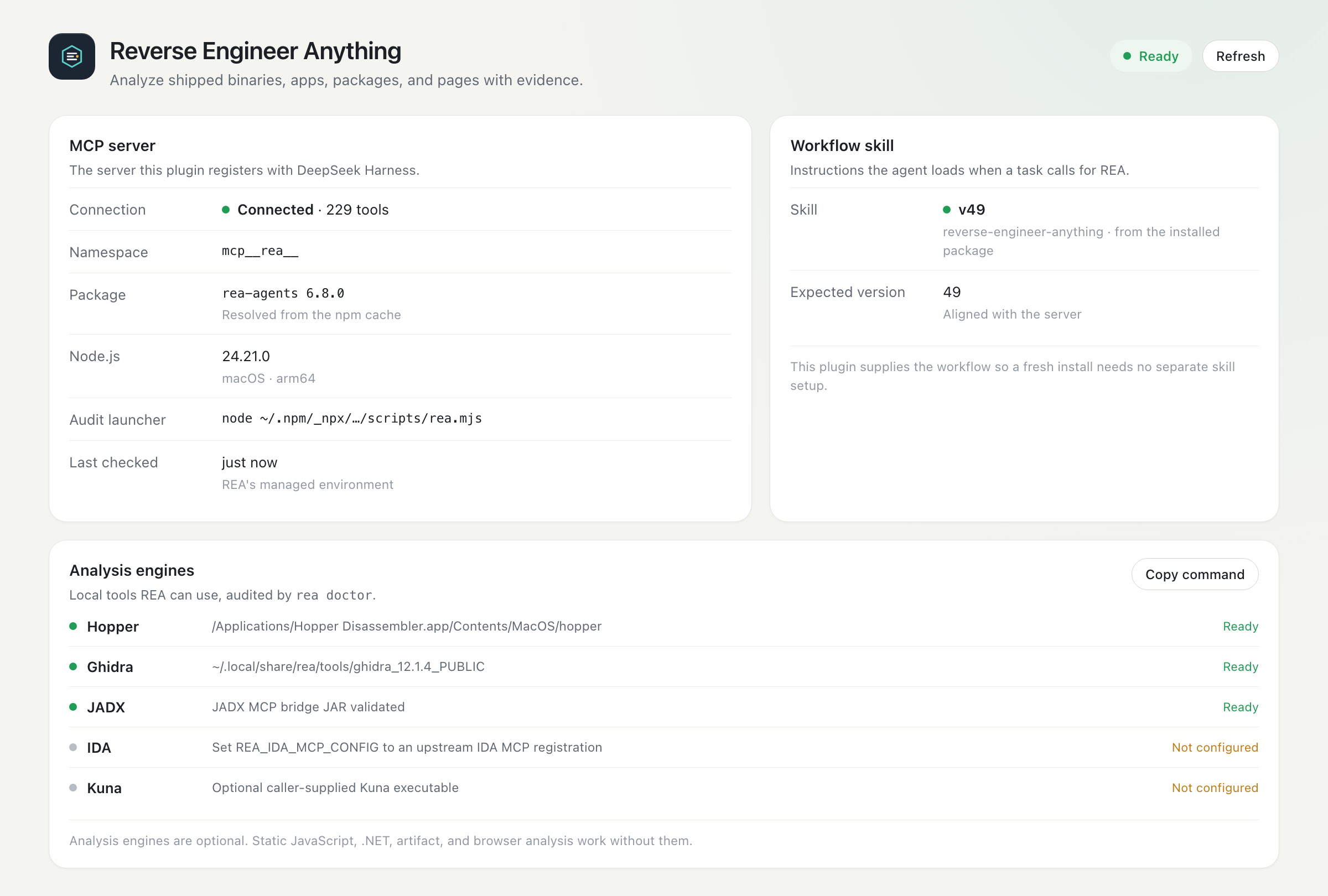
Panel preview: connection, workflow version, engine audit, and tool counts at a glance.
REA gives an agent tools to inspect binaries, applications, packages, and pages and to return the evidence behind each conclusion. This plugin makes that experience installable from the Harness itself:
- No hand-written MCP configuration. A bundle row starts REA's MCP server.
- No separate skill setup. The plugin contributes
reverse-engineer-anythingto the agent's skill catalog. - No launcher paths to maintain. The pinned REA package is fetched through
npxand cached. - A visible control surface. The sidebar panel reports the live tool count, workflow version, engine readiness, and a searchable tool catalog.
Contents
- Install
- Quick start
- What you get
- Architecture
- Tool catalog
- Compatibility
- Configuration
- Security and privacy
- Troubleshooting
- Development
- Distribution and catalog
- Roadmap
- Contributing
- License and acknowledgments
Install
Option A — npm (recommended)
The plugin is published as @axyatech/dsh-plugin-rea.
Settings → Plugins → Add plugin → paste the package name:
@axyatech/dsh-plugin-rea
Pin a release when you need reproducibility:
@axyatech/dsh-plugin-rea@1.1.0
From an agent or the plugin_manager tool:
plugin_manager action=install_bundle target=@axyatech/dsh-plugin-rea
Option B — Discover
Do this once:
- Plugins → More beside Experimental plugins → enable Custom plugin markets.
- Open the new Discover tab → Add index source.
- Paste this index URL:
https://raw.githubusercontent.com/axyatech/rea-harness-plugin/main/market/index.json
REA for DeepSeek Harness then appears as a searchable market entry, with the version, compatibility, and install target read from the index. Select it and install.
DSH does not ship an official third-party market; Discover lists the indexes you add. This repository publishes its own format-1 index, which resolves to the npm release.
Option C — Git repository
Settings → Plugins → Add plugin → choose the Git repository option → paste:
https://github.com/axyatech/rea-harness-plugin.git
Or install the same Git source from an agent:
plugin_manager action=install_bundle target=https://github.com/axyatech/rea-harness-plugin.git
Option D — Clone and link
git clone https://github.com/axyatech/rea-harness-plugin.git
plugin_manager action=install_bundle target=/absolute/path/to/rea-harness-plugin
After installing
The bundle is applied immediately. Refresh the Harness page once; new sessions pick up the workflow skill. If the MCP server reports zero tools on first open, wait for the npx download and press Refresh.
The current npm release is @axyatech/dsh-plugin-rea@1.1.0; see Distribution for release and provenance details.
Quick start
Ask in a new session:
Explain how search works in this shipped app, and show the evidence.
Compare two builds of this Electron app and list the behavior that changed.
Decompile this .NET method and reconstruct the interface it implements.
The REA skill teaches the agent when and how to use the tool set. The panel confirms that the server, skill, and engines are ready before a deep investigation starts.
What you get
| Component | Behavior |
|---|---|
| MCP server | npx -y rea-agents@6.8.0 mcp; tools are exposed as mcp__rea__* (229 tools in 6.8.0). |
| Workflow skill | reverse-engineer-anything, registered on each agent's own layer so it outranks a stale user copy while project-local skills still win. |
| Sidebar entry | A REA icon opens the panel: connection, package, skill version, engine audit, tool search, quick prompts, and commands. |
| Status endpoint | GET /plugins/rea/status returns the live tool inventory plus a cached rea doctor audit. |
| Cross-platform Host half | Plain ESM with no runtime dependencies; tested by CI on macOS, Linux, and Windows. |
Architecture
flowchart LR
  subgraph Harness["DeepSeek Harness"]
    A[Agent] -->|mcp__rea__*| M[MCP client]
    P[REA panel] -->|GET /plugins/rea/status| H[Host half]
    H -->|tool inventory| T[Tool registry]
    H -->|rea doctor| C[REA CLI]
    H -->|skill provider| S[Skill registry]
    A -->|loads skill| S
  end

  M -->|stdio| R[REA MCP server]
  R --> E[Hopper · Ghidra · IDA · JADX · Kuna]
  R --> F[Local binaries, apps, packages, pages]
  C --> E

  H -.->|reads| N[rea-agents package]
  P -.->|renders| U[User]
The panel never talks to the REA server directly: it reads the Host route. The Host half is optional-service based, so it stays inert in a Harness without a web server or skill registry. Nothing is written to disk.
Tool catalog
REA 6.8.0 exposes 229 tools. The panel makes them searchable, and the same list is available to the agent under the mcp__rea__ namespace.
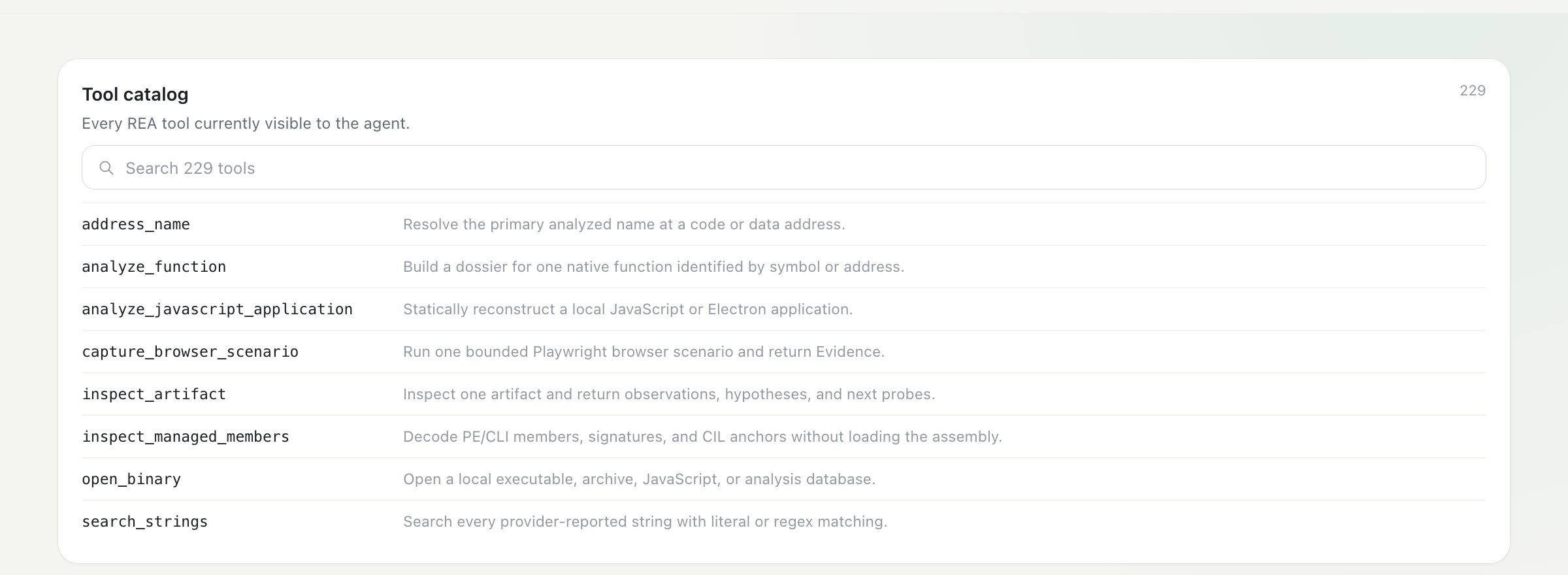
A few common entry points:
| Tool | Use it for |
|---|---|
open_binary |
Open an executable, archive, JavaScript bundle, or analysis database. |
analyze_function |
Build a complete function dossier with pseudocode, assembly, calls, and references. |
analyze_javascript_application |
Reconstruct an Electron or JavaScript application without executing it. |
inspect_managed_members |
Decode .NET metadata, CIL anchors, and signatures without loading the assembly. |
inspect_artifact |
Inventory a package, APK, IPA, DMG, ASAR, or archive with hashes and next probes. |
capture_browser_scenario |
Run one bounded browser scenario and return evidence. |
Compatibility
| Surface | Supported | Status |
|---|---|---|
| DSH | 0.2.x (engines.dsh: >=0.2.1-rc.3 <0.3.0-0) |
Runtime-verified on 0.2.1-rc.3 (macOS) |
| npm | @axyatech/dsh-plugin-rea@1.1.0 |
Published, MIT, public access |
| Node.js | REA 6.8.0 engines: ^22.23.4 || ^24.22.1 || >=26.12.1 |
Required for the npx MCP launch |
| macOS | macOS 12+ | Runtime-verified (arm64, Web GUI) |
| Linux | CI-tested Host logic | Full DSH + REA runtime not yet verified; REA needs procps |
| Windows | CI-tested Host logic | Full DSH + REA runtime not yet verified |
| Web GUI | Harness Web | Verified |
Electron file:// shell |
Not verified | Use the Web GUI |
CI runs the Host test suite on Ubuntu, macOS, and Windows with Node 22, 24, and 26. The suite exercises the status route, loopback guard, home-path redaction, doctor parsing, and skill provider without requiring DSH or REA.
REA's analysis engines are optional:
- Hopper is detected at its standard macOS location.
- Ghidra needs
GHIDRA_INSTALL_DIRand a JDK 21+. - IDA, JADX, apktool, ADB, WABT, TShark, Kuna, and a browser for web scenarios are configured through REA's
REA_*variables and its installation guide. - Static JavaScript/Electron, .NET, artifact, SQLite, plist, entitlement, Go/Rust, and WASM analysis work without a native engine.
Configuration
The bundle's rows can be overridden in your own cordis.patch.yml (a profile patch, or the home patch at ~/.dsh/cordis.patch.yml). A non-insert patch replaces the whole config, so restate every field you need.
Pin another REA version or add engine paths:
- id: mcp-rea
  name: "@deepseek-ai/dsh-mcp-client"
  config:
    serverName: rea
    transport: stdio
    command: npx
    args: ["-y", "rea-agents@6.8.0", "mcp"]
    toolCallTimeoutMs: 600000
    failOnStartupError: false
    env:
      GHIDRA_INSTALL_DIR: /absolute/path/to/ghidra_12.1.4_PUBLIC
      JAVA_HOME: /absolute/path/to/jdk-21
Keep machine-specific engine paths in that local patch, never in this repository.
Environment variables read by the plugin itself:
| Variable | Purpose |
|---|---|
REA_ROOT |
Absolute path to a rea-agents package to use for the audit and skill. |
REA_LAUNCHER |
Absolute path to a scripts/rea.mjs launcher. |
REA_NODE |
Node executable for the audit (defaults to common paths, then node). |
REA_NPX |
npm launcher for the audit fallback (defaults to npx). |
REA_INSTALL_ROOT |
REA's installer state directory (default ~/.local/share/rea); its environment.json supplies engine paths for the audit. |
Already configured REA by hand?
Two MCP rows with the same serverName cannot both load. Remove the older registration first:
rea setup --client dshwrites area-mcprow to~/.dsh/cordis.patch.yml— delete that row.- A hand-written
mcp-reainsertion in a profile patch — replace it with the override shown above so it keeps your engine paths and targets the bundle row.
Security and privacy
- No secrets, no writes. The plugin stores nothing and reads only local REA files for status and skill discovery.
- Loopback-only status.
/plugins/rea/statusrejects every non-loopback peer with403; it answersGET/HEADonly and uses no request value in a command or path. - Home-path redaction. Every returned path replaces your home directory with
~, including doctor details and remediation text. - No telemetry. The only network access is npm's first download of the pinned REA package, plus whatever local REA tool you invoke.
- No remote control. The plugin opens no port of its own, installs no service, and has no command endpoint.
The full model, including the loopback proxy behavior and supply-chain notes, is in SECURITY.md.
Troubleshooting
| Symptom | What to do |
|---|---|
| Panel shows Offline or zero tools | Confirm node and npx are on the Harness PATH; run npx -y rea-agents@6.8.0 doctor --format json in a terminal; check the first-download network access; press Refresh. |
Failed to load plugins after updating or renaming this bundle |
Restart DeepSeek Harness. The browser boot graph caches a client module id across a package rename; a restart rebuilds it. |
Two rea MCP servers or a startup error |
Remove the older rea-mcp/mcp-rea registration from the home or profile patch. |
Status route returns 403 from another machine |
That is the loopback guard. Use an SSH tunnel or a same-machine reverse proxy. |
| Node engine warning in the panel | Update Node to REA's supported range; the server can still run outside it, but the audit reports the mismatch. |
| Skill still shows an older version | New agents resolve the aligned copy; restart Harness so existing sessions re-resolve it. Project-local skills intentionally win. |
| MCP fails only on Windows | Ensure a Node distribution with npx.cmd is on PATH; the Host half is CI-tested, the DSH MCP launch path is not yet runtime-verified on Windows. |
Development
No build step. The package is plain ESM plus a browser module.
npm test        # node --test: route, redaction, loopback, doctor, skill provider
npm run check   # node --check for both halves
npm pack --dry-run
CI runs that same sequence on:
- Ubuntu, macOS, and Windows
- Node 22, 24, and 26
The preview images under docs/assets/ are rendered from the self-contained pages in docs/preview/:
chrome --headless=new --hide-scrollbars --force-device-scale-factor=2 \
  --window-size=1200,810 --screenshot=docs/assets/panel.png \
  file://$PWD/docs/preview/panel.html
Distribution and catalog
DSH's Discover tab has no official third-party catalog: it shows only the format-1 indexes a user adds. This repository therefore ships its own index:
market/index.json
The index is validated against DSH's dsh-plugin-market-index format and pins each release to an immutable npm version. Adding the raw index URL once makes the plugin discoverable and installable from Discover. The index entry also carries the engines.dsh compatibility range, so incompatible Harness versions are marked before installation.
The plugin is published to npm as @axyatech/dsh-plugin-rea (current release: 1.1.0, MIT, private: false, public access). Verify the published version:
npm view @axyatech/dsh-plugin-rea version
The unscoped dsh-plugin-rea name belongs to another publisher and is deliberately not used.
Publishing a release
Maintainer flow:
Bump
package.jsonandCHANGELOG.md; runnpm test.Authenticate and publish:
npm login
npm whoami
npm publish --access public
Update
market/index.jsonto the new version andpublishTimestamp, then commit and push.
prepublishOnly runs the test suite before the tarball is built. The package
name, version, license, repository, and files allowlist are already correct.
Tag-driven publishing
.github/workflows/release.yml publishes on a v* tag (or a manual dispatch)
using npm provenance and the NPM_TOKEN repository secret:
git tag v1.1.0
git push origin v1.1.0
The workflow checks that the tag matches package.json's version, then queries
the registry. If that version is already published, it skips the publish step
and finishes green, so tagging an already-released commit is safe. For a new
version it requires NPM_TOKEN (an npm automation token, or a granular token
with publish rights for @axyatech) and publishes with
--access public --provenance. Add the secret under
Settings → Secrets and variables → Actions.
Roadmap
- Scoped, publish-ready package name
-
engines.dsh0.2.x compatibility guard - Cross-platform test suite and 9-cell CI matrix
- Self-hosted Discover index
- Sanitized panel and tool-catalog previews
- Loopback-only, home-redacted status route
- npm publication (
@axyatech/dsh-plugin-rea@1.1.0) - Runtime verification on Linux and Windows with DSH
- Replace the previews with signed live screenshots
Contributing
Issues and pull requests are welcome. Keep changes focused, run npm test, and never commit machine paths, credentials, or verification screenshots that contain personal data. The security model in SECURITY.md is part of the review surface.
License and acknowledgments
This plugin is MIT-licensed (LICENSE). Its bundled workflow skill is copied from rea-agents 6.8.0, also MIT (LICENSE-REA); see NOTICE.
REA is created by morluto. Hopper, Ghidra, IDA, JADX, Kuna, and other analysis engines are separate projects with their own licenses and terms.
No comments yet. Be the first to write one.