 Workspace Status
A DeepSeek Harness plugin that colors each workspace folder by what its sessions are doing.
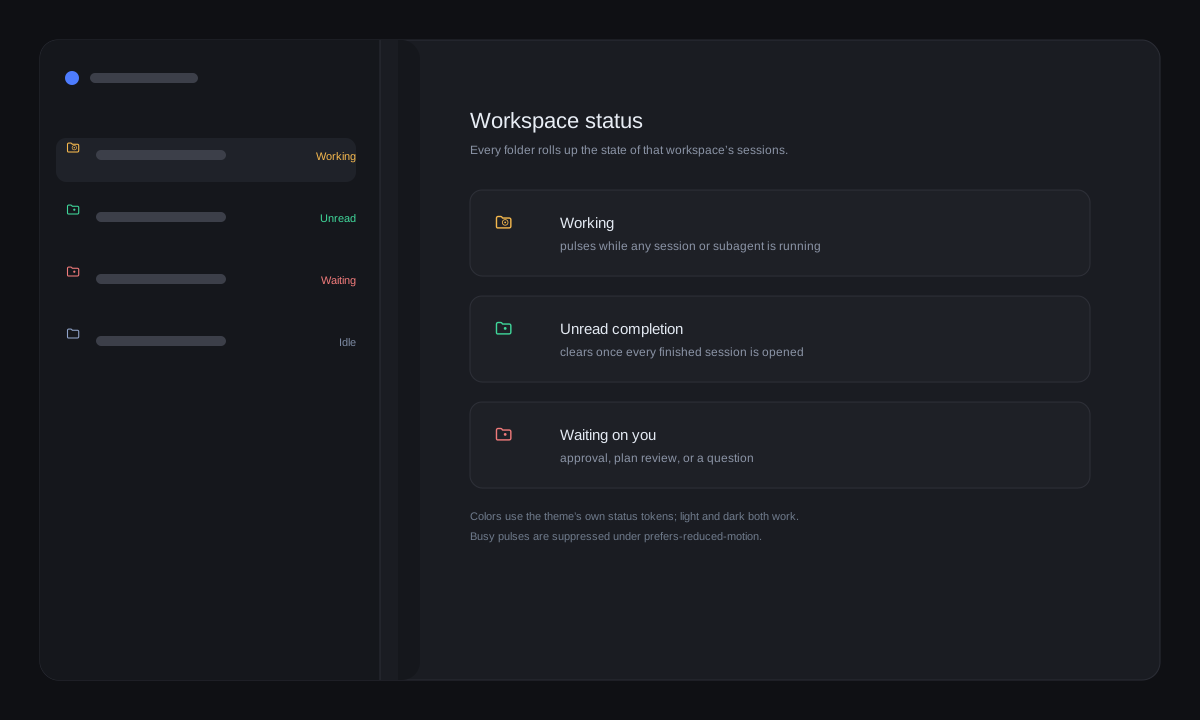
Workspace Status rolls the state of every session in a workspace into one folder glyph in the sidebar: red while something waits on you, pulsing amber while work runs, green while a finished session's completion is still unread. It reads the same statuses the session rows already use, so there is no extra state to maintain.
What you get
- Red folder — a session waits for your approval, plan review, or answer.
- Pulsing amber folder — any session, or one of its direct subagents, is running.
- Green folder — a session finished while you were not looking; it clears once every finished session in that workspace has been opened.
- Ungrouped sessions — the bucket for sessions outside every workspace follows the same rule.
How it decides
Each workspace resolves to the busiest state among its visible sessions, with red → amber → green precedence. Amber covers both a running parent and its running direct subagents, so a session waiting on subagents stays busy until they finish. Green is the same unread-completion reminder the session rows show; opening a session acknowledges it, and the folder returns to its normal color when the last unread session in that workspace is opened.
Archived, blank, and subagent conversations do not speak for a workspace.
Subagent work reaches its parent through the running child count — the same
direct children the header subagent dropdown lists. External tasks in the
catalog never count as running. Busy pulses are suppressed under
prefers-reduced-motion.
Technical notes
- Host coupling: DSH does not yet expose a slot for decorating a workspace
header row, so the layer paints the shipped folder glyph through
data-row-key="workspace:<id>". If that markup changes, the layer stops painting and folders return to their normal colors; nothing else breaks. - One source of truth: the rollup reads the shipped Session status and
Workspace snapshots;
completionUnreadis the same green reminder the session rows use, and main-view retention acknowledges it. - Theme-native colors: folder colors use the theme's own error, warning, and success tokens, so light and dark themes both work. The existing glyph is recolored in place — the open/closed folder shape and the hover chevron stay intact.
- Limit: an approval requested inside a subagent's own conversation shows amber (the parent is busy) rather than red; only a workspace session's own pending approval/question is red.
Install
- In DSH, open Plugins → Add plugin.
- Enter
https://github.com/awychoi/dsh-workspace-status, or the absolute path to a local checkout. - Enable the bundle. The sidebar's workspace folders recolor as sessions run, finish, or wait for you.
Uninstall
Remove Workspace Status from DSH's plugin list and restart DSH. The folder
glyph returns to its normal color, and the switch remains in localStorage
only.
License
MIT. Copyright © 2026 awychoi.
Not affiliated with DeepSeek.
No comments yet. Be the first to write one.