 VS Code Quick Launch
A DeepSeek Harness plugin that opens a workspace in VS Code from the sidebar menu or the session header.
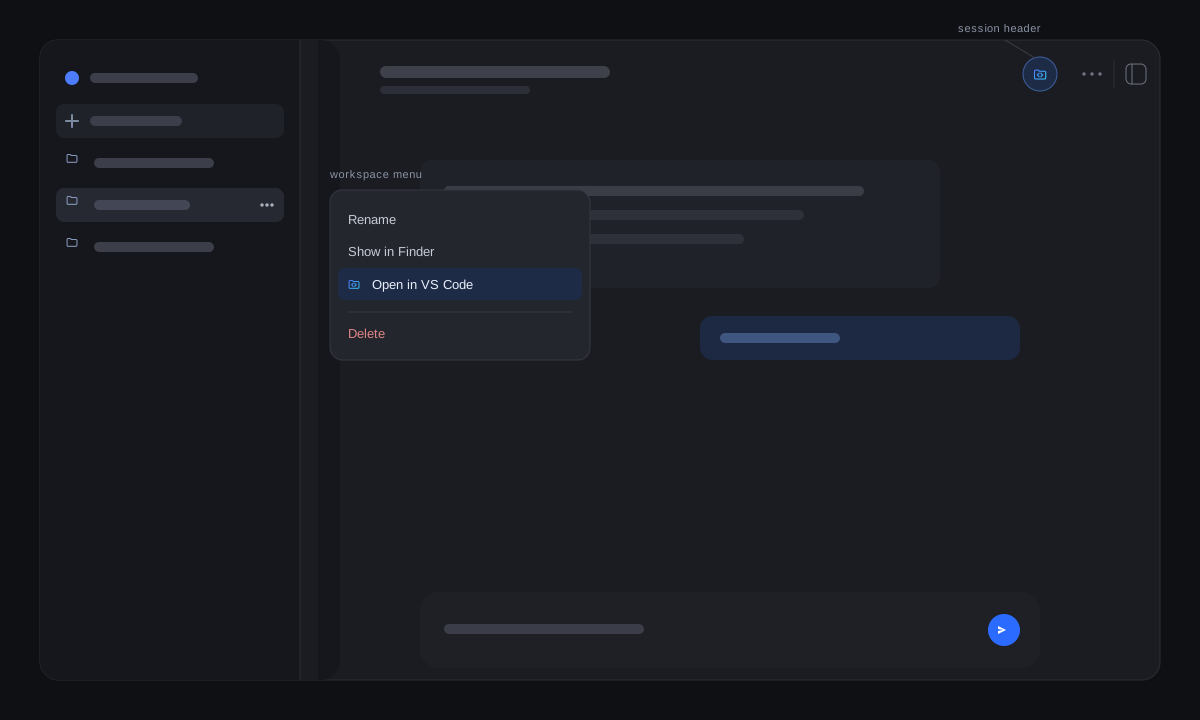
VS Code Quick Launch puts the editor one click away. A workspace's … menu
gains an Open in VS Code row beside the shipped Show in Finder item,
and the session header gains the same action immediately left of its overflow
… button. The plugin asks the Host which applications are installed, so an
entry point appears only while VS Code is available.
What you get
- Workspace menu row — right-click a workspace row, or use its
…button, and choose Open in VS Code. It opens that workspace's folder. - Session header button — the same action left of the header's overflow menu; it opens the current session's working directory.
- Independent switches — turn either entry point off in Settings → General → VS Code Quick Launch.
- No new Host surface — availability and launch reuse the shipped
open-in-approutes.
How it works
The plugin reads the Host's installed-application catalog once per page
(open-in-app/apps) and launches through open-in-app/open with the vscode
catalog id. The header entry registers in
conversation.session.header.utilities at order -1, immediately left of the
header's own overflow button (order 0). A launch failure shows a toast; a
remote browser whose Host reports no local applications sees neither entry
point.
Technical notes
- Detection: the Host catalog covers macOS (
Visual Studio Code.app), Windows (Code.exe), and Linux (code); nothing is probed from the browser. - One read per page: a failed availability read retries on the next opening instead of hiding the entry for the rest of the session.
- Copied path: the header button opens the session's working directory, which is the workspace folder for an ordinary session. A session without a known directory hides the button.
- Failure isolation: a refused launch is reported as a toast; the rest of the header and the workspace menu are untouched.
Install
- In DSH, open Plugins → Add plugin.
- Enter
https://github.com/awychoi/dsh-vscode-quick-launch, or the absolute path to a local checkout. - Enable the bundle, then right-click a workspace row or look left of the
session header's
….
Uninstall
Remove VS Code Quick Launch from DSH's plugin list and restart DSH. The two
switches remain in localStorage only.
License
MIT. Copyright © 2026 awychoi.
Not affiliated with DeepSeek.
No comments yet. Be the first to write one.