DSH HTML Render
Lets agents in DSH answer with a page: a chart, table, diagram or mockup shown right in the chat. The agent checks the page in headless Chrome first, so it sees what you will see and fixes it before you do.
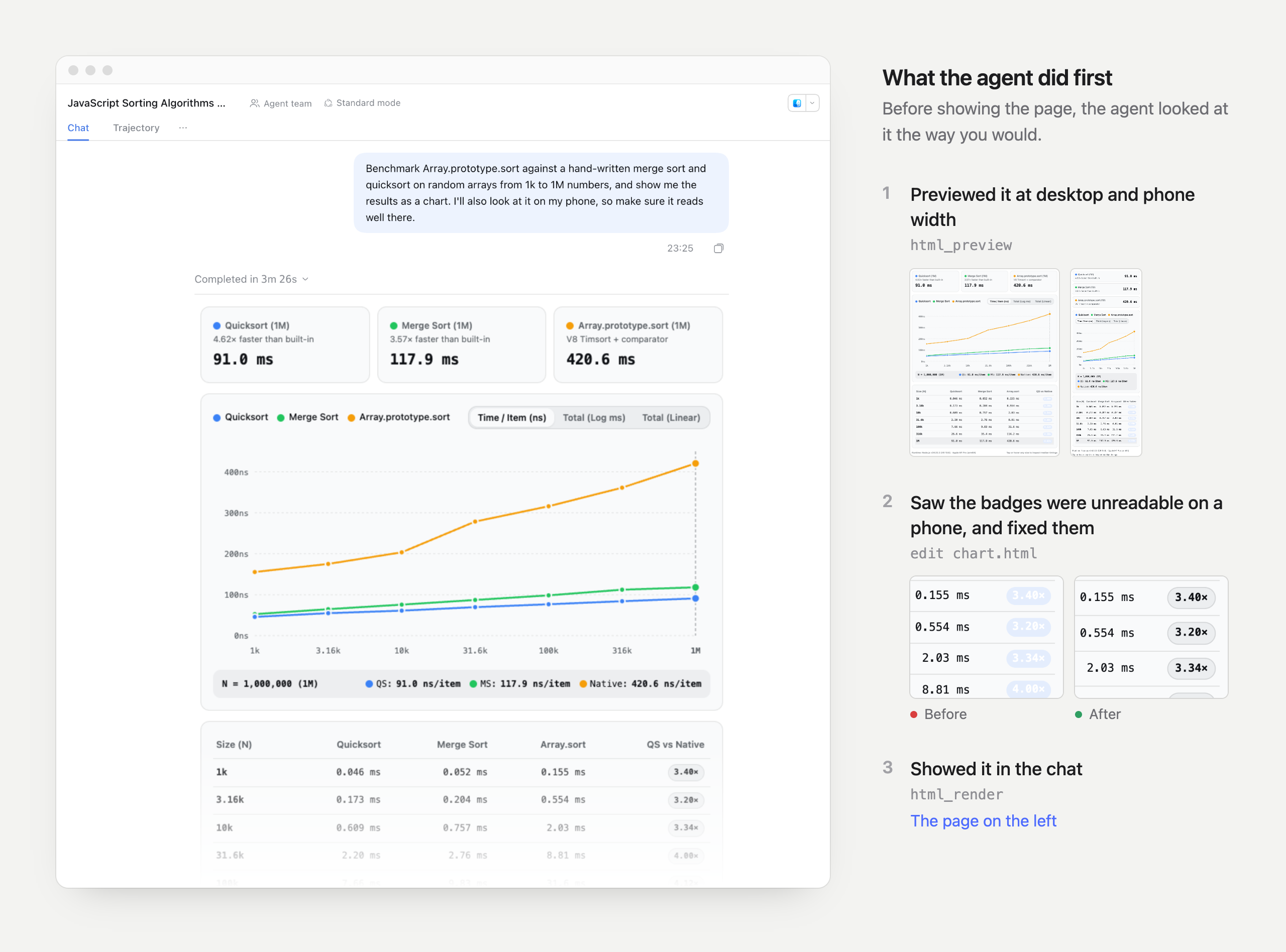
A real session: asked for a benchmark chart that also reads well on a phone, the agent caught unreadable badges in its own phone-width preview and fixed them before rendering. The before/after crops are re-rendered at higher resolution from the session's two versions of the page.
Needs DSH 0.2.x (0.2.2-alpha.2 or later) and, for previews, Google Chrome or Chromium on the machine running DSH. MIT licensed.
Install
Plugins page (DSH Web or Desktop): open Plugins in the sidebar, choose Add plugin, paste this address and install:
https://github.com/aur3l14no/dsh-html-render/releases/download/v0.1.0/dsh-html-render-0.1.0.tgz
Terminal (a CLI Web profile):
dsh plugin --profile web add https://github.com/aur3l14no/dsh-html-render/releases/download/v0.1.0/dsh-html-render-0.1.0.tgz
dsh web
Ask an agent: paste this into DSH (Creator mode), Claude Code, Codex or any coding agent:
Install the DSH plugin dsh-html-render by following
https://raw.githubusercontent.com/aur3l14no/dsh-html-render/HEAD/docs/install.md
Then ask for something visual, for example "chart this CSV" or "show the two layouts side by side".
What you see
- The page appears where the agent called
html_render: text the agent writes afterwards sits below it. When the turn's tool calls fold away, the page stays. - It follows your DSH theme, light or dark, and switches live with it.
- The frame fits the page's height (up to 20,000px). Hover it to open it full screen. Links open in a new browser tab.
- Each tool call has a compact row. Expand a preview row to see the screenshot the agent got, its result and the page source.
What the agent sees
Two tools. Their descriptions and schemas, in index.js, are the
whole contract.
| Tool | Takes | Returns to the agent |
|---|---|---|
html_preview |
path or html, width (240 to 1600, default 728; about 390 for phones), appearance (light or dark) |
A PNG of the page as the chat frame would show it, its contentHeight, layout problems and console output. The PNG is attached only for models that accept images. |
html_render |
path or html, title, height (80 to 2000, normally the previewed contentHeight) |
One line: Rendered "<title>" for the user. or the reason it refused the page. |
html_preview is the agent's own check: it looks at the screenshot, edits the
page and previews again until it is right, and only then calls html_render.
Pass path, the absolute path of an .html file, or the page itself as
html. With path the agent writes the page once and then edits it with its
usual file tools; previews and the render pass only the path. html_render
reads the file once, at the call: later edits do not change the page already
shown, and showing a new version takes another html_render.
The two tool definitions add about 3,100 characters (roughly 750 tokens) to each agent. Each preview adds a short text result and one screenshot; each render adds one line.
Writing pages
The html_render description tells the agent these rules; they are listed here
for anyone writing pages by hand.
- Self-contained. Inline
<style>and<script>. Remote URLs (a CDN chart library, web fonts) load as-is. - Local images by absolute path. Any quoted absolute path or
file://URL to an image (in an attribute, CSSurl()or a script string) is read and inlined as a data URI: at most 1 MB each and 2 MB per page. A file that is not really an image is never inlined, andhtml_renderrefuses a page with images it cannot read. - Theme variables. Use the CSS variables on
:rootinstead of fixed colors:--background,--foreground,--muted,--card,--popover,--secondary,--border,--ring,--primary,--accent,--destructive,--warning,--success,--info,--code-background(most with-foreground;accent,destructiveandwarningalso with-surface),--chart-1to--chart-6,--radius,--font-sans,--font-mono. - Layout. The frame is the reply's width (about 728px on desktop, 360px on
phones) on the chat background, with an 8px padding you can override. Leave
htmlandbodywithout a background or outer card. Let content set the height:vhunits andheight: 100%onhtmlorbodyare refused, because the frame grows to fit them. - Size. A page passed as a file is at most 512,000 characters, like one passed inline.
Security
The page runs in a srcdoc iframe with sandbox="allow-scripts allow-forms"
and no allow-same-origin, so it has an opaque origin. It cannot read DSH's
page, cookies or storage, or call DSH's API as you. It cannot open pop-ups or
navigate the DSH window; DSH opens only http(s) links it is handed, in a new
tab. The page can still reach the network.
path reads files through the session's filesystem. DSH restricts writes, not
reads, so this gives the agent nothing its shell could not already read.
Configuration
Set this on the html-render entry in the profile's cordis.patch.yml:
- id: html-render
  config:
    browserPath: /usr/bin/chromium
| Option | Default | Meaning |
|---|---|---|
browserPath |
'' |
Chrome or Chromium binary for html_preview. Empty uses the installed Google Chrome. |
The browser starts on the first preview and closes after a minute without one.
html_render does not need it: without a browser, previews fail with an
explanation and pages still render.
Limitations
- Pages rendered through
run_code(PTC mode) do not appear in the chat. - The preview uses a recorded copy of the DSH theme, so its colors can drift from the chat's after a DSH upgrade until the plugin re-records them.
- Pages can reach the network; the sandbox isolates DSH, not the internet.
Development
See CONTRIBUTING.md for building, testing, following DSH and T3 Code upstream, and releasing.
Acknowledgements
The design comes from the html_preview and html_render tools in
T3 Code: the tool shapes, theme
variables and layout rules match T3's, so a page written for one works in the
other. Parts of the page-file and image checks are ported from it; see
THIRD_PARTY_NOTICES.md.
License
MIT.
No comments yet. Be the first to write one.