
SVG Animation Pipeline
端到端 SVG 动画流水线:自然语言描述 → LLM 生成 SVG → 程序化动画 → 按帧渲染 → FFmpeg 合成
同一份 SVG 每次渲染得到相同帧,原生 CSS/SMIL 动画会被精确 seek 到帧时间,因此可以稳定输出循环无缝、可复现的 GIF/MP4/WebM。本仓库同时提供 DeepSeek Harness 插件 SVG Motion。
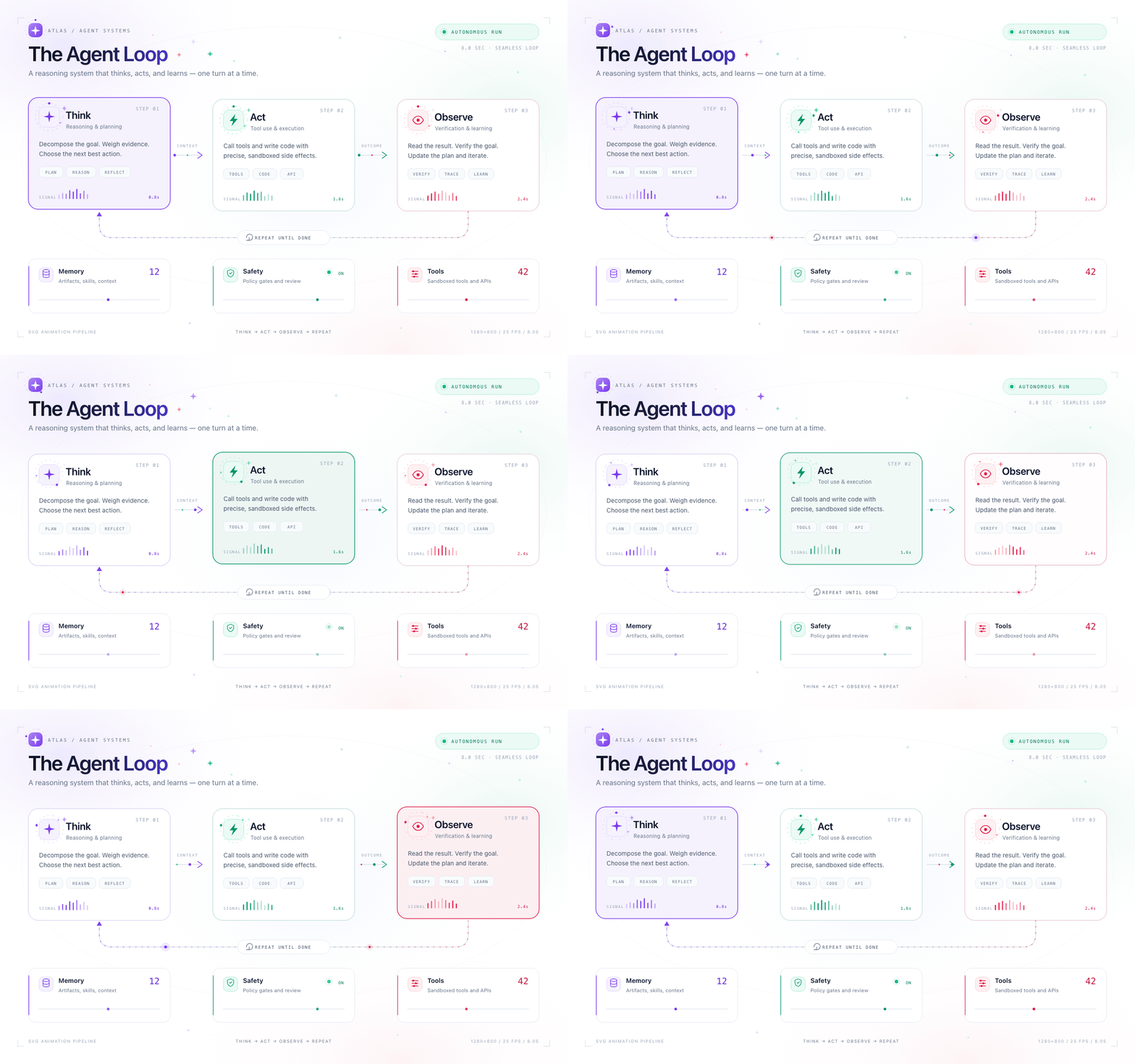
1280×800 · 25 FPS · 8s 无缝循环 · 200 帧 · GIF 2.5 MB · MP4 版(356 KB) · 源码
核心特性
- LLM 智能生成:支持 OpenAI/Anthropic API,自然语言描述自动生成 SVG 动画
- DSH 插件:注册
svg_motion_render工具,Agent 在对话里直接产出 GIF/MP4/WebM,输入输出跟随会话工作目录 - 确定性逐帧渲染:CSS 动画与 SMIL 统一暂停并 seek 到帧时间,同一输入重复渲染结果一致
- 原生动画保留:
preserveNativeAnimations: true时保留@keyframes、SMIL 动画,并逐帧同步两条时间轴 - 正确属性通道:presentation 属性走 kebab-case 内联样式,避免被 class CSS 覆盖;变换会与作者 transform 组合
- 自动变换中心:
scale/rotate未指定中心时绕元素 bbox 中心,不再绕 SVG 原点跳动 - 路径形变:解析 M/L/H/V/C/S/Q/T/A/Z,等弧长采样、起点与方向对齐,circle ↔ star 不再产生乱线
- 程序化动画:关键帧引擎,24 种缓动函数,变换/颜色/路径/数值插值
- 分辨率可控:
width/height为最终尺寸,pixelRatio单独控制超采样;quality只影响视频编码 - 更干净的 GIF:全序列 palette、
stats_mode=diff、sierra2_4a、-loop 0 - 工程化细节:唯一临时目录、
finally自动清理、帧序列校验、输出目录自动创建 - 前端界面:React + Vite 可视化编辑器,实时预览
快速开始
安装
# 主项目
npm install

# 后端 API
cd server && npm install && cd ..

# 前端界面
cd frontend && npm install && cd ..
环境要求
- Node.js 18+
- FFmpeg(通过
@ffmpeg-installer/ffmpeg自动安装) - OpenAI 或 Anthropic API Key(仅 LLM 生成模式需要)
如果 Puppeteer 无法下载 Chrome,可直接复用系统 Chrome:
export PUPPETEER_EXECUTABLE_PATH="/Applications/Google Chrome.app/Contents/MacOS/Google Chrome"
启动
# 终端 1:启动后端 API
cd server && npm run dev

# 终端 2:启动前端界面
cd frontend && npm run dev

# 访问 http://localhost:3000
使用方式
方式 1:LLM 自动生成(推荐)
import { SVGAnimationPipeline } from 'svg-animation-pipeline';

const result = await SVGAnimationPipeline.fromDescription({
  description: '创建一个用户认证流程图,包含登录、验证、授权三个步骤',
  style: 'ppt-flat',
  llmConfig: {
    provider: 'openai',  // 或 'anthropic'
    apiKey: 'sk-...',
  },
  outputConfig: {
    output: './output/auth-flow.gif',
    fps: 30,
    duration: 6000,
  },
});

console.log('Output:', result.output);
console.log('Frames:', result.frames);
方式 2:手动定义动画
import { SVGAnimationPipeline } from 'svg-animation-pipeline';

const pipeline = new SVGAnimationPipeline({
  input: 'logo.svg',  // 或 SVG 内容字符串
  output: 'output.gif',
  fps: 30,
  duration: 2000,
  width: 800,
  height: 600,
});

pipeline.addAnimation({
  targets: '#stroke-layer',
  keyframes: [
    { time: 0, properties: { strokeDashoffset: 1000, opacity: 0 } },
    { time: 1000, properties: { strokeDashoffset: 0, opacity: 1 } },
  ],
  easing: 'easeInOutQuad',
});

pipeline.on('progress', (progress) => {
  console.log(`${progress.percent}% - ${progress.message}`);
});

await pipeline.render();
方式 3:LLM 单独调用
import { LLMOrchestrator } from 'svg-animation-pipeline';

const orchestrator = new LLMOrchestrator({
  provider: 'openai',
  apiKey: 'sk-...',
});

const result = await orchestrator.generateDiagram({
  description: '系统架构图,展示微服务之间的调用关系',
  style: 'ppt-flat',
  dimensions: { width: 1400, height: 950 },
});

console.log('SVG:', result.svg);
console.log('Animations:', result.animations);
DeepSeek Harness 插件
本仓库同时是一个可安装的 DSH 插件,名字是 SVG Motion。它把渲染流水线注册为 svg_motion_render 工具,让 DSH 里的 Agent 直接生成 GIF / MP4 / WebM,而不是只输出一段 SVG 代码。
插件是 host-only 的:不修改 Web UI,不额外启动服务。安装后重启 DSH,工具会出现在 Agent 的工具列表中。
安装
要求 DSH >= 0.2.2-rc.1、Node.js 18+,以及可用的 Chrome/Chromium;FFmpeg 已随包提供。
dsh plugin --profile web add \
  https://github.com/atlasmarkz/svg-animation-pipeline/releases/download/v1.1.2/svg-animation-pipeline-1.1.2.tgz
工具调用
{
  "svg": "<svg xmlns=\"http://www.w3.org/2000/svg\" width=\"1280\" height=\"800\">...</svg>",
  "output": "output/agent-loop.gif",
  "fps": 25,
  "duration": 8000,
  "preserveNativeAnimations": true,
  "quality": "high",
  "pixelRatio": 1
}
也可以传 input: "assets/loop.svg" 读取文件,或用 animations 传入关键帧数组:
{
  "input": "assets/card.svg",
  "output": "output/card.mp4",
  "fps": 30,
  "duration": 1800,
  "animations": [
    {
      "targets": "#card",
      "keyframes": [
        { "time": 0, "properties": { "opacity": 0, "transform": { "translate": [0, 12] } } },
        { "time": 600, "properties": { "opacity": 1, "transform": { "translate": [0, 0] } }, "easing": "easeOutCubic" }
      ]
    }
  ]
}
output 支持 .gif、.mp4、.webm;相对路径按当前 DSH 会话工作目录解析,输入文件也通过会话文件系统读取。Chrome 会优先使用 chromePath / PUPPETEER_EXECUTABLE_PATH / 系统安装的 Chrome。
参数
| 参数 | 类型 | 默认值 | 说明 |
|---|---|---|---|
svg |
string | — | 内联 SVG,与 input 二选一 |
input |
string | — | .svg 文件路径,与 svg 二选一 |
output |
string | 必填 | 输出路径,扩展名决定格式 |
width / height |
number | SVG 尺寸 | 输出画布尺寸,16–4096 |
fps |
number | 25 | 1–60 |
duration |
number | 4000 | 动画时长,100–60000 ms |
background |
string | #ffffff |
背景色 |
quality |
low | medium | high |
medium |
只影响 MP4/WebM 编码 |
pixelRatio |
number | 1 | 0.25–4;2 输出 2× 尺寸 |
preserveNativeAnimations |
boolean | true | 保留并逐帧 seek CSS/SMIL |
animations |
AnimationConfig[] | — | 关键帧动画,格式见上 |
chromePath |
string | 自动检测 | Chrome/Chromium 可执行文件 |
keepFrames |
boolean | false | 保留 PNG 帧,便于调试 |
单次渲染限制:最多 1200 帧、捕获像素不超过 2400 万。工具返回输出路径、尺寸、帧数、耗时和文件大小。
市场
插件条目已提交到 DSH 社区市场索引 awesome-dsh-plugin(PR #14692)。合并后可以直接在 dsh-market 搜索 SVG Motion;在那之前,用上面的 Release tarball 安装即可。
支持的样式
| 样式 | 描述 | 适用场景 |
|---|---|---|
ppt-flat |
白色背景,马卡龙配色,细线条,圆角 | 商务 PPT、技术文档 |
dark-tech |
深色背景,霓虹色,发光效果 | 技术演示、黑客风格 |
academic |
纯白背景,衬线字体,专业风格 | 学术论文、研究报告 |
hand-drawn |
手绘风格,粗线条,活泼配色 | 教学材料、创意展示 |
支持的 LLM 提供商
| 提供商 | 模型 | 说明 |
|---|---|---|
| OpenAI | GPT-4o, GPT-4-turbo | 推荐 GPT-4o |
| Anthropic | Claude 3.5 Sonnet, Claude 3 Opus | 推荐 Claude 3.5 Sonnet |
API 参考
SVGAnimationPipeline
new SVGAnimationPipeline(config: PipelineConfig, events?: PipelineEvents)
配置项
| 选项 | 类型 | 默认值 | 描述 |
|---|---|---|---|
input |
string |
必填 | SVG 文件路径或 SVG 内容字符串 |
output |
string |
必填 | 输出文件路径 (.gif, .mp4, .webm) |
fps |
number |
30 | 帧率 |
duration |
number |
必填 | 动画时长(毫秒) |
width |
number |
800 | 渲染宽度(像素) |
height |
number |
600 | 渲染高度(像素) |
background |
string |
'#ffffff' | 背景颜色 |
quality |
'low' | 'medium' | 'high' |
'medium' |
MP4/WebM 编码质量;不改变分辨率 |
pixelRatio |
number |
1 | 帧捕获超采样倍率;2 会输出 2× 尺寸的帧 |
preserveNativeAnimations |
boolean |
false | 保留并逐帧 seek CSS/SMIL 动画 |
tempDir |
string |
系统临时目录 | 自定义帧文件目录 |
keepFrames |
boolean |
false | 保留 PNG 帧,便于调试或二次编码 |
executablePath |
string |
自动检测 | Chrome/Chromium 可执行文件;也可用 PUPPETEER_EXECUTABLE_PATH |
方法
addAnimation(config)- 添加动画配置addAnimations(configs)- 批量添加动画setStyles(css)- 注入 CSS 样式on(event, handler)- 注册事件处理器render()- 执行渲染流水线getLayers()- 获取 SVG 图层getParsedSVG()- 获取 SVG 元数据getTempDir()- 获取本次渲染的帧目录close()- 关闭浏览器资源
静态方法
SVGAnimationPipeline.fromDescription(request)- LLM 自动生成并渲染
分辨率、质量与循环
width/height决定最终帧尺寸。pixelRatio: 2会输出 2× 帧(例如 800×600 → 1600×1200),适合高 DPI 素材或后续缩放;它不会改变布局。quality只映射到视频编码质量:MP4 CRF 18/21/25,WebM CRF 30/33/37(high/medium/low)。GIF 固定使用 256 色全局调色板。- 要得到无缝 GIF,让所有 CSS/SMIL 周期整除
duration,并让第一帧与最后一帧状态一致。渲染器会把原生时间轴 seek 到每帧时间,而不是按实际耗时采样,所以机器快慢不会改变动画相位。
与旧版的行为差异
quality不再放大画布。旧版high会得到 3× 尺寸;现在请用pixelRatio显式控制超采样。preserveNativeAnimations默认改为false。需要保留 CSS/SMIL 动画时请显式开启。- 临时帧默认写入系统临时目录,并在
render()结束后清理;需要保留时设keepFrames: true。
AnimationConfig
{
  targets: string | string[],   // CSS 选择器
  keyframes: Keyframe[],        // 关键帧数组
  easing?: EasingType,          // 缓动函数
}
Keyframe
{
  time: number,                  // 时间(毫秒)
  properties: AnimatableProperties,
  easing?: EasingType,
}
缓动函数
| 名称 | 描述 |
|---|---|
linear |
匀速 |
easeIn, easeOut, easeInOut |
基础缓动 |
easeInQuad ~ easeInOutQuint |
二次到五次缓动 |
easeInSine ~ easeInOutSine |
正弦缓动 |
elastic, easeOutElastic |
弹性缓动 |
bounce |
弹跳缓动 |
spring |
弹簧缓动 |
可动画属性
opacity- 透明度 (0-1)strokeDashoffset/strokeDasharray- 描边动画transform- 变换 (translate, rotate, scale, skew);未指定中心时scale/rotate自动绕 bbox 中心d- 路径形变{ start, end }fill/stroke- 颜色(自动插值)strokeWidth,fillOpacity,strokeOpacity
流水线架构
┌─────────────────────────────────────────────────────────────────┐
│  Phase 1: 分层 (SVG Layering)                                   │
│  ┌──────────────┐    ┌──────────────┐    ┌──────────────────┐   │
│  │  SVG Loader  │───▶│  Validator   │───▶│  Layer Parser    │   │
│  └──────────────┘    └──────────────┘    └──────────────────┘   │
│                                                                  │
│  Phase 2: 动画 (Procedural Animation)                            │
│  ┌──────────────┐    ┌──────────────┐    ┌──────────────────┐   │
│  │   Keyframe   │───▶│  Interpolator│───▶│  Element Cache   │   │
│  └──────────────┘    └──────────────┘    └──────────────────┘   │
│                                                                  │
│  Phase 3: 渲染 (Per-Frame Rendering)                             │
│  ┌──────────────┐    ┌──────────────┐    ┌──────────────────┐   │
│  │  State       │───▶│  Puppeteer   │───▶│  Frame Buffer    │   │
│  │  Compute     │    │  Canvas      │    │  (PNG 输出)       │   │
│  └──────────────┘    └──────────────┘    └──────────────────┘   │
│                                                                  │
│  Phase 4: 合成 (FFmpeg Encoding)                                 │
│  ┌──────────────┐    ┌──────────────┐    ┌──────────────────┐   │
│  │  Frame Seq   │───▶│   FFmpeg     │───▶│  GIF / MP4 /     │   │
│  └──────────────┘    └──────────────┘    └──────────────────┘   │
└─────────────────────────────────────────────────────────────────┘
前端界面
功能
- 💬 聊天界面描述图表
- 👁️ 实时 SVG 预览
- ⚙️ API Key 配置
- 📊 生成状态显示
启动
# 后端 API (端口 3001)
cd server && npm run dev

# 前端界面 (端口 3000)
cd frontend && npm run dev
后端 API
端点
| 方法 | 路径 | 描述 |
|---|---|---|
| POST | /api/diagram/preview |
生成 SVG 预览(不渲染) |
| POST | /api/diagram/generate |
完整渲染(异步任务) |
| GET | /api/diagram/status/:jobId |
查询任务状态 |
| GET | /api/diagram/download/:jobId |
下载输出文件 |
示例请求
# 生成预览
curl -X POST http://localhost:3001/api/diagram/preview \
  -H "Content-Type: application/json" \
  -d '{
    "description": "用户登录流程图",
    "style": "ppt-flat",
    "llmConfig": {
      "provider": "openai",
      "apiKey": "sk-..."
    }
  }'
运行示例
# Agent Loop:8 秒无缝循环(GIF)
npx ts-node examples/agent-loop.ts

# 同一份素材输出 MP4
npx ts-node examples/agent-loop.ts mp4

# 分层视差场景
npx ts-node examples/layered-scene.ts

# 路径描边动画
npx ts-node examples/basic-path.ts

# 路径形变动画
npx ts-node examples/morph-demo.ts
agent-loop.ts 是“效果优先”的白底完整示例:1280×800 画布、25fps、8 秒周期,所有 CSS/SMIL 周期都整除 8 秒;输出约 2.5 MB GIF 或 356 KB MP4。
项目结构
svg-animation-pipeline/
├── src/                          # 核心库
│   ├── index.ts                  # 主导出
│   ├── types.ts                  # 类型定义
│   ├── pipeline.ts               # 流水线主类
│   ├── llm/                      # LLM 集成
│   │   ├── index.ts              # LLMOrchestrator
│   │   ├── types.ts              # LLM 类型
│   │   ├── parser.ts             # 输出解析器
│   │   ├── validator.ts          # 验证器
│   │   ├── prompts/              # 提示词模板
│   │   └── providers/            # LLM 提供商
│   ├── animator/                 # 动画引擎
│   │   ├── svg-animator.ts       # 状态计算 / 属性应用
│   │   ├── path-morph.ts         # 路径解析、等弧长采样、形变
│   │   └── easing.ts             # 24 种缓动
│   ├── renderer/                 # Puppeteer 渲染器
│   ├── encoder/                  # FFmpeg 编码器
│   ├── loader/                   # SVG 加载器
│   └── validator/                # SVG 验证器
├── server/                       # 后端 API
│   ├── index.ts                  # Express 服务器
│   └── routes/                   # API 路由
├── frontend/                     # 前端界面
│   └── src/
│       ├── App.tsx               # 主应用
│       └── components/           # React 组件
├── examples/                     # 示例文件
├── plugin/                       # DSH 插件
│   ├── src/index.ts              # svg_motion_render 工具实现
│   ├── package.json              # ESM 包标记
│   └── dist/                     # 插件构建产物
├── assets/                       # 插件 Logo(SVG + PNG)
├── cordis.patch.yml              # DSH 插件挂载声明
└── output/                       # 输出目录
License
MIT
No comments yet. Be the first to write one.