READMESource: main@8febac6c
dsh-session-delete
English | 简体中文
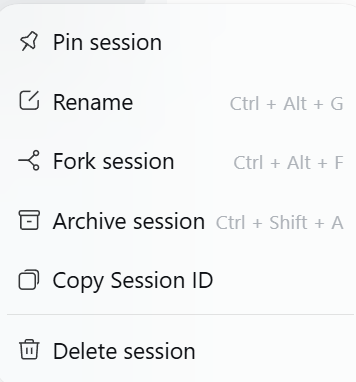
Adds 「删除会话 / Delete session」 to the sidebar's Session context menu in DeepSeek Harness and performs a real, recoverable deletion.
What it does
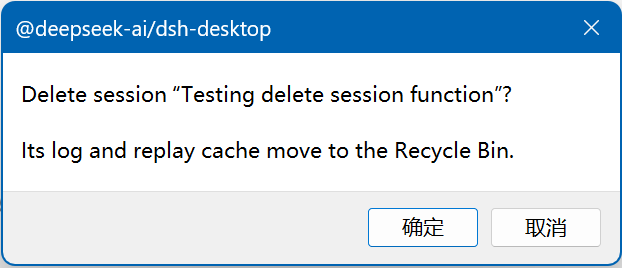
Hover a session row and click its ⋯ button → Delete session.
| Session state | Behaviour |
|---|---|
| Cold (not loaded in this app run) | Deleted immediately; its log and replay cache go to the Windows Recycle Bin (fallback: <DSH_HOME>/.session-trash/). The sidebar list refreshes itself through the client Session controller — no page reload needed. |
| Live (the session open right now, or one opened earlier in this run) | DSH exposes no "close a session" API, so the files cannot be removed safely. The plugin offers to queue it: POST /dsh-session-delete/queue writes <DSH_HOME>/.session-delete-queue.json, and the next start drains that queue before anything is opened. |
After a restart that removed queued sessions, a small notice in the corner lists what was deleted (titles, up to five, with a count for the rest) and reports any entry that could not be removed and stays queued.
Files removed
For one session id:
| Path | What |
|---|---|
<DSH_HOME>/sessions/<project>/session-<id>/ |
the append-only event log |
<DSH_HOME>/storages/session_projcache/sessions/<id>.json |
the replay/projection cache |
Nothing else is touched. Attachments are shared, content-addressed blobs and are
deliberately left alone. The Workspace registry keeps its sessionIds entry —
the registry has no "unregister a session" API, and the sidebar already skips ids
whose stored session is gone.
Safety
- A live session is refused (
409); only the queue path can remove it, on the next start. - The HTTP routes sit behind the Host's browser trust fence
(
connection.requestRejection) and accept onlysession-<uuid>ids. - Deletions are recoverable: Recycle Bin, or a stamped directory under
<DSH_HOME>/.session-trash/.
Requirements
- DeepSeek Harness 0.2.x (the
sidebar.workspaces.session.menu.itemandshell.overlayslots). - Windows for Recycle Bin support; on other platforms files fall back to the trash directory.
Install
Listed in the plugin market. Manual install:
dsh plugin --profile desktop add github:ashulam/dsh-session-delete
# or from a local checkout:
cd <profile dir>
pnpm add file:<path to this repo>
# then add "dsh-session-delete" to dsh.profile.bundles in package.json
Layout
lib/index.js— host half:POST /dsh-session-delete/delete,POST /dsh-session-delete/queue,GET /dsh-session-delete/last-drain(plus the boot-time queue drain).client/client.js— browser half: the context-menu entry and the boot notice.cordis.patch.yml— inserts the host row into the profile.
License
MIT
No comments yet. Be the first to write one.