DSH Mobile Suite
Open the DeepSeek Harness Web UI on your computer from an Android phone, then create tasks and submit instructions through the familiar DSH interface.
Unofficial community project: this project is independently developed and maintained by the community. It is not reviewed, endorsed, or supported by DeepSeek. The current Companion and Relay releases encrypt DSH session content end to end between Mobile, browser clients, and Companion.
DeepSeek Harness community post: Show Your Plugins! #2520. This is a community discovery entry, not an official review or endorsement.
 |
 |
Components
This repository pins four independently developed and released open-source components as Git submodules:
| Directory | Purpose | Repository |
|---|---|---|
dsh-mobile/ |
Flutter client for Android and iOS | april-jk/dsh-mobile |
dsh-plugin/ |
DSH plugin and Companion running on the computer | april-jk/dsh-mobile-plugin |
dsh-relay/ |
Accounts, pairing, short-lived tickets, and traffic relay | april-jk/dsh-relay |
dsh-website/ |
Public website, SEO content, and GitHub Pages deployment | april-jk/dsh-mobile-site |
The phone never connects directly to the computer. The plugin opens only an outbound WSS connection to the Relay, while DSH remains bound to 127.0.0.1:3080.
Default public Relay: https://relay.dshmobile.online
Install and use
Download these files from the latest release:
dsh-mobile-android.apk: signed Android installerdsh-mobile-plugin.tgz: prebuilt DSH plugin packagedsh-relay-v*.tar.gz: Relay source package for private deploymentSHA256SUMS: SHA-256 checksums for every release asset
Verify the downloaded files:
shasum -a 256 -c SHA256SUMS
Install the pinned plugin directly from GitHub, then start DSH. This path does not require a global DSH installation, a source checkout, or a local file path:
npx @deepseek-ai/dsh plugin --profile web add "github:april-jk/dsh-mobile-plugin#v0.1.7"
npx @deepseek-ai/dsh web
Install dsh-mobile-android.apk on your Android device. Android may ask you to allow the browser or file manager to install unknown apps. The application ID is io.github.apriljk.dshremote.
Pair and run remote tasks
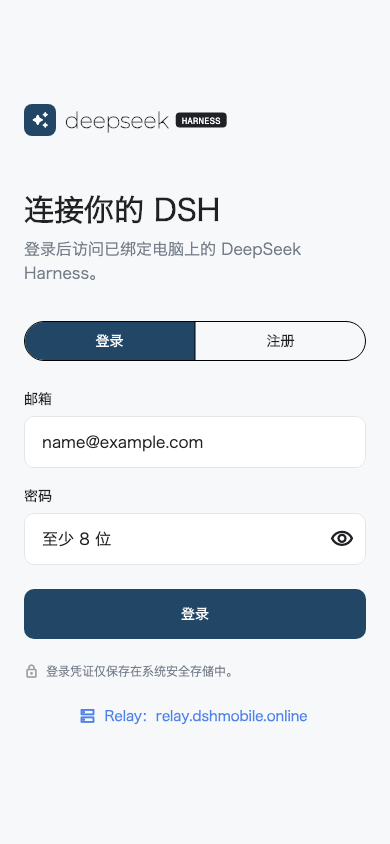
- Register or log in from the mobile app.
- On the computer, open Settings > Remote Access in DSH and create an encrypted pairing QR code.
- Tap + in the mobile device list and scan the QR code. Six-digit-only pairing is disabled because it cannot establish the encryption key.
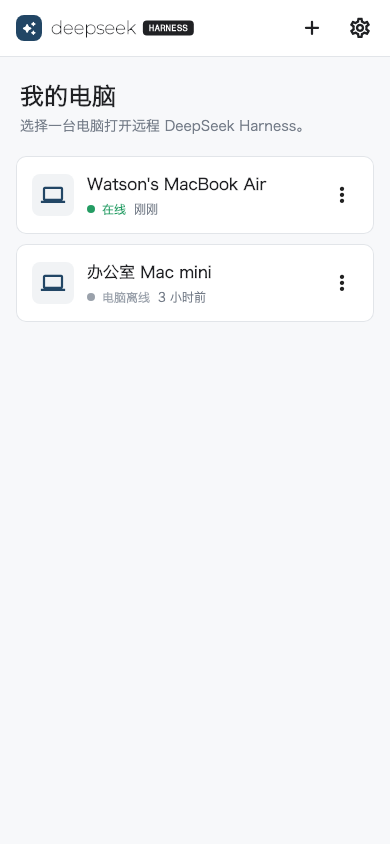
- Select the online computer to open its normal DSH Web UI.
- Create a task and submit instructions through the existing DSH interface.
Add another browser
After the computer is paired, open Settings > Remote Access in DSH and choose Generate browser access code. Open the link in another browser, or scan the QR code from that browser and sign in to the same Relay account. The browser stores its own E2EE key, so the phone and multiple browsers can remain connected at the same time.
The plugin follows the DSH Web process lifecycle and does not need a separate background process. The phone shows the computer as offline when the computer or DSH is stopped, or when the plugin is disconnected from the Relay.
Deploy a private Relay
Download and extract dsh-relay-v*.tar.gz from the release, then run:
cp .env.example .env
# Edit .env and replace JWT_SECRET with a long random value.
docker compose up -d --build
curl http://127.0.0.1:8787/health
For public access, put an HTTPS reverse proxy in front of port 8787 and back up the SQLite data under /data. The MVP Relay must run as a single instance.
The computer and phone must use the same Relay:
DSH_RELAY=https://relay.example.com npx @deepseek-ai/dsh web
On the mobile login screen, tap Relay, or open Settings > Relay Server after logging in, and enter the same HTTPS origin. Changing the Relay logs out the current account because accounts and tokens are isolated between Relay instances.
See the Relay README for all environment variables and resource limits.
Security boundaries
- Public traffic must use HTTPS/WSS; the computer never opens a public listening port.
- The mobile app receives account tokens and short-lived web tickets, never the computer's device credential.
- DSH HTTP, SSE, and WebSocket content is encrypted end to end between Mobile and Companion. The Relay routes opaque frames and does not receive the content key.
- The Relay can still observe account/device associations, online state, connection time, ciphertext length, and traffic timing. The current QR-provisioned key design does not provide forward secrecy.
- The Relay stores accounts, devices, pairing state, and bounded access-log metadata. Account deletion, a privacy policy, and related compliance work are still required before app-store distribution.
Report security issues privately as described in SECURITY.md. Do not disclose exploitable details in a public issue.
Development
git clone --recurse-submodules https://github.com/april-jk/dsh-mobile-suite.git
cd dsh-mobile-suite
git submodule update --init --recursive
Commit component code in its own repository. This repository maintains cross-component documentation, the unified release workflow, and tested component revisions. See CONTRIBUTING.md to contribute.
Every push and pull request to main runs the component builds and tests, verifies the committed plugin bundle, builds the Relay container and Android APK, and checks the public website. To publish the suite, first push matching component tags, update the pinned submodules, then push the same tag to this repository. The release workflow rejects any tag that does not match the Plugin, Relay, and Mobile package versions before producing signed assets and checksums.
License
The suite and all four components use the MIT License.
No comments yet. Be the first to write one.