@apodemakeles/dsh-macos-notify
English | 中文
A DeepSeek Harness (DSH) plugin: when a conversation turn finishes while the harness window is not in the foreground, show a macOS system notification. It also leaves an in-app unread dot on sessions that finished while you were away.
Status: v0.1.2, distributed from GitHub. The unscoped npm name
dsh-macos-notifybelongs to another package, so install this plugin from the@apodemakelesscope through GitHub.
Screenshots
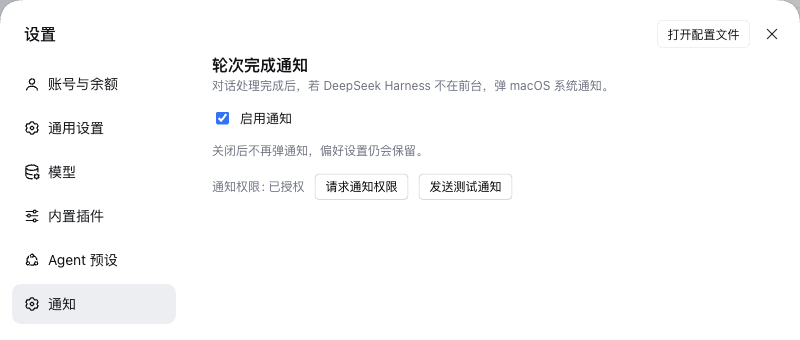
Notification settings
Unread completion dot

What it does
| turn/end reason | notification |
|---|---|
completed, max-tokens, blocked |
title = session name, body = completed (localized) |
error |
title = session name, body = failed (localized) |
aborted, interrupted, unknown |
silent |
| subagent sessions | silent |
- Notifies only while the harness window is unfocused (
document.hasFocus() === false). - Clicking a notification focuses the window and opens that session.
- A completion while the window is unfocused also leaves a small unread dot on the session row, even when the session stayed in the main view. The dot is green for success and red for failure; it clears when you click the row, start another run, or click the notification. When the official UI already shows its own background-completion dot, this plugin does not add a second one.
- No history replay: the first projection value after startup or reconnect only seeds the baseline.
- Settings → Notifications has the master switch (default on), permission state, and request-permission / test-notification buttons. The switch is stored in the browser's localStorage.
Install
Desktop app
The desktop profile is managed by the Electron app, so dsh plugin --profile desktop is refused. Add the dependency and the bundle to the profile the same way the app's plugin manager does:
DSH_HOME=${DSH_HOME:-$HOME/.dsh}
PROFILE="$DSH_HOME/profiles/desktop"

pnpm --dir "$PROFILE" add github:apodemakeles/dsh-macos-notify
Then add @apodemakeles/dsh-macos-notify to dsh.profile.bundles in $PROFILE/package.json:
{ "dsh": { "profile": { "bundles": [
  "@deepseek-ai/dsh-base",
  "@deepseek-ai/dsh-web-app",
  "@apodemakeles/dsh-macos-notify"
] } } }
Restart the app. Plugins → Installed lists the plugin, and Settings → Notifications shows the switch.
Web profile
dsh plugin --profile web add github:apodemakeles/dsh-macos-notify
# restart dsh web
Release tarball
Each GitHub release includes apodemakeles-dsh-macos-notify-<version>.tgz:
dsh plugin --profile web add file:/path/to/apodemakeles-dsh-macos-notify-0.1.2.tgz
macOS notification permission
The first notification needs permission: click Request permission or Send a test notification in Settings → Notifications, then allow DeepSeek Harness in System Settings → Notifications.
A Focus mode can silently hold notifications (delay delivery) even when the app is allowed. Add DeepSeek Harness to that Focus mode's allowed apps, or turn the Focus mode off. The in-app unread dot is independent of Focus.
How it works
- Host half (
src/index.ts,src/projection.ts) registers aturn-notifysession projection. It foldsturn/startandturn/end.reasonand exposes{ turn, reason }to the client. No webServer route, launch token, or Electron shell code. - Client half (
src/client/index.ts) watches the session list, detects a fresh projection turn, applies the master switch / subagent filter / reason mapping / focus gate, shows a browserNotification, and opens the session withuiWorkspace.openSession(id)on click. The unread dot is rendered through the officialsidebar.session.row.leadingslot, only while the official status dot is idle. - The host bundles
zodfor the projection schema; React stays external in the client and comes from the shell's module table. - No network requests: session names and turn reasons stay local.
Compatibility
- DSH
0.2.x(engines.dsh:>=0.2.0-rc.1 <0.3.0); tested with the desktop app0.2.1-rc.2and CLI0.2.0-rc.1. - macOS for notifications (browser/Electron Notification API); the unread dot is platform-neutral.
- Node
>=22.
Development
git clone https://github.com/apodemakeles/dsh-macos-notify.git
cd dsh-macos-notify
pnpm install
pnpm typecheck
pnpm test
pnpm build
pnpm build produces:
lib/index.js— host ESM; registers the projection.lib/client.js— browser CJS bundle wrapped in thewindow.__ModuleLoader__.loadfactory.lib/types/**— declaration files.
For local development, install the checkout into a profile with dsh plugin --profile web add link:$(pwd) (or the equivalent pnpm --dir "$PROFILE" add link:$(pwd) for the desktop profile).
License
MIT
No comments yet. Be the first to write one.