dsh-windows-session-notification
DSH 的跨会话提醒插件:某个会话「完成 / 待回答 / 待审批 / 出错」时,弹一条可点击的 Windows Toast + 分档提示音 + 任务栏角标 —— 只在你没看那个会话时提醒。
⚠️ 仅支持 Windows:依赖 Windows PowerShell 5.1(系统自带)与 WinRT 通知 API。
package.json里声明了"os": ["win32"]。 开箱即用:零渠道配置、零账号。明确不做「DSH 退出后仍能收到」——那需要 IM 通道,属于另一类产品。
中文
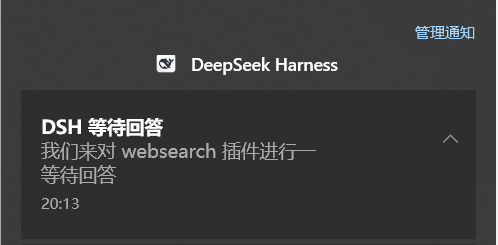
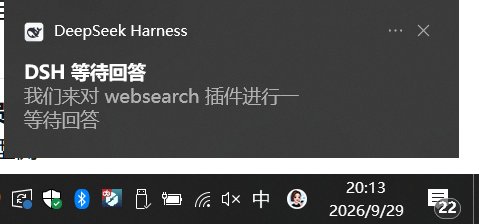
☝️ 真实截图(2026-09-29)。注意横幅里的应用名是
DeepSeek Harness并带 DSH 图标 —— 这正是 AUMID 注册的效果;没有它,横幅顶部会显示成Windows PowerShell。 截图里是「待回答」这一档;「完成 / 待审批 / 出错」走同一套出口,只是文案与提示音不同。
它解决什么
DSH 里同时开着好几个会话时,"哪个跑完了 / 哪个在等我点同意"很容易漏掉。本插件在你没盯着某个会话的时候,用一个 Windows 通知把你叫回来:
- 横幅可点击 → 回到对应会话(并尝试把窗口提到前台);
- 分档音:不同性质(完成 / 待回答 / 待审批 / 出错)用不同提示;
- 任务栏角标显示未处理数量;
- 正在看的那个会话不会提醒(这是它的主逻辑,不是 bug)。
触发与抑制规则
| 事件 | 提醒 | 说明 |
|---|---|---|
| 会话完成 | ✅ | ≥3 个完成会合并成一条("3 个会话已完成") |
| 待回答(agent 提问) | ✅ | 需要你实际回复 |
| 待审批(权限/工具确认) | ✅ | 需要你点同意 |
| 出错 | ✅ | 会话异常结束 |
| 你正在看该会话 | ❌ 不提醒 | 这就是"不打扰"的判据 D2 |
| subagent / teammate 内部会话 | 按各自事件走 | 与主会话同一套判据 |
安装
dsh plugin --profile <你的 profile> add dsh-windows-session-notification
包内声明了 dsh.bundle.patch,所以 dsh plugin 会自动把它记进 dsh.profile.bundles。然后重启 DSH(打包版没有「刷新页面」)。
手工兜底(不用 dsh plugin):pnpm add dsh-windows-session-notification,再在 profile 的 cordis.patch.yml 追加
- insert:
    - id: attention
      name: dsh-windows-session-notification
⚠️
name:必须写包名,不能写绝对路径(如D:/.../index.mjs)。实测(Win11 VM +dsh 0.2.0-rc.2):写死本机路径时装载会报disabling profile plugin row "attention": its declared peer dependencies cannot be validated: UNKNOWN: unknown error, lstat 'D:\'⇒ 该行被静默 disable、整个提醒功能消失(stderr 只有一行)。改成包名后正常装载。
系统侧会做什么
- AUMID 注册:往
HKCU\Software\Classes\AppUserModelId\DSH.Attention写显示名与图标(只在 HKCU,不需要管理员)。 没有它,通知横幅顶部会显示成 "Windows PowerShell"。 - URL 协议注册:
dsh-attention:open/<sessionId>,供点击横幅回调(scripts/protocol.ps1)。 - 调用方式:宿主 spawn
C:\Windows\System32\WindowsPowerShell\v1.0\powershell.exe(5.1,不是pwsh7 —— pwsh 7 没有 WinRT 类型投影)执行scripts/*.ps1。
运行期状态与排查入口
| 位置 | 内容 |
|---|---|
$DSH_HOME\dsh-attention\attention.log |
唯一的排查入口:toast 展示结果、viewing 变化、点击回调、降级原因(如 [diag:sessions-unavailable]) |
$DSH_HOME\dsh-attention\ |
未读集合等持久状态 |
"为什么这条没提醒"最先看日志里那行 done session=… viewing=… -> 不提醒(正在看它)/已提醒。
路由(宿主侧 HTTP)
focus / pending / state / opened(用于客户端上报"当前在看哪个会话"与"待办已清除")。
兼容性
- 实测环境:Windows 11 + DSH
0.1.7-rc.2(桌面壳)与0.2.0-rc.2(VM 装载测试)。 - host + client 双半边:client 半边注册进官方的 chain 槽位
conversation.composer(select弃权,零 UI 足迹)。 ⚠️ 因此它参与渲染端「每条 client entry 必须 active」的全有全无启动门禁 ⇒apply绝不能抛错(已全程 try/catch)。 - 宿主侧
inject: ['connection'];作用域事件用{ global: true }订阅(否则approval/request、user-questions/request收不到)。 - 零 npm 运行时依赖。
测试
⚠️ 若沙箱禁止命名管道,node --test 会 spawn EPERM 并给出误导性的 # fail 1。逐文件跑(任意 cwd):
Get-ChildItem test -Filter '*.test.mjs' | ForEach-Object { node $_.FullName; "exit=$LASTEXITCODE $($_.Name)" }
期望合计 127 pass / 0 fail(attention-core 33 / click-uri 7 / log 4 / payloads 16 / client-slot-contract 17 / event-payload 11 / routes 11 / session-title 10 / state-store 10 / win-notify 8)。
卸载
pwsh scripts/uninstall.ps1 # 撤协议 + 清 $DSH_HOME\dsh-attention\(可选:按锁文件 PID 停遗留进程)
再从 profile 删掉 id: attention 那条(或 dsh plugin --profile <profile> remove dsh-windows-session-notification),重启 DSH。
已知限制
- 抢前台只在窗口最小化/隐藏时可靠:窗口只是被别的应用压在后面时,Windows 前台锁会拒绝(日志里能看到
attempt=4 attached=False set=False final=False)。渲染进程里的window.focus()路径是可靠的,两条一起用。 - 角标走渲染进程的 Badging API:早期用
badge.ps1+ COMSetOverlayIcon的方案已证明跨进程必失败(E_FAIL),故退役(脚本保留但不再启动)。 - 分类提示音依赖系统通知设置;勿扰模式下平台会自行静音。
English
Real screenshots (2026-09-29). Note that the app name reads
DeepSeek Harnesswith the DSH icon — that is the AUMID registration at work; without it the banner falls back toWindows PowerShell. These show the "question" tier; "done / approval / error" use the same output path with different wording and sound.
A cross-session notification plugin for DSH: when a session finishes, asks a question, needs approval or errors, you get an actionable Windows toast, a tiered sound and a taskbar badge — only for sessions you are not currently watching.
⚠️ Windows only (Windows PowerShell 5.1 + the WinRT toast API;
"os": ["win32"]is declared). Zero channel configuration, zero accounts. Explicitly not a "notify me after DSH has exited" tool — that needs an IM channel.
Install
dsh plugin --profile <your-profile> add dsh-windows-session-notification
The package declares dsh.bundle.patch, so dsh plugin also records it in dsh.profile.bundles. Restart DSH afterwards.
Manual route: pnpm add dsh-windows-session-notification, then add to the profile's cordis.patch.yml:
- insert:
    - id: attention
      name: dsh-windows-session-notification
⚠️
name:must be the package name, never an absolute path. Verified on a Win11 VM withdsh 0.2.0-rc.2: a hard-coded path makes the loader printdisabling profile plugin row "attention": its declared peer dependencies cannot be validated: UNKNOWN: unknown error, lstat 'D:\'and silently disable the row — the whole feature disappears with a single stderr line.
Behaviour
- Fires on done / question / approval / error; three or more completions are merged into one toast.
- Never fires for the session you are viewing (that suppression is the point).
- The toast is clickable: it returns to the session and tries to raise the DSH window.
- Registers an AUMID under
HKCU(so the banner shows the real app name, not "Windows PowerShell") and thedsh-attention:open/<sessionId>URL protocol.
Troubleshooting
$DSH_HOME\dsh-attention\attention.log is the single entry point: toast results, viewing changes, click callbacks and every degradation reason (e.g. [diag:sessions-unavailable]). The line done session=… viewing=… -> 不提醒(正在看它)/已提醒 explains why a given event did or did not notify.
Tests
Get-ChildItem test -Filter '*.test.mjs' | ForEach-Object { node $_.FullName; "exit=$LASTEXITCODE $($_.Name)" }
Expected: 127 pass / 0 fail. Do not use node --test in Windows sandboxes that forbid named pipes — the runner fails with a misleading # fail 1.
License
MIT
No comments yet. Be the first to write one.