dsh-sidefork-a-teammate
给 DeepSeek Harness 加一条由人手动触发的 /teammate 入口:不必先让模型去调 spawn_teammate,你自己就能从输入框拉起一个组员(teammate)。
命令面只有这一条
/teammate,选中后先选模式(new teammate/fork teammate),再填一行名字 | 描述 | 任务提交。 不进模型上下文、不计 token。
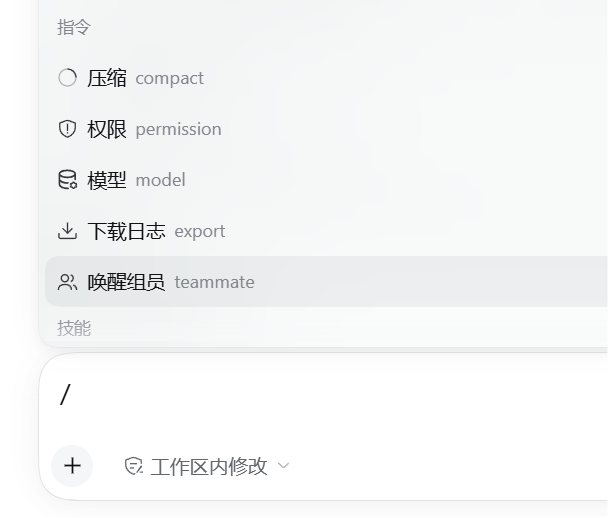
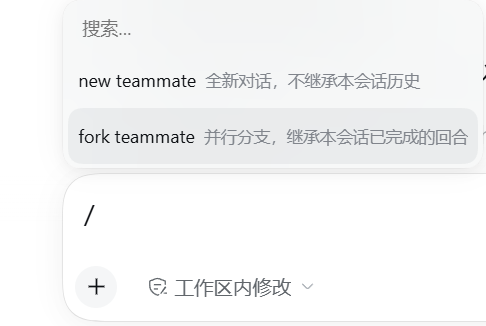
☝️ 真实截图:左侧命令面板里这一行显示为 「唤醒组员 teammate」(本地化标题 + 命令名作别名);选中后弹出两个模式, 文案就是
new teammate全新对话,不继承本会话历史 与fork teammate并行分支,继承本会话已完成的回合。
中文
一条命令、两级入口
- 输入框敲
/teammate—— 命令菜单里只有它; - 选中后弹模式选择:
new teammate/fork teammate; - 选中模式后弹自绘输入弹窗,填一行
名字 | 描述 | 任务,提交即创建。
new teammate 与 fork teammate 到底差在哪(重点)
两者都是"拉起一个组员",差别只有一个:新组员要不要继承你这边的对话历史。这一个差别决定了它们的适用场景完全不同。
new teammate |
fork teammate |
|
|---|---|---|
| 官方文案(截图原文) | 全新对话,不继承本会话历史 | 并行分支,继承本会话已完成的回合 |
内部 context |
fresh |
fork |
| 映射到 provider | spawn |
fork |
| 新组员能看到的历史 | 什么都看不到——全新会话 | 本会话里已完成的回合(Lead 侧的对话历史) |
| 它拿到的第一条消息(有任务时) | 一句"你是全新对话,不继承历史,别和主会话混在一起"的问候语 + 空行 + 任务:<你写的任务> |
只有任务本身(fork 的目的就是并行去做事,以你的指令为先) |
| 它拿到的第一条消息(没任务时) | 只有那句问候语 | 一句话自述"我是并行分支" |
| 适合用来干 | 一件与当前话题无关的新活;不想让它被上下文带偏 | 一件必须看懂当前上下文的活,例如"照我们刚讨论的方案去实现/去查" |
| 名字/描述/任务 | 同样一行三段,规矩一致 | 同样一致 |
身份前缀两者都有:任何组员的第一条消息前都固定带一段 You are teammate "…" + 怎么用 send_message / list_agents
(那是运行时给的团队身份说明,不是可省的废话)。
一句话判别:
- 要"接着我们刚才说的往下做" ⇒ 用
fork teammate(它继承已完成的回合,能看懂你在说什么); - 要"另起一摊、别被我这边干扰" ⇒ 用
new teammate(它从零开始,上下文干净)。
⚠️
fork继承的是 Lead 侧已完成的回合;你正在打、还没结束的这一轮不在继承范围内。 ⚠️ 两者创建的都是发起请求那个会话(页面上打开的那个)的组员 ⇒ 先打开目标会话再敲命令。 ⚠️ 名额受服务端maxMembers限制(本机 profile 为 8);满了报TEAM_MEMBER_LIMIT。
怎么填那一行
/teammate → 选 new / fork → 输入「名字 | 描述 | 任务」→ 提交
| 段 | 含义 | 省略 / 留空的行为 |
|---|---|---|
| 1 | 名字 | 可留空 ⇒ 从 24 个常用英文名里随机取(如 alice);被占用就换下一个候选,最多试 6 个 |
| 2 | 描述 | 可省略;服务端上限 200 字符,超出被截断 |
| 3 | 初始任务 | 可省略;**第 3 段之后再出现 ` |
- 显式名字要求小写 kebab-case(
a-z0-9与中间单个连字符)、≤64 字符、不能叫lead; 显式非法名在本地就拦下;显式重名不会偷偷换名,而是原样报TEAM_MEMBER_NAME_TAKEN。 - 成功后弹窗不自动关闭,就地显示
已创建 teammate "<name>"(会话 <id>)(这是唯一能看到新会话 id 的地方), 按钮从「取消」变「关闭」、同时「创建」键置灰。
架构(host 一条路由 + client 半边)
- host 半边
index.mjs:不注册任何命令,只提供一条路由POST /api/team.spawn(inject = ["connection", "agents", "agentTeams"])。内部用ctx.agents.get(sessionId)拿到接收 agent, 再调ctx.agentTeams.spawnTeammate(agent, {...})—— 与模型侧spawn_teammate工具是同一个 host 服务, 所以能力 1:1 复刻。缺agentTeams时只记一条 warn、不注册路由(不影响启动)。 - client 半边
client.js:注册/teammate的commandUi贡献项(kind: "popupSelect"), 并在shell.overlay槽位挂自绘输入弹窗,用fetch调上面那条路由。
路由契约
POST /api/team.spawn          content-type: application/json
{ "sessionId": "…", "context": "fresh" | "fork", "line": "名字 | 描述 | 任务" }
成功 200:{ "ok": true, "name": "alice", "sessionId": "session-…" } | 失败:{ "ok": false, "code": "…", "message": "…" }
code |
HTTP | 含义 |
|---|---|---|
BAD_JSON |
400 | body 不是合法 JSON |
INVALID_INPUT |
400 | context 不是 fresh/fork、line 不是字符串、或名字不合法 |
INVALID_SESSION_ID |
400 | sessionId 缺失 / 非字符串 / 空串 |
AGENT_UNAVAILABLE |
409 | 该会话当前没有活动 agent(请先打开该会话再试) |
TEAM_MEMBER_NAME_TAKEN |
409 | 显式名字已被占用(随机取名会换候选;连续 6 个都占用也报这个码) |
TEAM_MEMBER_LIMIT |
409 | 名额已满 |
TEAM_INVALID_MEMBER_NAME |
400 | 服务端名字校验拒绝 |
其它 TeamError |
500 | 原样透传 code/message(例如 TEAM_LEAD_REQUIRED) |
客户端侧:非 JSON 响应(含 5xx 的 HTML 错误页)统一归一成 HTTP_<status>。
安全边界
- 路由走浏览器 cookie 认证(未登录的
/api/*一律 401/403,鉴权闸门先于路由分发)。 - ⚠️
sessionId由页面提交,host 无法验证它属于发起请求的那个客户端 —— 一个已登录的浏览器可以要求"给任意 sessionId 创建 teammate"。 单操作者模型下可接受(本机 DSH 只有一个人用);若将来出现多用户 / 多客户端共享一个 DSH 实例,必须补一层"sessionId 归属"绑定校验。
安装
dsh plugin --profile <你的 profile> add dsh-sidefork-a-teammate
包内声明了 dsh.bundle.patch,所以 dsh plugin 会自动把它记进 dsh.profile.bundles,无需手工编辑 profile。然后重启 DSH(打包版没有「刷新页面」)。
手工兜底:在 profile 的 cordis.patch.yml 追加
- insert:
    - id: team-commands
      name: dsh-sidefork-a-teammate
⚠️
name:必须写包名,不要写绝对路径。实测(Win11 VM +dsh 0.2.0-rc.2):写死本机路径时该行会被静默 disable (disabling profile plugin row "team-commands": its declared peer dependencies cannot be validated: … lstat 'D:\'),功能整体消失、stderr 只有一行。
兼容性
- 实测环境:DSH 桌面壳
0.1.7-rc.2(页面级验收见项目内报告);host 依赖connection/agents/agentTeams。 - host + client 双半边:client 半边参与渲染端「每条 client entry 必须 active」的全有全无启动门禁 ⇒
apply全程 try/catch、不挂任何硬门禁(inject: []),服务一律走嵌套ctx.inject。 - 零 npm 运行时依赖、无构建步骤。
合规(按官方 cordis-plugin-development 对齐)
- bundle 形态:
package.json声明dsh.bundle.patch(官方交付单位;缺它install_bundle会回滚整次安装)。 - 不
require任何 Harness Client 包:官方 practices 明文禁止require("@deepseek-ai/dsh-client-ui-primitives")等。 本插件的Modal/Button/IconUsersOutlineRegular/IconCloseOutlineRegular/createSnapshotStore全部是按官方行为照抄进来的自包含实现(SVG path、CSS 规则、--dsw-alias-*token 与官方一致,类名统一dstc-前缀); 运行期只requirereact/react/jsx-runtime/react-dom(后者缺失时静默降级为就地渲染)。 - 浏览器工件的 factory id 等于包名(
window.__ModuleLoader__.load({ id: "dsh-sidefork-a-teammate", … }))。 - host 与 client 的
apply绝不外抛:最坏只是"这块 UI 不出现",不会让整机起不来。
测试
⚠️ 本机沙箱禁止命名管道 ⇒ node --test 会 spawn EPERM 并给出误导性的 # fail 1。逐文件跑(任意 cwd):
node test/host-smoke.test.mjs          # host 半边契约与错误码:99/99
node test/client-compliance.test.mjs   # 客户端合规(依赖白名单)+ 自包含原语行为:73/73
合计 172 条断言全绿。其中 client-compliance 是防回归闸门:它断言源码里除
react / react/jsx-runtime / react-dom 之外不得出现任何 require(尤其 @deepseek-ai/*),
并逐条验证两档文案、命令注册、overlay 注册、postTeamSpawn 的错误归一与自包含 store 的接口语义。
卸载 / 回滚
dsh plugin --profile <你的 profile> remove dsh-sidefork-a-teammate
手工装的话:从 profile 的 cordis.patch.yml 删掉 id: team-commands 那条 insert,重启 DSH。
English
A manually triggered way to spawn a teammate in DeepSeek Harness: instead of asking the model to call spawn_teammate, type /teammate yourself.
One command, two levels:
/teammate→ pick a mode (new teammate/fork teammate) → fill one linename | description | task. The interaction never enters the model context and costs no tokens.
new teammate vs fork teammate
Both spawn a teammate; the single difference is whether the new member inherits this conversation's history — and that decides when to use which.
new teammate |
fork teammate |
|
|---|---|---|
| Shown in the UI | 全新对话,不继承本会话历史 (fresh conversation, inherits nothing) | 并行分支,继承本会话已完成的回合 (parallel branch inheriting completed turns) |
context / provider |
fresh / spawn |
fork / fork |
| History the member can see | none — a brand-new conversation | this session's completed turns |
| First message, with a task | a greeting ("you are a fresh conversation, inherit nothing, don't mix with the main session") + blank line + 任务:<task> |
the task only — fork exists to go do the work |
| First message, without a task | the greeting only | one line saying it is a parallel branch |
| Use it for | brand-new work unrelated to the current thread | work that needs the current context, e.g. "implement the plan we just discussed" |
Rule of thumb: "continue what we were just talking about" → fork teammate; "start something separate, don't let my context bias it" → new teammate.
Both carry the same fixed identity preamble (You are teammate "…" + how to use send_message / list_agents), and both create a teammate of the session you submitted from — open that session first.
The one-line format
| Segment | Meaning | Empty / omitted |
|---|---|---|
| 1 | name | pick a random one from 24 common English names (retries up to 6 candidates on collision) |
| 2 | description | optional; the server caps it at 200 chars |
| 3 | initial task | optional; **any further ` |
Explicit names must be lowercase kebab-case (a-z0-9, single hyphens), ≤64 chars and not lead; an explicitly duplicated name fails with TEAM_MEMBER_NAME_TAKEN instead of being silently renamed.
Install
dsh plugin --profile <your-profile> add dsh-sidefork-a-teammate
Restart DSH afterwards. Manual route: add - insert: [{ id: team-commands, name: dsh-sidefork-a-teammate }] to the profile's cordis.patch.yml — the package name, never an absolute path (a hard-coded path gets the row silently disabled).
Compatibility & compliance
Tested on DSH desktop 0.1.7-rc.2. Host services: connection / agents / agentTeams. Being host + client, the client half takes part in the renderer's all-or-nothing "every client entry must activate" boot gate — so apply never throws and no hard inject gate is used.
The client does not require any Harness Client package (forbidden by the official practices): Modal, Button, the two icons and createSnapshotStore are self-contained copies of the official behaviour (same SVG paths, CSS rules and --dsw-alias-* tokens, classes renamed under the dstc- prefix). At runtime it only requires react, react/jsx-runtime and react-dom (the last one degrades silently to in-place rendering).
Tests
node test/host-smoke.test.mjs          # host contract & error codes: 99/99
node test/client-compliance.test.mjs   # dependency allow-list + self-contained primitives: 73/73
172 assertions, all green. Do not use node --test in Windows sandboxes that forbid named pipes.
License
MIT
No comments yet. Be the first to write one.