@apherchin/dsh-session-delete
给 DeepSeek Harness 补上官方缺失的会话删除能力。 在会话行的右键菜单里加两行:「复制会话 ID」(只读,随时可用)与**「删除对话」**(破坏性,永远排在最后)。 点删除 → 统计 → 确认 → 真删磁盘数据;顺带级联删掉子代理会话。
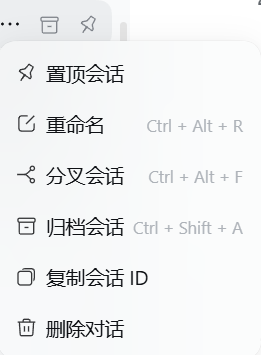
☝️ 效果图:
置顶会话 / 重命名 / 分叉会话 / 归档会话是官方项;复制会话 ID(order 450)与删除对话(order 500) 是本插件新增的两行 —— 破坏性动作排在最后。
中文
它解决什么
DSH 官方只有「归档会话」(隐藏,日志保留),没有删除。于是:
- 会话列表里堆着测试用的、跑废的会话,只能一直藏着;
- 手动去
~/.dsh/sessions/...删目录也能删掉文件,但侧栏条目仍在(宿主列表 = 内存里活着的 attached + 磁盘上的 persisted),看起来像"删除没生效"; - 子代理会话(一个父会话派生出多个)得自己去辨认、一个个删。
本插件把这三件事一次做完,并且在删之前把代价摆给你看。
功能
| 入口 | 行为 |
|---|---|
会话行 … 菜单 → 删除对话(order: 500,排在官方「归档会话」(400) 之后) |
打开确认弹窗;确认后永久删除该会话 |
会话行 … 菜单 → 复制会话 ID(order: 450) |
复制 id(只读动作,运行中的会话也能复制)—— 细节见下一节 |
会话行 … 菜单 → 悬停/点击后弹窗里显示 |
删除前统计:目标字节数、将被一并删除的子代理会话数、子会话 ID 清单(可选中复制) |
- 级联删除:删父会话时,把它派生的子代理会话一并删掉(子会话走与目标同一套删除序列 + 同一条广播)。
- 活跃会话一律拒绝:目标在运行 ⇒
409 SESSION_ACTIVE;任一子会话在运行 ⇒409 CHILDREN_ACTIVE—— 整单拒绝,一个字节都不删(客户端也会提前把删除键置灰)。 - 诚实的成功反馈:删完不自动关弹窗。宿主按内存里是否还挂着该会话回三种状态:
attached === true(打开过、仍在内存里)→ 明说「磁盘已删,但侧栏条目会一直显示,请关闭它的标签页或重启 DSH」;attached === false→ 「已删除会话:<id>」;- 判不了 → 通用兜底(绝不猜)。
- 统计失败绝不影响删除:dryRun 失败或 5 秒超时一律降级为"未统计",删除键保持可用。
「复制会话 ID」:它复制的是什么、ID 从哪来、拿来干嘛
复制的是什么 —— 该会话的原始 ID 字符串,逐字不改:不剥 session- 前缀、不补前缀、不做大小写或格式转换。
之所以"照抄不加工",是因为这个串是要拿去和磁盘目录名 / 日志文件 / 别的工具对账的 —— 插件一旦替你改写,反而对不上。
ID 从哪来 —— 这一行由官方槽位 sidebar.workspaces.session.menu.item 渲染,ID 就是该槽位交给插件的 sessionId 属性
(即宿主会话投影里的会话 ID)。插件不猜、不生成、不额外查库;又因为它是纯只读动作,运行中的会话也能复制
(不碰宿主的活体判据,也不带任何 disabled)。
两种历史形态并存(本机 ~\.dsh 实测):
| 形态 | 实例 | 本机数量 |
|---|---|---|
| 带前缀(较早) | session-7a87d682-0631-4781-94c6-73ceccb6f111 |
46 个会话目录 / 55 个投影缓存 |
| 裸 UUIDv7(较新) | 019c8fef-cb98-4f2c-8521-a28e67e5e9ae |
266 个会话目录 / 266 个投影缓存 |
你复制到的就是那个会话真实使用的那一个。删除/定位路径对两种都成立:入口先 isValidSessionId(两种形态都放行),
再在 sessions 根目录的第一层项目目录下按 basename 精确匹配定位(另有反穿越三重断言),
不自己重实现「cwd → 目录名」的转义规则(避免与后端逻辑漂移)。
反馈(不会静默失败) —— 先弹「正在复制」,剪贴板结果回来后回填:
- 成功 →
已复制会话 ID:<id> - 失败(剪贴板 API 不可用 / 被拒绝)→
复制失败,请手动复制会话 ID:<id>,并把 id 以<code>+user-select: all摆出来 —— 单击即可全选抄走 - 提示 约 2 秒后自动消失;后一次复制会取代前一次的提示(旧提示不会被"复活");整条路径 绝不抛(菜单回调里抛错会变成无人处理的错误)
拿来干嘛(下表路径均为本机实测存在):
| 用途 | 形式 |
|---|---|
| 会话正文日志 | ~\.dsh\sessions\<项目目录>\<会话ID>\session.v4.jsonl.zstd(项目目录名是路径转义形态,如 --D-DSH-Day1--) |
| 侧栏投影缓存(标题 / 待办等) | ~\.dsh\storages\session_projcache\sessions\<会话ID>.json |
| 归档 / 置顶记账 | ~\.dsh\storages\workspace.json → global.archivedSessionIds / global.pinnedSessionIds |
| 报 bug / 排查 | 直接给出 ID 就能精确定位到那一个会话(不用再描述"哪个项目里的第几个") |
| 和本插件交互 | 宿主路由 POST /api/session.delete 吃的就是同一个 sessionId |
| 和本仓库另一个插件联动 | 通知插件的点击回调协议 dsh-attention:open/<会话ID> |
| 级联删除时 | 确认弹窗里列出的子代理会话也是同一套 ID 串(可选中复制) |
为什么它是单独一行而不是塞在删除弹窗里:它只读、随时可用;而删除是破坏性动作。 菜单里
order: 450(复制)在order: 500(删除)之前,破坏性动作永远排最后。
安全边界
- 只动三处:
sessions/<项目>/<会话>目录、storages/session_projcache/sessions/<id>.json、workspace.json里的archivedSessionIds/pinnedSessionIds记录。 - 不碰附件目录(附件只增不减是设计如此)。
- 破坏性动作排在菜单最后;确认框默认焦点在「取消」;危险色用官方
--dsw-alias-state-error-primary。 - 顺序不变量:先读子会话列表、再删任何东西(日志一旦被删就读不出子会话了)。
安装
dsh plugin --profile <你的 profile> add @apherchin/dsh-session-delete
包内声明了 dsh.bundle.patch,所以 dsh plugin 会自动把它记进 dsh.profile.bundles,不需要手工编辑 profile 文件。然后重启 DSH(打包版没有"刷新页面")。
手动兜底(不用 dsh plugin 时):pnpm add @apherchin/dsh-session-delete,再在 cordis.patch.yml 追加
- insert:
    - id: session-delete
      name: "@apherchin/dsh-session-delete"
兼容性
- 实测环境:DSH 桌面壳
0.1.7-rc.2(Windows / Electron)。 - 用到的主机服务:
connection、workspaceRegistry、agents(并可选探测sessions,不可用不影响任何功能)。 - 用到的客户端槽位:
sidebar.workspaces.session.menu.item(官方槽位)、shell.overlay。 - 无 npm 依赖、无安装脚本、无构建步骤:
client.js就是可直接加载的单文件浏览器工件。
与同类插件的区别
npm 上已有两个做"DSH 会话删除"的包,本插件的差异在入口与安全性:
vtxf/dsh-session-delete |
youqu68/dsh-delete-chat |
本插件 | |
|---|---|---|---|
| 入口 | 侧栏会话菜单 | 设置页里的会话管理页 | 侧栏会话菜单(官方槽位) |
| 菜单怎么挂 | DOM 注入 + MutationObserver 克隆现有菜单项(作者自述"官方未开放该菜单的扩展 Slot") |
不挂菜单(自带页面) | 官方槽位 sidebar.workspaces.session.menu.item |
| 批量操作 | 目录级归档/删除全部 | 列表页勾选 | 不做(有意,见下) |
| 子代理会话 | 不处理 | 不处理 | 级联删除 + 运行中整单拒绝 |
| 删除前统计 | 无 | 两步确认(显示路径) | 字节数 + 子会话数 + 子会话 ID 清单 |
| 删除后的诚实反馈 | 无 | 无 | attached 三态(打开过的会话会照实说"行还在") |
本插件有意不做批量删除全部:那是不可逆的高危操作,而侧栏菜单没有足够的确认空间。请用官方的归档,或逐个删。
架构
index.mjs        主机半边:路由 POST /api/session.delete(含 dryRun 分支)、活体拒绝、级联计划、
                 attached 三态探测、门控摘记账、api-session/removed 广播
core.mjs         纯逻辑:校验 / 定位 / 删除序列(可离线单测)
cascade.mjs      纯只读:从多帧 zstd 会话日志里认出子代理会话(不写任何东西)
client.js        客户端半边:window.__ModuleLoader__ 单文件工件
                 —— 菜单两行 + 确认/结果弹窗 + 复制提示;自带全部原语(见下)
cordis.patch.yml 本 bundle 的装配层:一行 insert
locale/{zh,en}.json  GUI 卡片上的标题与描述
合规说明(按官方 cordis-plugin-development 技能逐条对齐)
- bundle 形态:
package.json声明dsh.bundle.patch(官方交付单位;缺它install_bundle会回滚整次安装)。 - 客户端 manifest:
dsh.client.platform = "web"+ 导出./client,浏览器工件的 factoryid等于包名。 - 不 require 任何 Harness Client 包。官方 practices 明文禁止
require("@deepseek-ai/dsh-client-ui-primitives")等, 理由不是"拿不到"(平台静态模块表里能解析),而是升级稳定性:它们会无预告变更、纯 JS 无类型检查, 而抛错的组件会让整块 slot entry 空白。 ⇒ 本插件把用到的 5 个原语(MenuItemButton/Modal/Button/ 两个图标)与 1 个 store (createSnapshotStore)全部按行为自包含实现:SVG 路径、CSS 规则、每一条--dsw-alias-*token 引用 都取自官方dsh-client-ui-primitives的lib/index.js与lib/{Button,Menu,Modal}.module.css, 类名统一加dsd-前缀(官方建议的做法)。运行期只requirereact/react-dom/react/jsx-runtime(基座)。 - 主机半边零
@deepseek-ai/*运行时 import(只读ctx上的服务)。 - 不 append 新的 session 事件类型(官方不变量;否则会话会打不开)。
- 缺失的服务一律降级为 no-op 且不打日志,
apply绝不外抛(client 插件抛错会撞渲染端 「每条 client entry 必须 active」的全有全无启动门禁 ⇒ 整机起不来)。
开发与验证
node test/host-smoke.test.mjs        # 主机接线与路由分支:90/90
node test/cascade.test.mjs           # 级联识别(含真实多帧 zstd 样本):52/52
node test/client-bench.test.mjs      # 客户端离线验证台(结构断言):256/256
node test/client-prime-probe.test.mjs # 正面探针:portal / 样式注入 / 弹窗键盘层:21/21
⚠️ 逐个文件跑,不要用
node --test:本机沙箱禁止命名管道,runner 会 spawn EPERM 并给出误导性的# fail 1。 ⚠️ 浏览器半边改了之后必须整机重启 DSH 才生效(打包版没有「刷新页面」)。
English
The screenshot above:
Pin / Rename / Fork / Archiveare the official rows;Copy session ID(order 450) andDelete conversation(order 500) are added by this plugin — the destructive action goes last.
What it solves
DeepSeek Harness ships archive but no delete. Deleting ~/.dsh/sessions/... by hand removes the files but
leaves the sidebar row behind (the host list is attached sessions plus persisted ones), which looks like the
deletion failed. Subagent sessions must be hunted down one by one. This plugin does all of it, and shows you the
cost before you confirm.
Features
- Session row
…menu → "Delete conversation" (order: 500, after the official "Archive" row). - Session row
…menu → "Copy session ID" (order: 450; read-only, works on running sessions too). - Pre-delete dry run: target byte count, how many subagent sessions will go too, and their IDs (selectable).
- Cascade: deleting a parent also deletes the subagent sessions it spawned.
- Live sessions are refused: target running →
409 SESSION_ACTIVE; any child running →409 CHILDREN_ACTIVEand not a single byte is deleted (the client greys out the delete button ahead of time). - Honest success feedback: the dialog does not auto-close. The host reports whether the session is still
resident in memory (
attached: true | false | undefined) and the three cases get different text — when a session was opened, it says plainly that its sidebar row will keep showing until you close the tab or restart DSH. - Statistics never block deletion: a failed or 5s-timed-out dry run degrades to "not measured" and the delete button stays enabled.
"Copy session ID": what it copies, where the ID comes from, what it is for
- What it copies — the session's raw ID string, verbatim: no prefix stripping, no reformatting. The string is meant to be reconciled against directory names, log files and other tools, so rewriting it would only break the match.
- Where the ID comes from — the row is rendered by the official
sidebar.workspaces.session.menu.itemslot, and the ID is exactly thesessionIdprop that slot hands to the plugin (the session ID from the host's session projection). The plugin never guesses, generates or looks anything up; and since the action is read-only it also works on running sessions (no liveness gate, nodisabledstate). - Two historical shapes coexist (measured on this machine):
session-<uuid4>(46 session dirs / 55 cache files) and a bare UUIDv7 such as019c8fef-…(266 / 266). You always copy the one that session actually uses; both are accepted byisValidSessionId, and the directory is located by exact basename match inside the first-level project dir ofsessions/(with three anti-traversal assertions) instead of re-implementing the cwd→dirname escaping. - Feedback is never silent — a "copying" notice appears first, then resolves to
已复制会话 ID:<id>or复制失败,请手动复制会话 ID:<id>(the ID is rendered as<code>withuser-select: all, so one click selects it). The notice auto-dismisses after ~2s, a newer copy supersedes an older notice, and the whole path never throws. - What it is for — the ID is the key to that session's artefacts:
| Use | Form |
|---|---|
| Session transcript | ~\.dsh\sessions\<project-dir>\<session-id>\session.v4.jsonl.zstd (project dirs are escaped paths, e.g. --D-DSH-Day1--) |
| Projection cache (title, pending) | ~\.dsh\storages\session_projcache\sessions\<session-id>.json |
| Archive / pin bookkeeping | ~\.dsh\storages\workspace.json → global.archivedSessionIds / global.pinnedSessionIds |
| Bug reports & log triage | Quote the ID and exactly that one session can be located |
| Talking to this plugin | the host route POST /api/session.delete takes the same sessionId |
| Talking to this repo's other plugin | the notification plugin's click-back protocol dsh-attention:open/<session-id> |
| Cascade deletes | child sessions listed in the confirm dialog use the same ID strings (selectable) |
It is a separate row rather than something buried in the delete dialog because it is read-only and usable at any time:
order: 450(copy) precedesorder: 500(delete), so the destructive action always comes last.
Safety boundaries
- Touches exactly three places: the session directory, its projection cache file, and the
archivedSessionIds/pinnedSessionIdsbookkeeping inworkspace.json. Attachment directories are left alone. - Destructive row is last in the menu; the confirm dialog focuses Cancel by default.
- Ordering invariant: the child-session list is read before anything is deleted (the log that names children is the very thing being removed).
Install
dsh plugin --profile <your-profile> add @apherchin/dsh-session-delete
The package declares dsh.bundle.patch, so dsh plugin also records it in dsh.profile.bundles — no profile file
editing. Restart DSH afterwards (packaged builds have no "reload page").
Compatibility
Tested on DSH desktop 0.1.7-rc.2 (Windows/Electron). Host services: connection, workspaceRegistry, agents
(plus an optional probe of sessions). Client slots: sidebar.workspaces.session.menu.item (official slot) and
shell.overlay. No npm dependencies, no install scripts, no build step.
How it differs from the other two
Two other npm packages already delete DSH sessions. This one differs in entry point and safety: it uses the
official menu slot (not DOM injection + MutationObserver), it cascades into subagent sessions and refuses
the whole request if any child is running, it shows byte/subagent counts before confirming, and it reports the
attached state honestly instead of claiming a clean delete. Bulk "delete everything" is deliberately not
implemented.
Compliance (aligned with the official cordis-plugin-development skill)
- Bundle form:
dsh.bundle.patchis declared (the official delivery unit; without itinstall_bundlerolls the whole install back). - Client manifest:
dsh.client.platform = "web"+ a./clientexport whose factoryidequals the package name. - No Harness Client package is
required. The official practices forbidrequire("@deepseek-ai/dsh-client-ui-primitives")and friends — not because they cannot be resolved, but because they change without notice, a plain-JS plugin has no type check, and a throwing component blanks your slot entry. The five primitives used here (MenuItemButton/Modal/Button/ two icons) and one store (createSnapshotStore) are therefore reimplemented self-contained, with SVG paths, CSS rules and every--dsw-alias-*token reference taken from the shippeddsh-client-ui-primitives, and classes renamed under adsd-prefix. Onlyreact/react-dom/react/jsx-runtime(the baseline) are required at runtime. - The host half imports no
@deepseek-ai/*runtime package, and appends no new session event type. - Missing services degrade to no-ops without logging, and
applynever throws (a throwing client entry trips the renderer's all-or-nothing boot gate and takes the whole app down).
Development and verification
node test/host-smoke.test.mjs        # host wiring and route branches: 90/90
node test/cascade.test.mjs           # child-session detection on real multi-frame zstd: 52/52
node test/client-bench.test.mjs      # offline client bench with structural assertions: 256/256
node test/client-prime-probe.test.mjs# positive probe: portal / style injection / modal keyboard layer: 21/21
⚠️ Run the files one by one — do not use
node --testhere (the sandbox forbids named pipes; the runner fails with a misleading# fail 1). ⚠️ After changing the browser half you must restart DSH; packaged builds have no page reload.
License
MIT
No comments yet. Be the first to write one.