dsh-canvas


A conversation-branch canvas for DeepSeek Harness: draw the current workspace's session lineage as a full-bleed canvas, fork from any message, run two approaches in parallel, and compare them deterministically. 中文说明见 README.zh-CN.md。
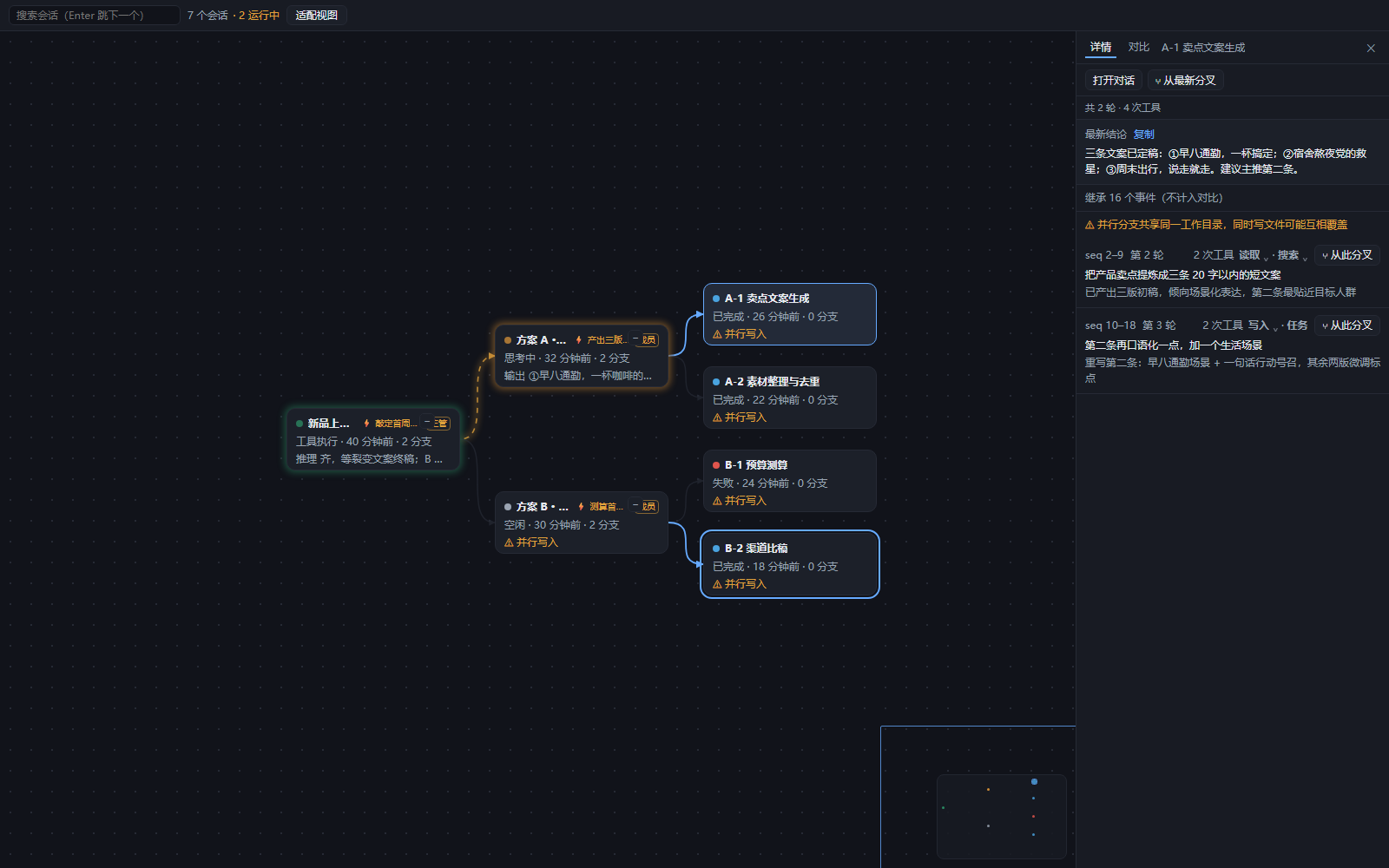
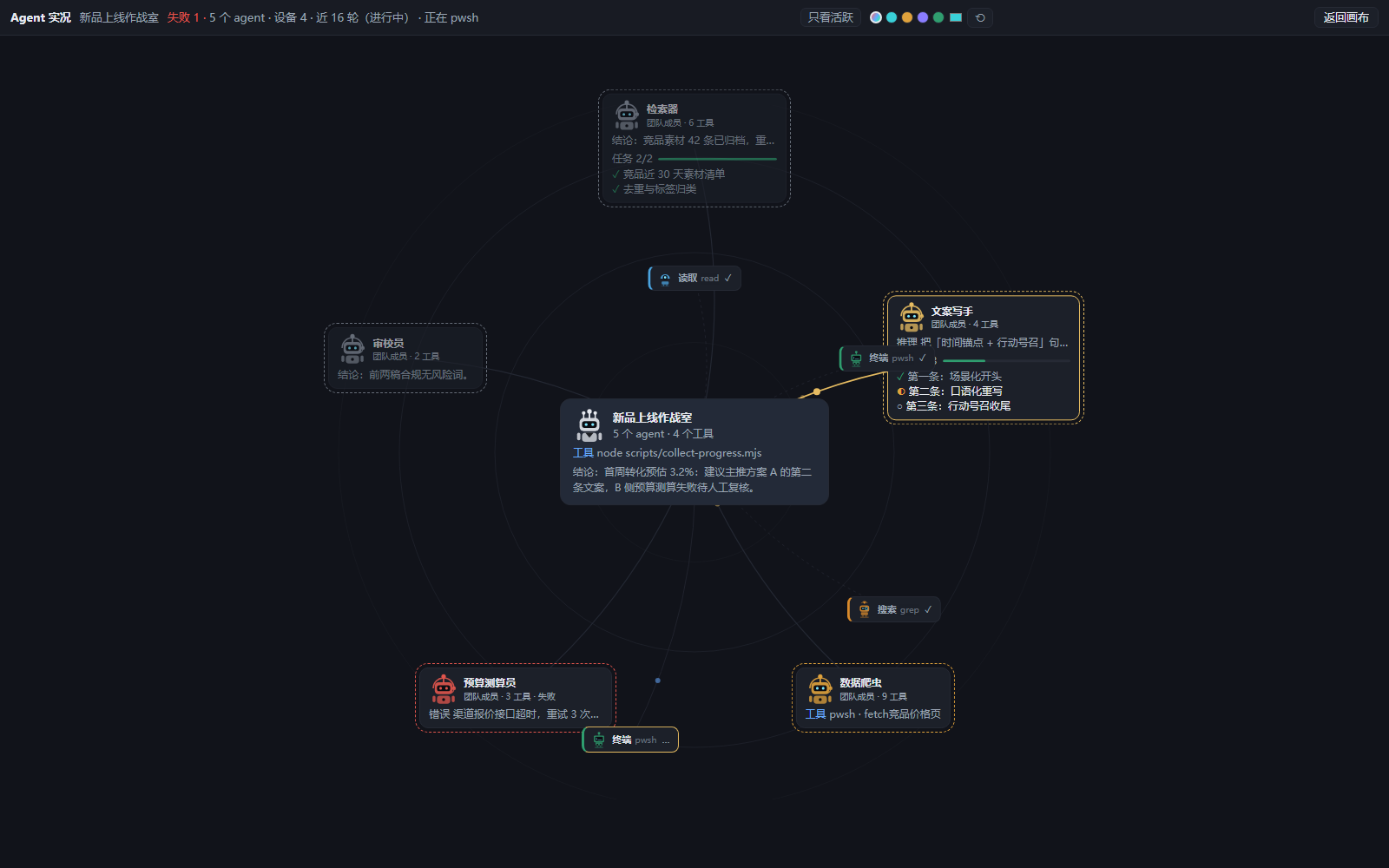
| The lineage canvas — fork from any message, watch branches run live | The agent war room — every subagent on the web, pulsing as it works |
|---|---|
 |
 |
Try it without installing: the online demo runs the real UI against synthetic data. Locally: pnpm run demo, then open demo/index.html.
Target: DSH
0.2.0-rc.2. Every DSH API used here was verified against the local checkout (commit639ed01539), not against online docs.
What it solves
DSH supports forking natively and the sidebar lists sessions, but:
- Lineage is invisible — forked children sit flat next to ordinary sessions; the parent/child relation is dropped.
- Forking is buried — only in the sidebar row menu and the chat turn footer, so you cannot plan where to branch without seeing the whole shape.
- Parallel exploration has no live view — running two approaches at once gives you no single place to watch both or compare results.
v1 capabilities
- Lineage canvas — workspace sessions laid out left→right by
parentSession. A linear chain stays on one row; only real branches spread downward. Zoom 0.4–2×, drag to pan, fit to view, search to locate. Subagent sessions are conversation-internal, so they stay out of the lineage by default — each parent folds them into a 「机器人 ×N」 badge that jumps straight to its ⌖ web, and a toolbar toggle (子代理) brings them back as nodes. - Fork from any message — the detail panel lists the branch's own turns with their real
seqrange and a 「⑂ fork here」 action. The cut is that row's own last event seq, so it is always a real event. - Two launch modes — 「run now」 queues the instruction into the child; 「create empty branch」 sends nothing at all.
- Deterministic comparison — compares only events after each branch's
inheritedEventCount, aligned positionally, never semantically. 「Carry conclusion」 produces an editable draft and never submits. - Three-state status — confirmed (idle/queued/failed/done), inferred (thinking/tool), unknown (disconnected). Never infers idle from silence.
- Live streaming output — a running branch's in-flight assistant stream is visible on the canvas: the node card shows the newest line (reasoning / answer / tool), and the selected branch's detail panel shows the full live reasoning and answer text, updated per chunk and folded into the turn list when the durable message settles. While a stream is visible the status badge is driven by it (thinking vs tool), so a running node is no longer a guess.
- Agent swarm web — the ⌖ corner button on a node card opens that session's own live view: the parent agent at the center, its subagents on the ring around it. When an agent emits, its spoke lights up and a glowing dot crawls toward the parent (spider-web effect), with the agent's newest line on its chip. The roster comes from the session log's
subagent/catalogevents, so a freshly spawned agent joins the web instantly.
Requirements
- DeepSeek Harness (desktop app or CLI), pinned to
0.2.0-rc.2— see the version matrix - Node.js ≥ 22.19, pnpm 10+ (
corepack enable), Git
Install
One line, straight from GitHub (pinned release tag, no build needed):
dsh plugin --profile <your-profile> add "github:answertsundere/dsh-canvas-plugin#v0.1.0"
Restart the app / profile afterwards — a newly added bundle row is read at host boot.
From source (for development):
git clone https://github.com/answertsundere/dsh-canvas-plugin
cd dsh-canvas-plugin
pnpm install
pnpm run build
Desktop app (recommended):
node scripts/install-local.mjs --profile desktop
node scripts/install-local.mjs --profile desktop
The standalone CLI cannot install the desktop profile — it hard-rejects --profile desktop (apps/cli/src/args.ts:83-87), because the desktop profile's plugin set belongs to the app. The script switches to the app's own carrier CLI (resources/runtime/cli/bin/dsh.cmd, which runs with manageDesktopProfile=true).
Restart the app afterwards: a newly added bundle row is read at host boot, and HMR only covers code changes to plugins that are already mounted.
Web profile (development):
node scripts/install-local.mjs --profile web --repo <path to a DSH checkout>
dsh web --port 3090 --no-open
--repo (or the DSH_REPO env var) points at the checkout the DSH CLI boots from; it defaults to the maintainer's D:/deepseek harness. The desktop path needs no checkout — it uses the app's own carrier CLI.
Explicit v1 limits
| Limit | Why |
|---|---|
| Branches share one working directory | The public fork API has no cwd; the UI carries a permanent 「⚠ parallel write」 warning. |
| The detail panel is a snapshot | Selecting a node reads once and releases immediately, so no session is pinned open. |
| Carry-forward goes to the clipboard | v1 has no composer handle. |
| No persistent mainline marker | Only 「continue in this branch」. |
| No auto-pick, no semantic summary | Positional alignment is the only rule that gives the same answer twice. |
Version matrix
| DSH | Status |
|---|---|
0.2.0-rc.2 |
development and verification target |
See docs/compat.md and docs/superpowers/m0-verification.md for the actual M0 gate results, including the gates that were not run.
⚠️ Known publish blocker
dsh-canvas is already taken on npm (0.0.1, described as "Infinite canvas for the DeepSeek Harness - name reserved", repo dushaobindoudou/dsh-canvas). Publishing requires renaming to @<scope>/dsh-canvas and updating package.json name, the name: in cordis.patch.yml, and PLUGIN_ID in tsdown.config.ts. Until that decision is made, this GitHub repository is the distribution channel.
Do not rename during local development: the loader id changes, the installed profile row stops matching, and the verified M0 install breaks.
Development
env -u NODE_OPTIONS -u CODEBUDDY_SAFE_DELETE_BULK_GUARD node node_modules/vitest/vitest.mjs run
env -u NODE_OPTIONS -u CODEBUDDY_SAFE_DELETE_BULK_GUARD ./node_modules/.bin/tsdown
env -u NODE_OPTIONS -u CODEBUDDY_SAFE_DELETE_BULK_GUARD node scripts/install-local.mjs
env -u NODE_OPTIONS -u CODEBUDDY_SAFE_DELETE_BULK_GUARD node scripts/m0-check.mjs
The env -u … is not decoration: the host's injected shim intercepts pnpm's filesystem calls and produces zero-byte files or EPERM rename.
Taking this project over (by a human or another AI): start with HANDOFF.md — current state, the file map of durable knowledge, the commands, the traps that fail silently, and the open decisions.
Two traps that make changes silently not apply — see docs/superpowers/m0-verification.md:
- A
file:dependency is copied, not linked, and pnpm skips the copy while spec/version are unchanged — so a rebuild must delete the profile's copy first (the install script does). - pnpm 11's
pnpm-workspace.yamlcarries unansweredallowBuildsplaceholders; until answered,pnpm addfails and the DSH plugin manager swallows pnpm's stderr.
Contributing
See CONTRIBUTING.md for the setup, the verify loop, and the project's ground rules. Bug reports are welcome — include your DSH version, OS, target profile, and the failing command's full output.
License
MIT, see LICENSE.
No comments yet. Be the first to write one.