dsh-submodel
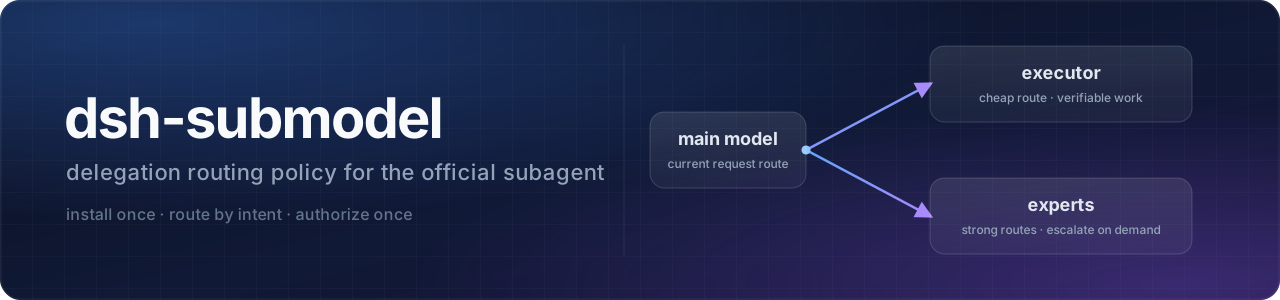
官方 subagent 的默认策略包:装上一次配好「什么时候自己干、什么时候派出去、派给谁」。





中文 | English
它不新建 provider 体系——只读你 profile 里已有的渠道与模型配置,把委派策略写进系统提示词,
并给官方 subagent 补一个统一的委派入口 delegate_task。0.2.0 起模式按路由判定(不再依赖
模型命名约定),并提供首次配置向导与 economyRoutes;要求 DSH 0.2.2-rc.1(0.2.1 及更早不兼容)。
安装
dsh plugin --profile <你的 profile> add dsh-submodel   # 1. 安装
dsh --profile <你的 profile>                            # 2. 启动(装完插件需重启 profile)
# 3. 首次会话按下面「两步配置」完成授权与路由;或直接调用 configure_submodel
配置(两步)
配置分两层,缺一层都派不出去:
| 层 | 管什么 | 缺失的后果 |
|---|---|---|
| ① 宿主授权 | DSH 自己的「子代理模型选择」设置:允许子代理切到哪些路由 | 子代理要切到非继承路由时,派工报 child LLM route "…/…" is not allowed for this Session |
| ② 插件配置 | 本包的 executor(执行路由)与 experts(专家路由) |
强主脑模式下没有默认派工目标,只记 error 日志、不派工 |
① 宿主授权(必须)
DSH 原生 subagent 默认只允许子代理沿用父会话的路由;要让子代理切到执行/专家路由,先做宿主授权:
- GUI:打开「设置」里的 子代理模型选择(配置项 id 为
subagent-model-selection-settings), 打开开关,并把执行路由、专家路由逐条加入允许列表。 - 或手写 profile 补丁 YAML(
~/.dsh/profiles/<你的 profile>/cordis.patch.yml;该文件默认是空数组[],把下面的条目追加进数组即可):
- id: subagent-model-selection-settings
  config:
    enabled: true
    allowedModels:
      - provider: your-provider
        model: your-model
      - provider: your-provider
        model: your-strong-model
注意:enabled: true 时 allowedModels 不能为空;宿主授权只对新会话生效,写完要新开会话(或重启 profile)。
② 插件配置(二选一)
方式 A(推荐):首次会话调用 configure_submodel 自动写两处
不用手写 YAML。只要满足:顶层主代理 + autoConfigure 保持默认 true + executor 还没配置,
首次会话里就会出现 configure_submodel 工具:
- 调用它,会依次问 3 个问题——执行路由(日常可验证的执行块派给谁,单选)、 专家路由(需要升级时允许点名的模型,可多选)、是否同时写宿主授权表(推荐「是」);
- 确认后它用官方
configEditor先写宿主授权、再写插件配置(插件配置里的executor、experts与economyRoutes都按你的选择落盘),两处一起生效; - 新会话生效。写入成功后本插件会重载、该工具随之消失——这是预期的,不是出错。
没有 GUI 客户端(headless / 纯 CLI)或相关服务不可用时,它不会弹卡,而是直接返回可复制的手动 YAML,并且不会写任何配置。
方式 B:手动写 5 行 YAML
在 profile 补丁层(~/.dsh/profiles/<你的 profile>/cordis.patch.yml)里按 id 覆盖配置。
该文件默认是空数组 []:把 [] 替换成下面的条目;已有其他条目时,把它追加到数组里。
- id: submodel
  config:
    executor:
      provider: your-provider
      model: your-model
注意:profile 补丁对某一条目的 config 是整段替换——没写的字段回落到默认值(见下表),
不会和内置默认值逐字段合并。
完整字段:
| 字段 | 默认值 | 说明 |
|---|---|---|
enabled |
true |
总开关;false 时只注册一个空段,不装任何工具/guard |
autoConfigure |
true |
是否在首次配置时注册 configure_submodel 向导(顶层主代理且 executor 未配置才可见);关掉后完全手动配置 |
preset |
standard |
只对这个 composition 生效 |
executor.provider / executor.model |
空 | 执行路由:强主脑的默认派工目标;留空会记 error 日志(见故障排查)。主模型切到这条路由本身也等于进入 Flash 模式 |
executor.reasoningEffort |
max |
只在调用方没显式指定档位时作缺省 |
economyRoutes |
[] |
额外声明「便宜路由」,每项 {provider?, model}:本次请求命中任一项即算 Flash(economize)模式。provider 省略时只按 model 匹配;非空时旧的 flash 后缀规则不再生效 |
experts |
[] |
允许升级时显式点名的专家路由列表,每项 {label, provider, model, reasoningEffort?};reasoningEffort 目前为预留字段,不影响派工 |
texts.economize / texts.boss / texts.child |
空 | 非空时整段替换内置正文(替换后不再插值) |
toolName |
list_subagent_models |
策略段的能力门控工具名 |
order |
2850 |
策略段在系统提示词里的顺序 |
guardNativeSubagent |
true |
是否拦截"非经济路由(非 Flash 模式)顶层用原生 subagent 却不给完整 provider/model" |
它怎么判断该谁干(0.2.0 起按路由)
两种模式,判定只看本次请求的路由(provider + model),不再要求模型名带特定后缀:
- 本次请求路由 == 配置的
executor路由 → Flash(economize)模式; - 命中配置的
economyRoutes任一条 → Flash(economize)模式(有多条便宜路由时用); economyRoutes为空时保留旧版兼容:模型名以flash结尾 → Flash(economize)模式;- 其余 → 强主脑(
boss)模式。
内置正文与行为:
- Flash 模式:默认自己干;普通子任务用
delegate_task(不传 provider/model,子代继承当前路由); 只有"问题本身够复杂"或"超出执行上限"时才升级,升级时从experts里点名。 - 强主脑模式:理解/判断/写作自己来;可验证的执行块默认派给
executor配置的执行路由。 - 子代:硬边界——
delegate_task/subagent/subagent_fork/workflow/spawn_teammate一律不可用,防止递归派活。 delegate_task:参数与原生subagent相同(description、prompt,以及可选的provider/model/reasoning_effort;provider与model必须成对传,只给一个会立即失败)。 经ctx.tools.execute发起真正的原生调用,宿主的 allowlist / 预检 / 权限照旧生效。 0.2.0 起语义为「启动后立即返回子会话 id,完成时由运行时通知」:不要反复轮询,需要查看在线 子代理用list_agents、追加消息用send_message、停止用interrupt_agent。 不确定有哪些已授权路由时先调list_subagent_models。
两个典型用法:
// 1) 强主脑 → 执行路由:不传 provider/model,自动补 executor
{ "description": "跑通测试", "prompt": "<完整任务说明:目标、约束、已试过的方案>" }
// 2) 升级 → 专家路由:provider/model 成对,且必须已在宿主授权列表里
{ "description": "复核状态机", "prompt": "<完整任务说明>", "provider": "your-provider", "model": "your-model" }
与官方插件的边界
| 能力 | 提供方 |
|---|---|
状态查看 list_agents、追加消息 send_message、停止 interrupt_agent |
官方 @deepseek-ai/dsh-tool-subagent-control(本包不重复注册) |
策略正文、delegate_task、子代 guard、configure_submodel 向导 |
本包 |
模型选择能力本身(subagent 的 provider/model 参数) |
官方 subagent(本包只消费) |
兼容性
| DSH 版本 | 状态 |
|---|---|
0.2.2-rc.1 |
✅ 目标版本:fixture + 隔离 profile 真机装载已验;GUI 端到端由用户验收(未验证) |
0.2.1-rc.5 及更早 |
❌ 不兼容:没有批量 ctx.tools.execute,也没有 0.2.2 的子代理路由语义 |
其他 0.2.x 版本 |
未逐版实测;engines.dsh 声明 >=0.2.2-rc.1 <0.3.0,范围外的版本会被安装器拦住 |
故障排查
fail-fast:启动期的告警只记日志、绝不抛;只有你主动调用工具时才可能收到错误。
| 现象 | 级别 | 含义与处理 |
|---|---|---|
config.executor.provider/model 未配置,自动委派不可用… |
error |
没有默认派工目标:调用 configure_submodel 自动配置,或按上面「两步配置」手动补 executor |
child LLM route "…/…" is not allowed for this Session |
派工时报错 | 宿主授权缺失(或没包含这条路由):打开「子代理模型选择」并把该路由加入允许列表(新会话生效);或重新运行 configure_submodel 并勾选写宿主授权 |
看不到 configure_submodel |
— | ① executor 已配置(向导按设计只出现一次);② autoConfigure 被设为 false;③ 当前会话的原生 subagent 没有选模参数(先确认 profile/preset 开启了模型选择);④ 当前不是顶层主代理 |
调用 configure_submodel 后没有弹提问卡 |
— | 当前客户端没有 GUI(headless / 纯 CLI),没人可问;工具会返回手动 YAML 且不写配置,按「方式 B」手写即可 |
当前 profile 无 agentPresets 服务,策略不生效 |
warn |
该 profile 没有 agentPresets 服务;换一个支持 composition 的 profile |
原生 subagent 未暴露 provider/model,delegate_task 不安装 |
warn |
本会话的原生 subagent 没有选模参数:该 agent 上整套安装(策略段 / guard / 工具)都会跳过,等能力出现后由 tools/change 或 agent/pre-step 自动补装 |
本会话未启用官方 subagent 模型选择,策略段不渲染 |
info |
去设置里启用 subagent-model-selection-settings(宿主授权只对新会话生效);工具本身仍按注册门控安装 |
已知限制
- 策略正文默认中文;可用
texts.*整段覆盖(工具描述与部分 guard 拒绝理由仍为英文)。 - 只对
preset指定的 composition 生效(默认standard)。 - 不提供预算护栏 / 催收 / 故障改派(watchdog)。
configure_submodel只写两处:本插件配置行 + 宿主授权行(subagent-model-selection-settings); 不创建渠道/密钥,也不改其他插件。- 模型元数据里没有价格字段,哪些路由算"便宜"由你的配置决定(向导只做候选预填,不替你拍板)。
- 非 GUI 客户端没有提问卡可用,只能用「方式 B」手动 YAML。
回滚
dsh plugin --profile <你的 profile> remove dsh-submodel
插件移除后,宿主授权行仍在 profile 补丁里;如需一并撤销,手动删除 subagent-model-selection-settings 条目即可。
开发与验证
npm install                                     # 安装开发依赖(schemastery)
node tests/unit/flash-routing-fixture.mjs ./lib # 纯函数 + 生命周期回归
python -m unittest discover -s tests/unit       # Python 驱动(包根执行)
node tests/unit/public-profile-smoke.mjs        # 干净用户配置的确定性冒烟
当前验证计数(CI 在每次 push / PR 跑同一组命令,见 .github/workflows/ci.yml):
| 检查 | 结果 |
|---|---|
| fixture | 104 条断言,failed: 0 |
| Python 驱动 | 7 个用例 OK |
| 公共 profile 冒烟 | 7 条断言,failed: 0 |
GUI 端到端(configure_submodel 弹卡与两处写入、delegate_task 派工、主模型切到执行路由后进入
economize 模式)需要在重启后的真实 GUI 会话里由用户验收,尚未验证。
发版(维护者)
发布走 GitHub Actions + npm Trusted Publishing(OIDC),本机与仓库都不保存 npm 令牌:
- 在
CHANGELOG.md顶部补## <版本>(YYYY-MM-DD)段; - 在
main分支运行pwsh scripts/release.ps1 <版本>:跑门禁 → 改package.json版本 → 提交 → 打 tag → push,并轮询 npm 直到看到新版本; - 仓库的
release工作流(.github/workflows/release.yml)在 tag push 后再次跑测试并自动npm publish;scripts/release.ps1验证成功后会尽量创建 GitHub Release。
首次接入需在 npm 包设置里一次性配置 Trusted Publisher(仓库 angel291592/dsh-submodel、
工作流 release.yml,并允许 Direct publish),之后发版不再需要 npm 密码 / 动态码 / 令牌。
No comments yet. Be the first to write one.