dsh-feishu
中文文档 | English
Standalone Feishu self-built app integration for DSH.
What it does
- Receives Feishu text and rich text (post) messages over the official WebSocket long connection; links and mentions are kept, while an embedded image is downloaded and preserved as an image input. Other media remains a readable placeholder.
- Downloads image messages through the official resource API into a local media directory, saves them through DSH's attachment service, and sends native
{ type: 'image', attachment }content blocks to the selected agent model. Failed downloads or attachment admission degrade to a path-based vision prompt or plain-text notice. - Creates or resumes one independent top-level DSH agent/session per Feishu chatId; it never reuses a Web conversation.
- Attaches every current and persisted
session-feishu*session to the real DSH workspace that owns itscwd. New sessions receive飞书 · <first meaningful message>titles; generic greetings begin as飞书会话and upgrade when meaningful text arrives, while existing manual titles remain untouched. - Follows the DSH default model by default, or uses a Feishu-specific provider, model, and model-declared reasoning effort.
- Composes each Feishu Agent from a configurable Agent preset (
cordisby default), inheriting the Host file sandbox and approval policy. - Adds an OK emoji reaction to the original Feishu message as the immediate acknowledgement.
- Falls back to a short text acknowledgement if the reaction API is unavailable.
- Opens a Feishu Card JSON 2.0 streaming card at
turn/startwith a blue header. Status, notation-sized plain-text tool progress, the Markdown answer, and the separatedhr+ notation-sized metadata row use independent elements. Tool-only events never resend the answer element, while cumulative answer updates preserve CardKit's prefix-streaming behavior so only the new suffix is animated. A one-second footer-only heartbeat keeps model, reasoning effort, and elapsed time current and stops on completion, cancellation, errors, and disposal. - Falls back to ordinary text when CardKit streaming APIs are unavailable or fail, so the final answer is not lost.
- Tolerates the DSH startup race where a configured model adapter registers after this plugin: the Feishu WebSocket starts immediately and session creation waits briefly for
NO_ADAPTERto clear. - Sends errors and disposed-session notices back to the same chat.
- Uses the configured Feishu application API, so no custom group webhook is required.
Screenshots
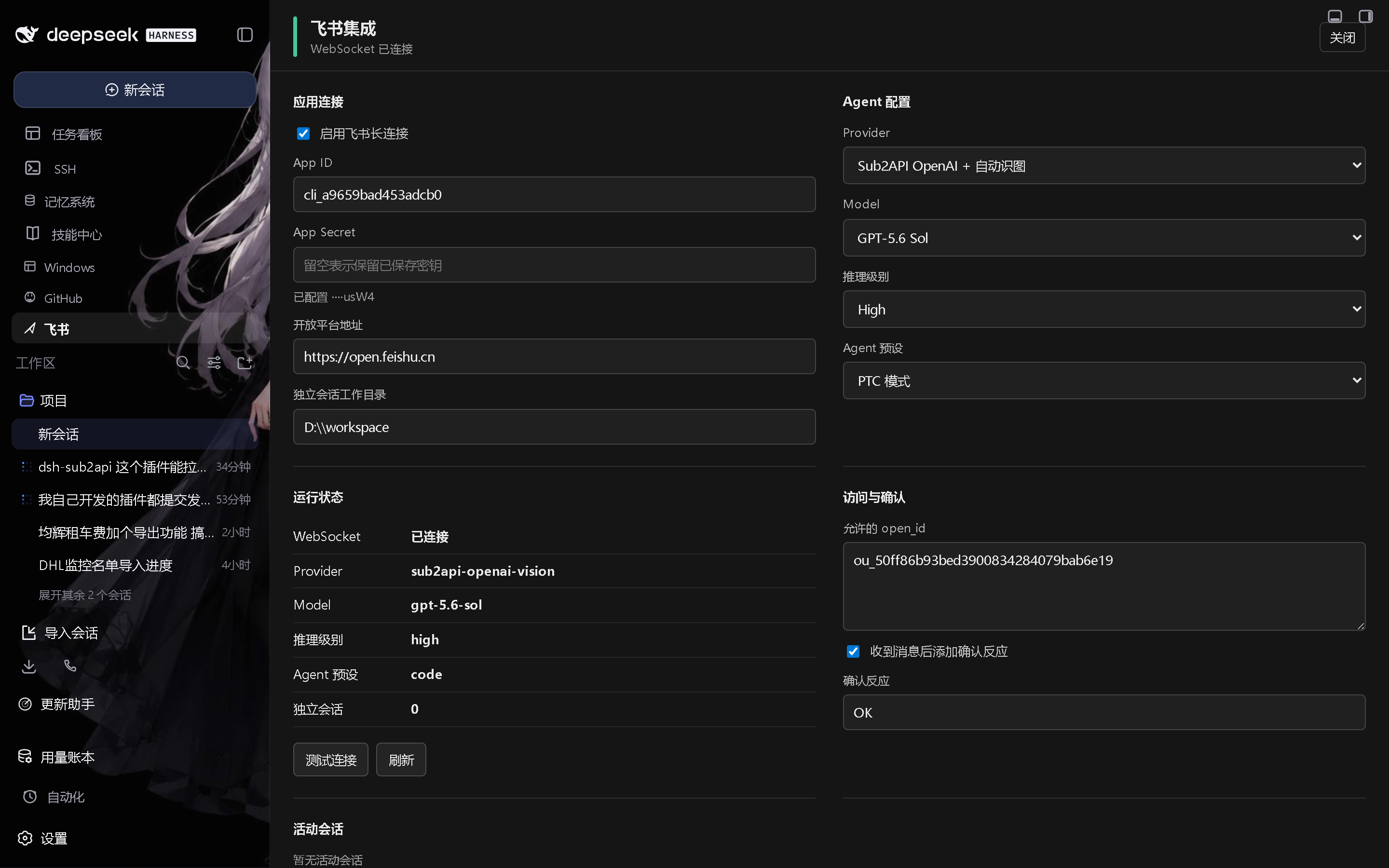
Install
Download the newest dsh-feishu-*.tgz from Releases and add it to the profile:
dsh plugin --profile web add D:\downloads\dsh-feishu-0.2.0.tgz
Restart the DSH Web host after installation, then complete the profile configuration below.
For local development, install from a checkout instead:
dsh plugin --profile web add link:D:/项目/dsh-feishu
Profile configuration
Add the plugin to the profile bundle list and configure the row in the profile patch. The shipped bundle row is disabled until credentials are configured:
- id: dsh-feishu
  config:
    enabled: true
    appId: cli_xxx
    appSecret: your-secret
    allowUsers:
      - ou_xxx
    ack: true
    ackReaction: OK
    provider: ''
    model: ''
    reasoningEffort: ''
    agentPreset: cordis
The allowUsers list is required for business messages. An empty list rejects all users.
Leave both provider and model empty to follow the current DSH default selection. The Web panel reads reasoning efforts from llm.resolveModelInfo(provider, model) and only offers efforts the selected model declares.
Changing provider, model, reasoning effort, or Agent preset disposes every live Feishu Agent. The update is transactional: if the replacement bridge cannot start, the stored configuration and prior bridge are restored. Session ids use a v2 configuration fingerprint, so legacy sessions without meta.agentPreset remain preserved but are not resumed under a different tool composition; the next Feishu message creates or resumes the matching v2 session.
Commands
- /status shows this Feishu chat's independent session and its actual provider, model, reasoning effort, and Agent preset.
- /stop cancels this Feishu chat's session task.
- /help shows the command list.
The plugin has a Host integration and a Web configuration panel. It uses session/event and agent/* Host events, registers loopback-only /api/dsh-feishu/* routes, and does not modify DSH core source.
No comments yet. Be the first to write one.