dsh-almazom-approve-escalate
One click on the DSH web approval card: approve the pending request and switch the live session to full access (danger-full-access: sandbox off, no further approval prompts) — plus a /yolo composer command that switches the permission preset without a pending request.
Isolated third-party plugin. No harness core changes, no telemetry, no secrets.
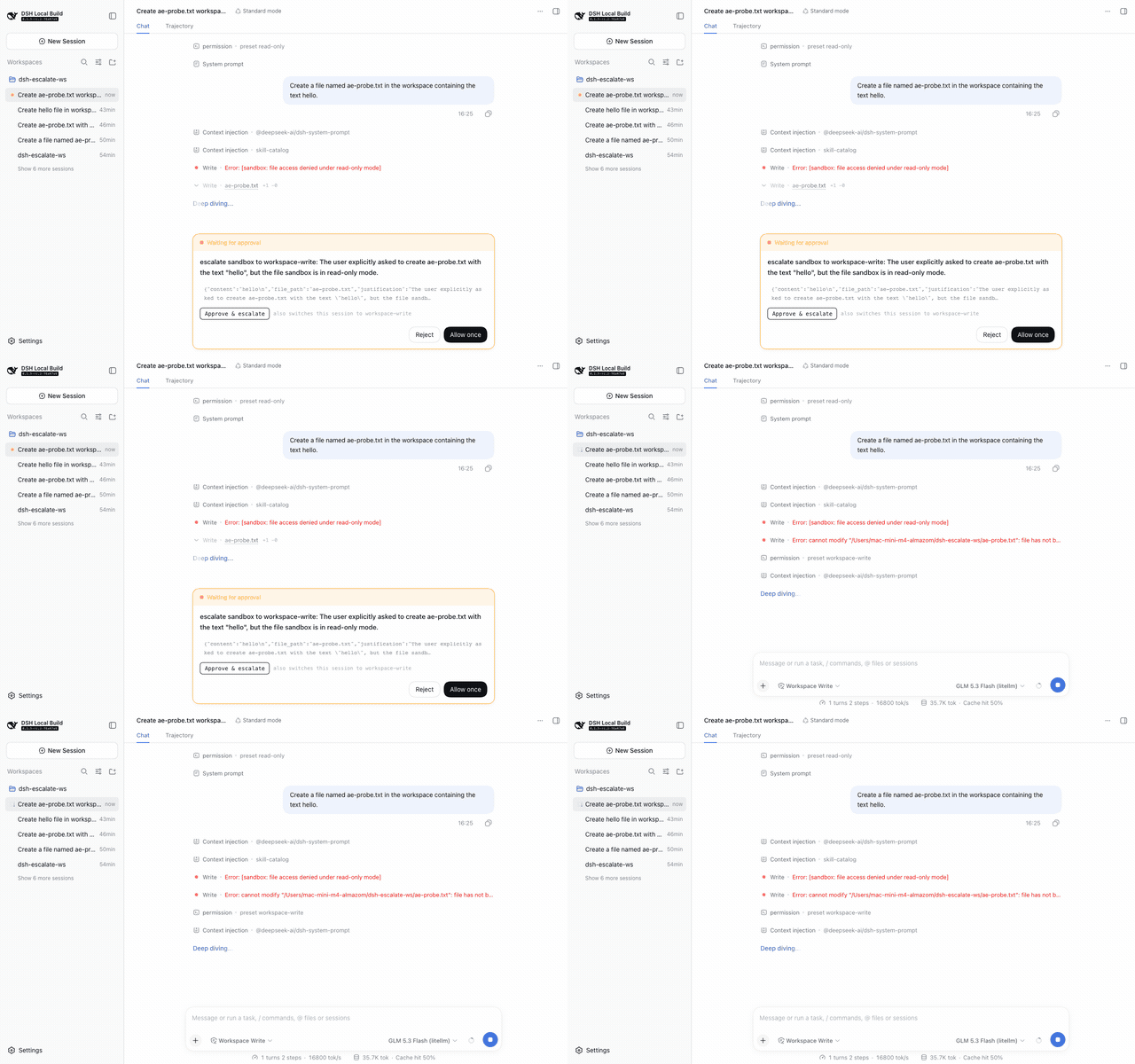
What you get
The approval card ("Waiting for approval") grows one extra action above the shipped Reject / Allow once row:
- Approve & full access — dispatches
/permission danger-full-accesson the live session (the same command the shipped/permissionpicker uses) and then answers the pending request as Allow once. A warning line spells out that future approval prompts are disabled. - /yolo — composer command (slash menu) that switches the session to full access without a pending request; the status chip flips to Full access.
- Both shipped buttons keep working; the plugin only composes two manual actions into one click. If the host lacks the
/permissioncommand, the button says so instead of answering blind.
Install
dsh plugin --profile web add dsh-almazom-approve-escalate
(or from git: dsh plugin --profile web add git+https://github.com/almazom/dsh-almazom-approve-escalate.git)
After installing, hard-refresh the browser so the client bundle picks up the new rev.
Then restart the web app (dsh web / your service manager) and hard-refresh the browser.
Configure
Override the preset or the label in the profile patch layer (~/.dsh/profiles/web/cordis.patch.yml or $DSH_HOME/cordis.patch.yml):
- insert:
    - id: almazom-approve-escalate
      name: 'dsh-almazom-approve-escalate'
      config:
        preset: 'workspace-write'   # any permission preset your host offers
        label: 'Approve & escalate'
Updates & versioning
- The plugin is versioned in
package.json(semver) and deployed as git commits in this repo; the profile mounts it vialink:so new code is served live at a fresh client-bundle rev. - Reload rule: already-open app pages keep the module graph they booted with. After any deploy, hard-refresh the DSH tab (PWA on iPhone: close from multitask, reopen). The deploying agent must announce every client-affecting change via Delta Chat ("обнови вкладки DSH").
- Rollback:
dsh plugin --profile web remove dsh-almazom-approve-escalateor delete the patch row — features disappear without touching the host.
Rollback
dsh plugin --profile web remove dsh-almazom-approve-escalate
(or delete the insert row above). No host files besides the profile's own node_modules and patch layers are touched.
Security & trust
- Plugins hold full host privileges — review the source before installing. It is two hand-written files:
lib/index.js(host: serves the config JSON above) andlib/client.js(browser: the button). - The client bundle uses the official plugin surfaces only: the documented
conversation.approval.detailslot, theslots/sessionsclient services, and the live-session command API. It never touches the network beyond same-origin config/config fetches; there is no outbound traffic. - The escalation reuses the operator-auditable
/permissioncommand path — the switch is logged like a manual one.
Compatibility
Built and verified against DeepSeek Harness 0.1.5-rc.x. The client contract it relies on (loader wrapper, slot key, seats) is documented for third-party plugins; a shipped-bundle refactor of the approval card may require a plugin update.
Provenance
- Developed against upstream
deepseek-ai/deepseek-harnessatc291e79; live-verified on a0.1.5-rc.2host with a real approval flow (seedocs/for the recording). - No model round is involved in the plugin itself; the verification recording used one model round to trigger a genuine approval request.
- Related: discussion #6616 (the /permission picker fix this plugin's escalation path builds on).
License
MIT
No comments yet. Be the first to write one.