dsh-remote-ssh
English | 中文
Move the workspace's file IO and command execution onto an SSH target — while sessions, the web GUI, and $DSH_HOME stay on this machine. A DSH plugin set for remote development over SSH.
Manage connections and browse remote directories from the web GUI; each session routes to the host its working directory names, and several remote hosts can run side by side. Design notes, contracts, and audits live in DESIGN.md and specs/. The harness-fork patch behind same-named remote workspace titles lives under harness-patches/ — see Issue #1.
Compatibility
| Plugin version | DSH baseline |
|---|---|
| v0.3.3 (current) | 0.1.5-rc.1 — readByteRange implemented, connection.rpc.handle regression worked around, SSH keepalive on by default, harness patches re-cut |
| v0.3.0 – v0.3.2 | 0.1.2-rc.1 (legacy harness patches, keepalive disabled) |
Install straight from this repository (git source), so main always tracks the
current baseline:
dsh plugin --profile web add github:aijunjiang/dsh-remote-ssh
ssh2/cpu-features need their native build script approved — see
Install below.
Feature overview
| Capability | What it does |
|---|---|
| SSH connection manager | Add / test / remove connections in the web GUI: password, key, SSH agent, ProxyJump |
| Remote directory browser | Browse the target's tree in the GUI and adopt any directory as a workspace |
| Per-session routing | A session's working directory decides the machine: ssh://<id>/<path> and its local placeholder twin are equivalent; many remotes can run in parallel |
| Remote fs/subprocess (full mode) | ctx.fs / ctx.subprocess point at the remote host: git, tests, builds, reads and writes happen there |
| Agent guidance (built-in) | Routed sessions declare "which machine am I on" in the runtime context, plus a usage guide, ssh_exec / ssh_route_status, and DSH_SSH_* env vars — no more guessing from paths, no silent "empty project" mirrors |
| Credentials stay local | Passwords and identity keys only ever live under this machine's DSH home |
Screenshots — from local GUI to a routed remote session
Five steps, one flow: add a remote connection, browse the remote host, adopt one of its directories as a workspace, and start a session that genuinely runs there.
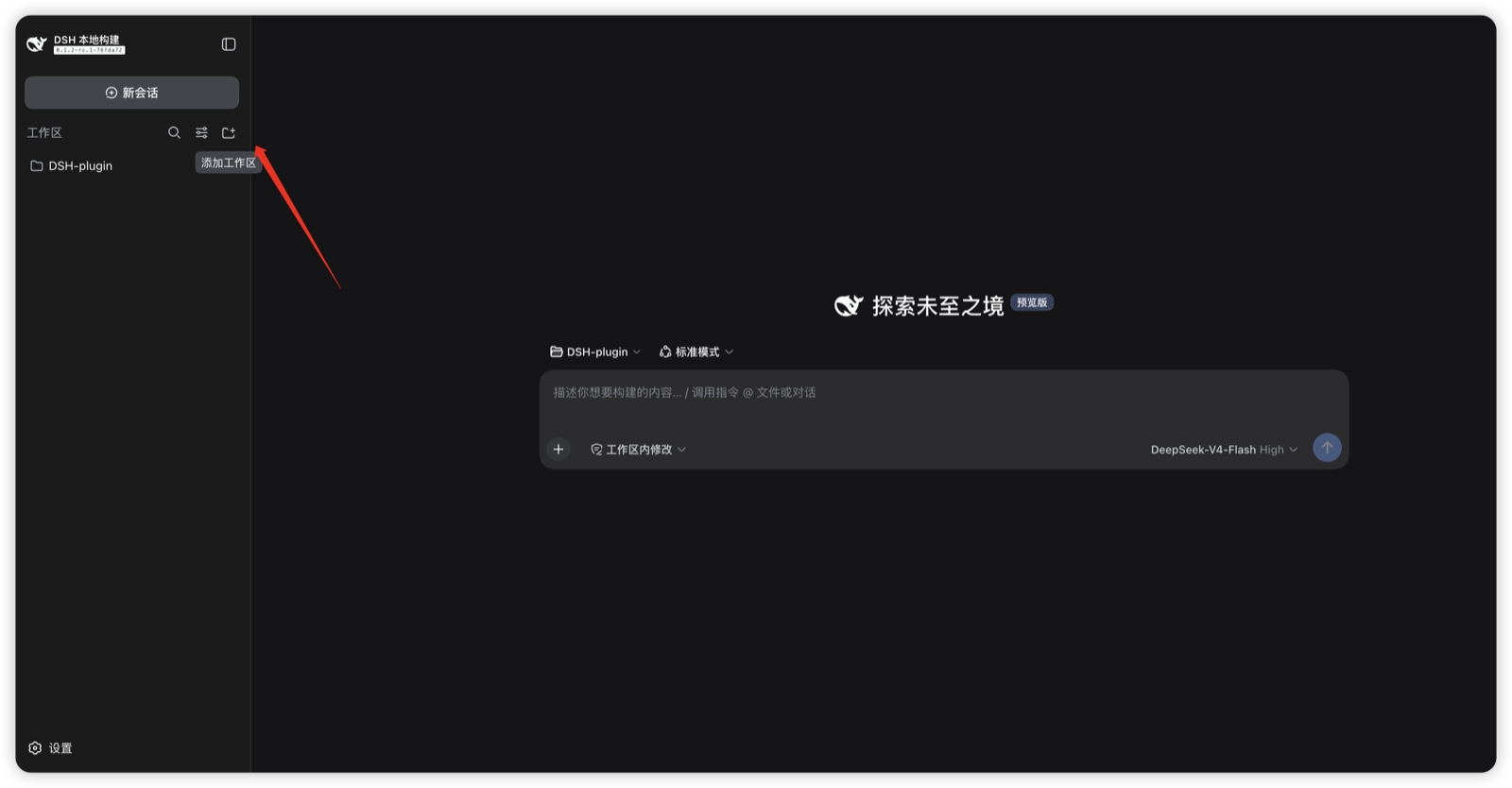
1 · Enter the workspace panel — every remote workspace starts here: open the sidebar's workspace panel and click Add workspace.
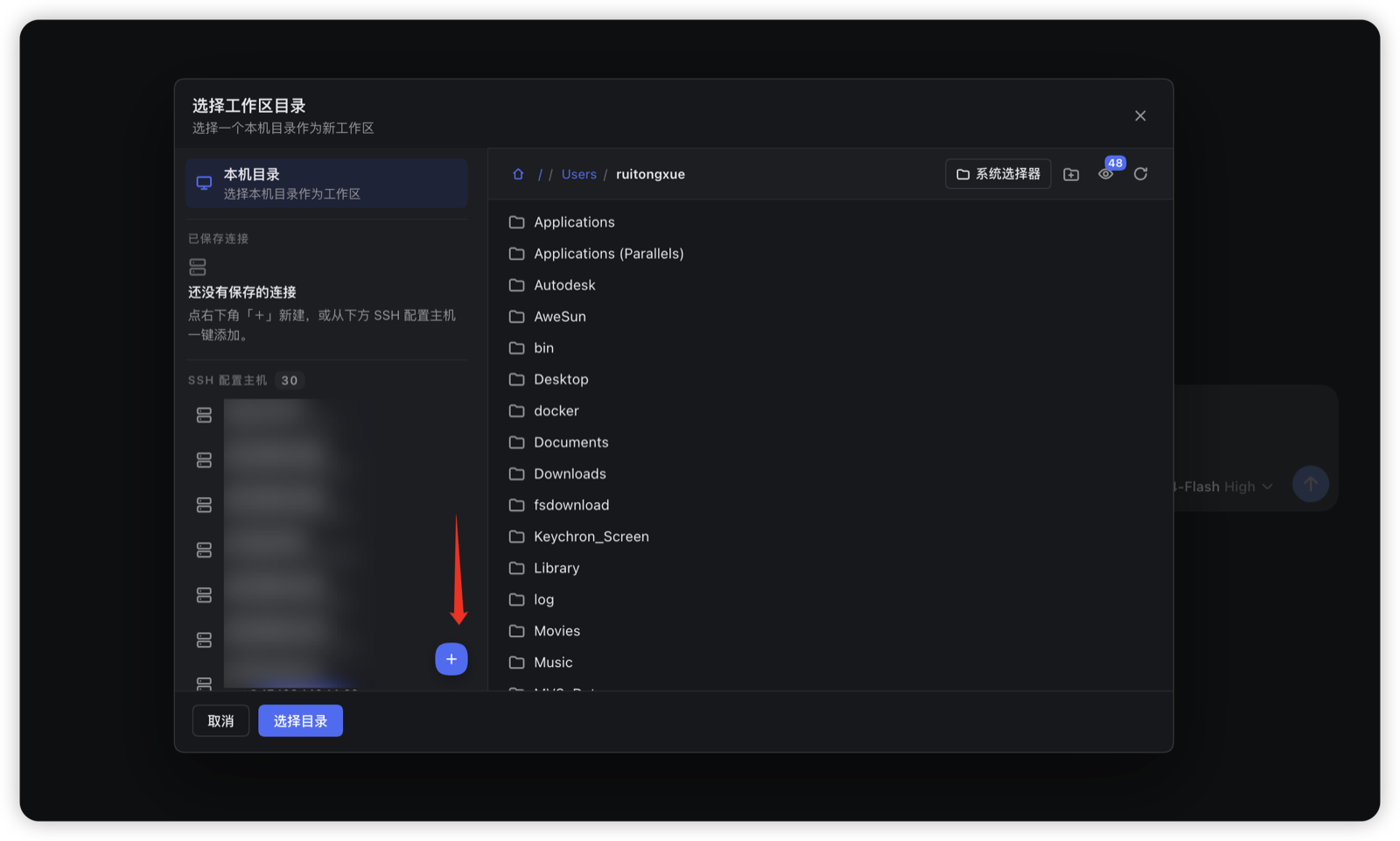
2 · Pick a local directory — or create a remote connection — the directory picker starts on the local machine; its + button opens the new-connection form.
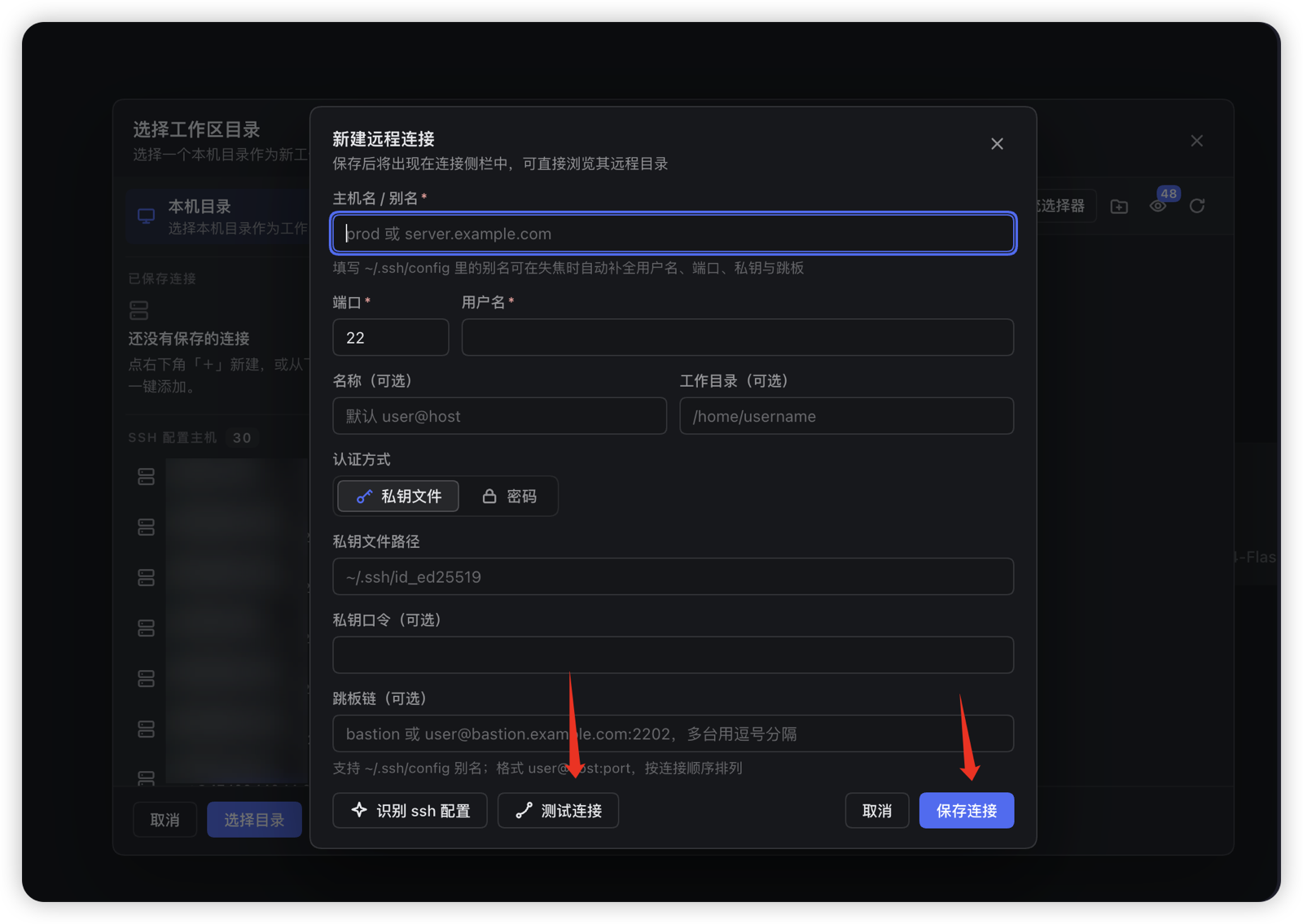
3 · Add the remote connection — host/alias, port, user, key or password auth, and an optional ProxyJump chain; ~/.ssh/config aliases autofill on blur, and you can Test the connection before saving.
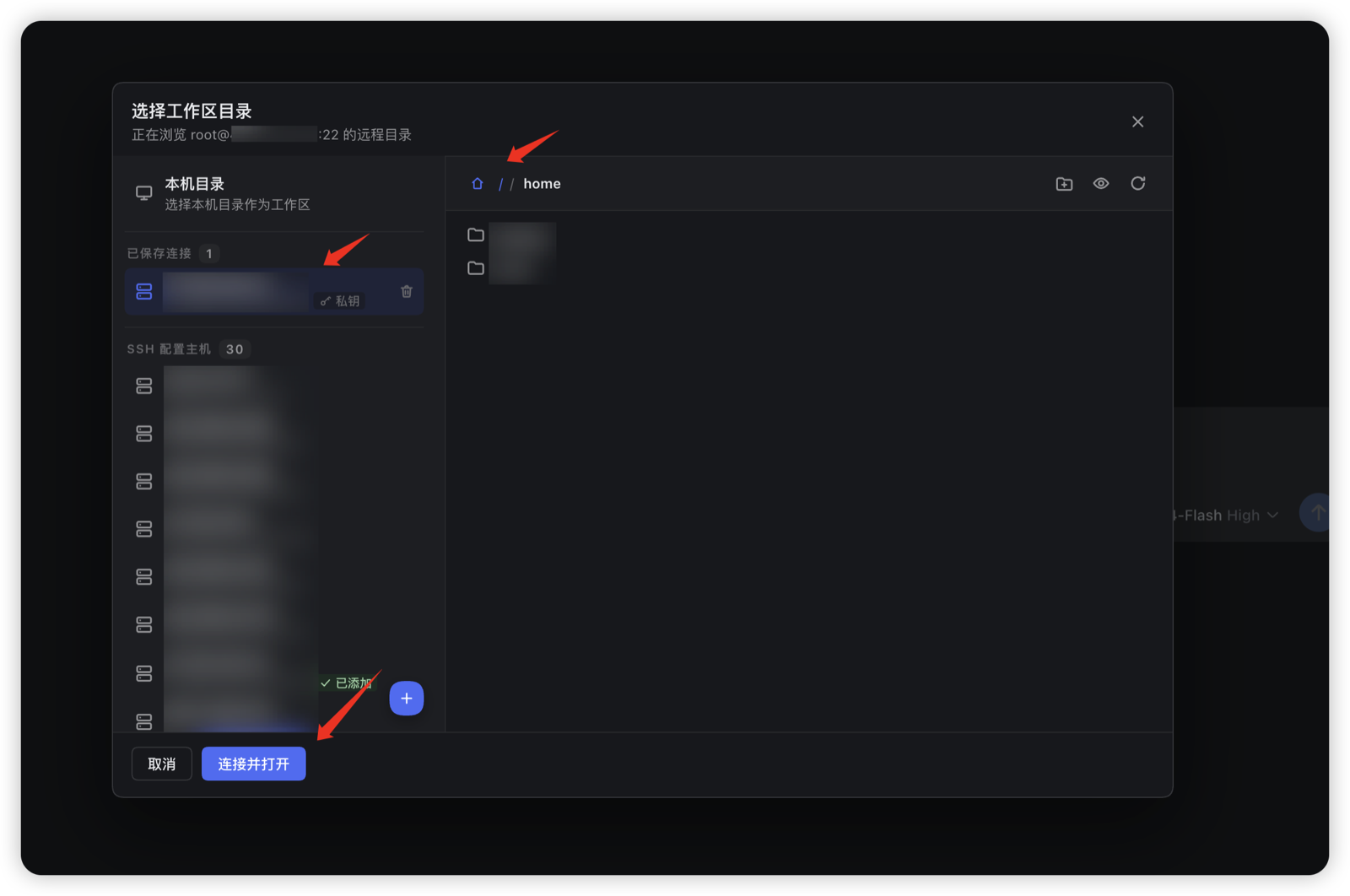
4 · Browse the remote and adopt a directory — the saved connection opens straight into the remote tree; choose the directory that will become your workspace and open it.
5 · A session routed to the remote host — the workspace now carries the host suffix (home · root@…), and a session started in it runs on that machine: here the agent schedules a 600 s background job over ssh_job, and the session toolbar shows it as 1 background job running with a Stop control.
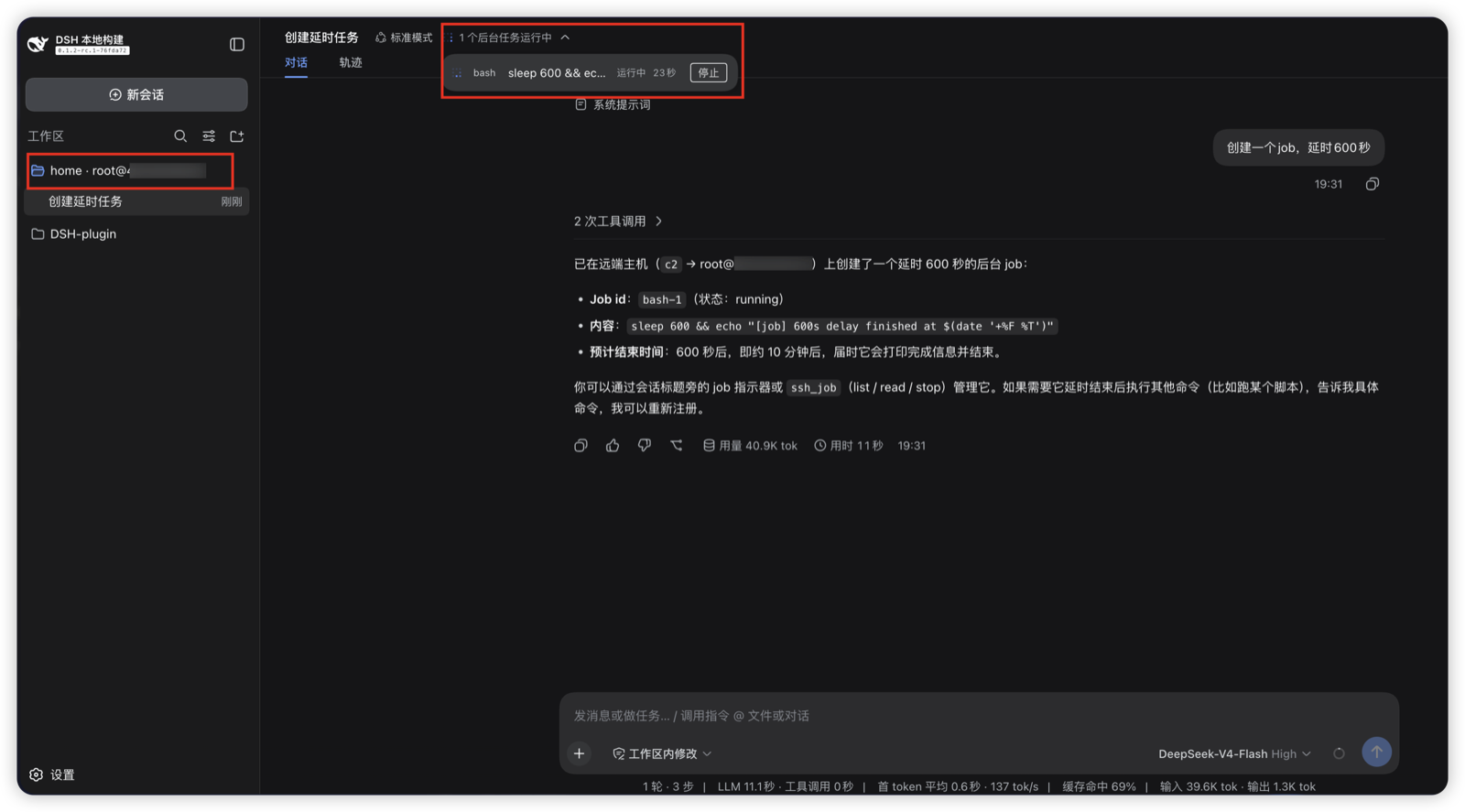
Two things visible in this screenshot are not part of the plugin — they come from harness patches that modify the DSH source tree. The plugin works without them (you simply lose the suffix and the Stop button). Both live in
harness-patches/; background in Issue #1.
| In the screenshot | Patch file | What the patch does |
|---|---|---|
The workspace title reads home · root@… (the host suffix) |
harness-patches/dsh-remote-ssh-route-labels.patch |
Makes workspace/session default titles route-aware, so same-named directories on different remote hosts read directory-name · <connection label | user@host>. Touches util/workspace-path, workspace/workspace, client/ui-workspace. |
The Stop button in the job list (1 background job running) |
harness-patches/dsh-remote-ssh-job-actions.patch |
Adds the browser-to-host stop path: a session.jobStop Remote plus a per-row Stop button in client/ui-jobs, so a background job can be killed from the session header (for remote jobs: a real process-group kill on the target). Touches api/session-controller, client/ui-jobs. |
⚠️ Patches are applied to a harness checkout with
git applyand re-verified on every DSH upgrade — they were already invalidated once by the 0.1.2 → 0.1.5 restructure. A build without them still routes sessions and runs remote commands; only these two UI affordances are missing.
Install
Prereqs: DSH (deepseek-harness) and Node ≥ 22 locally; an SSH account on the target with python3 and bash.
A. Official dsh plugin add (recommended — zero-flag startup)
⚠️ Do not run
dsh plugin add dsh-remote-ssh. That bare name resolves to the public npm registry, wheredsh-remote-sshbelongs to an unrelated project by a different author (Yan-Zero/dsh-remote-ssh) — it is not this plugin and does not carry the fixes or the 0.1.5 baseline below. Always install from this repository (git source).
The repository root IS the official bundle package (dsh.bundle.patch → the GUI user layer), applied at every boot:
dsh plugin --profile web add github:aijunjiang/dsh-remote-ssh
# or from a local checkout: dsh plugin --profile web add <this-repo-path>

pnpm dsh web          # no flags needed
pnpm installs the root package (internal
@deepseek-aideps ride the DSH baseline as optional peers; onlyssh2comes from npm) and auto-registers the bundle in the profile layer. Uninstall:dsh plugin --profile web remove dsh-remote-ssh.
First install: approve the ssh2 native build script (pnpm 11)
ssh2 (and cpu-features) ship native modules, and pnpm 11 blocks their build
scripts, so the first dsh plugin add fails with
ERR_PNPM_IGNORED_BUILDS: Ignored build scripts: cpu-features, ssh2 — that is
expected. Approve, then re-run:
# 1) approve the build scripts in the profile directory
#    (pnpm has already written placeholders into pnpm-workspace.yaml)
cd ~/.dsh/profiles/web
#    set these under allowBuilds in pnpm-workspace.yaml:
#      cpu-features: true
#      ssh2: true
pnpm install            # rebuilds ssh2

# 2) re-run add to finish registration
dsh plugin --profile web add github:aijunjiang/dsh-remote-ssh
If dsh plugin add reports ignored build scripts again, edit
~/.dsh/profiles/web/pnpm-workspace.yaml directly: set cpu-features and
ssh2 under allowBuilds to true, then pnpm install.
B. Local dev install script
git clone https://github.com/aijunjiang/dsh-remote-ssh && cd dsh-remote-ssh
node scripts/install.mjs        # links 4 packages + registers the GUI layer (idempotent)
# options: --home <dsh home> | --profile <name> (default web) | --remove
pnpm dsh web                    # zero flags
Startup modes:
# A. (default) SSH GUI user layer: connection manager + remote browser + agent
#    guidance/tools. Local fs/subprocess stays local.
pnpm dsh web

# B. Full remote workspace: move file IO AND command execution to the remote
#    (run on a dedicated instance, not your daily one)
export DSH_REMOTE_HOST=your-host
export DSH_REMOTE_USER=your-user
export DSH_REMOTE_PASSWORD=your-password      # first connect only; key auto-provisioned after
export DSH_REMOTE_CWD=/home/you/workspace
pnpm dsh web --patch <repo>/cordis.patch.yml
Quick start (GUI)
- Add a connection — sidebar → workspace panel → Add workspace → + → fill the new-connection form (host, account, auth, optional ProxyJump), Test it, then save (screenshots 1–3).
- Adopt a remote directory — open the saved connection, browse the remote tree, and pick the target directory as your workspace (screenshot 4).
- Start a routed session — a new session in that workspace runs on the remote host (screenshot 5). The host suffix on workspace titles and the in-session job indicator/Stop need the harness-fork patch (
harness-patches/README.md, Issue #1) — the screenshots above are from a patched build.
The session is now routed: its runtime context shows e.g.
This session's working directory is on SSH route
c1(dev@192.168.0.101:22); its remote absolute path is /home/dev/projects/project-alpha.
…followed by a usage guide (when to use ssh_exec, that mirrors are untrusted, that ssh_route_status is the recovery tool, output caps, …). Just say "check this device's hardware" — the agent runs ssh_exec on the remote host.
Same-named directories
Remote workspaces are unique by route + remote absolute path, so same-named directories on different devices/paths never collide. Workspace/session titles carry a human route suffix (connection label, else user@host):
project-alpha · dev@192.168.0.101      # on remote server 192.168.0.101
project-alpha · dev@192.168.0.102      # on another remote server
Give connections meaningful labels (e.g. dev-server) to control the suffix. The same rule applies to agents: the runtime context names the route and host directly, and ssh_route_status re-confirms it any time.
Built-in agent capabilities
ssh_exec— run one script on the session's route over the in-process ssh2/helper channel (no local ssh.exe, no quoting layers). Locale fixed to C; output capped at 256 KiB/stream with truncation marked; every result is verified against an end sentinel — a sentinel-verified empty output is genuinely empty, suspected lost output auto-retries once and reports loudly.ssh_route_status— route facts, known connections, manifest path;checkLive: trueprobes reachability.- Environment — routed shells carry
DSH_SSH_ROUTE_ID / HOST / USER / PORT / REMOTE_CWD / ENDPOINT. - Route manifest —
<dsh home>/dsh-ssh-routes.json, plain and secret-free, so "which host is c1" is answerable even offline. - Adaptive semantics — in full mode your read/write/glob/grep hit the remote; in GUI-only mode they stay local and the guide says so (remote reads via
cat/sed -n, never the local placeholder dirs).
Full mode (move the local world to the remote)
cordis.patch.yml is a one-way switch, not an overlay:
- turns off local
subprocess,fs-sandbox,sandbox, both sandboxed shells, the default directory chooser and permission presets; - mounts remote
fs-ssh/subprocess-ssh(incl. remoteshell) plus the routing GUI layer; - points
sandbox-policy.workspaceRootatDSH_REMOTE_CWD.
Environment:
| Variable | Meaning |
|---|---|
DSH_REMOTE_HOST |
target host (required) |
DSH_REMOTE_USER |
remote account (required) |
DSH_REMOTE_PASSWORD |
first connect only; a key is provisioned after |
DSH_REMOTE_PORT |
default 22 |
DSH_REMOTE_CWD |
remote working directory (default /root/workspace) |
DSH_REMOTE_RIPGREP |
optional absolute remote rg path (auto-discovered when unset) |
One directory, one source:
cwdandsandbox-policy.workspaceRootboth derive fromDSH_REMOTE_CWD, so files and commands always name the same world.
Security model (read this)
- The remote account's own permissions are the only fence. Full mode disables the local sandbox rows: whatever machine you hand files and commands to is a machine an agent operates as that account. Use a dedicated account, least privilege, rotated keys — or constrain reach via ProxyJump.
- Connection passwords/keys live only in
<dsh home>/dsh-ssh-connections.jsonand the identity dir; the route manifest contains no secrets. - GUI-only mode leaves the local file/command world untouched — start there before full mode.
Limitations (honest)
- GUI-only mode does not move fs/subprocess: files/commands stay local;
dsh-ssh-routes/...are placeholder dirs (the agent guide says so). - No PTY yet:
spawnTerminalis unavailable on remote connections (helper PTY subsurface pending); ordinary spawns are unaffected. ssh_execcalls are serialized per step; run multiple commands inside one call.- Remote
readhas no line numbers; window big files withsed -n. - Remote execution needs the Python helper on the target (auto-deployed to the account home on first use).
Repository layout
package.json               # official root bundle package (dsh.bundle.patch → bundle.gui.patch.yml)
bundle.gui.patch.yml       # official GUI user layer (auto-applied by dsh plugin add)
src/index.ts               # official root entry (re-exports the ssh-gui plugin surface)
lib/client.js              # official root client bundle (id dsh-remote-ssh)
cordis.patch.yml           # full-mode composition (one-world switch + remote rows)
harness-patches/           # harness-fork patch + apply/rebuild README (Issue #1)
packages/
  ssh/                     # connection owner: auth ladder, key provisioning, helper channel & protocol
  fs-ssh/                  # ctx.fs → remote filesystem (single-trip listings, capped reads, CAS writes)
  subprocess-ssh/          # ctx.subprocess → remote processes (real pid/pgid, tree-scoped kill, target-side spills)
  remote-argv/             # remote rg/grep argv translation
  ssh-gui/                 # GUI: registry / /dsh-ssh RPC / sidebar / React bundle + agent experience
scripts/
  install.mjs              # local dev install (links + profile auto-register; --remove)
  build-gui-client.mjs     # rebuild client bundles (dev id dsh-ssh-gui / official id dsh-remote-ssh)
  test.mjs                 # all local tests: node scripts/test.mjs
specs/ DESIGN.md           # contracts, audits, design rationale
Development, tests, bundle building and design rationale: DESIGN.md; upstream-fork differences: specs/upstream-dsh-ssh-audit.md. Sidebar & browser are a fork of UynajGI/dsh-ssh (MIT). The same-name-title harness patch: harness-patches/ / Issue #1.
No comments yet. Be the first to write one.