dsh-remote
SSH remote-server operations for DeepSeek Harness (DSH).
dsh-remote lets the agent in your DSH session actually operate remote servers:
list the hosts you already configured in ~/.ssh/config, probe a box, run
non-interactive commands, read and edit remote files over SFTP, and move files
between the session workspace and a server — with a Crescent-style static
command-risk review in front of every mutating action and the DSH approval
dialog as the human gate.
It is inspired by the Crescent operations workbench: the same idea that the agent should gather evidence on the real host, one bounded action at a time, with risky commands reviewed before execution.
Features
- Hosts you already have — discovers every concrete
Hostin~/.ssh/config(includingIncludes) and merges a configurable host list; the model refers to hosts by name, exactly likessh <name>. - Remote exec — one-shot, non-interactive commands with working directory,
timeout, bounded output, and a clear
[exit code: N]result line. - Remote files over SFTP — read (line-numbered, paginated), list, write (atomic temp + rename), exact-string edit, and upload/download transfers.
- Persistent remote shells — open an interactive PTY shell on a host and
keep using it across tool calls (
remote_shell_*): send input, read scrollback, interrupt with signals, close. Every submitted line is risk-reviewed likeremote_exec. - Live terminal mirror — a Remote Terminal tab in the conversation's right sidebar shows every remote command the agent runs as it runs, with streamed stdout/stderr and status lines. It opens automatically on the first command (or from the sidebar's Start page). See Live terminal.
- Non-mutating commands never ask — under the default policy only commands
the static classifier proves mutating need approval; read-only and
unprovable-but-non-mutating commands (e.g.
curl,awk,python -c) run directly, whilepolicy: never, read-only hosts,denyCommandPatternsand the approval seam keep their stricter behaviour. - Remote Ops management page — a first-level panel in the DSH Web GUI with the discovered host inventory (per-row read-only connection test), live remote shell sessions (scrollback preview + close), and a persisted audit trail of recent remote operations. See Management page.
- Command risk review — a port of Crescent's static classifier separates
statically read-only commands (
low) from clearly mutating ones (high) and unknown ones (gray); it understands shell lists, wrappers (sudo,env,nohup,time,xargs),sh -c/ssh/kubectl execinner commands,find -delete,sed -i,yq -i,docker/kubectl/systemctlsubcommands, and quoting. - Approval policy —
auto(read-only runs, mutations ask),always, ornever(fail-closed headless stance). Denials, cancelled prompts, and a missing answerer all fail closed. - Hard limits — per-host read-only lock, host allowlist, command deny patterns, output caps, transfer caps, and TOFU host-key verification.
Requirements
- DSH
>= 0.2.1-rc.5(bundled in the Desktop app and thedshCLI). - Node.js
^22.19.0 || >=24.0.0(already bundled with DSH). - SSH access to the target hosts: key files,
ssh-agent, or a password supplied through an environment variable.~/.ssh/configsettings (HostName,User,Port,IdentityFile,ProxyJump) are honored.
Install
From a local tarball (recommended for this checkout)
cd /Users/hubiao/aide-family/dsh-remote
npm install                       # once: ssh2 + test devDependencies
npm run install:profile           # packs dist/dsh-remote-<version>.tgz and installs
                                  # it into the "desktop" profile
Or do the steps manually and choose another profile:
npm run pack:plugin
dsh plugin --profile desktop add file:$PWD/dist/dsh-remote-0.4.0.tgz --ignore-scripts
Then fully quit and reopen the DSH Desktop app (a newly installed bundle is loaded on the next boot), or boot the CLI profile you installed into.
--ignore-scriptsis required with pnpm 11. pnpm refuses to install packages that declare unapproved install scripts, andssh2declares an install script for its optional native cipher-speed addon (cpu-features). ssh2's pure-JavaScript implementation is fully functional without it, so skipping the scripts is safe and avoids needing a C toolchain. (Alternatively, addallowBuilds: [ssh2, cpu-features]to the profile'spnpm-workspace.yamland install without the flag; that does require a working compiler setup.)Do not install a development checkout with
link:. DSH routes@deepseek-ai/*imports only for packages that physically live inside the profile'snode_modules; a symlink to a directory outside the profile cannot resolve them and the plugin fails to load. Use the tarball (file:…tgz) for local installs, or the npm package when published.
From npm (when published)
dsh plugin --profile desktop add dsh-remote --ignore-scripts
Where it lands
The plugin is a DSH bundle: installing it adds the dsh-remote package and a
dsh-remote row to the profile. To remove it:
dsh plugin --profile desktop remove dsh-remote
Configure
All settings live on the plugin's row in the profile patch. The desktop profile
patch is ~/.dsh/profiles/desktop/cordis.patch.yml; a --patch overlay works
too (useful for headless and CI):
- id: dsh-remote
  config:
    # Hosts not present in ~/.ssh/config. Never put secrets here — only the NAME
    # of an environment variable that holds the secret.
    hosts:
      - name: prod-web-1
        host: 10.0.0.11
        port: 22
        username: ops
        identityFile: ~/.ssh/prod_ed25519
        tags: [prod, web]
        description: primary web node
      - name: legacy-db
        host: 10.0.0.31
        username: dba
        passwordEnv: LEGACY_DB_SSH_PASSWORD   # exported in the DSH environment
    policy: auto                 # auto | always | never
    readonlyHosts: ["prod-*"]    # every mutating action on these is denied
    allowHosts: []               # empty = all; otherwise only matching hosts usable
    denyCommandPatterns: ["\\b(shutdown|reboot|mkfs)\\b"]
    connectTimeoutMs: 20000
    execTimeoutMs: 120000
    maxOutputBytes: 200000
    maxReadBytes: 800000
    maxTransferBytes: 52428800
    knownHostsPolicy: tofu       # tofu | strict | insecure
    unprovenCommands: allow      # allow (only provably mutating asks) | ask
    liveTerminal: true           # right-sidebar live terminal + /dsh-remote/live
    autoOpenLiveTerminal: true
Hosts from ~/.ssh/config need no configuration at all. If ~/.ssh/config
contains Host prod-* patterns, those wildcard entries are skipped (a pattern
is not a concrete target); add a concrete host block or a hosts: entry.
Authentication
The transport tries, in order, and uses the first that applies:
passwordEnv— password auth; the env var is read at connect time.identityFile— public-key auth (from plugin config or~/.ssh/config), with an optional passphrase frompassphraseEnv.ssh-agent(SSH_AUTH_SOCK).- Default keys:
~/.ssh/id_ed25519,~/.ssh/id_ecdsa,~/.ssh/id_rsa.
Secrets are never read from YAML, never logged, and never included in tool results or approval prompts.
Host keys
knownHostsPolicy controls verification against
$DSH_HOME/remote/known-hosts.json:
tofu(default) — trust and remember a host's key on first use; reject a changed key.strict— only previously remembered hosts connect.insecure— accept any key (the result carries a warning; not for production).
Tools
| Tool | Read-only | Purpose |
|---|---|---|
remote_hosts |
yes | List usable hosts, auth hints, and policy flags. |
remote_probe |
yes | Connect and report hostname, OS/kernel, uptime, load, memory, disk, and latency. |
remote_exec |
per classifier | Run one non-interactive command with optional workdir and timeout; only provably mutating commands ask for approval. |
remote_read |
yes | Read a remote text file with line numbers, offset/limit, and a continue hint. |
remote_list |
yes | List a remote directory with type/size/mtime/mode. |
remote_write |
no | Write a remote file atomically, creating missing directories. |
remote_edit |
no | Replace one exact string in a remote file (or all with replace_all). |
remote_transfer |
no | Upload/download between the session workspace and the host. |
remote_shell_open |
no | Open a persistent interactive PTY shell on a host. |
remote_shell_send |
per line | Write input (Enter submitted by default) and wait for output silence/timeout/exit. |
remote_shell_read |
yes | Read a bounded scrollback page (newest-relative). |
remote_shell_signal |
yes | Deliver SIGINT/SIGTERM/SIGKILL/SIGTSTP/SIGHUP to the foreground process group. |
remote_shell_close |
no | Close a session and wait for its process tree to end. |
remote_shell_list |
yes | List this agent's live shell sessions. |
Typical agent loop:
remote_hosts→ choose the host name.remote_probe→ confirm reachability and rough state.remote_execread-only checks (systemctl status,df -h,kubectl get pods) → they run without asking.- Mutating step (
systemctl restart nginx,rm …,remote_write,remote_edit) → command review + approval prompt, then execution. remote_readthe log/config to verify.
Persistent remote shells
remote_exec is deliberately one-shot. For work that needs shell state across
calls — a REPL, an interactive prompt, a long-lived cd, environment variables,
or a running command you want to interrupt — open a PTY session instead:
remote_shell_open  { host: "me" }                       -> sessionId + shell motd
remote_shell_send  { sessionId, text: "cd /var/log" }   -> output delta
remote_shell_send  { sessionId, text: "tail -n 20 syslog" }
remote_shell_read  { sessionId, offset: 0, count: 200 } -> scrollback page
remote_shell_signal{ sessionId, signal: "SIGINT" }      -> interrupt a command
remote_shell_close { sessionId }
How a send settles: output silence (inferred_idle), the send timeout
(timeout), or the shell exiting (session_exit). inferred_idle and timeout
never prove the foreground command exited — read again or check with
remote_shell_read. Only one send may be active per session, and sessions are
owned by the agent that opened them.
Safety: every submitted line is classified exactly like remote_exec — read-only
lines run, mutating/unknown lines need approval, policy: never and read-only
hosts deny mutating input. submit: false raw control input is not classified
(it does not execute a line by itself); signals are mutating actions.
Limits: output is ANSI-sanitized line text, so full-screen TUIs (vim, top,
less) are not usable — run non-interactive commands instead, and put
long-running work in nohup … > log 2>&1 & then check it with remote_read.
Sessions are process-local and end when the harness restarts.
Configure with:
- id: dsh-remote
  config:
    terminalEnabled: true          # register remote_shell_* (default true)
    terminalRows: 40
    terminalCols: 120
    terminalIdleSilenceMs: 800     # silence that settles a send
    terminalTimeoutMs: 30000       # absolute bound on one send
    terminalStartupTimeoutMs: 15000
    terminalScrollbackLines: 2000
    terminalScrollbackBytes: 2000000
    terminalMaxReadBytes: 262144
Live terminal in the DSH sidebar (watch and type yourself)
The agent-side shell above shows each send's output in its tool card. If you
want a real xterm pane that you can watch and type in yourself, point DSH's
right-sidebar terminal at the bundled host picker (it reads the same
~/.ssh/config hosts):
# ~/.dsh/profiles/desktop/cordis.patch.yml
- id: terminal-controller
  config:
    shell:
      path: /Users/hubiao/aide-family/dsh-remote/scripts/dsh-remote-shell
      name: Remote SSH
      args: []
Then use New terminal in the right sidebar and pick a host. The picker also
accepts a host directly (dsh-remote-shell me) or --list. This pane is an
ordinary ssh -t session and is independent of the agent's sessions.
Live terminal (right sidebar)
Every remote_exec command and submitted remote_shell_send line is mirrored
into a right-sidebar tab, so you watch the real execution instead of only the
final tool card:
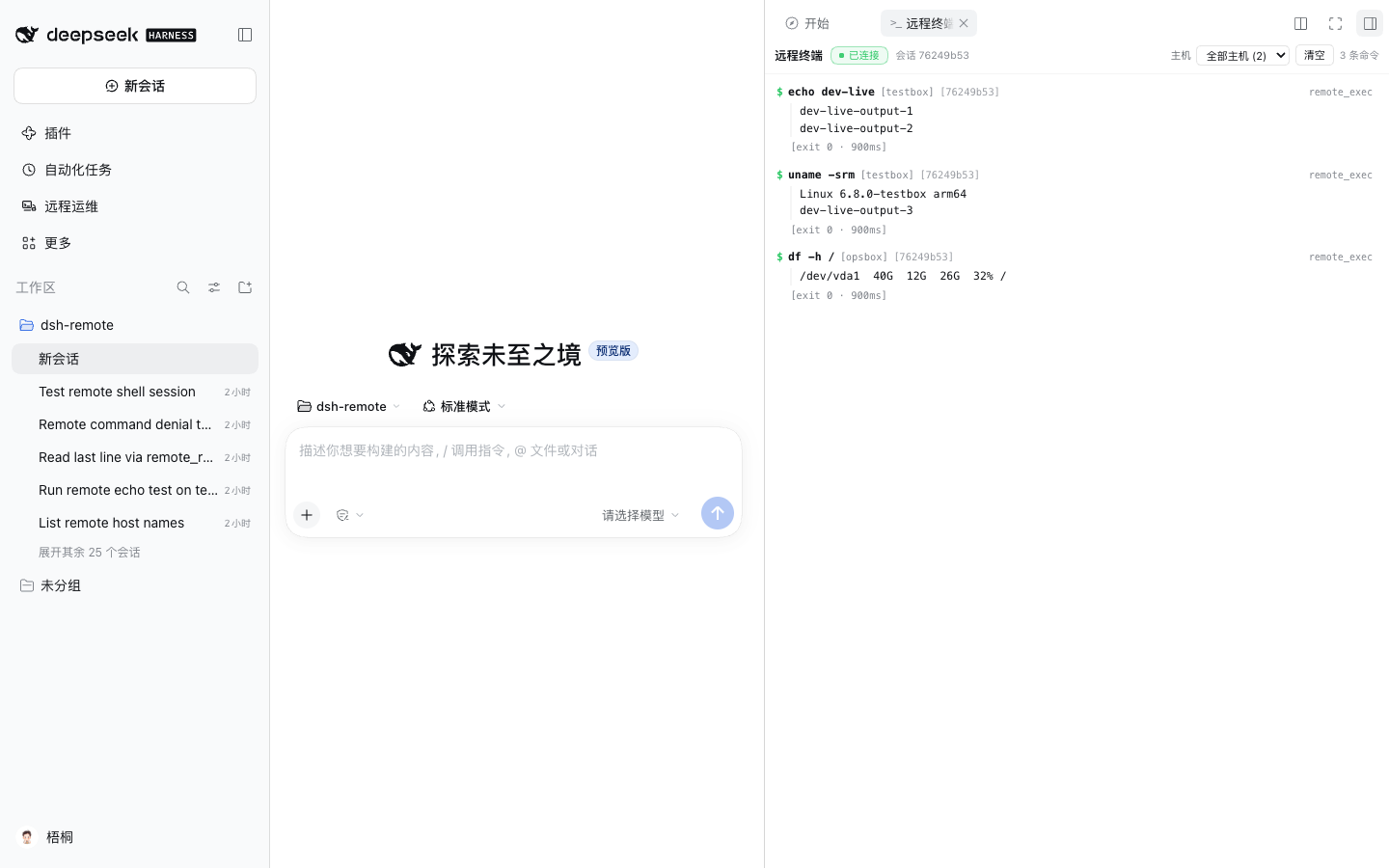
- Opens automatically on the first remote command of the session (the right-sidebar column expands), and is also available from the right sidebar's Start page as a 远程终端 entry.
- Streams in real time: a prompt line (
$ command, host, session), the command's stdout/stderr chunks as they arrive, and a status line ([exit 0 · 812ms]/[error: …]/[running]). Denied commands appear too, so you see exactly what the agent attempted. - Bounded and private: the stream is served from the running Host over a
fenced same-origin SSE route (
/dsh-remote/live); the Host keeps a bounded replay buffer (last 200 commands, 64 KiB per command, 1 MiB total) so a late panel still shows recent activity. Nothing is written to disk for the stream. - Controls: connection state, per-host filter, local clear, auto-scroll (unless you scrolled up), automatic reconnect.
- id: dsh-remote
  config:
    liveTerminal: true            # serve /dsh-remote/live + register the tab
    autoOpenLiveTerminal: true    # auto-open on the first command
Approval policy (default auto): only provably mutating commands ask. Set
unprovenCommands: "ask" to require approval for commands the classifier cannot
prove read-only (unknown binaries, curl, awk, …), or keep the strict
policy: never for unattended runs (mutating and unproven commands are denied,
read-only commands run).
Management page (Remote Ops / 远程运维)
The plugin registers a first-level sidebar panel in the DSH Web/Desktop GUI:
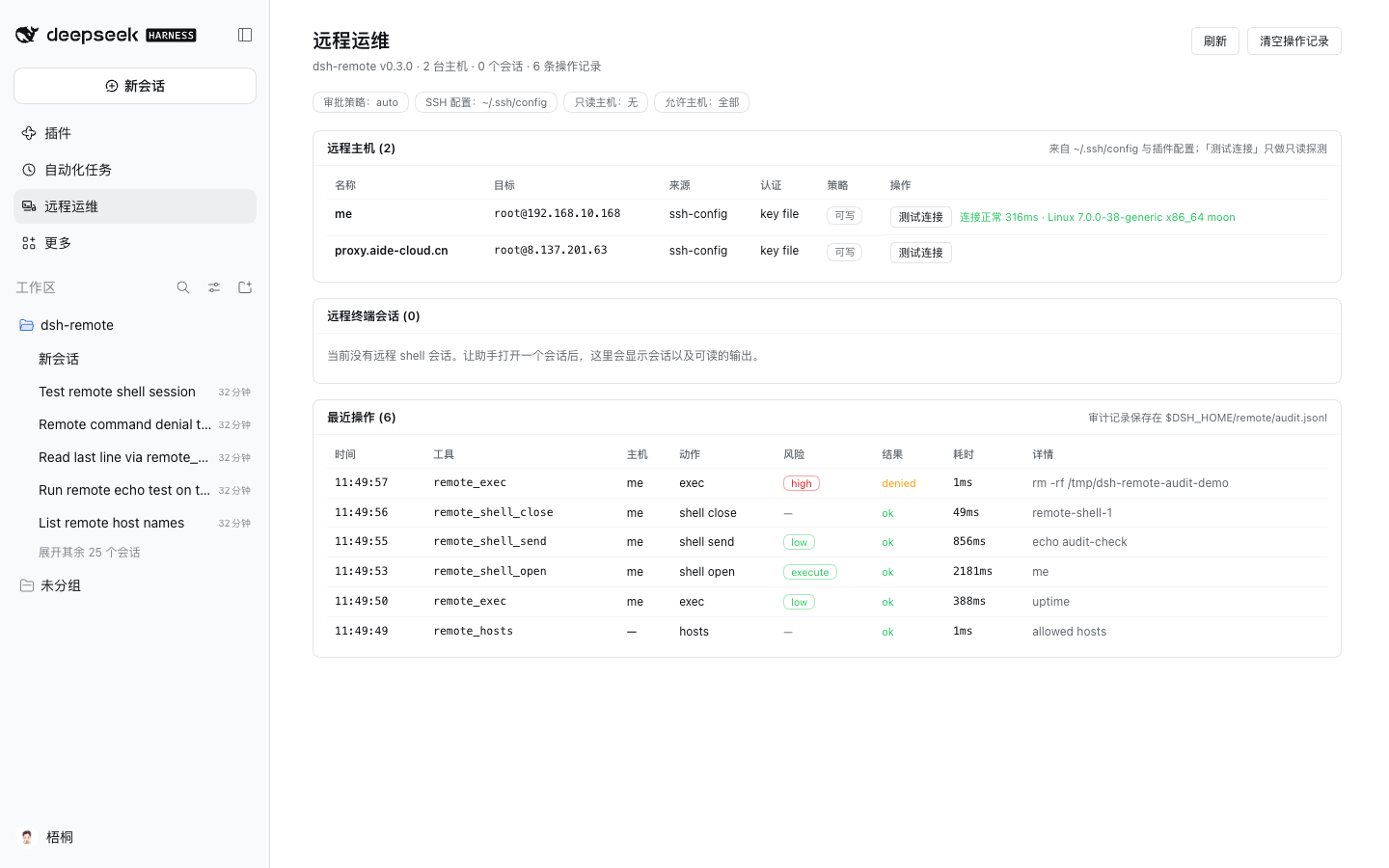
| Section | What you get |
|---|---|
| Remote hosts | Every discovered host (source, user@host:port, auth hint, readonly / allowHosts policy) with a per-row 测试连接 / Test connection that runs one read-only probe (connect + uname -srm; hostname) and shows latency and output inline. |
| Remote shell sessions | Live remote_shell_* sessions for every agent (session id, host, status) with a bounded scrollback preview and a 结束会话 / Close action. |
| Recent operations | The audit trail of model-facing remote calls: time, tool, host, action, risk level (low/gray/high/write), outcome (ok / denied / error), duration, and the command/path. |
The page polls the Host every 10 seconds and has manual refresh and audit-clear
buttons. It is backed by a small same-origin JSON API at /dsh-remote/api
(overview, host.test, session.read, session.close, audit.clear) that is
mounted only when a web server exists and is fenced by the same Host/Origin +
browser-cookie check DSH's own /api uses. The audit trail is also appended to
$DSH_HOME/remote/audit.jsonl (bounded tail reloaded on startup), so it
survives a restart.
Disable the HTTP API/page backend with managementApi: false in the plugin
config if you do not want the route registered.
Safety model
- Static review before approval. Every
remote_execcommand is classified by the ported Crescent classifier. Underpolicy: autoonlyhigh(provably mutating) commands need approval;lowandgray(unproven) run directly, with the live terminal and audit trail recording them.unprovenCommands: askrestores approval for the unproven class, andremote_write/remote_edit/remote_transferalways need approval. - Fail closed. No approval answerer mounted, a cancelled prompt, a rejected prompt, or an approval-service failure all deny the action.
policy: neveris the headless/unattended stance: statically read-only actions work; mutating and unproven actions are denied with an explanation.- Host-level guards.
readonlyHostsdenies every mutating action on matching hosts in every policy mode;allowHosts(non-empty) hides and rejects everything else;denyCommandPatternsalways denies a matching command. - Bounded everything. Exec output is capped (tail kept, marker added), reads are paginated, transfers are capped, and connections/commands time out.
- Workspace-scoped transfers. Local transfer paths resolve against the
session working directory and must stay inside it unless
allowLocalOutsideWorkspace: true.
Development
npm install                       # ssh2 + test devDependencies
npm test                          # unit + integration tests (no real servers)
npm run e2e                       # real DSH headless run against a fixture SSH server
npm run dev:profile               # create the isolated DSH dev profile
npm run dev:sync                  # copy lib/ into the dev profile's node_modules
The integration and e2e suites run a real SSH server fixture
(test/fixtures/ssh-server.mjs, built on ssh2's server) on 127.0.0.1, so no
external host, key, or network access is required.
The e2e suite uses an isolated DSH_HOME (./.dsh-test), a remotedev profile
created from the shipped headless template, and the credentials already saved by
the desktop app (symlinked, never copied). It asserts the real harness loads the
plugin, registers the tools, and executes read-only remote actions; mutating
actions are asserted to fail closed in headless mode.
Known limitations
- No persistent remote shell.
remote_execis one-shot (no PTY): each call is a fresh shell. Long-running processes must be started detached (nohup … &); interactive programs (vim, top) are not supported. remote_readpages withinmaxReadBytes. Lineoffset/limitwork on the file window returned by one read; a file larger thanmaxReadBytescannot be paged past that window. Useremote_execwithtail -n/grep/sed -norremote_transferfor very large files.- Workspace containment is lexical. Transfer local paths are checked
lexically against the session working directory (no symlink resolution);
keep
allowLocalOutsideWorkspace: falseunless you need otherwise. - Host management is declarative. Hosts come from
~/.ssh/configand the plugin config (profile patch YAML); there is no dedicated GUI host manager. - One connection per host. Operations for one host are serialized through a single pooled SSH connection (plus ProxyJump hops), so concurrent calls to the same host queue rather than open many sessions.
- No full-screen TUI in agent shells.
remote_shell_*output is line-sanitized, sovim/top/lessare not usable from the agent; use non-interactive commands. The user sidebar terminal (above) is a real xterm. - Shell sessions and the live stream are process-local. The terminal mirror retains a bounded in-memory buffer only; a harness restart clears it (the audit trail persists).
- The live mirror shows
remote_execand shell sends, not file reads/writes (those keep their tool cards) and not commands run outside the plugin. - One send at a time per remote shell, bounded by
terminalTimeoutMs. - The management page needs the Web/Desktop surface. Headless CLI runs have no HTTP server, so the API and page are not mounted there (tools still work).
- Session list is process-local. The page shows sessions of the running harness process; the audit trail is persisted, sessions are not.
- No port forwarding / tunnels. The plugin runs commands and file transfers;
ssh -L-style forwarding is out of scope.
Layout
lib/
  index.js        plugin entry (apply, Config, prompt section, wiring)
  client.js       browser half: sidebar "Remote Ops" panel + page
  api.js          Host JSON API behind the management page (fenced)
  audit.js        bounded audit trail (memory ring + JSONL persistence)
  live.js         live command hub for the right-sidebar terminal
  live-stream.js  fenced SSE transport (/dsh-remote/live)
  tools.js        8 defineTool definitions
  render.js       canonical value -> model text
  approval.js     policy + risk review + DSH approval seam
  host-store.js   cached host discovery/resolution
  config.js       Schemastery Config + normalizeConfig
  hosts.js        ~/.ssh/config + config hosts merge/resolve
  ssh-config.js   ~/.ssh/config parser (Include, ProxyJump, …)
  policy/         ported Crescent static command-risk classifier
  ssh/            ssh2 pool, auth, exec, SFTP, known hosts
test/
  unit/           pure-module tests
  integration/    fake-ctx plugin tests + fixture SSH server
  fixtures/       ssh-server.mjs
scripts/          dev-profile, sync-profile, e2e, dev-web (browser loop), packaging
Attribution: the command-risk classifier in lib/policy/ is ported from the
Crescent project (aide-family/Crescent, src/shared/command-guard.ts,
src/shared/shell-command.ts, src/shared/command-policy/).
Verification
npm test        # 582 tests: unit + real-fixture integration (no external servers)
npm run e2e     # real DSH headless run against a fixture SSH server
The e2e suite proves the model actually calls the tools through the DSH pipeline,
that read-only remote actions work, that mutating actions fail closed in headless
mode, that a persistent PTY shell opens, echoes a command, and closes cleanly,
and that an unproven (gray) command now runs without approval. The management page is verified in a real browser against an isolated
DSH Web profile (npm run dev:web boots it, drives it with headless Chrome, and
writes a screenshot); the checked-in screenshot above was produced that way,
including a live "test connection" against a real SSH host. The live terminal is
verified the same way with --emit-live: guide entry, auto-open, streamed
commands/output, session and host filters, scrolling and Clear, with zero browser
console errors. A packaged tarball
install is verified separately:
npm run pack:plugin
dsh plugin --profile <test-profile> add file:$PWD/dist/dsh-remote-<version>.tgz --ignore-scripts
E2E_SKIP_SYNC=1 DSH_TEST_PROFILE=<test-profile> node scripts/e2e.mjs
Troubleshooting
| Symptom | Cause / fix |
|---|---|
Cannot find package '@deepseek-ai/dsh-tools' |
The plugin was installed with a symlink (link:) outside the profile. Reinstall from a tarball/npm so it lives under <profile>/node_modules. |
denied because no approval answerer is mounted |
Headless or unattended run; use policy: never for read-only automation, or run the interactive Web/Desktop surface for mutating work. |
HOST_KEY / changed host key |
A previous key is remembered in $DSH_HOME/remote/known-hosts.json; verify the server key and remove the stale entry (or switch knownHostsPolicy). |
AUTH failure |
Check ssh -v <host> works with the same user/key; verify identityFile, SSH_AUTH_SOCK, or the passwordEnv variable is visible to the DSH process (the app may not inherit your shell's exports). |
Host missing from remote_hosts |
Wildcard-only Host blocks and hostname-less entries are skipped; add a concrete host block or a hosts: config entry. |
License
MIT. See LICENSE.
No comments yet. Be the first to write one.