Drafi

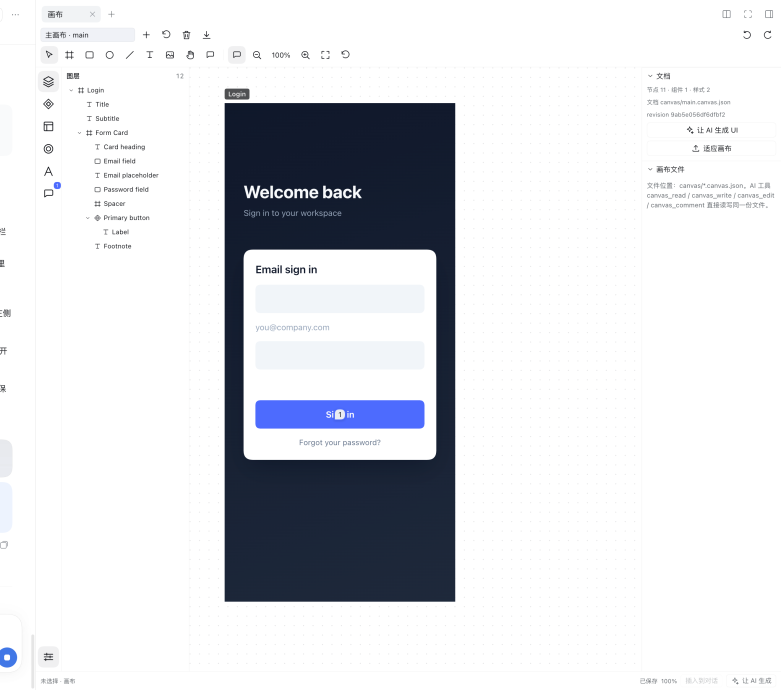
An AI-native design canvas inside DeepSeek Harness. Design UI mockups in the right sidebar, send the current selection into the chat composer with one click, and let the agent generate or edit the design through an open JSON file.
The package name is @local/dsh-canvas; installation paths, dsh-canvas:// links,
and the dsh.canvas@1 document format retain their technical identifiers.
right Sidebar guide card "Drafi" → Drafi tab
The composer toolbar carries no Drafi button; the right sidebar is the only entry point. Inserting a selection still adds a locate chip above the composer.
What it does
- Infinite canvas with pan/zoom, frames, rectangles, ellipses, lines, text and image fills; multi-select, move/resize/rotate, layers, properties, smart snapping, alignment, grouping, copy/paste, z-order and undo/redo.
- Top-level Frame names sit above their frames like Figma labels and are always visible; clicking a label selects its frame.
- Two drawer buttons fold the side panels: the left one sits at the top of the icon rail and folds the layers/components panel away (remembering the last opened tab), the right one sits at the far right of the tool row and folds the inspector. Rail buttons keep working as before.
- Right-click the canvas for a context menu: copy/cut/paste/duplicate/delete, insert selection into the chat composer, copy the rendered selection as an image, export PNG/SVG or a Drafi pack, group/ungroup, z-order, lock/unlock, show/hide, create component, fit, select all.
- Export opens a dialog with image formats and the portable Drafi pack; rename and create dialogs are modal.
- The layer tree starts collapsed; right-click a layer for rename, reveal, copy/cut/paste/duplicate/delete, group/ungroup, z-order, lock/hide and component actions. Row action icons are larger and appear on hover/selection.
- Auto-layout frames (horizontal/vertical, gap, padding, alignment, fixed/hug/fill child sizing, nested layouts, text auto-height).
- Components and variants: create a component from a selection, insert instances, override text/fills/visibility, swap variants/components, edit the main component, detach instances.
- A local style library for fill/text/effect styles, with live propagation and detach.
- Multiple fills (solid, linear/radial gradient, image), drop/inner shadows, layer blur and background blur.
- Upload your own fonts (woff2/woff/ttf/otf); they are registered with
@font-face, used by the text tool and embedded into exports. - Non-destructive image cropping.
- Single-user threaded comments pinned to a node or a page position; the agent
can read and reply through
canvas_comment. - SVG and PNG export (selection, frame or the whole page) through a save dialog: the browser picker chooses the destination, with a download fallback. The UI no longer writes files into the workspace or into the composer.
- Built-in iOS mobile page templates (iPhone 16 393×852 by default, iPhone 15
390×844 optional): Settings, Form, List and Detail screens; plus standard
status bar (dark/light icons), navigation bar and tab bar. Insert them from the
Templates panel or with the
canvas_templatetool. canvas-ui-designruntime skill: adapted from the user's BD Flutter Dev UI design skill suite (source/adaptation notes: SOURCE.md). It drives direct page/component generation, reference rebuilds, refactor, design review and handoff on the canvas.- A deterministic
canvas_audittool for screenshot-boundary, contrast, touch-target, clipping, missing-reference and empty-frame checks, with explicit skipped checks. - Image generation capability chain: GPT models use native image generation;
otherwise a local Codex CLI with
image_generationis used; otherwise the user imports images.canvas_image probe/generate/importexposes this. - Device selection lives in the Templates panel; AI UI generation, image generation and design audit are driven from chat/tools, and export stays in the top toolbar.
- A collapsible「代码」section in the inspector shows the selected layer's resolved CSS (layout, fills/gradients, radius, border, shadows, typography) with one-click copy; this is CSS handoff, separate from local style reuse.
- A built-in default design system: Material Design 3 tokens for general UI and
Apple HIG metrics/colors for iOS. If the user does not name a system, the
agent follows these defaults (documented in
canvas/DESIGN.md). - Agent tools:
canvas_read,canvas_write,canvas_edit,canvas_comment,canvas_template,canvas_audit,canvas_image,canvas_export,canvas_import,canvas_migrate,canvas_snapshot. canvas_readtakesquery(match id/name/text and return matches with their ancestor path),fields(only the outline sections you need),depthandchildrenLimit. Tool output is compact JSON, so a read costs far less context than the pretty-printed form.canvas_snapshotrenders the open canvas tab and saves a PNG undercanvas/exports/, so the agent can read the image instead of guessing visual results. It requires an open canvas tab; without one the tool explains why.- Portable packs: the agent tool
canvas_exportwrites<name>.drafi.jsonundercanvas/exports/; the toolbar export dialog downloads the same pack file through the save picker.canvas_importrestores a pack as a document plus assets. canvas_migrateupgrades a stored document to the current format version and reports what changed.pathvector nodes: SVG pathd, viewBox, fill/stroke, solid/gradient paints and SVG export; basic SVG path import via the toolbar. No pen/anchors.- TypeScript source layout under
src/{shared,host,client}with generatedclient/client.jsanddist/host/main.js. Agent writes appear in an open canvas within a second (SSE, with a polling fallback). The user's current selection is part ofcanvas_readoutput. - After a selection is inserted, a compact「在画布中定位:Title」chip appears above the composer; clicking it opens/focuses the canvas at that node. This is the stable composer-area shortcut (the draft itself still receives plain text). The top toolbar no longer duplicates the insert/AI actions; the status bar is the single insertion point.
- Selection insertion now carries a single canvas link:
[画布选区:Title](dsh-canvas://main?node=title). Node details are no longer duplicated into the draft; the agent reads them withcanvas_read. In the composer it is markdown text; after sending, the chat replaces it with a clickable canvas chip that opens/focuses the canvas tab, loads that document, selects the node and zooms to it. - The editor workspace uses the Figma default: a neutral, lightly dotted
infinite canvas. v1 is single-page; the page list in the format is kept for
forward compatibility but page management and page background are hidden. A
document is simply one canvas; no "Page 1" entry or page background control
is shown. Editor chrome uses the DeepSeek blue accent (
#4D6BFE) with larger, rounder icon buttons; generated iOS templates keep Apple HIG blue.
Design system and templates
Large-company systems worth knowing: Material Design 3 (Google), Apple Human Interface Guidelines, Fluent 2 (Microsoft), Carbon (IBM), Spectrum (Adobe), Lightning (Salesforce), Polaris (Shopify), Primer (GitHub), Atlassian Design System, Base Web (Uber), and Ant Design / Arco / Semi / TDesign in Chinese products.
Material Design 3 is the most universal cross-platform default. For iOS the platform baseline is Apple HIG. The plugin picks Material 3 when no system is named, and the iOS templates use HIG metrics.
- Templates panel (left rail → 模板): insert Settings / Form / List / Detail pages and the standard status/nav/tab bars.
- Foundation:
canvas_template action="foundation"returns device (iPhone 16 default / iPhone 15 legacy), Neutral/Minimal/Soft/Compact preset and resolved tokens. - Agent:
canvas_template { action: "list" | "insert", template: "ios-screen" }. - Load the system as a Figma-like local style library: Styles panel → 「内置规范」→
Material 3 / iOS HIG, or
canvas_template { action: "styles", system: "material3" | "ios" }. The fill/text/effect styles then appear in the Styles panel and can be applied to layers; loading does not restyle existing layers automatically. - Token and template details: DESIGN.md.
Figma-style shortcuts
V/F/R/O/L/T/H/C/I— move/frame/rectangle/ellipse/line/text/hand/comment/imageSpacedrag — pan; mouse wheel — zoom;1fit;2fit selectionShift+1/Shift+2/Shift+0— fit / fit selection / 100%⌘/Ctrl+C/X/V/D— copy/cut/paste/duplicate;⌘/Ctrl+G/⇧⌘G— group/ungroup⌘/Ctrl+]/[— forward/backward;⇧⌘]/⇧⌘[— front/back⌥/Alt+ hover — measure spacing to adjacent elements; release to clearShift+A— add auto layout to selected frame/group⌥⌘K/Ctrl+Alt+K— create component from selection⇧⌘L/⇧⌘H— lock/unlock or hide/show selection⌘/Ctrl+Z/⇧⌘Z— undo/redo;Delete— delete; arrows — nudge (Shift = 10)
The document lives in the workspace
<workspace>/canvas/<name>.canvas.json   dsh.canvas@1 document (default `main`)
<workspace>/canvas/assets/              image assets
<workspace>/canvas/fonts/               uploaded font files
<workspace>/canvas/exports/             agent exports and snapshots
<workspace>/canvas/FORMAT.md            format reference (generated on first open)
<workspace>/canvas/DESIGN.md            default design system and templates
The format is plain JSON and is documented in FORMAT.md and
schema/canvas.v1.schema.json. The agent can edit
it through the canvas tools, or with ordinary read/write file tools; the
editor watches the file and reloads external changes.
Install
Repository: https://github.com/aiShuiJiaoDeXioShou/dsh-canvas
git clone https://github.com/aiShuiJiaoDeXioShou/dsh-canvas.git
cd dsh-canvas
pnpm install
pnpm typecheck
pnpm build
pnpm test
Then install the bundle in the current profile:
plugin_manager action=install_bundle target=/absolute/path/to/dsh-canvas
client/client.js and dist/host/main.js are committed so a checkout can be
installed directly; run pnpm build after source changes. Refresh the Harness
page (or toggle the plugin) to load a rebuilt client bundle. Host code reloads
on plugin disable/enable.
License
MIT; see LICENSE.
Development
pnpm typecheck        # TypeScript checks
pnpm build            # esbuild → client/client.js + dist/host/main.js
pnpm test             # tsx --test tests/*.test.ts
| Path | Role |
|---|---|
index.js |
thin Host entry, cache-busted import of dist/host/main.js |
src/shared/format.ts |
document model, normalization and validation |
src/shared/ops.ts |
document mutations shared by tools and UI |
src/host/main.ts |
Host routes, SSE, file store, assets/fonts, agent tools |
src/host/skills.ts |
Registers the runtime canvas-ui-design skill |
src/shared/design-system.ts |
Material 3 / iOS HIG tokens and the default-system summary |
src/shared/foundation.ts |
iPhone device metrics + Neutral/Minimal/Soft/Compact presets |
src/shared/templates.ts |
Device-aware iOS page/system templates and placement metadata |
src/shared/audit.ts |
Deterministic design audit checks |
src/host/image.ts |
GPT/Codex image capability probe, Codex CLI adapter and image import |
skills/canvas-ui-design/ |
Adapted UI design skill, workflows and references |
src/client/index.jsx |
placement in the right sidebar (with inline-dock fallback) |
src/client/store.js |
the canvas tab's mutable store, history, autosave, AI sync |
src/client/editor/ |
resolve/layout, hit testing, geometry, text measure, export |
src/client/ui/ |
toolbar, layer tree, inspector, panels |
The client bundle has no runtime npm dependencies; React and the JSX runtime come from the Harness platform module table.
Limitations (v1)
- No multiplayer collaboration, no realtime cursors, no version history.
- No independent backend or cloud account; the Host half runs inside the DSH process and only reads/writes the session workspace.
- No server-side rendering, thumbnail generation, font conversion/subsetting or
image processing. Exports are rendered in the browser, including the PNG that
canvas_snapshotreturns, which is why it needs an open canvas tab. - Background blur is exact on screen but approximated in SVG/PNG export.
- The composer can only receive plain text, so the canvas link is markdown in the input box; it becomes the clickable reference chip once sent.
- Figma/Penpot file import, full SVG vector editing, code export and prototyping
are not included. Basic SVG
<path>import is supported; transforms, text, filters and masks are skipped with warnings. Image generation requires a GPT-native image tool or a local Codex CLI withimage_generation; otherwise import an image. - The runtime skill is adapted from the user's BD Flutter Dev UI design skill
(see
skills/canvas-ui-design/); Figma/Flutter-specific parts were replaced with canvas tools and design handoff. - Auto-layout v1 has no wrap, grid, min/max or absolutely positioned children.
- Instance overrides support text, fills and visibility; layout overrides on inner nodes are out of scope.
Icon
icon.png contains the AI-generated Drafi mascot artwork; the browser bundle embeds it directly. icon.svg embeds the same PNG for the package icon export and is not a vector tracing. The full-resolution source is docs/drafi-icon.png.


The artwork combines the Figma mark with a whale-maid character inspired by the community DeepSeek mascot. Drafi is an independent plugin, not an official Figma product. The code's MIT license does not grant rights to third-party trademarks or character designs.
No comments yet. Be the first to write one.