SSH Workspace for DeepSeek Harness
Unofficial community plugin. Maintained by ahian-lee; derived from Yan-Zero/dsh-remote-ssh, under Apache-2.0.
Use a Linux SSH project as a regular workspace in DSH Desktop. Pick a host and a remote directory, then use the usual file, search and Bash tools in that workspace.
DSH, its conversation runtime, model requests and plugins stay on your local computer. Supported workspace file operations, search, subprocesses and Bash run through SSH on the selected host. Installing this plugin does not install a different DSH version or move every plugin to the server.
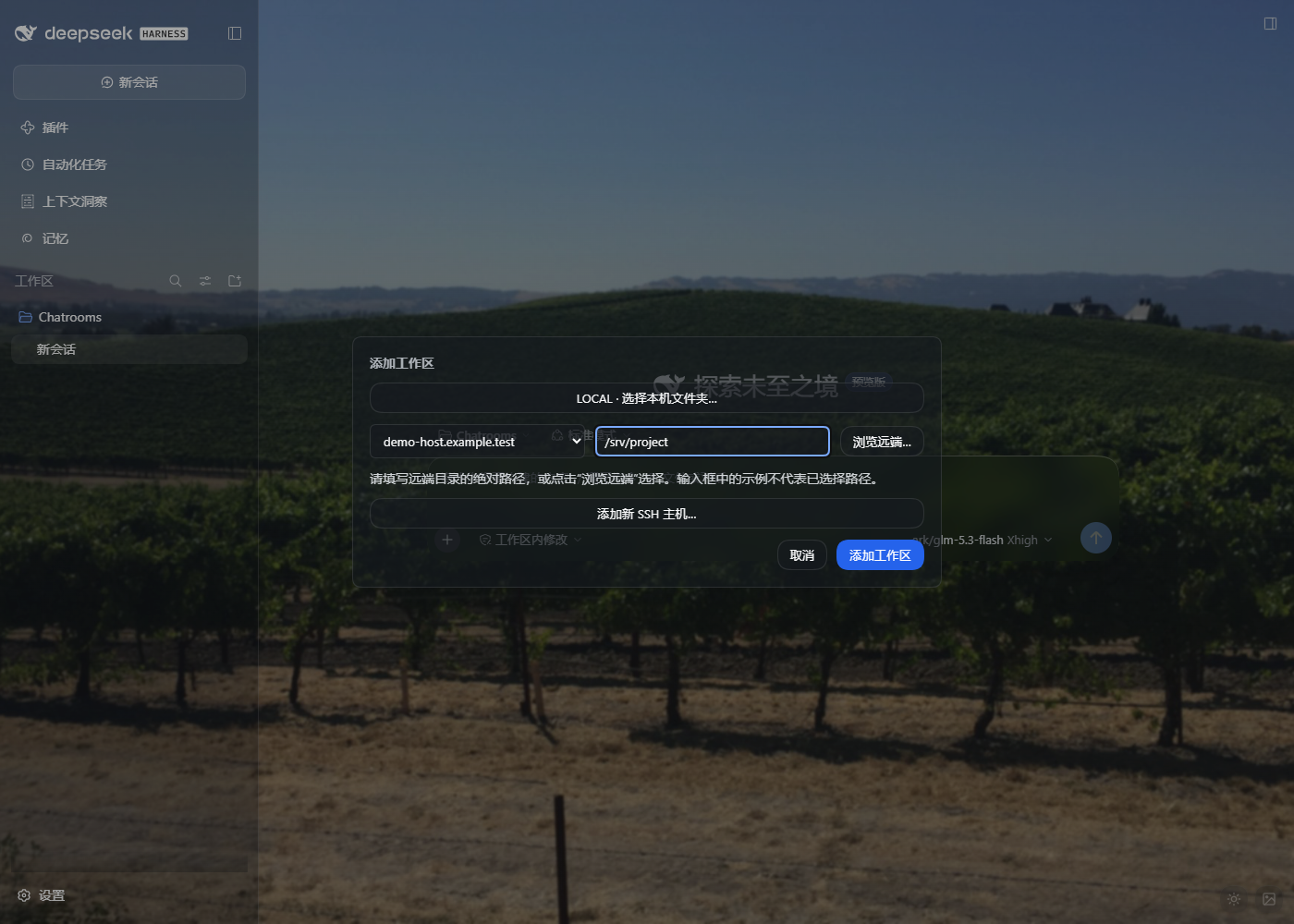
What it provides
- Discover OpenSSH hosts, including
IncludeandProxyJump; add a host from the workspace picker or Settings → Remote SSH. - Choose a local folder with DSH's native picker, or browse/type an absolute remote directory.
- Give each remote project its own normal workspace and conversation history.
- Route supported files, search and Bash to the selected SSH host without a separate
remote_*tool set. Failed or removed remote mappings do not fall back to local execution. - Preserve the shipped local sandbox provider and the user's default permission settings.
- Show readable primary buttons and an explicit explanation when an empty remote path disables workspace creation.
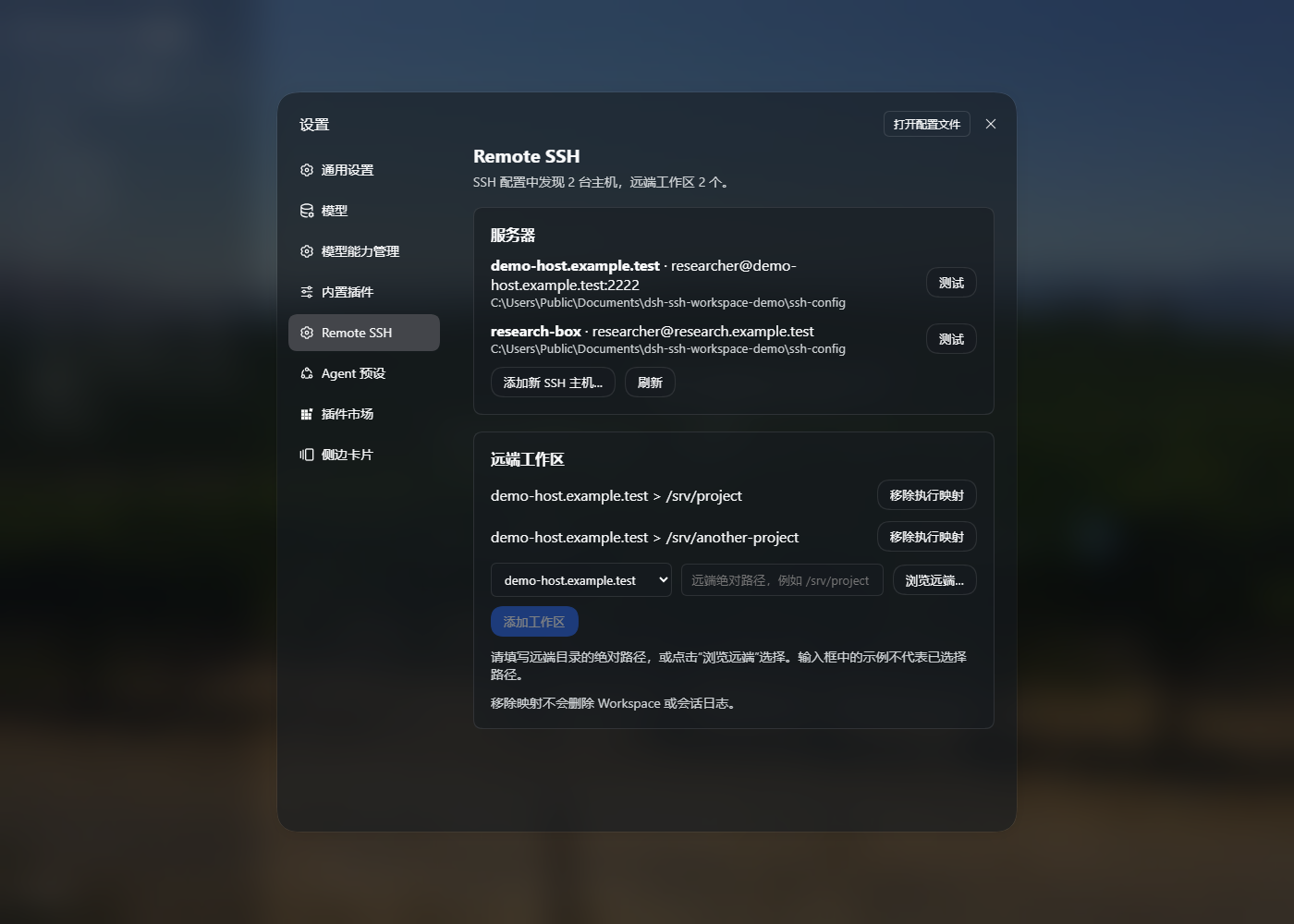
Screenshots use demonstration host names and directories, not a bundled host configuration.
Compatibility
Validated on Windows DSH Desktop 0.2.0-rc.2, with Linux/POSIX remote hosts and Node.js 22+. The bundle currently uses the Windows local PowerShell sandbox provider. Linux/macOS local hosts, Windows remote hosts, the optional legacy TUI adapter and full remote DSH backend are not supported by this release.
This fork adapts the upstream 0.2.4 plugin to DSH's 0.2 Desktop service, settings, shell execution and UI slot APIs. It is not an upstream release.
Install
In DSH Desktop → Plugins, install this prebuilt package URL, then completely exit and reopen DSH:
https://github.com/ahian-lee/dsh-ssh-workspace/releases/latest/download/dsh-ssh-workspace.tgz
The release package contains compiled lib/ files, the client module and cordis.patch.yml; no source build is required. The repository also contains those compiled files for GitHub installs.
For a standalone CLI Web profile on a Windows host:
dsh plugin --profile web add https://github.com/ahian-lee/dsh-ssh-workspace/releases/latest/download/dsh-ssh-workspace.tgz
dsh web
The standalone CLI does not manage the Electron-owned desktop profile. Use Desktop's plugin manager for that profile.
Replace an existing dsh-remote-ssh installation: disable/remove that bundle before enabling dsh-ssh-workspace. Both replace the same execution providers and must not be enabled together. Existing catalog and workspace aliases remain under ~/.dsh/remote-ssh/; switching the package name does not require deleting them. A separate SSH operations panel such as dsh-ssh can remain installed.
First workspace
- Confirm
ssh your-hostworks in your terminal. Complete any host-key, password or MFA setup there first. - Click Add workspace, select an SSH host, and enter an absolute remote path such as
/home/user/project, or click Browse remote. Placeholder example text is not an entered path. - Add the workspace and create a conversation in it. Settings → Remote SSH also supports host and workspace management.
- For arbitrary remote Bash execution, explicitly select that conversation's Full access permission mode. Restrictive remote shell requests are rejected; the plugin does not silently relax them. Local defaults remain unchanged.
The SSH account's permissions apply to remote commands; the remote directory is a routing boundary, not an operating-system sandbox. Use an appropriately scoped SSH account when needed.
Remote hosts need OpenSSH, bash, base64, mkfifo, rg, and a compatible VS Code Agent Host/CLI or cached VS Code Server. Missing remote software is reported, not installed silently. An optional per-server remoteRgCommand in ~/.dsh/remote-ssh/config.json can reuse an existing ripgrep binary outside PATH.
Validation and development
The initial release passed 35 focused tests covering routing, filesystem, current shell handles, catalog persistence, SSH config, path mapping, AHP negotiation, SOCKS and bundle composition. Its packed artifact was installed in a separate directory and loaded into a real DSH Desktop profile composition. Browser checks covered adding a host and workspace, empty-path disabled behavior and the four Agent presets. Live Linux SSH checks covered file reads, Bash pwd and ripgrep; no model inference request was needed.
pnpm install
pnpm run check
pnpm run pack:release
Use Node.js 24 and pnpm 11.7.0 for development. test selects the supported Desktop routing suite; retained upstream backend/TUI tests are outside this release's supported surface. build transpiles the source and bundles the browser entry; it is not a whole-project TypeScript typecheck. See CHANGELOG.md, DESKTOP-COMPAT.md and NOTICE for the changes and attribution.
No comments yet. Be the first to write one.