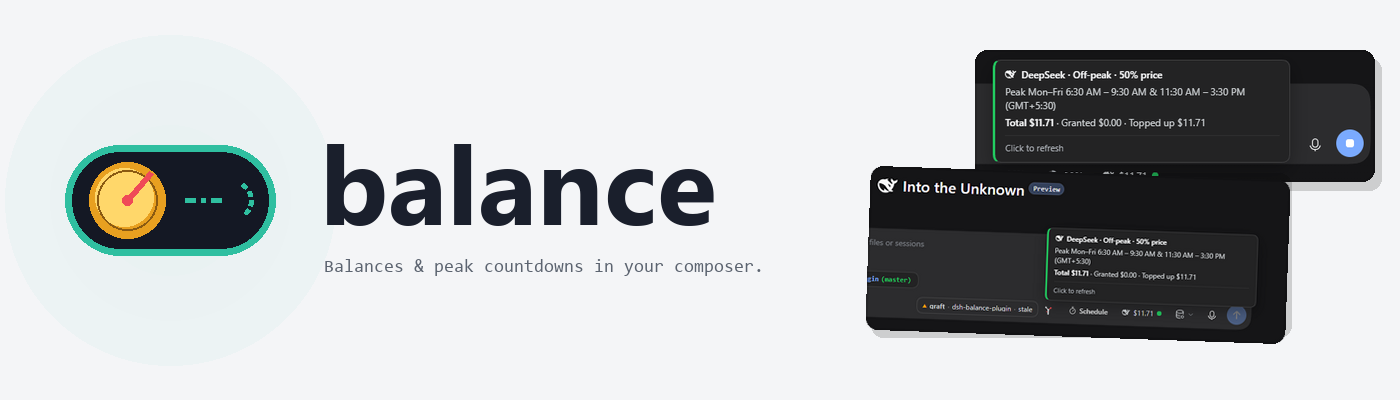
dsh-balance-plugin
English | 中文






A DeepSeek Harness plugin that puts the account balance of whichever provider is serving your current model into the composer dock — with the provider's brand mark, a status dot, and live countdowns for the billing windows that change what a token costs.
It does five things:
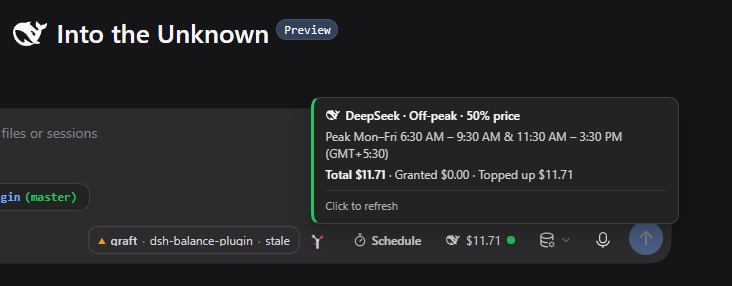
- A chip in the composer naming the provider and its remaining balance (or plan quota), pinned to the right end of the dock. On a blank session it sits in the hero tool row and flies down to the dock when you send.
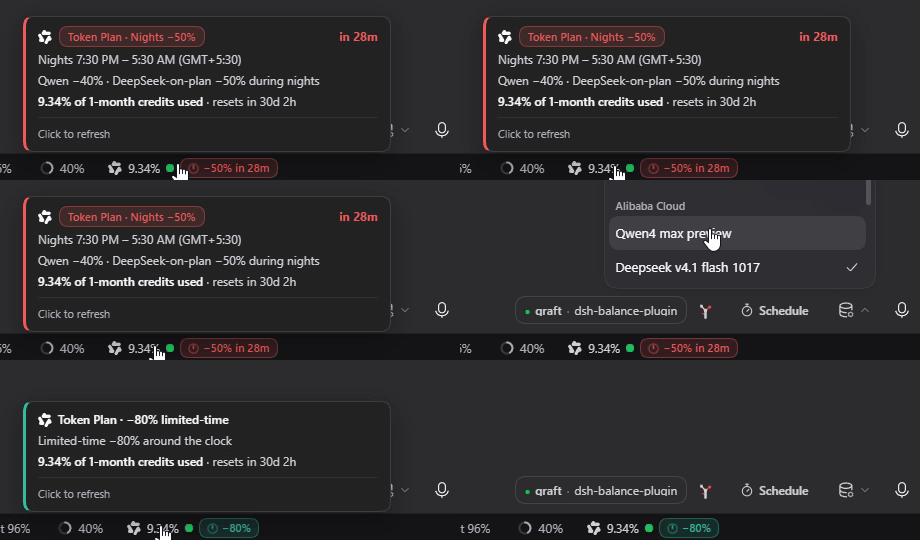
- Billing-window countdowns on the chip: DeepSeek's peak/off-peak hours and Alibaba Cloud's Token Plan night discount, as tinted pills with a sweeping clock — teal while the cheap window runs, red in the last hour before it opens, waving in the final five minutes.
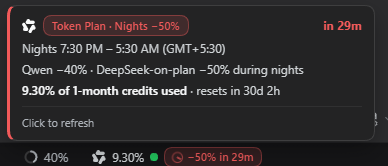
- A hover popover in your own local time: the windows with AM/PM tags and your zone label, the countdown, and the provider's own breakdown (cash/granted, credits, prompts, or Token Plan percent used).
- A showcase for local models: when the session's model has no billable provider (a local or custom model), the chip stops guessing and rotates through the providers it does support — Alibaba first, then the rest, ~10 s each. Each card also names that provider's next billing-window change, so an upcoming off-peak or night switch is visible while you rotate. Hovering pauses the rotation; clicking jumps to the next provider.
- Host-side secrets: the browser never sees an API key. The host resolves it through the credentials seam and talks to the provider alone; Alibaba usage percentages come from your own logged-in
blCLI, never from a key this plugin stores.
Install
From npm:
pnpm dsh plugin --profile web add @adithyanraj/dsh-balance-plugin
Or straight from GitHub:
pnpm dsh plugin --profile web add github:adithyanraj03/dsh-balance-plugin
The bare
dsh-balance-pluginname on npm belongs to an unrelated package. Always install the scoped name.
pnpm 10 and later block postinstall scripts from unapproved packages, and dsh skips writing the plugin's bundle row whenever the install exits non-zero — the dependency lands, the plugin stays invisible. If add ends with ERR_PNPM_IGNORED_BUILDS, approve and re-run:
cd ~/.dsh/profiles/web && pnpm approve-builds      # tick @adithyanraj/dsh-balance-plugin
pnpm dsh plugin --profile web add @adithyanraj/dsh-balance-plugin
Confirm it mounted — the plugin must appear in both dependencies and dsh.profile.bundles:
cd ~/.dsh/profiles/web && node -e "const p=require('./package.json');
  console.log(p.dependencies['@adithyanraj/dsh-balance-plugin'],
              p.dsh.profile.bundles.includes('@adithyanraj/dsh-balance-plugin'))"
In the desktop app
Open Plugins (settings, left sidebar) → Add plugin, paste the repository address, click Install:
https://github.com/adithyanraj03/dsh-balance-plugin
Installed plugins do not update automatically yet — to upgrade, uninstall and install again. The host half loads at startup, so restart the app after installing or upgrading.
What you get
The chip
Sits at the right end of the composer dock, after the context meter:
🐋 $42.50 ●  ⏱ 2h 14m      DeepSeek, off-peak, peak approaching
☁ 4.22% ●  ⏱ −40% · 6h 02m   Alibaba Token Plan, night discount running
Hovering opens the popover; clicking refreshes. The amount is never dropped for the label's sake, and the pill, dot and popover all paint with dsh's own --dsw-* theme variables, so they follow the active theme.
Hovering and switching model, live: the popover and the pill follow the selection from a DeepSeek-on-plan model to the Qwen launch promo.
The providers
| provider | balance source | billing windows |
|---|---|---|
| DeepSeek | api.deepseek.com/user/balance |
peak Mon–Fri 09:00–12:00 & 14:00–18:00 (UTC+8); off-peak half price |
| Alibaba Cloud Model Studio | Token Plan via the bl CLI (optional) |
nights 22:00–08:00 (UTC+8): Qwen −40%, DeepSeek-on-plan −50%, qwen4-max-preview −80% all day |
| OpenRouter | openrouter.ai/api/v1/credits |
— |
| Moonshot / Kimi | /v1/users/me/balance (.ai / .cn mirrors) |
— |
| Zhipu / GLM (Z.ai) | account report (bigmodel / z.ai mirrors) | — |
| MiniMax | /v1/token_plan/remains |
— |
The provider follows the session's model selection, including modlens vision wrappers and custom openai-compat channels aimed at Model Studio (Qwen model names identify those). Model Studio sessions wear the Qwen knot on the chip — the models being billed are Qwen-family, and the knot reads better at 14px than the Alibaba Cloud bracket.
The showcase (local models)
A local or custom model has no billable provider, so instead of guessing one the chip runs a showcase: it rotates through the six supported providers, Alibaba first, ~10 s each, showing each one's real card. Providers without a key are skipped; Alibaba always answers, so the rotation never runs dry. Every card also names that provider's next billing-window change (off-peak in 2h, nights start in 4h), so an upcoming switch is visible while you rotate. Hovering pauses the rotation so you can read; clicking jumps straight to the next provider. Pin a real provider by naming the channel alibaba-cloud, deepseek, openrouter, etc.
Alibaba usage percentages
Model Studio's quota gateway accepts console-login or AccessKey-derived tokens only — never a model API key — so the chip reads your usage through the official CLI instead of storing any secret:
npm install -g bailian-cli
bl auth login --console        # browser login; international accounts add --console-site international
With bl installed and logged in, the chip shows percent used and the window reset countdown (4.22% · resets in 1d 6h); without it, the chip runs in night-discount-only mode and says where the credits live. Readings cache for five minutes. If the console session expires, the percentage slot turns into a refresh‑% sign-in button — click the chip and the host opens a terminal running the login (the CLI opens the browser). Set DSH_BALANCE_AUTOLOGIN=1 to also open it automatically on expiry.
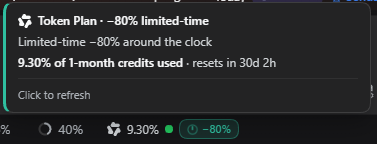
Live captures from a Model Studio session — the all-day launch promo, and the last hour before nights open on a DeepSeek-on-plan model:
Configuration
All optional:
| knob | default | meaning |
|---|---|---|
DSH_BALANCE_MOCK=1 or ?mock=1 |
off | canned balances for every provider, no account needed |
DSH_BALANCE_BL |
bl on PATH |
path to the Model Studio CLI binary |
DSH_BALANCE_AUTOLOGIN=1 |
off | also auto-open the login terminal when the Token Plan session expires (default: a sign-in button on the chip instead) |
Provider keys resolve from ~/.dsh/.credentials.yaml first, then the environment (DEEPSEEK_API_KEY, OPENROUTER_API_KEY, MOONSHOT_API_KEY, ZAI_API_KEY/GLM_API_KEY/ZHIPU_API_KEY, MINIMAX_API_KEY). Alibaba needs no key at all.
Requirements
- a DeepSeek Harness web profile (
dsh web) or the desktop app - Node ≥ 22.18
- one API key for whichever provider you use (Alibaba excepted)
Development
pnpm install
pnpm run build                  # tsdown: host ESM + client CJS
node scripts/verify-client.mjs  # bundle contract, slot registration, provider resolution
node --test test/*.test.mjs     # 33 tests against the built bundle
python scripts/make-banner.py   # regenerate the README banners (Pillow)
Troubleshooting
No chip and dsh started without errors. The plugin is in dependencies but not in dsh.profile.bundles — the pnpm 10+ ignored-builds trap above. Approve, re-add, restart.
Alibaba shows Token Plan instead of a percentage. The bl CLI is absent or not logged in; the night-discount pill still works. Install and log in as above, then click the chip.
A local model shows a rotating showcase instead of one balance. That is intended: a local/custom model has no billable provider, so the chip cycles the supported providers (Alibaba first) rather than guessing. To pin a single provider, name the channel after it (alibaba-cloud, deepseek, openrouter, …).
Licence
MIT © 2026 Adithya N Raj
Credits
- Initial upstream: andregoncalves/dsh-balance by Andre Goncalves (MIT). This plugin forked from that project: the original provider-aware balance chip, the host/client split, the DeepSeek peak/off-peak model, and some of the early screenshot assets come from it. Thank you.
- Brand marks: LobeHub icons — DeepSeek, OpenRouter, Kimi, Zhipu, MiniMax and Qwen glyphs, rendered in
currentColor. - Alibaba Cloud Token Plan terms: the official Model Studio CLI docs and Token Plan blog, plus the open-source modelstudioai/cli whose auth contract shaped the
blbridge.
No comments yet. Be the first to write one.