dsh-memo
中文 | English
A memo/scratchpad plugin for DeepSeek Harness — sidebar entry with quick capture, local SQLite storage, sync to a private GitHub repository, and image/screenshot support.
Built for the moment a requirement changes mid-conversation: capture it in seconds, find it later, keep the context, never lose it.
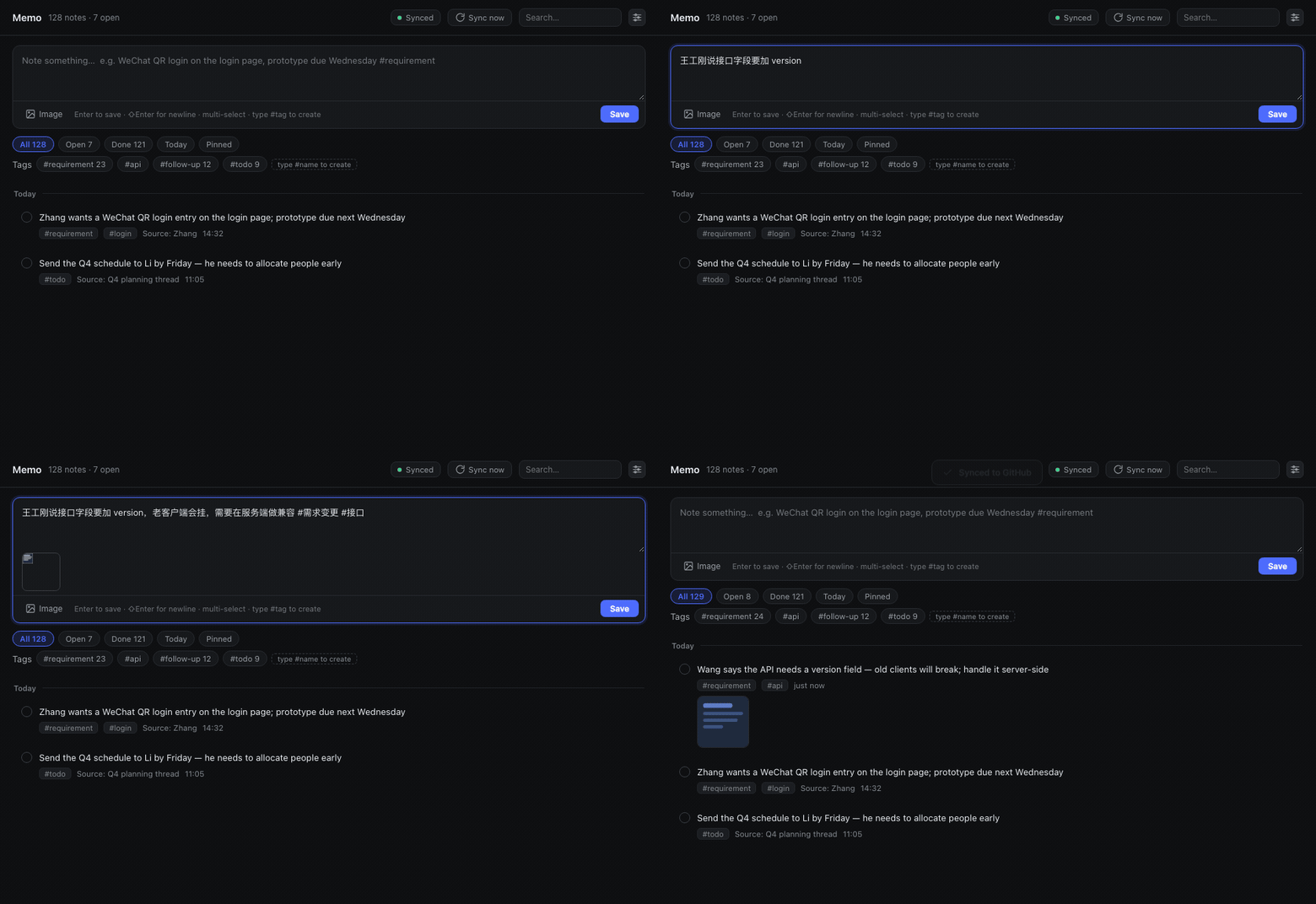
Type it, press Enter — thirty seconds later it is in your private GitHub repository
| Main panel | Capturing with images |
|---|---|
 |
 |
| Search across everything | GitHub sync settings |
 |
 |
Features
| Sidebar entry | Bottom-rail icon next to Settings, with an open-items badge; click to switch to the memo panel |
| Quick capture | Always-present input at the top of the panel; Enter saves; the box is drag-resizable |
| Images & screenshots | ⌘V paste / drag-and-drop / file picker (multi-select); content-hash deduplicated, one copy per image |
| Editable | Inline editing on the card — body and images both; tags follow the #tags in the body, images can be added/removed one by one |
| Tags | Type #anything in the body and it is created automatically — not a fixed whitelist |
| Pinning | Pinned notes sort first and show a pin badge plus a left accent bar on the card; the pin button lights up too |
| Drag & drop | Hold and drag a card to reorder it within the same day group, with transition animation (inlined SortableJS) |
| Search | CJK-safe substring search plus #tag / source: / after: / before: / has:image / is:open qualifiers |
| Local storage | node:sqlite (built into Node) — zero external dependencies, no native module compilation |
| GitHub sync | Auto-pushes the text layer to a private repo (30s debounce), plus daily compact SQLite snapshots |
| No build step | The client half is a hand-written module bundle using React.createElement — edit and refresh |
Installation
Requirements
- DeepSeek Harness (dsh) 0.2.0-rc.2 or newer
- Its bundled Node ≥ 22.5 (the minimum for
node:sqlite; dsh's Electron usually ships 24.x) - No third-party runtime dependencies, no
npm installneeded
Option 1: Install from npm (recommended)
dsh plugin --profile <your-profile> add @adamcjm/dsh-memo
<your-profile> is your dsh profile name (e.g. web, tui). Restart dsh afterwards.
Option 2: Install from GitHub
Pins to the repository's default-branch HEAD instead of a published release:
dsh plugin --profile <your-profile> add github:adamcjm/dsh-memo
Option 3: Install for local development
git clone https://github.com/adamcjm/dsh-memo.git
dsh plugin --profile <your-profile> add link:/path/to/dsh-memo
With link: your edits are live (refresh the page for client changes; restart for host changes).
Option 4: Manual wiring (desktop profile only)
The desktop profile is owned exclusively by the dsh desktop app and the CLI refuses to write to it (it reports profile "desktop" is managed exclusively by the Electron application). Wire it manually:
Edit
~/.dsh/profiles/desktop/package.json:{ "dsh": { "profile": { "bundles": [ // ... existing bundles ... "@adamcjm/dsh-memo" // ← add ] } }, "dependencies": { // ... "@adamcjm/dsh-memo": "^0.2.10" // ← add } }Install dependencies (creates the symlink):
cd ~/.dsh/profiles/desktop
pnpm install
Restart DeepSeek Harness.
Verifying the install
dsh --profile <profile> --dump-config | grep -A3 "id: memo"
Or just look at the UI: a Memo icon should appear at the bottom of the sidebar.
Usage
Capturing a note
Open the Memo icon at the bottom of the sidebar and type into the input at the top, then press Enter:
Mr. Zhang wants a WeChat QR login entry on the login page; prototype due next Wednesday #requirement-change #login
#requirement-change and #login become tags automatically, and the tag markers are stripped from the body.
Editing a note
Hover a row and click Edit (the pencil); the row expands in place into an editor:
- Change the body directly. The
#tagsin the body become the note's tags (remove a#tagfrom the body and the tag is removed too) - Opening the editor merges the note's existing tags back into the body as
#tags— visible, and saved back as-is - Images can be removed one by one (the × on the thumbnail) or added at any time (paste / drag / multi-select)
⌘Entersaves,Esccancels
Saving regenerates the .md source of truth, bumps rev, and syncs to GitHub within 30 seconds.
Reordering
Within one day group, hold a card and drag it to change the order:
- The new order saves on drop and is written to the
.mdsource of truth asorder:, so it survives syncing to another machine - You cannot drag across day groups (a "today" card will not drop into "yesterday"); use Pinning to lift something across days
- Order is decided only by dragging and pinning: marking done / undone or editing the body no longer bounces an item to the top
Adding images / screenshots
Three ways, freely mixable and repeatable:
- Paste — take a screenshot, then press
⌘Vin the input - Drag — drag images straight from Finder onto the input
- Pick — click the "Image" button; hold
⌘/⇧in the file dialog for multi-select
Images are named by SHA-256 and stored in attachments/, so pasting the same image twice costs one copy. Click a thumbnail to view it full size.
Tags
Tags are not fixed. The defaults (#requirement-change #todo #follow-up #idea #meeting) are just starting suggestions:
- Type
#customer-Aor#MrZhangin the body and save → the tag is created and attached to that note - Anywhere works: start, middle or end of the body (
buy milk#groceries,meeting,#workalso count); a tag name ends at whitespace or punctuation - The tag area is sorted by usage; click one to filter
- A tag that no note uses anymore disappears on its own
Search
Use the search box in the panel header and press Enter. Qualifiers combine:
| Syntax | Meaning |
|---|---|
scan |
Body or source contains the string (works for short CJK queries too) |
#requirement-change |
By tag |
source:MrZhang |
By origin |
after:2026-10-01 before:2026-10-08 |
By date range |
has:image |
Only notes with attachments |
is:open is:done |
Only open / only completed |
Keyboard shortcuts
| Key | Action |
|---|---|
Enter |
Save the current input |
⇧Enter |
Newline inside the input |
⌘V |
Paste an image from the clipboard |
Esc |
Close an overlay (settings / image zoom) |
Syncing to GitHub
- Create a private repository on GitHub (e.g.
yourname/dsh-memo-data) - Create an access token:
- Preferred: a fine-grained PAT scoped to that repo with Contents: Read and write
- Or a classic PAT with the
reposcope
- Click the settings icon in the panel header, fill in the repository and token, and hit "Save and sync"
After that:
- Manual sync — click "Sync now"; the result is reported by a top-center notification (success / failure)
- Auto sync — every change is committed and pushed 30 seconds later; failures also raise a notification
- Status — the panel header shows "Synced / Pending / Local only / Sync error"
Where the repository setting lives
Three layers, resolved in order:
| # | Location | Notes |
|---|---|---|
| ① | ~/.dsh/memo/.config.json |
Saved from the plugin's settings dialog — survives restarts |
| ② | Plugin config config.repo in cordis.patch.yml |
Deployment-time default |
| ③ | remote.origin.url in ~/.dsh/memo/.git/config |
Existing git trace (a manual git remote add counts) |
Only when all three miss does the panel say "not configured". The sync-badge tooltip reports which layer is in use (runtime / config / git-remote).
Token lookup order (none of them ever enter the repository):
- The settings dialog writes
~/.dsh/memo/.token(mode0600) - Environment variable
DSH_MEMO_GITHUB_TOKEN - Environment variable
GITHUB_TOKEN
When pushing, the token only ever appears in the git process arguments (http.extraheader) — it is never written into .git/config.
Data & backup
The data root is ~/.dsh/memo/, which is itself a git repository:
~/.dsh/memo/
├── memo.db                  # SQLite working DB (engine; git-ignored, rebuildable from notes/)
├── notes/2026-10/<id>.md    # ★ the text source of truth: one file per note
├── attachments/<xx>/<sha256>.<ext>      # images, content-hash named
├── log/2026-10.jsonl        # append-only action log (.gitattributes sets merge=union)
├── snapshots/memo-YYYY-MM-DD.sqlite     # daily compact snapshot, 7 kept
├── .token                   # credentials (0600, git-ignored)
├── .config.json            # remote repository setting (saved from the UI, synced too)
├── .gitignore
└── .gitattributes
Why the SQLite file is not committed directly
A SQLite file in git is an unmergeable binary: if two machines both edit it, git can only pick one entire file — you lose everything from the other machine, not just one note. It also rewrites whole database pages on every change, so a single small edit becomes a complete new blob and the repository balloons.
Hence three layers:
| Layer | Role | If it breaks |
|---|---|---|
| ① Local SQLite | Query engine and index | Delete it; it rebuilds from ② |
② notes/ + attachments/ + log/ |
Sync source of truth — this is what git moves | ③ is the backstop |
| ③ Private GitHub repo | Backup and history | — |
The daily .sqlite files under snapshots/ are committed too, satisfying "the SQLite file lives on GitHub as well" — but they are disaster recovery only and never participate in merges.
What if the SQLite file is lost
Delete memo.db* and restart dsh (or call the rebuild API). The plugin scans notes/**/*.md and rebuilds everything, including tags, sources, due dates and attachment references.
Uninstalling
If installed via the CLI
dsh plugin --profile <your-profile> remove @adamcjm/dsh-memo
If wired manually (desktop profile)
- Edit
~/.dsh/profiles/desktop/package.jsonand remove the two@adamcjm/dsh-memoentries fromdsh.profile.bundlesanddependencies cd ~/.dsh/profiles/desktop && pnpm install- Restart DeepSeek Harness
Optional: delete your data
Uninstalling the plugin does not delete your data. If you are sure:
rm -rf ~/.dsh/memo # local data (including credentials)
If you synced to GitHub, the remote repository (e.g. yourname/dsh-memo-data) is yours to delete.
Development
git clone https://github.com/adamcjm/dsh-memo.git
cd dsh-memo

node test/smoke.mjs                    # host half, 64 checks: CRUD / tags / attachments / rebuild / snapshots / credentials
node test/client-precheck.mjs          # client half, 25 checks: module protocol / slot registration / component rendering
node test/ui-feedback-check.mjs        # UI details, 80 checks (incl. pinning and drag wiring)
node test/edit-interaction-check.mjs   # theme foreground + clickable edit area, 15 checks (real mount via jsdom + React)
node test/tag-rules-check.mjs          # tag rules & edit round-trip, 52 checks (position / fidelity / host-client parity)
node test/edit-check.mjs               # editing & image refcounting, 29 checks
node test/reorder-check.mjs            # ordering, 20 checks (done does not jump / drag persists / old-db migration)
node test/drag-check.mjs               # real-browser drag, 12 checks (Chrome + CDP; skipped without Chrome)
node test/panel-mount-check.mjs        # real panel mount, 7 checks (jsdom + React; proves the Sortable instance is attached)
node test/i18n-check.mjs               # i18n, 22 checks (zh/en switching, missing-key fallback)
node test/config-check.mjs             # sync config, 18 checks
node test/hot-swap-check.mjs           # hot swap, 9 checks
None of these need dsh running. The client tests need to resolve react / react-dom (they look in the project first, then borrow from a dsh profile); the two real-mount tests also need jsdom (installed as a devDependency by npm i, skipped when absent).
Layout
package.json        dsh.bundle.patch + dsh.client (platform: web)
cordis.patch.yml    host plugin row: id: memo
lib/index.js        host half: SQLite / attachments / Markdown source of truth / git sync / HTTP API
lib/client.js       client half: window.__ModuleLoader__.load({id, factory}) + React UI
                    (SortableJS 1.15.7 — MIT — is inlined here for drag-and-drop reordering)
test/               independently runnable test files (host / client / UI / tag rules)
Extension points
- Client → host:
fetch('/memo/api/<method>'); the host serves it viactx.webServer.register({ kind: 'prefix' }) - Sidebar icon:
ctx.slots.register({ name: 'sidebar.panellist', id, order, label }, Icon)— the icon component receives{ size, active } - Main panel:
ctx.slots.register({ name: 'main', key: id }, Panel)— both ids must match; the shell callsctx.layout.selectPanel(id)when the icon is clicked
How changes take effect
- Client (
lib/client.js): refresh the page (the module system derives revisions from mtime / ctime / size and hot-swaps) - Host (
lib/index.js): restart dsh (host code loads at process start) lib/client.jsrewritten exactly while dsh boots: the client-side HMR watch can hot-swap the bundle while its first load is still in flight, so DSH ends up executing the same bundle twice. The bundle now tolerates its own duplicate registration (a secondduplicate factory registrationis ignored, because a registration already exists) instead of failing the whole web boot. Every other error is still rethrown
Known limitations
- Text-layer sync only — no multi-device merge UI (it cannot happen on a single machine; the text layer being mergeable is the insurance)
- No mobile UI
- Search uses
LIKE, not FTS5 — SQLite'strigramtokenizer requires query terms of 3+ characters, and the most common Chinese queries are two characters ("扫码", "登录"), which would silently return nothing. Correctness first - Images are transferred at original size; no thumbnails
- No system-level reminders (only a due-date field and due highlighting)
No comments yet. Be the first to write one.