dsh-reasoning-slider
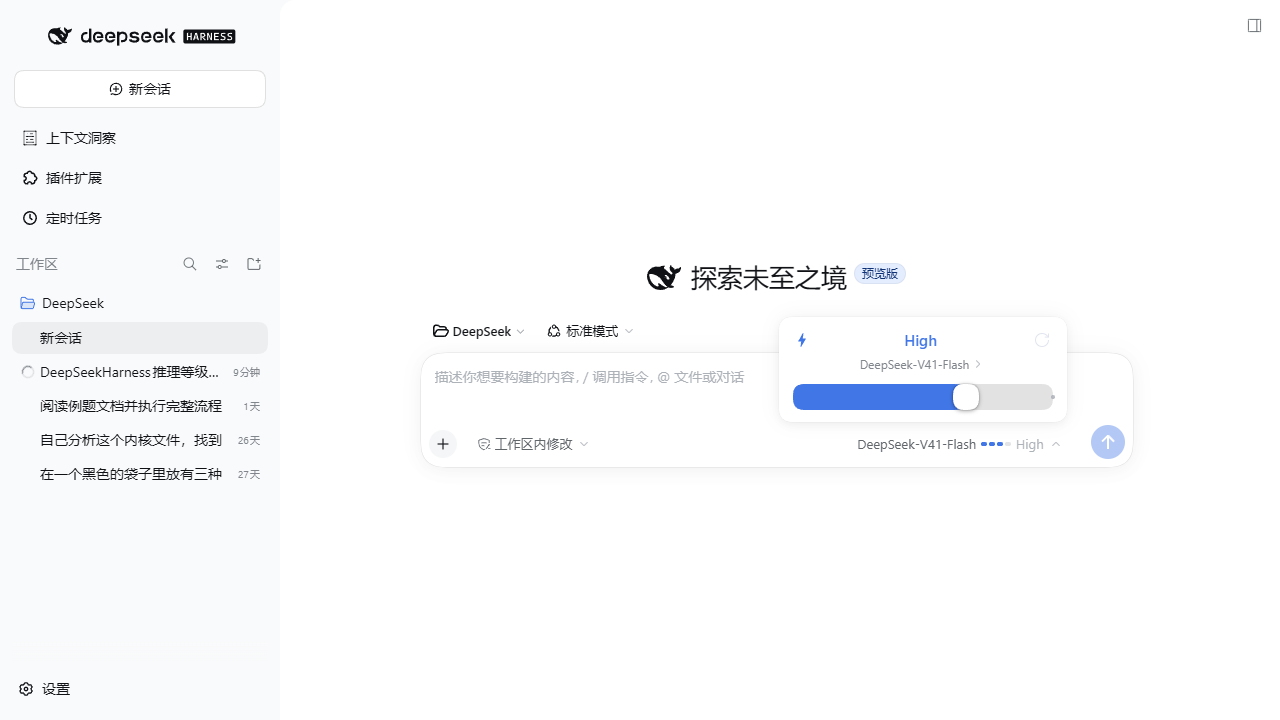
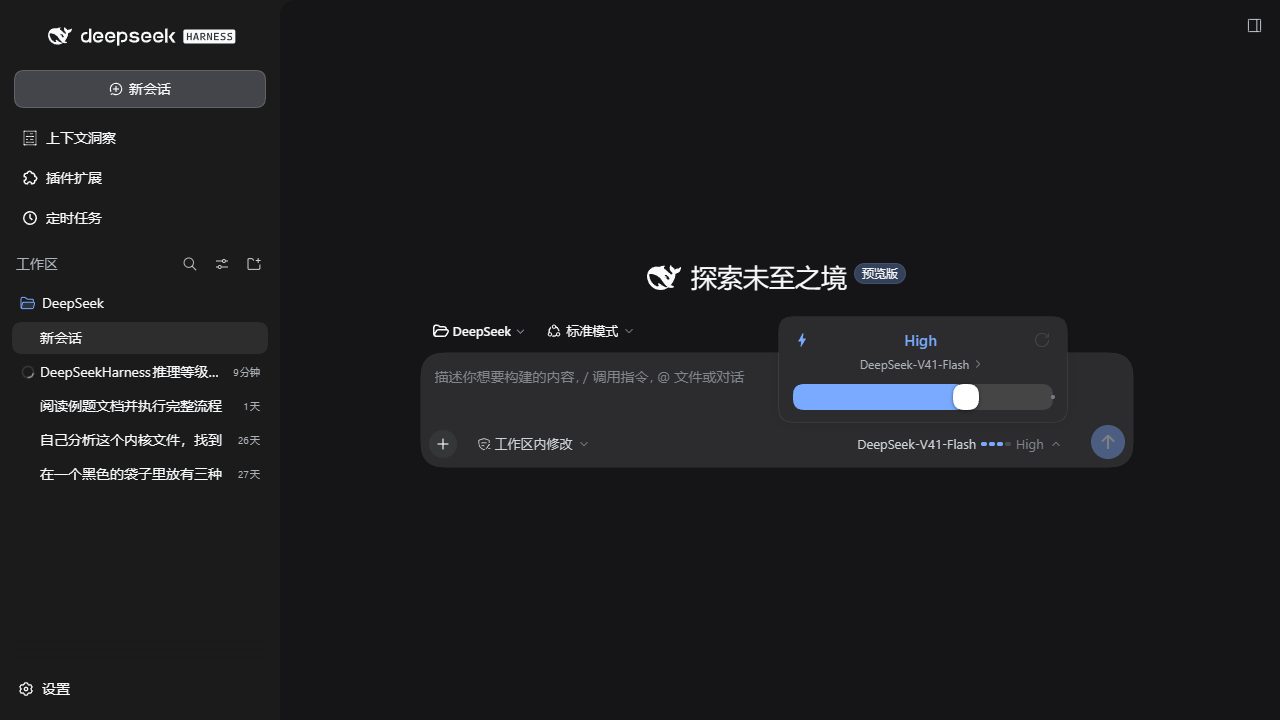
把 DeepSeek Harness 输入框里的 推理等级 选择,从「点开二级菜单再点一行」改成一张 卡片式滑块。
| 浅色 | 深色 |
|---|---|
 |
 |
特性
- 滑块选档:卡片底部一条轨道,蓝色填充 + 白色圆形滑块,未到达的档位用圆点标出。
- 三种操作方式:拖拽滑块、点击轨道任意位置、键盘
←→↑↓/Home/End。 - 一键重置:卡片右上角回到该模型的默认档;当前已是默认档时按钮置灰。
- 大字档位 + 说明:卡片正中显示当前档位名称(
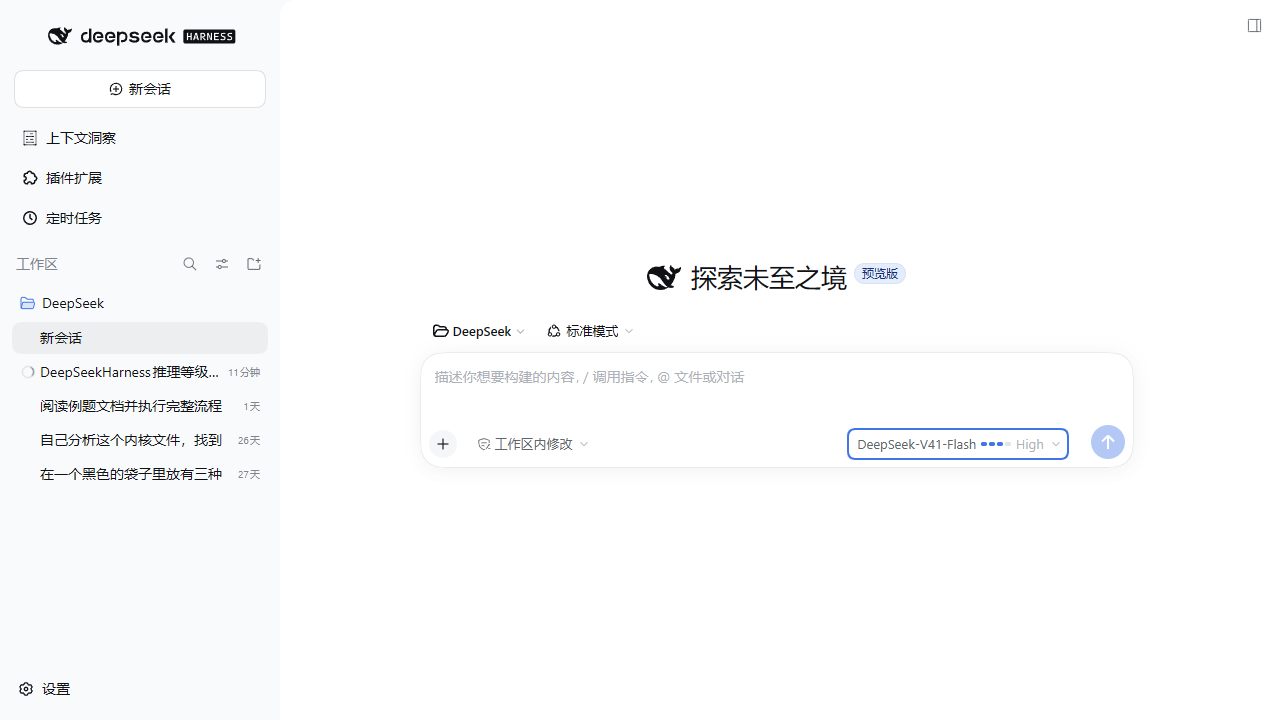
Off/Low/High/Max…),下方是该档位的说明文字。 - 触发按钮上的刻度条:不打开菜单也能一眼看出当前档位。
- 模型二级菜单保留:分组、搜索、勾选、加载失败重试都在,只换成同一套卡片样式。
- 跟随明暗主题:全部使用 DSH 设计令牌(
--dsw-alias-*),浅色 / 深色自动适配;文案中英文自动切换。 - 不动官方插件:官方
ui-model-selection照常加载,它的modelDirectories服务和/model指令弹窗都能继续用。
安装
安装后 刷新一次浏览器页面(浏览器半边是在页面加载时注入的)。
方式一:插件页(推荐)
打开 DSH Web → 设置 → 插件 → 添加插件,粘贴:
github:aci825223-ai/dsh-reasoning-slider
方式二:命令行
dsh plugin --profile <你的 profile 名> add github:aci825223-ai/dsh-reasoning-slider
也接受完整地址:dsh plugin --profile <profile> add https://github.com/aci825223-ai/dsh-reasoning-slider
装好后插件会出现在 设置 → 插件 → 已安装 列表里,开关默认打开。
方式三:预构建 tarball
不想让 pnpm 从源码取包的话,用 release 里附带的预构建包(地址固定,不带版本号,不会随发版失效):
https://github.com/aci825223-ai/dsh-reasoning-slider/releases/latest/download/dsh-reasoning-slider.tgz
同样粘到 添加插件 里,或:
dsh plugin --profile <你的 profile 名> add https://github.com/aci825223-ai/dsh-reasoning-slider/releases/latest/download/dsh-reasoning-slider.tgz
方式四:本地源码(开发用)
把仓库克隆到任意位置,然后链接进 profile:
git clone https://github.com/aci825223-ai/dsh-reasoning-slider
New-Item -ItemType Junction `
  -Path "$env:USERPROFILE\.dsh\profiles\<profile>\node_modules\dsh-reasoning-slider" `
  -Target "<克隆下来的目录>"
再在 ~/.dsh/profiles/<profile>/package.json 里把包加进依赖和 bundles 列表:
{
  "dependencies": { "dsh-reasoning-slider": "link:<克隆下来的目录>" },
  "dsh": { "profile": { "bundles": [ "…", "dsh-reasoning-slider" ] } }
}
正在运行的 DSH 会监听 profile 组合并自动重载,浏览器刷新即可看到效果。
卸载
设置 → 插件 → 已安装 → 关掉 dsh-reasoning-slider 的开关(或删除它),刷新页面即回到官方样式。
手动安装的话,从 profile package.json 的 dsh.profile.bundles 里删掉这一项,并删除
node_modules\dsh-reasoning-slider 链接。
工作原理
官方 @deepseek-ai/dsh-client-ui-model-selection 用默认优先级 0 占用了单占位槽
conversation.input.model。dsh-client-ui-slots 对同名单槽的规则是
「同优先级重复注册直接报错,换一个优先级即可遮蔽,优先级最低者渲染」,
所以本插件用 priority: -1 注册自己的组件,渲染权落到本插件,而官方那份仍然被加载,
其服务与指令不受影响 —— 不需要 disabled: true 去覆盖官方设置页。
数据全部来自占位槽注入的 props(available / directory / load / select),与官方组件一致;
写回同样走 select({ provider, model, reasoningEffort })。
两个坑(写同类插件的人可以抄)
必须声明
remote+remote.session:directoryFor()内部会访问ctx.remote.session/ctx.sessions,而 Cordis 是按 调用方 的 inject 声明做访问检查的。漏声明会在渲染时报cannot get property "remote.session" without inject,并让该槽位条目直接崩溃。浏览器半边不需要构建:手写 CJS 包体即可,只要
factory返回module.exports:window.__ModuleLoader__.load({ id: '<包名>', factory: (require) => { /* … */ return module.exports; } });本插件只
require平台基线模块(react、react/jsx-runtime、react-dom、@deepseek-ai/dsh-client-ui-primitives),因此dsh.client.external为空。
文件
| 文件 | 作用 |
|---|---|
package.json |
清单:dsh.bundle.patch + dsh.client.platform: web |
cordis.patch.yml |
自挂载行(id 必须等于包名) |
lib/index.js |
宿主半边(Web 端逻辑都在 client,这里只占位) |
lib/client.js |
浏览器半边:locale、样式、滑块、模型二级菜单、槽位注册 |
常见问题
装完没变化?
浏览器半边在页面加载时注入,刷新一次页面(Ctrl+R)即可。不用重启 DSH 服务。
控制台报 cannot get property "remote.session" without inject?
inject 里补上 remote 和 remote.session,见上文「两个坑」。
和别的插件抢同一个槽位?
单占位槽同优先级重复注册会直接抛错,换个优先级(例如 -1)就能并存并遮蔽。
档位和模型的组合对不上?
档位来自当前模型自身的 reasoning 声明:不同模型的档位数量、名称、默认档都可能不同,
卡片上的档位名与说明文字都取该模型自己的定义。
开发
没有构建步骤:直接改 lib/client.js,刷新页面即可。改完后插件宿主会自动重载并更新资源版本号。
node --check lib/client.js   # 语法检查
node --check lib/index.js
兼容性
在 DSH 0.2.0-rc.2(profile 名 tauri,Web 端)上开发并验证。插件不声明 peerDependencies、
不声明 dependencies,因此不会与 profile 里已有的运行时冲突。
验证记录见 docs/verification.md。
English
dsh-reasoning-slider replaces the DeepSeek Harness composer's reasoning-effort picker with an
inline slider card: drag the thumb, click anywhere on the track, or use the arrow keys / Home /
End; the top-right button resets to the model's default effort. The model submenu (groups, search,
checkmarks) is kept in the same style. It shadows the shipped selector by registering into the
conversation.input.model single slot at priority: -1, so the official
@deepseek-ai/dsh-client-ui-model-selection plugin keeps working untouched. Install with
dsh plugin --profile <name> add github:aci825223-ai/dsh-reasoning-slider, then refresh the page.
No comments yet. Be the first to write one.