dsh-delete-chat


Delete a DSH conversation without losing it.
DeepSeek Harness only archives: the row disappears from every list, the log stays on disk forever.
This plugin adds the real delete — with a safety net first. The directory is moved into
~/.dsh/session-trash, the sidebar gains a Trash page listing what is inside, and only an explicit
"delete permanently", behind a confirmation modal, ever unlinks a file.
English | 中文

Why it exists
Two shipped DSH packages document the gap themselves:
"Does not delete session files — logs accumulate under
rootuntil removed externally. The seam has no delete interface." —@deepseek-ai/dsh-session-persistence-jsonl
"Removing a project keeps its folder, files and session history … while session deletion and folder removal are independent features that are not yet provided." —
@deepseek-ai/dsh-workspace
"Delete workspace" only touches the list, "archive" only hides, so ~/.dsh/sessions only grows.
This plugin is the scissors.
What you get
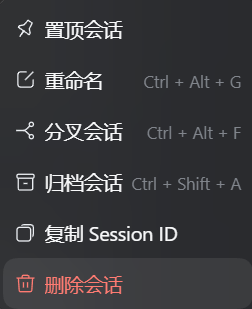
| Soft delete | Session row "⋯" → Delete chat renames the directory into ~/.dsh/session-trash. Same volume, so it is instant, atomic, and copies nothing |
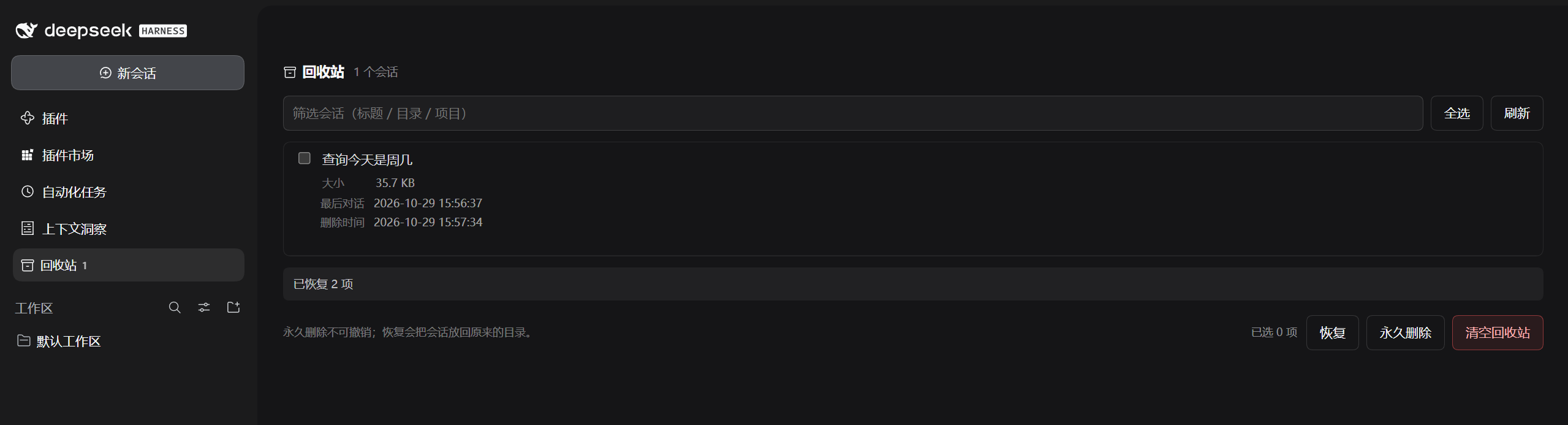
| A trash page | The sidebar's panel list gains "🗄 Trash · 3"; selecting it replaces the centre column with a page (the same kind the Plugins manager uses): filter, multi-select, restore, permanent delete, empty |
| A modal for every verb | Restore, delete and empty each open a confirmation naming the count, the bytes it frees and whether it is reversible. Only the confirm button touches the disk |
| Full row details | Size, absolute path inside the trash, last activity and deletion time (YYYY-MM-DD HH:mm:ss) |
| Hard to lose by accident | The permanent verbs exist only inside the trash; every other entry point is reversible |
| Localized | Wording follows the host language (zh / en) live — row, modal and page all re-render on a switch |
| Both layouts | Per-project <root>/<project>/session-<uuid>/ and flat <root>/session-<uuid>/ |
| CLI | --trash / --trash-list / --restore / --purge --yes / --empty --yes, usable without the GUI |
| Self-hosted index | Ships a format-1 market index — add it as an index source for a private market |
Screenshots


Install
In DSH, just ask:
Chinese works too: 帮我安装 https://github.com/abangbang/dsh-delete-chat
Restart DSH afterwards. The plugin tree — and the client bundle, which is served with immutable
cache headers — are both composed at boot, so a page refresh is not enough.
Usage
Delete
Session row → "⋯" → Delete chat → confirm. The row leaves the list, running work stops, and the directory moves into the trash:
Status   moved to trash
Size     274.4 KB
Nothing is lost: this is a rename, and it stays reversible until you say otherwise.
The trash
The sidebar's panel list (the nav above the workspaces, aria-label="全局面板") gains a
🗄 Trash · 3 row:
- the count follows the row's own text colour, is hidden at zero, shows
99+above that, and moves the moment a delete lands; - collapsed to the 56px rail it drops the name, keeping icon and count;
- selecting it opens a page listing every trashed conversation:
alpha conversation
  Size           2.0 KB
  Location       ~/.dsh/session-trash/--proj--/session-…
  Last activity  2026-10-27 17:08:07   ← the log's mtime; rename keeps it
  Deleted        2026-10-29 09:02:03
On that page:
- filter by title, path or project;
- select one row or all of them — the footer counts the selection;
- Restore moves the directories back, re-accounts them and unarchives them;
- Delete permanently and Empty trash live only here, and each asks first: a modal naming the count, the bytes it frees and that it cannot be undone.
The restore confirmation is amber; only the deleting ones are red. Colour is meaning here, not decoration.
How it works
Moving a conversation to the trash
| Step | Action | Why this order |
|---|---|---|
| 1 | archiveSession(id, { stopActivity: true }) |
Hides the row everywhere immediately, stops a running turn, and ArchivedSessionGate refuses later wakes |
| 2 | rename <sessions-root>/…/session-<uuid>/ → <home>/session-trash/<project>/session-<uuid>/ |
Same volume, so the move is instant and atomic; a root on another volume falls back to copy + remove (EXDEV) |
| 3 | Rewrite storages/workspace.json |
Drops the id from sessionIds so the sidebar row cannot come back; .bak-<stamp> kept |
| 4 | Update <home>/session-trash/index.json |
Keeps title, cwd, size, last activity and deletion time without decoding a single zstd frame |
The trash layout
~/.dsh/
├── sessions/                      # live sessions
│   └── <project>/session-<uuid>/
└── session-trash/                 # everything you deleted
    ├── index.json                 # titles, cwd, sizes, timestamps
    └── <project>/session-<uuid>/  # the directory, byte for byte
The directory tree is the truth: a directory the manifest does not know is listed with its id as
the title, and a manifest row whose directory vanished is reported as missing instead of being
shown.
Restore reverses steps 2–3 and asks the live registry to re-project the row (insertSessionBefore)
when it can. Permanent deletion — only ever reachable from the trash — unlinks the directory,
forgets the manifest row and clears the projection cache.
When it fails
| What failed | What you see | What is actually true |
|---|---|---|
| The host call itself | dialog phase error, red box |
Nothing was written |
| The move refused (on Windows: a directory another process holds) | dialog error carrying EBUSY/EPERM |
The archive already ran; the directory is still in the sessions root, so unarchive it and it is back |
workspace.json rewrite refused after a good move |
the trash row exists, the sidebar row may linger | Files are safe in the trash; restore them, or clear the stale reference by hand |
| A purge cannot unlink | the page lists path + reason, and N failed |
The other selections were deleted; the failing one is still listed |
| Restore cannot move back | N failed with the path |
The directory is still in the trash; nothing was half-moved |
Recovery, in the order to try it:
- Restore — anything in the trash comes back with one click; that is the whole point.
- Retry — the dialog and the page are idempotent: run them again after fixing the cause (close the handle, quit the sync client).
- CLI fallback — quit DSH first; the lock that blocks a directory is usually the host's own
handle.
dsh-delete-chat --trash | --restore | --purge --yes. - Roll back the store — every rewrite leaves
workspace.json.bak-<stamp>next to it.
Known limitations
- The trash is not the OS recycle bin. It lives at
<DSH home>/session-trash; deleting that directory by hand is a permanent delete that bypasses every confirmation. - Restore may need a restart. The live row comes back immediately when the workspace registry
exposes
insertSessionBefore; without it the directory is restored and the row reappears on the next boot. - No cascade: subagent and forked child sessions survive on their own, and their
parent_sessiondangles. - Attachments untouched:
~/.dsh/attachments/v1/objectsis content-addressed and shared, so neither trashing nor purging one session deletes objects other sessions still reference. - In-memory object lingers: the
sessionsservice exposes onlycreate/get/list, so a trashed session's object stays until restart. It runs no model step while archived.
License
MIT. Listing ≠ endorsement: this is third-party code; install only from sources you trust.
No comments yet. Be the first to write one.