dsh-arcaea-theme
English | 简体中文
dsh-arcaea-theme is an Arcaea theme for DeepSeek Harness Desktop and Web. Version 0.7.1 adds locally supplied Arcaea song-selection backgrounds and UI artwork to the Windows Desktop 0.2.1-rc.3 adaptation, with bundled fonts.
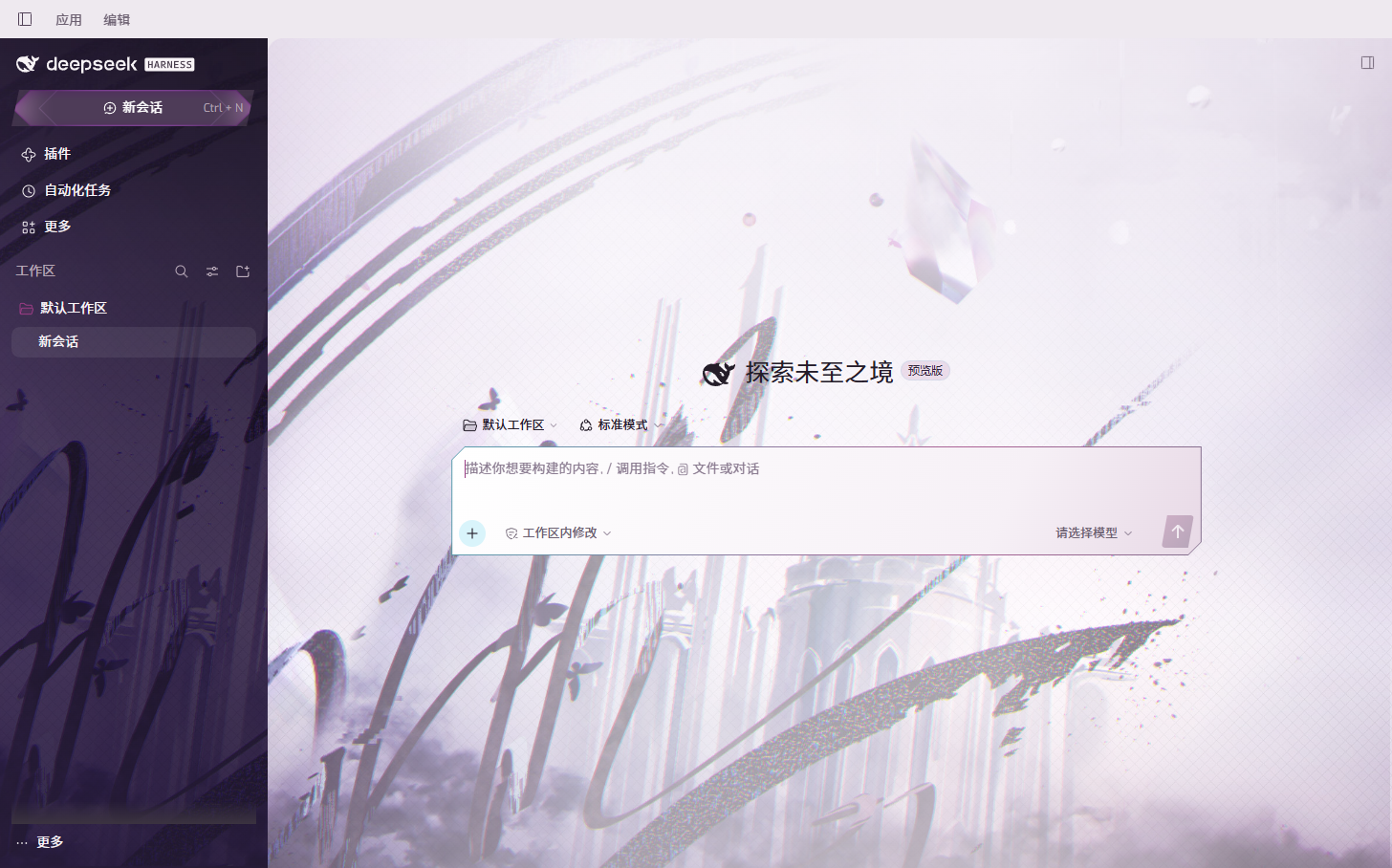
Visual treatment
- A light song-selection background with architecture, floating fragments, arcs and butterflies.
- The dark song-selection background in the sidebar, with original title artwork on the New Session button.
- More visible artwork on the new-session screen and a stronger light veil behind conversation text.
- Angular composer and New Session surfaces, with unclipped menus, editor and caret.
- A pale mauve desktop titlebar and dark sidebar, preserving native drag regions, window controls, sidebar collapse and split panels.
- A bundled Exo variable display face and bundled Noto Sans CJK SC Light / Regular / Bold body faces, with system fallbacks.
While enabled, the plugin keeps its dedicated arcaea-light palette selected. Disable it to restore the underlying built-in theme preference. Desktop text font and size preferences remain effective; an empty text font preference uses the bundled faces, while code and terminal fonts stay independent. The plugin does not replace chat components, modify session data, or make network requests.
Local reference directories
The raw Fonts/ and img/ collections are not packaged wholesale. Selected fonts are in assets/fonts/, and three selected Arcaea images are in assets/arcaea/. All runtime assets are embedded as data URLs in dist/client.js, requiring no external image or font services. Fonts include their SIL Open Font License 1.1 texts. Image source paths and placements are recorded in assets/arcaea/README.md; see THIRD_PARTY_NOTICES.md for ownership details.
Desktop installation
Build from the plugin directory:
node scripts/build.mjs
Fully quit DeepSeek Harness, including its tray process. Use the CLI bundled with the desktop app and the desktop profile. Adjust these paths to your installation:
$dshDesktopCli = 'D:\DSH\resources\runtime\cli\bin\dsh.cmd'
& $dshDesktopCli plugin --profile desktop add 'D:\zhuomian\dsh-plugin\dsh-arcaea-theme'
Restart Desktop. You can also pass a packaged .tgz instead of the source directory. Desktop uses the web client platform: the manifest's dsh.client.platform: "web" is intentional, while desktop is the installation profile.
To uninstall, fully quit Desktop, then run:
& $dshDesktopCli plugin --profile desktop remove dsh-arcaea-theme
Web installation
Use the Web CLI, then restart the server and hard-refresh your browser. Do not run pnpm dsh in the theme directory: it does not provide that executable.
pnpm --dir D:\deepseek-harness dsh plugin --profile web add D:\zhuomian\dsh-plugin\dsh-arcaea-theme
pnpm --dir D:\deepseek-harness dsh web
Verify
node scripts/build.mjs
node --test
npm pack --dry-run
Desktop regression runner: scripts/inspect-desktop.mjs. First install the theme into an isolated DSH_HOME using the bundled desktop CLI, then run:
node scripts/inspect-desktop.mjs '<Playwright index.mjs>' 'D:\DSH\DeepSeek Harness.exe' '<isolated DSH_HOME>' '.local\desktop-check'
The runner checks bundled fonts, editing, four popup types, settings, sidebar collapse, the right panel and three window sizes in the actual desktop app. It saves screenshots and report.json, uses an isolated profile, and makes no model calls. Windows 0.2.1-rc.3 has been tested; macOS and Linux have not been tested on-device. Browser fixtures also cover the legacy Web layout.
License
Plugin code is MIT licensed. Arcaea artwork belongs to lowiro and the respective rights holders and is outside the MIT license. This is an unofficial theme and does not represent lowiro or Arcaea.
No comments yet. Be the first to write one.