dsh-usage-dashboard
English · 简体中文
A usage and cost dashboard for DeepSeek Harness (DSH): token and call counts broken down by project, provider and model, cost estimated from your local price config, and your DeepSeek account balance — all on one screen inside Settings → Usage & Cost.
Screenshots use synthetic demo data — no real account information.
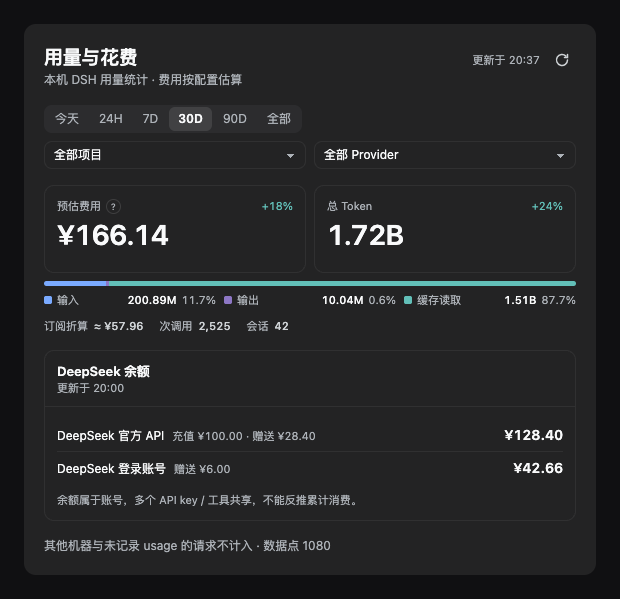
Features
- Two primary KPIs plus one composition bar — estimated cost, total tokens, and the input / output / cache-read split in a single glance.
- Ranges — Today, rolling 24H, 7D, 30D, 90D, All, custom.
24His a rolling window and is not the same as "today". - Three combinable filters — project, provider, model. Click a provider row or a project row to drill in.
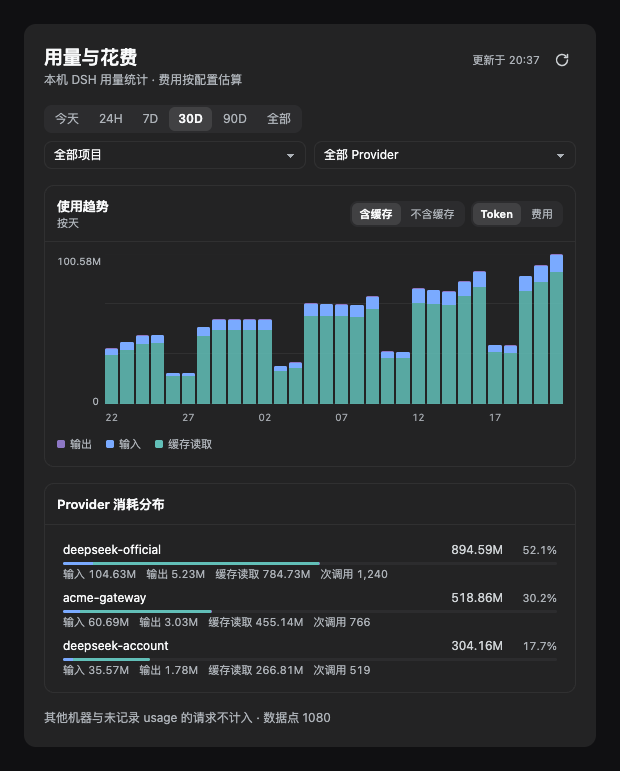
- Trend chart — toggle between tokens and cost; toggle cache in or out (cache is usually >95% of all tokens, so hiding it is the only way to see the input/output shape).
- Provider breakdown — input / output / cache / call count per provider, with the bar segmented by composition.
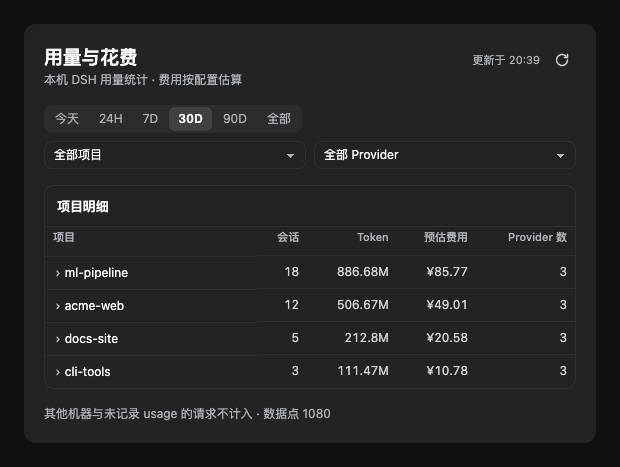
- Project table — expand a row to see which providers that project used, with tokens and cost each.
- Balance — DeepSeek API-key wallet and logged-in account wallet on separate rows, with top-up and bonus listed apart.
- Floating card — pinned bottom-right on the chat page, collapsed to a
Today ¥3.42 · 1.2Mpill; expand for today's breakdown and balance. Draggable, position remembered. - Refresh policy — refreshes only when you open the settings page, expand the card, or click refresh. No background polling: a full scan costs ~12s, so an idle page must not burn CPU. Data older than 10 minutes is dimmed as a staleness cue.
Install
Requires a DSH build that ships the dsh plugin subcommand (tested on 0.2.1-rc.2).
# replace "desktop" with your profile name (desktop / web)
dsh plugin --profile desktop add github:Zhangw1998/dsh-usage-dashboard
Reload DSH, then open Settings → Usage & Cost.
Uninstall: dsh plugin --profile desktop remove dsh-usage-dashboard
How the numbers are computed
These are deliberate honesty choices, and they matter more than the charts:
| Label | What it is | What it is not |
|---|---|---|
| Estimated cost | Per-token cost estimated from your local price config, including peak/off-peak bands | Not a billed amount — no billing records are read |
| Plan value | Subscription usage valued at list prices, prefixed with ≈ |
Not money spent, and never added to estimated cost |
| Unpriced | Models with no rule in the price config | Not zero — unpriced usage is counted separately and never priced at 0 |
| Calls | Calls that carried a usage report | Failed or usage-less requests are not counted, so this can be lower than your provider's dashboard |
| Balance | Account wallet balance | Cannot be used to infer cumulative spend — one balance is shared by many keys/tools |
- Currencies are never summed across — each currency gets its own line.
- Every view reconciles under the same filters — KPIs, trend, provider ranking and project table all aggregate from one filtered fact table, so totals and detail cannot disagree.
- No data means no data — an empty range renders an explicit empty state, not a flat zero chart.
Privacy and network access
Everything this plugin does on your machine, in full:
- Reads local session logs — scans
~/.dsh/sessions/**/session.v4.jsonl.zstd(or$DSH_HOME/sessions) to extract per-call token usage. Conversation content is never uploaded and never copied into this plugin's output. - Makes one balance request — only if
DEEPSEEK_API_KEYis configured, it callshttps://api.deepseek.com/user/balancewith that key. That is the only host it ever contacts, and redirects are refused. - Writes two files — under
~/.dsh/storages/: the scan cache and the price config. No session data is written.
No telemetry, no third-party reporting.
Pricing config
Default rules live in pricing.js. To override, edit:
~/.dsh/storages/usage-dashboard-pricing.json
Per-provider peak/off-peak rates, currency and billing mode (token / plan / subscription / unknown) can be overridden. The file is validated before it is applied — invalid config is rejected rather than partially applied.
Development
No dependencies; Node ≥ 22 only.
node --test test/*.test.mjs   # 78 tests
node build-client.mjs         # re-inline chart-kit.js + view-model.js into client.js
client.jsis a build artifact and must stay committed — installing from git performs no build step (preparecovers it anyway).- Preview the sanitized screenshots with synthetic data (serve from the repo root):
python3 -m http.server 8899
# open http://127.0.0.1:8899/docs/demo.html
- Code layout:
usage.js— parses session logs into an hourly fact table (tokens, call counts, cost already computed)view-model.js— the single aggregation layer: time windows, granularity, composable filters, period comparisonchart-kit.js— components and design system (theme tokens only; light and dark follow automatically)client.js— the browser half, generated by inlining the two modules abovehost.js— the host half, registering the/api/usage.dashboard*endpoints
Known limitations
- A full scan takes ~10–15 s (it replays every session log), so refresh happens on entry/expand/manual only — no timer. If you leave the settings page open, the numbers stay frozen until you refresh.
- Session counts are exact only without filters — the host does not bucket sessions by time, so that column shows
—under a project/provider filter instead of a wrong number. - Balance is DeepSeek-only —
deepseek-official(API-key wallet) anddeepseek-account(logged-in wallet). Other providers have no balance adapter. - Weekly aggregation for 90D is implemented but needs enough history to show more than one bar.
License
MIT
No comments yet. Be the first to write one.