DSH Model Presets
English | 中文
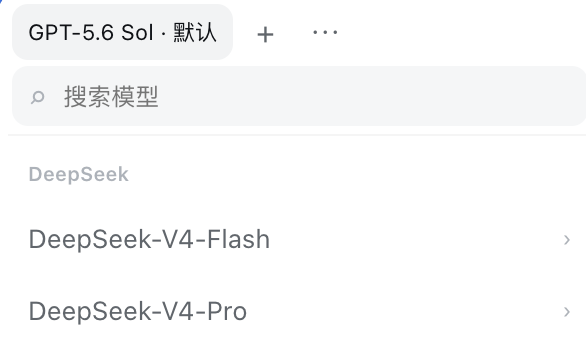
Save frequently used model + reasoning effort combinations in the DeepSeek Harness model menu and switch them with one click.
Features
- Saves frequently used model and reasoning-effort combinations.
- Switches presets from the top of the model list with one click.
- Adds, renames, reorders, and deletes presets.
- Searches available models.
- Switches the first nine presets with
Alt/Option + 1–9; shortcuts stay inactive while typing. - Keeps presets after Harness restarts with browser-local persistence.
Each preset records the API provider, model, and reasoning effort used when it was saved. The same model on two providers remains two separate combinations. If a provider or model becomes unavailable, its preset dims and stops responding; it returns to normal when the provider or model comes back.
Install
dsh plugin --profile web add https://github.com/Zding89/dsh-model-presets
Restart DSH Web after installation. Once listed, it will also be available from DSH's Plugin Market.
Use
- Open the model selector at the bottom of the composer.
- Pick a model and reasoning effort.
- Select
+at the top to save the current combination. - Select a preset name to switch immediately.
- Select
⋯to rename, reorder, or delete presets.
On first use, the current combination is saved as the first preset. If you delete every preset, it will not be added again.
Data and privacy
Presets stay in the current browser and are never uploaded. They do not sync across browsers, devices, or addresses. Up to 50 presets are stored.
Compatibility
- DeepSeek Harness
0.1.0-rc.7or a compatible newer release. - Uses DSH's built-in
modelDirectoriesservice andconversation.input.modelSlot. - The current release targets the Web profile.
Development
The browser bundle is included in the repository, so installation needs no local build.
npm run check
Uninstall
dsh plugin --profile web remove dsh-model-presets
Restart DSH Web afterward. Uninstalling does not clear presets already stored by the browser.
License
MIT
No comments yet. Be the first to write one.