MCP Manager
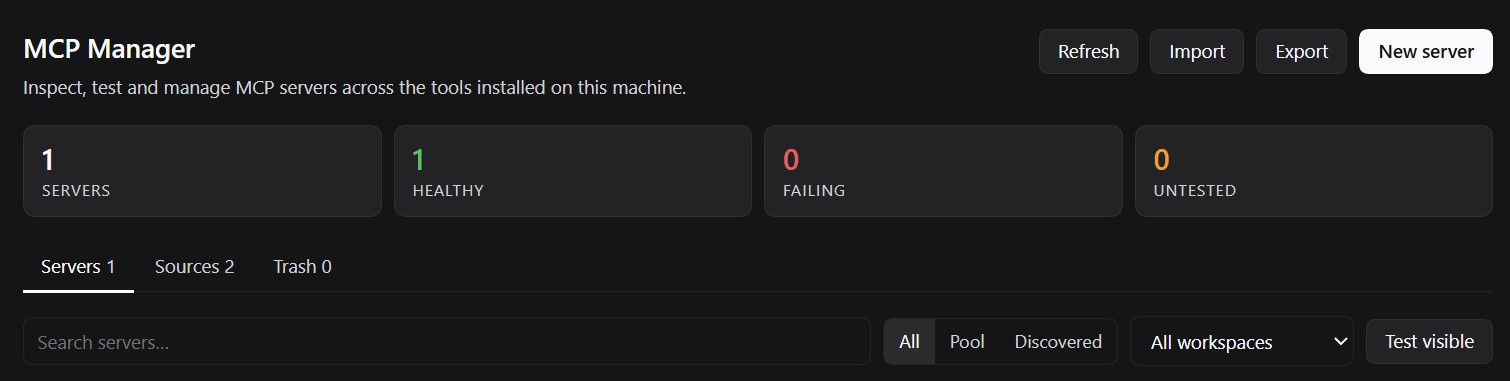
A DeepSeek Harness plugin that puts every MCP server definition on your machine in one place: it scans the config files of the clients you already use, normalises them, verifies that each server actually answers the MCP handshake, and keeps a small editable pool of its own.
Modelled on the idea of dsh-skills-manager, but for MCP servers instead of skills — and in English only.
Distributed as @zarpyk/dsh-mcp-manager (MIT). Source: https://github.com/Zarpyk/dsh-mcp-manager.
What it does
- Discovers MCP servers from the config files of DeepSeek Harness, Claude Desktop / Claude Code, Cursor, VS Code, Windsurf, Codex, Zed, Gemini CLI, OpenCode, Cline, Roo Code, Kilo Code, Qwen, Trae and more, both user-level and per workspace.
- Tests any of them for real: it performs the MCP
initializehandshake and lists the tools the server exposes, over stdio, streamable HTTP or legacy SSE. Failures come with a plain-English hint (missing executable, 401, DNS, certificate, timeout, unsupported protocol version). - Manages its own pool: create, edit, enable/disable, soft-delete to trash, restore and export servers.
- Exports the pool as
mcpServersJSON, VS CodeserversJSON or Codexconfig.toml. - Imports an existing config document by pasting it.
- Never rewrites other applications' files. Discovered entries are strictly read-only; the pool lives in the plugin's own state file.
It also registers five agent tools so the model can inspect and maintain the same inventory:
mcp_inventory, mcp_probe, mcp_save_server, mcp_export_config, mcp_remove_server.
Where it shows up
Two entry points, both disabled independently if their slot is unavailable:
- Settings → MCP Manager – a page in the settings dialog, next to the built-in sections (order 26).
- Sidebar panel – a server-bars icon in the sidebar (order 3) that opens the same page in the central column. Pick it like any other panel; select another entry to leave.
The client half is a single plain-JS module (lib/client.js), so after changing it only a window reload is
needed — no rebuild step.
Install
Published as @zarpyk/dsh-mcp-manager. From the profile that should load it:
dsh plugin --profile <profile> add @zarpyk/dsh-mcp-manager
or, from a checkout of this repository:
plugin_manager install_bundle # target: this package directory
Using the Harness UI: Settings → Plugins → install from npm or from a local package directory.
Requirements: Node.js 20+ (the stdio probe spawns node-based servers) and a Harness build that provides
@deepseek-ai/dsh-client-ui-slots and @deepseek-ai/dsh-client-locale at >=0.2.0-rc.1 <0.3.0-0.
Configuration
The bundle patch is intentionally empty apart from the insert row:
- insert:
    - id: mcp-manager
      name: '@zarpyk/dsh-mcp-manager'
All behaviour is driven from the settings page; there is no required config.
Files and storage
- State (pool + trash + last probe results):
$DSH_HOME/mcp-manager/state.json(%USERPROFILE%\.dsh\mcp-manager\state.jsonon Windows by default). - The file is written atomically (temporary file + rename) and is only touched by explicit actions.
HTTP surface
The page talks to the host half over two routes, registered on the plugin's own connection:
| Method | Path | Purpose |
|---|---|---|
GET / HEAD |
/api/dsh-mcp-manager/state?workspace= |
Snapshot: servers, sources, trash, stats |
POST |
/api/dsh-mcp-manager/action |
All mutations and probes |
Every POST must carry x-dsh-mcp-manager: 1, a JSON content type and a same-origin Origin header when one
is sent; anything else is rejected with 403 / 415.
Actions: refresh, probe, spec, save, set-enabled, delete, restore, purge, empty-trash,
import, export.
Responses are { "ok": true, "data": … } or { "ok": false, "error": "…", "code": "…" }.
Security notes
- Secrets in discovered configs are masked (
••••••plus the last four characters) before they reach the browser, except through the explicitspecaction used to pre-fill the editor. - Cross-origin mutations are refused, and the custom header makes plain HTML form posts impossible.
- Probing a stdio server executes its configured command. That is the same trust model as running the server in its original client; only probe servers you would also run yourself.
Development
lib/sources.js     where MCP configs live, per client
lib/parse.js       JSON/TOML config parsing, normalisation, masking
lib/probe.js       real MCP client (stdio, streamable HTTP, legacy SSE)
lib/state.js       pool state file
lib/discovery.js   file scanning and normalisation
lib/index.js       host half: HTTP routes, actions, agent tools
lib/client.js      web half: settings page (plain JS, no build step)
Tests use the Node test runner and need no dependencies:
node --test test/parse.test.js test/probe.test.js test/plugin.test.js test/client.test.js test/render.test.js
test/render.test.js renders the settings page with a tiny React substitute and a fixture snapshot, so the
whole tree (rows, details, tabs, editor) is exercised without a browser. The probe tests spawn a fake stdio
server and start throwaway HTTP servers on 127.0.0.1; nothing touches your real config files (the plugin
tests point HOME and DSH_HOME at a temporary directory).
Limitations
- It does not install servers into the Harness MCP Connector. That stays with the official connector plugin; use Copy JSON / Export to move definitions there.
- Project-level configs are only scanned for registered workspaces (plus explicit ones passed by the UI).
- TOML support covers the subsets MCP clients actually write (tables, arrays, inline tables, dotted keys), not the whole TOML 1.0 grammar.
License
MIT.
No comments yet. Be the first to write one.