
DSH iOS Simulator
A live, interactive iOS Simulator inside a DeepSeek Harness conversation — plus your real iPhone over USB.
22 agent tools • live MJPEG sidebar panel • simulator & real iPhone over USB • list/feed row actions • SwiftUI preview hot reload
npm: @zseven-w/dsh-ios · Current plugin release: 0.1.0-rc.3 · Tested with DSH 0.1.1-rc.1
English · 简体中文 · 繁體中文 · 日本語 · 한국어 · Français · Español · Deutsch · Português · Русский · हिन्दी · Türkçe · ไทย · Tiếng Việt · Bahasa Indonesia
npm: @zseven-w/dsh-ios · Current plugin release: 0.1.0-rc.3 · Tested with DSH 0.1.1-rc.1
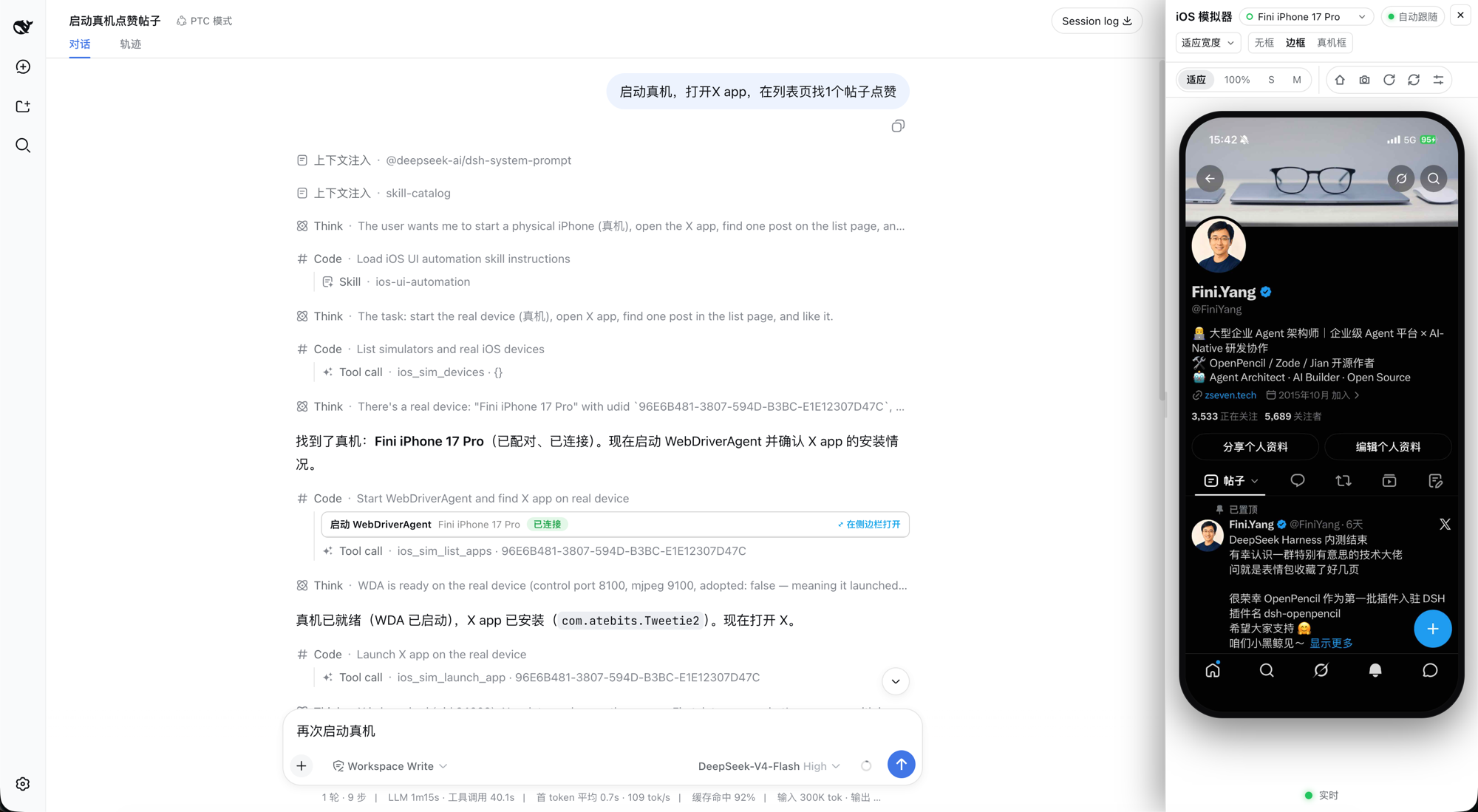
A real iPhone driven from inside a DSH conversation — the agent's tool calls on the left, the live device panel on the right
Why DSH iOS Simulator
DSH iOS Simulator gives the agent a real iOS Simulator inside the conversation — and gives you the pixels. The agent can boot a device, build and run an Xcode project or Swift package, drive the UI by accessibility identity or by OCR text, read unified logs, and inspect processes, backtraces, and leaks, while a live stream of the device renders in a persistent sidebar panel where you can tap, drag, rotate, and press Home directly on the video. The same verbs also work on a real iPhone connected over USB: the plugin builds and launches WebDriverAgent on the phone, tunnels its control and screen ports over loopback, and streams the device into the same panel, cards, and tools. No image blocks, no screen-recording files: visual bytes reach the UI only through signed, expiring URLs served by the DSH webserver.
| 🖥️ Live simulator in the conversation | A serve-sim MJPEG stream of the booted device, proxied through signed /_dsh/dsh-ios/* routes into a persistent right-side panel — the browser never touches serve-sim's port. |
| 📱 Real iPhone over USB | ios_real_start_wda builds and launches WebDriverAgent on a connected phone and tunnels its control (REST) and screen (MJPEG) ports over loopback; the same panel, tools, cards, and status capsule then drive the phone. The device must be unlocked, and every real-account tap is gated by the plugin's identify-before-tap rules. |
| 🛠️ 22 agent tools | Devices, boot/shutdown, screenshot, interact, build & run, unified logs, AXe-backed UI tree + tap-by-element, list/feed row actions, Vision OCR find/tap, SwiftUI preview hot reload, processes, backtrace, leaks, app info. |
| 👆 Interactive panel | Tap and drag on the live video; Home / rotate / screenshot / refresh icon toolbar with hover tooltips; size modes (适应 · 50–125% · S/M/L); frame styles (无框 / 边框 / 真机框); drag-resize up to 960 px with double-click reset; landscape auto-widen. |
| 🧾 List & feed rows | ios_sim_ui_rows turns deep accessibility snapshots into indexed rows with labels and generically parsed counters; ios_sim_tap_row taps inside a row at relative coordinates and verifies the action by the counter's expected ±1 change — the only reliable confirmation a list app offers. |
| 🔐 Loopback-only transport | serve-sim binds 127.0.0.1 in a dedicated port range; every route requires a loopback peer, a loopback Host, and Fetch-Metadata/Origin checks; HMAC capabilities expire within 10 minutes. The WebDriverAgent control/MJPEG tunnels on a real device are loopback usbmux forwards under the same fence. |
| ⚡ SwiftUI preview hot reload | ios_sim_preview generates a disposable host app outside your package, builds your previews as a dylib, and hot-swaps edits into the running simulator without relaunching (~2–5 s). |
| 🧭 Semantic UI automation | ios_sim_ui_tree dumps the accessibility tree (AXe-backed) and ios_sim_tap_element taps by label or identifier; ios_sim_find_text OCRs the screen when the tree is empty or degenerate, and ios_sim_tap_text taps the matched text — identity- and text-based taps instead of guessed coordinates. |
Tools
All 22 tools are registered on every host and return plain JSON — visual bytes reach the UI only through presentationMeta + signed routes, never as image blocks. Simulator udids route through simctl/serve-sim; physical-device udids route through WebDriverAgent automatically. On non-macOS hosts (or when serve-sim is unresolvable) the tools stay registered but fail with an explanatory error; the one exception is ios_sim_preview status, which truthfully reports { running: false } on any host.
Core simulator tools
| Tool | What it does | Key parameters |
|---|---|---|
ios_sim_devices |
List the iOS Simulator devices available on this Mac (udid, name, runtime, state) and which are booted, plus any USB-connected physical iPhones under realDevices (udid, name, osVersion, model, state, developerMode). Use it to discover the udid or name to pass to the other tools. |
— |
ios_sim_boot |
Boot a device and start its live serve-sim stream; the stream stays alive for the conversation so the panel can show the simulator live. | udid (required — udid or device name) |
ios_sim_shutdown |
Shut a device down; stops the stream when it targets that device. | udid (required) |
ios_sim_screenshot |
Capture a PNG and return a small JSON summary (path, bytes, dimensions, device); the image renders in the card/panel, never as an image block. Works on the streamed simulator and on a USB-connected phone via WebDriverAgent. | udid (optional — streamed device, else first booted) |
ios_sim_interact |
Interact with the streamed device — simulator or USB-connected phone: tap at normalized 0..1 coordinates, type text (US keyboard on a simulator), press a hardware button (home, lock, volumeUp…), scroll, or send a touch gesture; after the action settles (~300 ms) a fresh screenshot shows the effect. |
action (required — tap/type/button/gesture/scroll), x/y, text, name, json |
ios_sim_list_apps |
List the apps INSTALLED on a booted simulator or a connected phone (bundle id, display name, version, system flag) — a third-party bundle id cannot be guessed, so list it or pass name to ios_sim_launch_app. A FAILED listing throws (e.g. "the device is not reachable by CoreDevice") instead of returning an empty list, so count: 0 always means the device really has no matching app. |
udid (optional), query (case-insensitive substring over display name AND bundle id, CJK included), include_system (default false) |
ios_sim_launch_app |
Launch an installed app on a booted simulator or a connected phone — by bundleId, or by name (a case-insensitive display-name substring resolved through the same listing, CJK included). Exactly one of the two; a launch failure and an ambiguous name both come back with what to do next (ios_sim_build_run is for building one from source). |
bundleId or name (exactly one), udid, relaunch |
ios_sim_build_run |
Build an .xcodeproj, .xcworkspace, or Swift package for the simulator, install the built .app, and launch it; pass a physical-device udid to build, install, and launch on the phone instead (requires Apple Development signing). On failure the result carries the filtered xcodebuild error tail. Takes minutes for a full build. |
projectPath (required), scheme, udid (streamed → booted → newest-runtime iPhone, which is booted), configuration (default Debug) |
ios_real_start_wda |
Start WebDriverAgent (WDA) on a USB-connected physical iPhone — real devices only, never a simulator. Adopts an already-running WDA when one answers; otherwise runs the xcodebuild build/launch (a cold build takes minutes), then waits until WDA reports ready and returns the control/MJPEG ports the live panel streams through. Run this first when ios_sim_screenshot / ios_sim_interact / ios_sim_ui_tree / ios_sim_tap_element report WDA is not running for the device. |
udid (required — physical-device udid from ios_sim_devices.realDevices) |
UI-tree tools (AXe-backed)
| Tool | What it does | Key parameters |
|---|---|---|
ios_sim_ui_tree |
Dump the frontmost app's accessibility element tree (labels, identifiers, values, frames in device points) plus the screen size in points — AXe on a simulator, WebDriverAgent on a USB-connected phone (depth-capped by default there: an uncapped snapshot of a busy app measures ~32 s / 751 KB, capped ~2 s); output is capped at ~40 KB (deepest levels pruned, truncated + hint set). |
udid (optional), max_depth, filter (case-insensitive substring over label/identifier/type) |
ios_sim_tap_element |
Tap an element by identity — exact match first, then case-insensitive substring over identifier/label; nested duplicates collapse to one target, ambiguous matches list every candidate. The tap lands on the element center (AXe HID on a simulator, WebDriverAgent on a phone), then a ~300 ms screenshot shows the effect; pass expect_text / expect_gone and the tap plus its verification become one round trip (expected.matched). |
udid (optional), identifier, label, expect_text, expect_gone |
List & feed rows
List/feed apps aggregate each item into one accessibility cell whose label carries the whole summary and all its counters ("57 回复。18 喜欢。592 次查看") — there are no per-control child buttons to match, and the row cells only surface at a deep snapshot. These two tools expose that structure as rows and act inside a row.
| Tool | What it does | Key parameters |
|---|---|---|
ios_sim_ui_rows |
Read the visible list/feed rows of the frontmost app as rows instead of a raw tree: each row reports its index, frame in points, the aggregated label, and the counters parsed out of that label (number + classifier token, e.g. 57 回复 → 回复=57, 中文 or English — no app vocabulary hardcoded). Rows only surface at a deep snapshot: on a phone the default max_depth is 60, costing ~15–25 s / ~0.5 MB per call (WDA serves requests serially) — keep the cheap observers (ios_sim_find_text / ios_sim_ui_tree) first. Counters are parsed heuristically and keys round-trip: pass a key exactly as listed to ios_sim_tap_row.expect_count. When no rows are found the result says why (depth too shallow / not a list screen / genuinely no accessibility information after a deep read) — a shallow read is never reported as "the app has no accessibility information"; off-screen rows are excluded and counted as omittedOffscreen. |
udid (optional), max_depth (phone-only; default 60) |
ios_sim_tap_row |
Tap at a relative position inside one visible list row (reported by ios_sim_ui_rows: 0-based index; x/y as fractions of that row's frame — 0 = left/top edge, 1 = right/bottom, default 0.5 = center) on a simulator (AXe) or a USB-connected phone (WebDriverAgent). The row frame comes from a FRESH tree read, so no absolute screen coordinates are guessed; an out-of-range index FAILS (never clamps). Safety gate: with expect_count={key,delta} the tool verifies the action by re-reading the row label and checking the counter moved exactly +1/−1 (countCheck.verified); if the key is not among the row's parsed counters the tap is REFUSED before it happens — a real-device tap is never a probe. Without expect_count the tap still happens (an explicit row-relative position IS the identification) but nothing is verified. |
udid (optional), index (required), x, y (fractions 0..1), max_depth, expect_count ({key, delta}) |
OCR tools (Vision)
| Tool | What it does | Key parameters |
|---|---|---|
ios_sim_find_text |
OCR the CURRENT screen of a booted simulator or a USB-connected phone with the plugin-compiled Vision helper (accurate recognition, zh-Hans + en-US, compiled with swiftc on first use into ~/Library/Caches/dsh-ios/bin/ocr). Use it when the accessibility tree is empty or degenerate, for text rendered as graphics (badge counts, prices baked into images), or to independently verify what is on screen. Captures a fresh screenshot and returns {device, size, items:[{text, confidence, rect}]} — rects are device-point boxes (origin top-left), confidence-sorted, capped at ~40 KB (truncated drops the lowest-confidence tail; narrow with query or raise min_confidence). |
udid (optional), query (case-insensitive substring), min_confidence (default 0.3) |
ios_sim_tap_text |
OCR the CURRENT screen and tap the center of the best text match — the same exact → case-insensitive-contains → candidate-list ambiguity rules as ios_sim_tap_element, for text the accessibility tree cannot see (no-a11y apps, badge counts, text baked into images). On a phone the tap lands at absolute device points through WebDriverAgent; on the streamed simulator it is sent normalized through the serve-sim control (run ios_sim_boot first). After ~300 ms a fresh screenshot shows the effect; pass expect_text / expect_gone and the tap plus its verification become one round trip (expected.matched). On a REAL device every tap has real consequences — never tap an unidentified control to find out what it does. |
udid (optional), query (required), min_confidence, expect_text, expect_gone |
ios_sim_wait_for |
Wait until text appears or disappears on the screen, polling the same capture+OCR pipeline as ios_sim_find_text until the condition holds or the timeout expires (default 8 s, max 60 s). A timeout is a normal matched:false answer, never an error — one call instead of a find_text loop that costs ~1.2 s per round trip on a phone. On a match, item carries the OCR text, confidence, and rect in device points. |
udid (optional), text (required), mode (appear/disappear), timeout_ms, min_confidence |
Logs tool
| Tool | What it does | Key parameters |
|---|---|---|
ios_sim_logs |
Read what a simulator app prints, from the device unified log: snapshot (log show --last <duration>, default 2m) or follow (bounded live capture for duration_seconds, default 10, max 60 — never a hanging stream). Output is capped at ~300 lines / 30 KB with a narrowing hint. |
udid (optional), mode (snapshot/follow), duration, duration_seconds, bundle_id, predicate (raw NSPredicate, overrides bundle_id), level (default/info/debug), grep |
Preview tool
| Tool | What it does | Key parameters |
|---|---|---|
ios_sim_preview |
SwiftUI preview hot reload, live in the simulator: start (default) validates the package, generates a disposable host app in the plugin cache (never inside your package), builds the package as a dylib for the simulator, installs + launches the host, and watches the sources — every edit rebuilds and hot-swaps without relaunching (~2–5 s). Compiler errors keep the last good preview and surface through status; one session at a time. |
packagePath (required for start), udid, action (start/status/stop), previewFilter (case-insensitive substring over preview names) |
Debug tools
| Tool | What it does | Key parameters |
|---|---|---|
ios_sim_processes |
List the running app processes of one simulator from its own launchd (host-visible pid, name, bundle id) — the pid source for backtrace/leaks; a physical-device udid lists the phone's processes through devicectl instead. | udid (optional), filter (case-insensitive substring over name/bundle id) |
ios_sim_backtrace |
One-shot batch LLDB (attach → thread backtrace → detach, never interactive); output capped at ~200 lines, main thread first, target always verified resumed. When macOS denies the attach (Developer Mode off), degrades to Xcode's non-suspending sample engine and reports the enable hint. Simulators only — physical devices are rejected with the reason. |
udid (optional), pid / bundle_id, all_threads (default true) |
ios_sim_leaks |
Analyze leaks with Xcode's leaks tool: summary (leak count, total leaked bytes, top ~30 types) or memgraph (a .memgraph artifact to open in Xcode Instruments, never parsed here). The app is suspended while scanning and always resumed. Simulators only. |
udid (optional), pid / bundle_id, mode (summary/memgraph) |
ios_sim_app_info |
Installed-app facts: app bundle path, writable data container, and Info.plist values — via simctl appinfo (with a get_app_container fallback) on a simulator, via devicectl on a USB-connected phone; installed: false plus a note naming ios_sim_list_apps for missing apps. |
udid (optional), bundle_id (required) |
Display surfaces
- Sidebar panel — “iOS 模拟器”. The live view lives in a persistent right-hand panel (a fixed dock that pushes the conversation aside, or a centered overlay on narrow viewports). It renders the live MJPEG stream and accepts click-to-tap and drag-to-gesture directly on the video, with an icon toolbar (Home, screenshot, rotate, refresh) whose buttons carry hover tooltips. Size controls offer 适应 (fit to panel width), 50–125% zoom of the device's logical width, and S / M / L presets that size the device's short side (portrait width; landscape scales so the device keeps its physical size). Frame styles are 无框 / 边框 / 真机框 (frameless / bezel / realistic device shell) with a proportional corner radius. When the device rotates to landscape the panel auto-widens to a comfortable size and restores your width when it rotates back — a manual drag during the stint always wins. The left-edge handle drags the panel wider/narrower (max 960 px; double-click resets to the default width). When a USB-connected iPhone is the stream target, the same panel shows the phone's WebDriverAgent MJPEG stream with the same controls.
- Compact conversation cards. Tool results render as one-line cards with no inline imagery: the unified “iOS 模拟器” title, an action sub-label (Boot / Screenshot / Interact / Build & Run / Start WebDriverAgent), the device name, a status badge, and an “open in sidebar” cue. Clicking the row opens the panel; clicks on buttons, links, or the live frame itself never trigger it.
- Status capsule above the input. While the panel is closed and a stream is online, a small green-dot pill (
<device> · 实时) appears above the composer and opens the panel when clicked. It is session-gated: it renders and polls only while the current conversation has mounted simulator results, and stops when you switch to a session without them. - Standard mode and Code Mode. Standard sessions use the host-projected
presentationMeta. Nested Code Mode (PTC) dispatches never carry meta, so the client reconstructs the identical meta from the durable result JSON — the panel, the cards, and the capsule work in both modes.
Security
- The browser never talks to serve-sim's port. Every byte crosses the DSH webserver origin through plugin-owned
/_dsh/dsh-ios/*routes:/stream/<token>(MJPEG proxy),/screenshot/<token>(cached PNG),/ws?token=…(HID control relay), plus/grant,/capture, and/statusendpoints. - Tokens are HMAC-SHA256 capabilities (
base64url(payload).base64url(mac)) expiring within 10 minutes, signed with a per-DSH-home key (<DSH_HOME>/cache/dsh-ios/stream-access.key, 0600, created atomically). - Every route applies a loopback/trusted transport fence before any capability is consulted: loopback peer address, loopback
Host(DNS-rebinding rejected), and Fetch-Metadata/Origin checks. The screenshot route serves only files inside the plugin cache directory (symbolic links refused,realpathcontainment). - serve-sim runs as a foreground child on loopback only, in a dedicated port range (3181–3244), so a user's own serve-sim on port 3100 is never touched;
--hostis never used. - Real-device transport — the WebDriverAgent control (REST, device port 8100) and screen (MJPEG, port 9100) tunnels are loopback usbmux forwards over the USB link; they sit behind the same signed-route fence, and the browser still only ever talks to the DSH webserver origin.
- Orphan adoption/reclaim — if a previous DSH host was killed ungracefully and its serve-sim helper survived, the same device is adopted (the orphan's handshake is authoritative); a stale helper squatting on a slot for a different device is reclaimed via
serve-sim -kand relaunched once. - Keep-alive + idle stop — a crashed stream restarts in the background (~5 s delay); with zero consumers the stream stops automatically after 5 minutes. Intentional stops are never fought. (The real-device runner is exempt from the idle reaping on purpose: restarting it costs a multi-minute
xcodebuildrebuild.)
Requirements
- macOS with full Xcode — not just Command Line Tools.
xcodebuild,xcrun simctl, and the simulator runtimes all ship with Xcode. - At least one iOS Simulator runtime installed in Xcode.
- DSH ≥ 0.1.0-rc.6 with the web bundle for the panel. Headless profiles work too: all 22 tools function normally, just without the live view.
- Non-macOS hosts: the plugin loads and all 22 tools register, but every call returns an explanatory error (
iOS Simulator requires macOS with Xcode …). - serve-sim ships as an npm dependency of this plugin, so it resolves locally on real installs; the
npx -y serve-simfallback covers development trees (first use needs network). - AXe (optional — only the AXe-backed tools need it:
ios_sim_ui_tree/ios_sim_tap_element, plusios_sim_ui_rows/ios_sim_tap_rowon a simulator):brew install cameroncooke/axe/axe, or let the plugin auto-download the pinned release (v1.8.0, SHA-256 verified) into~/Library/Caches/dsh-ios/bin.DSH_IOS_AXE_BINoverrides resolution;DSH_IOS_AXE_OFFLINE=1disables the download. - Vision OCR (optional — only
ios_sim_find_text/ios_sim_tap_textneed it): the plugin compiles its bundledassets/ocr.swiftwithswiftcon first use into~/Library/Caches/dsh-ios/bin/ocr(zh-Hans + en-US recognition). - lldb attach needs macOS Developer Mode: run
sudo DevToolsSecurity -enableonce. Until thenios_sim_backtraceuses Xcode'ssampleengine (non-suspending) andios_sim_leaksdegrades with the enable hint. - Real iPhone — a USB-connected iPhone with the screen unlocked (WebDriverAgent cannot start on a locked screen; consider Auto-Lock: Never), a data-capable USB cable (a Wi-Fi-only pairing cannot carry the port forward), Developer Mode enabled on the device, a WebDriverAgent checkout at
~/Library/Caches/dsh-ios/wda/src(the plugin builds itsWebDriverAgentRunnerscheme from there — it never downloads or clones anything). The first WDA build installs a signed WebDriverAgentRunner: trust its certificate on the device when prompted, and re-runios_real_start_wdawhen the free-team signing profile expires (7-day lifetime). Signing-team order isDSH_IOS_TEAM_ID> a team the Xcode account can provision for (preferring one with a matchingApple Developmentkeychain identity, then the personal team) > the first keychain identity's team > the legacy default. SetDSH_IOS_WDA_BUNDLE_IDto override the runner bundle identifier whenWdaOptions.bundleIdis not supplied.
Install into DSH
dsh plugin --profile web add @zseven-w/dsh-ios@latest
dsh web
Quick start
A typical first conversation:
- Discover devices — “List the available simulators.” →
ios_sim_devices. - Boot — “Boot the iPhone 17 Pro.” →
ios_sim_boot. The stream starts and the “iOS 模拟器” panel opens: the device is live in the sidebar. (Click any simulator card row, or the status pill above the input, to reopen it.) - Tap on the video — tap or drag directly on the panel; or let the agent drive the UI: “Open Settings, then tap General.” →
ios_sim_interact(orios_sim_ui_tree+ios_sim_tap_elementfor identity-based taps;ios_sim_find_text+ios_sim_tap_textfor text-based taps;ios_sim_ui_rows+ios_sim_tap_rowfor list/feed apps). - Build & run your app — “Build and run /path/to/MyApp.xcodeproj.” →
ios_sim_build_run. A full build takes minutes; when it lands, the app launches on the simulator and you watch it live in the panel. - Preview hot reload — “Show the SwiftUI previews of /path/to/MyPackage.” →
ios_sim_preview start. Edit a source file and the preview hot-swaps in the running simulator within ~2–5 s — no relaunch. - Drive a real iPhone — plug the phone in over USB (data cable), unlock it, then “Start WebDriverAgent on the phone.” →
ios_real_start_wda. The panel switches to the phone's live stream and every tool accepts itsrealDevicesudid; when a call fails, read the coded reason from the panel's status (device-locked,cert-untrusted,profile-expired,tunnel-failed,device-unplugged).
Troubleshooting
- Backtrace uses
sampleinstead of lldb, or leaks complains about restricted inspection — macOS Developer Mode is off. Runsudo DevToolsSecurity -enableonce and retry. The tools degrade cleanly until then:ios_sim_backtracefalls back to Xcode'ssample(symbolized, non-suspending) andios_sim_leaksreports the enable hint. ios_sim_ui_tree/ios_sim_tap_elementneed AXe — install it withbrew install cameroncooke/axe/axe, or let the plugin download the pinned release on first use (needs network to github.com). The error message always carries the full install hint;DSH_IOS_AXE_BIN=/path/to/axeoverrides resolution. The row tools (ios_sim_ui_rows/ios_sim_tap_row) need AXe on a simulator too.ios_sim_find_text/ios_sim_tap_textreport the OCR helper is missing — first use compiles the bundledassets/ocr.swiftwithswiftc(needs Xcode) into~/Library/Caches/dsh-ios/bin/ocr; the error carries the exact path and hint.ios_sim_ui_rowsfinds no rows — the result says why: depth too shallow (raisemax_depth; on a phone each deeper snapshot costs ~15–25 s), not a list screen, or genuinely no accessibility information after a deep read. A shallow read is never misreported as missing accessibility.ios_sim_leakson iOS 26.2 simulators — on iOS 26.2 runtimes, Xcode'sleakscan fail to inspect simulator processes with fatal diagnostics such asFailed to get DYLD infoor minimal-corpse errors, even with Developer Mode enabled. The tool degrades cleanly: you get the raw diagnostic, the target is always verified resumed, and nothing hangs. There is no plugin-side fix — when it bites, trymode: "memgraph"or a different runtime.- Real-device calls fail with a coded status — the panel's status names the cause instead of guessing:
device-locked(unlock the phone; it recovers by itself),cert-untrusted(trust the WebDriverAgent certificate on the device),profile-expired(free-team signing lasts 7 days — re-runios_real_start_wdato rebuild),tunnel-failed(check the USB link/usbmuxd),device-unplugged(use a data-capable USB cable — Wi-Fi-only pairing cannot carry the port forward). - The stream stops by itself — that is the idle policy, not a crash: with zero consumers (panel closed, no cards mounted, no route active) the stream stops after 5 minutes and restarts on the next tool call or panel open. A crashed stream restarts in the background within ~5 seconds.
Development
pnpm install
pnpm run build      # host tsc + client bundle → lib/
pnpm run typecheck
The scripts/ smoke tests exercise the built lib/ (macOS only for the parts that boot a simulator or talk to a USB-connected phone; set DSH_IOS_SMOKE_SKIP_SIM=1 to skip those parts):
| Script | What it covers |
|---|---|
node scripts/dev-smoke.mjs |
Sim host: binary resolution, stream launch, control, keep-alive, dispose. |
node scripts/dev-tools-smoke.mjs [--full-build] |
The core tools against a real simulator (plus a real build with --full-build). |
node scripts/dev-routes-smoke.mjs |
Signed web routes: grant, stream proxy, screenshot, ws relay, fences, expiry. |
node scripts/dev-card-smoke.mjs |
Client cards: static SSR (no <img>), status/capture contract, live-ish network part. |
node scripts/dev-panel-smoke.mjs |
Panel components, size modes, frame styles, dock/trigger/capsule logic (static only). |
node scripts/dev-logs-smoke.mjs |
ios_sim_logs snapshot/follow, filters, caps, process reaping. |
node scripts/dev-uitree-smoke.mjs |
UI-tree tools: AXe resolution/download pipeline, selectors, real-simulator tree + tap. |
node scripts/dev-debug-smoke.mjs |
Debug tools: processes, backtrace (lldb + sample), leaks, app info. |
node scripts/dev-preview-smoke.mjs |
Preview hot reload: start, edit → hot-swap without relaunch, error recovery, stop. |
node scripts/dev-orphan-smoke.mjs |
Orphaned serve-sim adoption/reclaim after an ungraceful host kill. |
node scripts/dev-ocr-smoke.mjs |
Vision-OCR tools: helper resolution, swiftc compile cache, recognition pipeline, tap-text routing. |
node scripts/dev-wda-smoke.mjs |
WebDriverAgent host: ServerURLHere parsing, failure classification, tunnels, keep-alive (mocked; optional live pass). |
node scripts/dev-realdevice-smoke.mjs |
xcrun devicectl against a USB-connected iPhone — the exact code paths the tools use. |
node scripts/dev-realstart-smoke.mjs |
The /real-start route: fence, coded refusals, build/launch gating (static). |
node scripts/dev-realtools-smoke.mjs |
Real-device backends of ios_sim_screenshot / ios_sim_interact / ios_sim_ui_tree / ios_sim_tap_element plus ios_real_start_wda. |
Ecosystem
- DSH Android — a live Android emulator or USB device inside the conversation, driven entirely through adb
- DSH Crew — dispatch work to DSH agents from Claude Code / Codex
- DSH Noema — long-term memory for DSH
- DSH OpenPencil — inspect and edit
.opdesign documents inside a conversation
Credits & License
- serve-sim — Evan Bacon — the simulator streaming engine (Apache-2.0; bundled runtime dependency).
- AXe — Cameron Cooke — the accessibility CLI behind the UI-tree tools (MIT).
- WebDriverAgent — the WebDriver server the plugin builds and launches on real devices (BSD-licensed).
- Architecture inspired by Codex's “Build iOS Apps” plugin; the SwiftUI preview engine is a clean-room reimplementation of the publicly documented approach — no Codex code is copied.
- See THIRD_PARTY_NOTICES.md for the full notices.
License: MIT
No comments yet. Be the first to write one.