
DSH Harbor
Evidence-first governance for the DeepSeek Harness plugins already installed on your machine.
Capability Inventory • Declared vs Detected • Runtime Attribution • Conflict Detection • Version Drift • Change Timeline
npm: @zseven-w/dsh-harbor · Current plugin release: 0.1.0-rc.2 · Tested with DSH 0.1.1-rc.2
English · 简体中文 · 繁體中文 · 日本語 · 한국어 · Français · Español · Deutsch · Português · Русский · हिन्दी · Türkçe · ไทย · Tiếng Việt · Bahasa Indonesia


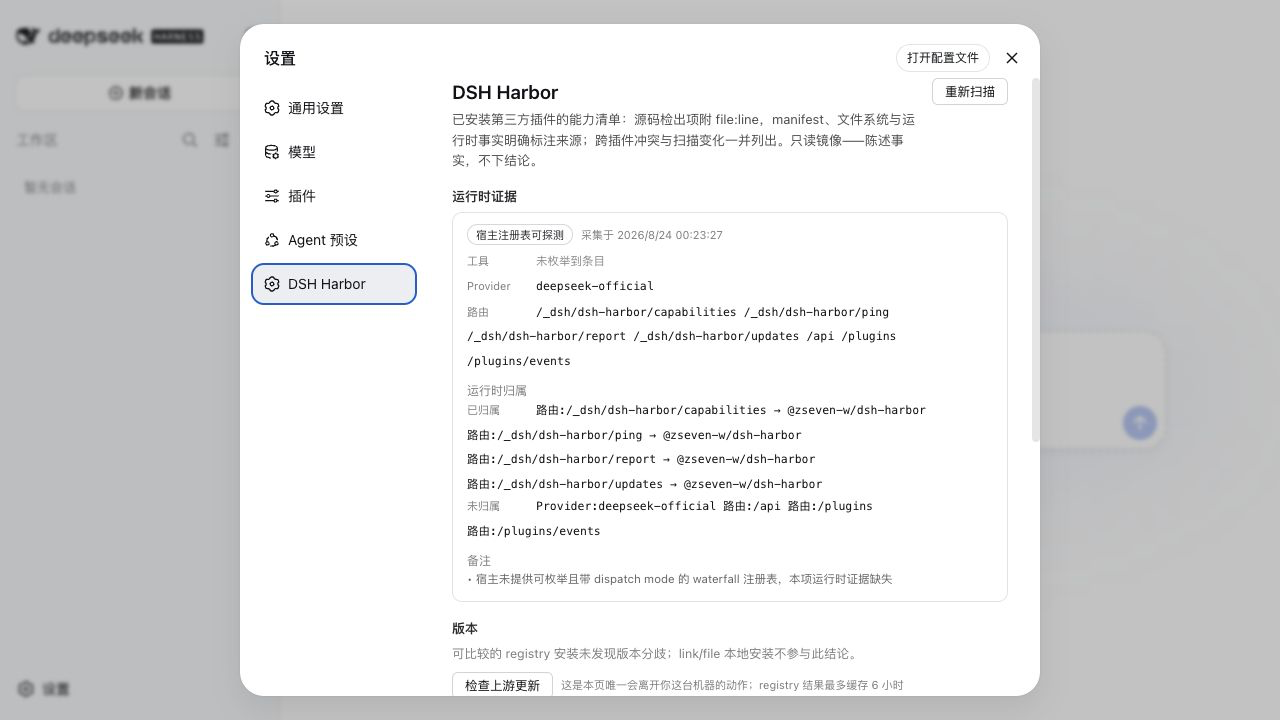
The Harbor settings page in DSH light mode — live runtime registries, profile-scoped attribution, local version truth, and the change baseline.
Why DSH Harbor
DSH plugins run in the host's Node realm with the same local permissions as DSH itself. Harbor does not pretend this can be solved with a score or a badge: it keeps a read-only, evidence-backed ledger of what is installed, what each plugin declares, what its code and live host actually expose, where plugins collide, and what changed since the previous scan.
🔎 Capability InventoryHarbor scans every installed third-party bundle across DSH profiles and reports a fixed 13-capability vocabulary. Source findings carry |
🤝 Declared vs DetectedPlugins may declare |
🟢 Runtime AttributionInside a live DSH host, Harbor enumerates tools, providers, and routes, then attributes them only to plugins installed in the active profile. Missing host registries remain visible as coverage gaps rather than empty proof. |
⚠️ Conflict DetectionThe ledger finds same-profile tool names, route prefixes, provider ids, client-module ids, and order-sensitive message hooks. A quoted route used by a client does not make that client the route owner. |
🧭 Two Version AxesCross-profile drift is local and always offline. The optional upstream check is separate, explicit, registry-aware, credential-redacted, and cached for six hours. |
🕰️ Change TimelineSnapshots track additions, removals, version transitions, profile moves, capability changes, and claim changes. Even two artifacts exchanging profiles are reported as concrete per-profile transitions. |
How it works
~/.dsh/profiles/*
  ├─ installed package + provenance
  │    registry artifact | link: working tree | file: snapshot
  ├─ declared
  │    package.json + cordis.patch.yml
  ├─ static
  │    bounded source scan + file:line evidence
  ├─ runtime (when loaded inside DSH)
  │    tools + providers + routes + profile-scoped attribution
  ├─ versions
  │    local cross-profile drift + opt-in registry check
  └─ snapshot
       additions + removals + version/profile/capability/claim changes
The CLI and the settings page consume the same scan core. The default path is offline. Only harbor scan --check-updates or the panel's Check for updates button contacts a registry.
Evidence you can inspect
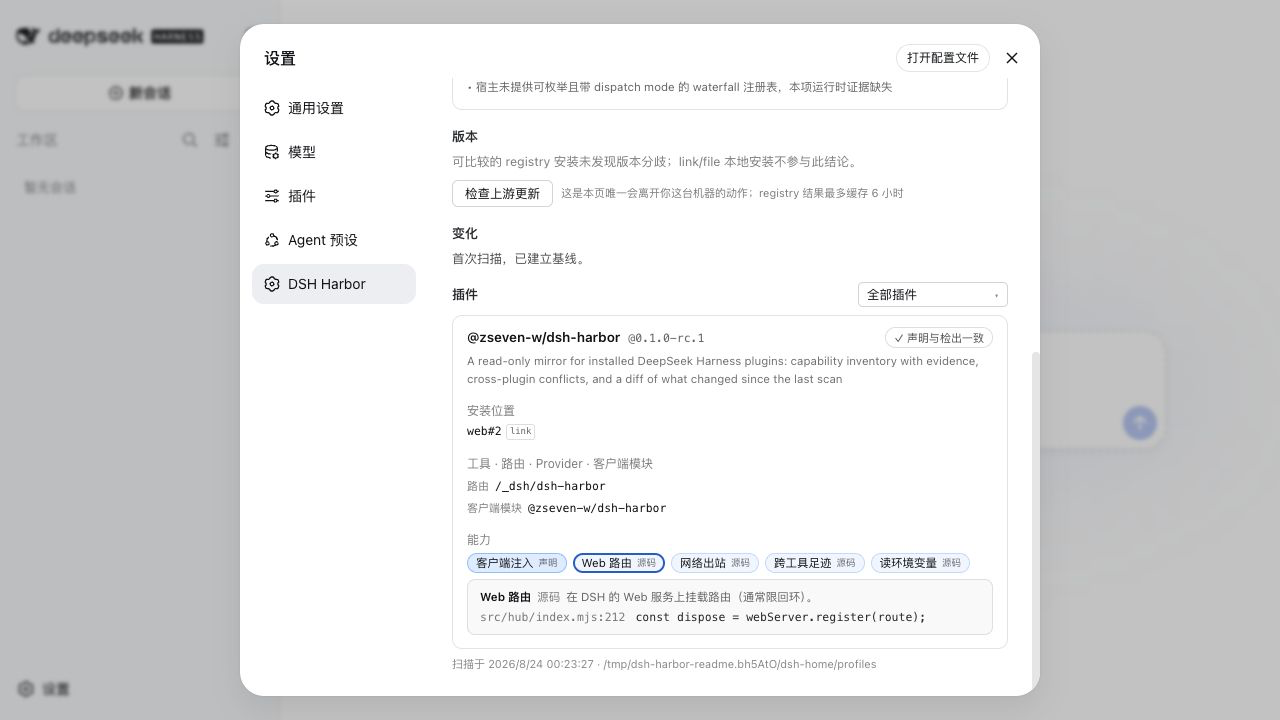
Expand any capability pill to inspect its tier, detail, and source evidence — here the Web route registration resolves to src/hub/index.mjs:212.
| Tier | What Harbor actually knows |
|---|---|
declared |
A manifest or filesystem fact, such as client injection or an on-disk realm copy. |
runtime |
A registry entry observed in the active DSH host. |
static |
A source behavior matched with inspectable file:line evidence. |
heuristic |
A pattern-based inference that deserves human review. |
Harbor reports facts, not a risk score. Spawning a subprocess may be the entire purpose of a plugin; the useful question is whether that capability is visible, declared, attributable, and expected.
Install into DSH
DSH is a separate package. Install the tested host version if you do not already have it:
npm install -g @deepseek-ai/dsh@latest
For local development, install the current checkout into a Web profile and restart DSH once:
dsh plugin --profile web add link:/path/to/dsh-harbor
dsh web
For a registry install, use the prerelease next tag:
dsh plugin --profile web add @zseven-w/dsh-harbor@next
dsh web
Open Settings → DSH Harbor. The panel mounts only in profiles with a Web server; the CLI remains usable in headless and CI environments.
Verify the installation
curl http://127.0.0.1:3080/_dsh/dsh-harbor/ping
pnpm --dir ~/.dsh/profiles/web exec harbor --version
A healthy ping reports four mounted Harbor routes. The package executable is profile-scoped: installing into web does not place harbor on your global shell PATH.
CLI
harbor scan
harbor scan --evidence
harbor scan --json --no-snapshot
harbor scan --json --check-updates
harbor manifest ./my-plugin
Invocation choices:
# installed in the web profile
pnpm --dir ~/.dsh/profiles/web exec harbor scan

# source checkout
node /path/to/dsh-harbor/src/cli.mjs scan

# one-off registry run after publication
pnpm dlx @zseven-w/dsh-harbor@next scan
--help and --version are side-effect free. Human-readable output strips terminal control sequences from untrusted package metadata; JSON preserves the original machine data. --no-snapshot prevents baseline writes.
Capability vocabulary
| Surface | Capability ids |
|---|---|
| UI and host routes | client-injection, web-routes |
| Agent and model surface | tool-registration, llm-adapter, global-hook, mcp-server |
| Machine and data access | subprocess, network-egress, env-read, credential-handling, foreign-config |
| Module-realm integrity | realm-risk, realm-copy |
The full, stable definitions and declaration rules live in SPEC.md and SPEC.zh.md. Authors can draft the capabilities member to merge into an existing dsh object:
harbor manifest /path/to/my-plugin
Always review the draft. Detection is deliberately conservative and pattern based; dynamic calls can be missed, and examples or dead code can look live.
Version and snapshot semantics
- Cross-profile drift compares actual installed registry artifacts.
link:working trees andfile:snapshots stay visible but do not define the registry baseline. - Upstream checks read your npm registry configuration, keep cache entries isolated by registry and package name, redact credentials from errors, and return
behind,current,ahead,local, orunknown. - Snapshots live under
~/.config/dsh-harbor/and track profile membership as well as artifact identity, so profile swaps and upgrades cannot disappear behind deduplication.
Trust model and limits
- Harbor is a read-only mirror, not a sandbox, installer gate, or policy engine.
- The default scan never contacts the network. The upstream check is the sole networked panel action.
- Source, manifest, and freshness reads are bounded, regular-file-only, and no-follow; skipped or over-limit coverage is surfaced.
- Runtime waterfall dispatch modes are not enumerable in the current host API, so Harbor marks that runtime evidence as unavailable instead of guessing.
- Static analysis can produce false positives and false negatives. Evidence is for review, not blind enforcement.
Develop and verify
pnpm install
pnpm run typecheck
pnpm test
pnpm run build:client
npm run smoke:pack
The test runner is compatible with Node 20 and Windows. CI covers Node 20/24 on Ubuntu and Windows. smoke:pack packs the real payload, installs it with plain npm in an empty directory, imports the public entry, runs the installed CLI, and checks required files and modes.
Ecosystem
- DSH Android — a live Android emulator or USB device inside a conversation
- DSH Crew — dispatch work to DSH agents from Claude Code, Codex, Antigravity, and Grok
- DSH iOS — a live iOS Simulator or USB-connected iPhone inside a conversation
- DSH Noema — durable, inspectable long-term memory for DSH
- DSH OpenPencil — inspect and edit real OpenPencil design documents inside a conversation
License
MIT — Copyright (c) 2026 ZSeven-W
No comments yet. Be the first to write one.