song-mv
English · 简体中文
Give it a song and an .lrc and it draws a beat-synced video, one frame at a
time, on a canvas. The backgrounds are code too: a keyboard at 2 AM, an inbox
that won't stop, office towers going dark, a phone call, an eraser eating a
floor plan. Lyrics are drawn as typography rather than parked in a subtitle bar.
Two ways to run it. As a DSH plugin, so you can just ask your agent for a video. Or as a CLI, if you'd rather drive it yourself.
song  ─▶ analyze ─▶ features.json ─┐
                                   ├─▶ render ─▶ frames ─(pipe)─▶ ffmpeg ─▶ .mp4
storyboard.json ───────────────────┘                              ▲
lyrics.lrc ─────────────────────────────────────────────────────────┘
▶ 54 s demo (webm, silent) · contact sheet

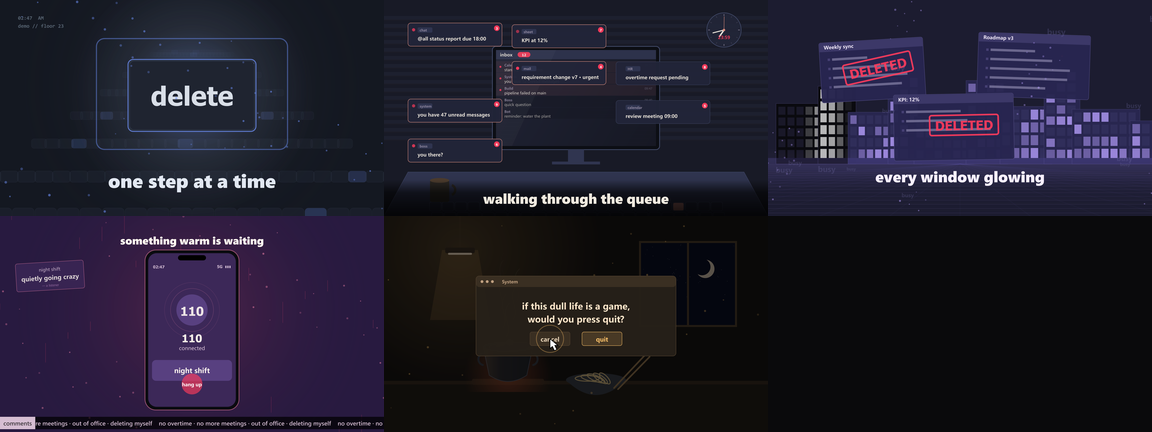
Frames from the demo. Every pixel is drawn by code — no footage, no images, no
bundled fonts. The audio is synthesised by ffmpeg and the lyrics were written for
this repo; see examples/synthetic-demo.
About the test song: I built and tuned this against a commercial track I bought
on NetEase Cloud Music, together with its .lrc. That recording, its lyrics, and
the videos rendered from it are not in this repo. What's here is the engine, the
storyboard format and the synthetic demo.
A frame is a pure function of time. renderFrame(t) gives you the same pixels on
every run, which is why you can change one line, re-render, and diff the two.
Install
Requirements (two, both installed by you)
| dependency | version | where to get it |
|---|---|---|
| Node.js | ≥ 20.10 | nodejs.org — LTS release |
| ffmpeg | ≥ 6.0 | ffmpeg.org/download.html — unzip, put bin on PATH |
node -v          # v20.10 or newer
ffmpeg -version  # any version prints fine
ffmpeg is not bundled and not downloaded for you, on purpose (see
Licensing). If it's missing, render stops and prints the download
link for your platform instead of guessing. There's no postinstall step and no
binary in the package.
On macOS/Linux, if npm install can't find Cairo/Pango headers:
brew install pkg-config cairo pango libpng jpeg giflib librsvg
# or
apt install build-essential libcairo2-dev libpango1.0-dev libjpeg-dev libgif-dev librsvg2-dev
As a DSH plugin
git clone <this repo> dsh-song-mv
cd dsh-song-mv && npm install        # fetches canvas; run it once to check it builds
dsh plugin --profile desktop add "link:$PWD/dsh-song-mv"
# restart DSH once so the bundle layer picks it up
That adds a song-mv skill to the agent's skill list, plus the CLI. The skill
walks the agent through analyze → read the song → plan → preview → render → qa.
If you don't have a dsh command (the desktop app doesn't always put it on
PATH), there are two equivalent routes:
- ask your agent to install it — DSH has a plugin manager, and the agent can do the file edits below for you;
- edit the profile by hand: add
"dsh-song-mv": "link:/abs/path"to~/.dsh/profiles/desktop/package.json→dependencies, add"dsh-song-mv"to the same file →dsh.profile.bundles, runpnpm installin that directory, restart DSH. Step by step: docs/publishing.md.
As a plain CLI
git clone <this repo> dsh-song-mv
cd dsh-song-mv
npm install          # builds/downloads the canvas native binding
node tools/cli.mjs help
Everything below works the same with the plugin installed. The plugin only adds the agent skill on top of these commands.
Five-minute quickstart
# 1. decode + analyze the song (any format ffmpeg can read)
node tools/analyze.mjs song.flac --out features.json
#    tempo 106.67 BPM · 5445 frames · 181.5s

# 2. draft a storyboard; cut points land on bar lines, scenes follow the energy
node tools/plan.mjs --features features.json --out storyboard.json --shots 9

# 3. edit storyboard.json: set lyricsFile, replace the placeholder scene params
#    with what the song is actually about (see docs/scenes.md)

# 4. look before you commit ten minutes of rendering
node tools/preview.mjs --storyboard storyboard.json --features features.json \
  --audio song.flac --out out/preview

# 5. render
node tools/render.mjs --storyboard storyboard.json --features features.json \
  --audio song.flac --out out/mv.mp4 --crf 18

# 6. check it
node tools/qa.mjs --file out/mv.mp4
A 3-minute 1080p video renders at about 25 fps on a normal laptop: roughly 3.5 minutes wall clock, 57 MB at CRF 18.
analyze options
| flag | meaning |
|---|---|
--fps 30 |
frames per second of the beat grid (must divide the sample rate) |
--bpm 106.67 |
force the tempo when you know it; energy voting can't tell 80 from 160 |
--out features.json |
where to write the analysis |
Tempo detection reports the winning grid plus tempoCandidates, the runner-up
metrical levels. If the pulse feels half-speed, that's expected: pass --bpm.
What a storyboard looks like
{
  "title": "demo",
  "duration": 181.5,
  "lyricsFile": "lyrics.lrc",
  "post": { "scan": 0.03 },          // scanlines
  "safety": { "maxFlash": 0.7 },     // clamp on full-frame flashes
  "shots": [
    {
      "id": "05_call110",
      "start": 95.1, "end": 119.8,
      "palette": "intense",          // still|tender|build|release|intense|peak|dawn|fade
      "enter": "cut",                // cut|dissolve|wipe|glitch
      "loud": true,                  // camera punch on the beat
      "scene": {
        "type": "call110",
        "params": {
          "number": "110",
          "caller": "你好,我需要帮助。",
          "reply": "请讲,我在听。",
          "tickerText": "deadline · deadline · nobody answers the mail"
        }
      }
    }
  ]
}
A few things worth knowing:
- Shots have to tile the timeline. No gaps, no overlaps, and the last
endis the song duration. paletteis a mood, not a colour.stillis a dead office at 2 AM,peakis the drop. Scenes read palette fields (p.accent,p.text, …), so changing the palette recolours everything.enteris how a shot comes in.glitchis the one for when the beat hits.paramscarry the copy. Every string the demo shows comes from its storyboard, not from the engine.examples/nine-shots/storyboard.jsonis a full nine-shot arc you can copy and rewrite line by line.
Schema: docs/storyboard.md. Scenes and their parameters: docs/scenes.md.
Lyrics
lyricsFile points at a standard .lrc:
[00:00.50]one step at a time
[00:05.80]walking through the queue
[00:18.40]delete the noise
For each timestamp the engine finds the active line and hands it to the scene, which decides how it shows up: slam, word-by-word bounce, rubber stamp, RGB-split glitch, karaoke fill, echo wall. Lines without a timestamp are ignored, so a plain-text lyric file will give you a video with no lyrics. Timestamps can carry one to three decimal places, since editors disagree.
Lyrics are a literary work, so only ship an .lrc you have the right to use.
Licensing
The code is MIT. What the repo does not contain matters as much as what it does:
- No music, no lyrics, no fonts, no ffmpeg. You supply all four at run time, and
.gitignorekeeps them out of commits. - ffmpeg runs as a separate process and is never linked or bundled. Per the GPL FAQ that's mere aggregation: your video is yours and the repo carries no ffmpeg obligation.
- Fonts are referenced by family name (
Inter,Microsoft YaHei,Noto Sans CJK) and rendered by whatever your OS has.
If you redistribute a packaged artifact (zip, Docker image, single binary) with
node_modules inside, you become a distributor: canvas brings Cairo
(LGPL-2.1 / MPL-1.1) and, in canvas v3, Pango (LGPL only). Read
THIRD-PARTY-NOTICES.md first.
The usual risk in a project like this isn't the MIT dependencies, it's demo
assets: a commercial track, a scraped .lrc, a font committed "just for the
example". So examples/ ships the storyboard format — shot tables with
placeholder copy — and one synthetic demo, whose audio ffmpeg generates and whose
lyrics were written here.
To be precise: this repo has no recording of a published song, no .lrc
transcribed from one, and no video rendered from one. The storyboards in
examples/ describe shot structure (timings, palettes, scene types); the words in
them were written for the example. A storyboard is neither a recording nor a
lyric sheet, but if you fill one with someone else's lyrics and publish the
render, that's your call and it isn't covered by the MIT licence.
Repository layout
engine/
  core.mjs        palettes, Features (beat/onset sampling), Lyrics, canvas ctx, post FX, createEngine
  scenes.mjs      9 scene functions, each (ctx, tv, f, params)
  lyric_fx.mjs    lyric treatments: slam / bounce / wall / sliced / karaoke / decode
  story_fx.mjs    story props: stamp, ticker, phone call, city towers, kitchen, floor plan, black hole
  prng.mjs        seeded randomness (same seed → same frame)
tools/
  analyze.mjs     ffmpeg decode → WAV → FFT → features.json
  plan.mjs        draft a storyboard from the energy curve
  preview.mjs     render a few stills
  render.mjs      full render, raw frames piped straight into ffmpeg
  qa.mjs          luma curve + flash detector
  cli.mjs         one entry point for all of the above
  lib/analyze.mjs pure-JS FFT / mel bands / tempo grid (no Python, no librosa)
skills/song-mv/   the agent-facing workflow
examples/         storyboards: nine-shots (full arc, placeholder copy), synthetic-demo
docs/             storyboard schema, scene catalogue, rendering model, demo assets
FAQ
Why canvas instead of a browser? Frames are generated headlessly and piped to ffmpeg as raw RGBA. No page load, no screenshot timing, no 60 fps ceiling, no GPU needed, and the output is deterministic.
Can I add a scene? Write export function myscene(ctx, tv, f, P) in
engine/scenes.mjs, draw with ctx.g, read the palette from ctx.pal and the
lyrics from lyricsOf(ctx).activeAt(tv), then register it in SCENES and use
"type": "myscene" in a shot.
Why is the first frame black? The dissolve and glitch entries fade in from
black. Start the first shot at 0 with "enter": "cut".
Rendering is slow here. Try --fps 24, or render a slice with
--start 60 --end 90 while you iterate. 1080p in canvas is CPU-bound.
Can I use a photo? Load it with canvas.loadImage() inside a scene, and make
sure you have the rights to it.
License
MIT © 2026 dsh-song-mv contributors. See LICENSE.
No comments yet. Be the first to write one.