dsh-landmarks-3d
English · 简体中文
A DeepSeek Harness plugin. It adds one entry to the left sidebar; the entry opens a full page with four world landmarks rendered as interactive 3D models.
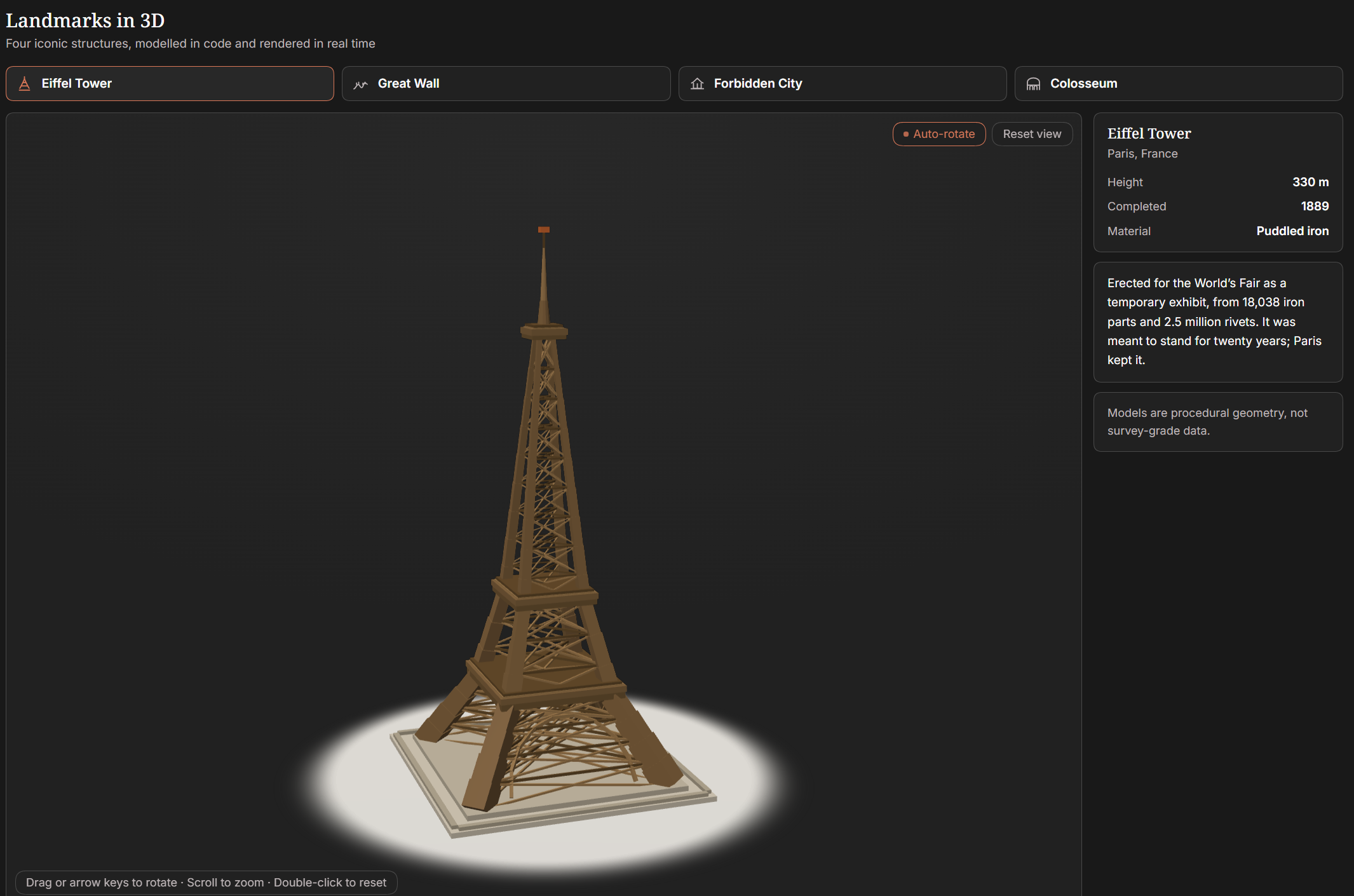
Rendered live in the panel — the dark theme shown here; the light theme is equally supported.
| Landmark | Location |
|---|---|
| Eiffel Tower | Paris, France |
| Great Wall | Northern China |
| Forbidden City | Beijing, China |
| Colosseum | Rome, Italy |
What it does
- Left sidebar entry — registered into
sidebar.panellistwithid: landmarks-3d, and the matchingmainpanel key renders the page. The icon is a hand-drawn SVG Eiffel Tower, so no image asset is downloaded. - Real 3D, no dependencies — every model is built procedurally from triangles at
load time and drawn by a small hand-written WebGL renderer inside
client.js. Nothree.js, no CDN script, no build step. - Interaction — drag to orbit, wheel or two-finger pinch to zoom,
+/-/arrow keys on the focused canvas, double-click to reset the camera, and a toggle that stops or starts the slow auto-rotation. A new landmark starts rotating only after the gesture pauses, and motion followsprefers-reduced-motion. - Themed — surfaces and text use
--dsw-alias-*tokens, so light and dark themes both work; only the artwork carries its own stone/bronze palette.
Models
Each model is generated from a parametric description rather than loaded from a file:
- Eiffel Tower — four lattice legs converging through three stages, four base arches, three platforms, the top lantern and antenna mast.
- Great Wall — a sinuous ridge line with a crenellated wall extruded along it, watchtowers, and a scatter of conifers.
- Forbidden City — perimeter wall with corner towers, three-tier marble terrace, a double-eave main hall with upturned eaves, and side halls.
- Colosseum — 36 bays on an elliptical plan, three arcade storeys plus attic, a stepped cavea, and a collapsed sector of the outer ring — about a third of it — so the ruin reads as a ruin.
Install into a DeepSeek Harness
Requirements: DeepSeek Harness with the web client (the plugin targets the
sidebar.panellist and main slots) and a WebGL-capable renderer. Nothing else — the
bundle has no dependencies and no build step, so it installs offline.
1. Get the plugin onto the machine
The plugin is a directory bundle, so DSH installs it from a folder, not from npm:
git clone https://github.com/YunFengyi/dsh-landmarks-3d.git
Downloading Code → Download ZIP from the repository page and unpacking it works the same way.
2. Install it
Two ways, same result: it installs into the current profile, applies to every session, and survives a restart.
- From the Web UI — open Plugins in the left sidebar, choose Add plugin, and
select the cloned
dsh-landmarks-3dfolder. This entry installs a local directory. - From a session — give the absolute path to the agent, e.g. "install the plugin at
D:\code\dsh-landmarks-3d". It runsplugin_manageraction: install_bundlewith that directory astarget.
3. Reload the page once
The rendering half is a client module, so the Harness page has to load again. The left sidebar gains an icon — a small Eiffel Tower, ordered after the built-in panels — and clicking it opens the page.
If the icon does not appear, open Plugins, make sure the dsh-landmarks-3d row is
enabled, and reload once more.
Update and remove
cd dsh-landmarks-3d && git pull # then reload the page
To remove it: in Plugins, delete the dsh-landmarks-3d row; or have the agent call
plugin_manager action: remove_bundle with target: dsh-landmarks-3d.
Controls
| Action | Input |
|---|---|
| Orbit | drag with the pointer |
| Zoom | wheel, two-finger pinch, or + / - with the canvas focused |
| Rotate with keys | arrow keys with the canvas focused |
| Reset camera | double-click, or the "Reset view" pill |
| Stop auto-rotation | the "Auto-rotate" pill |
| Recover from a WebGL failure | the message inside the stage says so; the tabs stay inert |
Files
package.json        manifest: bundle patch + client section
cordis.patch.yml    inserts the host plugin row
index.js            host half (no server work; the client owns rendering)
client.js           client module: models, WebGL renderer, sidebar icon, page
icon.svg            sidebar icon
locale/en.json      plugin manager metadata (English)
locale/zh.json      plugin manager metadata (Chinese)
docs/DETAIL.md      plugin detail page (English)
docs/DETAIL.zh.md   plugin detail page (Chinese)
docs/screenshot.png README hero: a real render of the panel
docs/preview.svg    preview illustration used by the detail page
test/verify-panel.mjs     static check: slots, locale keys, a11y, CSS coverage
test/verify-geometry.mjs  model geometry, real-world proportions, camera fit
CONTRIBUTING.md     commit format, branch names, how to run the checks
Tests
No browser and no dependencies — both checks read client.js as text, or rebuild the models
in Node and project them through the same matrices the renderer uses:
npm test
verify-panel.mjs loads the module through a fake __ModuleLoader__, calls apply() with a
recording ctx, and asserts the two slot registrations share one id, that the <style> is
mounted, every t() key resolves in both languages, and every rendered className has a rule.
verify-geometry.mjs builds the four models, then checks triangle data, proportions against
the real buildings, and that the fitted camera keeps the whole model inside the frustum.
Notes
- No runtime dependencies:
client.jsuses only the built-inReactandctxhanded to a client module. It imports no Harness client package and touches no network. - The camera fit is derived from each model's bounding box, including the near-corner perspective correction, so a 48-unit-wide Great Wall and a 21-unit-tall Eiffel Tower both frame themselves without hand-tuned numbers.
- Known limits: WebGL is required; the geometry is illustrative rather than surveyed; and touch zoom needs two fingers.
No comments yet. Be the first to write one.