




dsh-skills-mcp-cli-manager
Tool Manager — a self-contained DSH web plugin that adds a first-class settings page for the three agent tool families: Skills, MCP servers, and local CLI tools.
Mounted purely as a profile bundle patch + package — no DeepSeek Harness source changes.
✨ What it is
One settings page (「Web UI 插件 → 工具管理」) that manages the agent's three tool families:
| Tab | Manages | Backing |
|---|---|---|
| Skills 技能 | browse / enable / disable / delete / import skills (project + user roots) | user-level canonical copy in ~/.dsh/S-M-C/skills + directory junction; project-level SKILL.md frontmatter rewrite |
| MCP 服务 | create / edit / test / enable / archive / delete MCP servers | real @deepseek-ai/dsh-mcp-client connections (mcp__<server>__<tool>); archived ones move to S-M-C/mcp-archive.json |
| CLI 工具 | discover / probe local CLI tools; register system CLIs | skill-embedded scripts/run-cli + S-M-C/cli.json |
| 卸载准备 (Uninstall prep) | undo the skills migration ↔ migrate again; inject all archived MCP back; lists the store files to remove by hand | migration is reversible both ways (red / green conditional button); MCP injection is one-way by design |
💡 Features
- Skills — group by project/user level & source (
.dsh/skills,.agents/skills,~/.dsh/skills,~/.agents/skills); user-level skills are adopted into the unified store~/.dsh/S-M-C/skills— enable = inject a directory junction into the skills root, disable = remove it (SKILL.mdis never rewritten); project-level skills stay in place and still use frontmatter; two-step physical delete; detail (description / whenToUse / body); import from an arbitrary directory (native picker or typed path) into the store and enable it. - MCP — form or JSON editor; test connection (one-shot real probe); enable / archive actually connects/disconnects and registers
mcp__<server>__<tool>tools (an archived definition moves toS-M-C/mcp-archive.json— not connected, not announced, kept whole so it can be moved back); live status (connecting/running/failed/stopped). - CLI — auto-discovers the CLI a skill wraps (its
scripts/run-cli.*/scripts/cli-state.*, the tencent-news pattern); probes whether it is installed / its version / needs-update / API-key state (parsingcli-stateJSON) and lists its subcommands (fromhelp); aS-M-C/cli.jsonregistry for system CLIs (gh,git,tencent-news-cli…) with enable/delete. - Uninstall prep — the escape hatch before removing the plugin. "撤销迁移" (red) moves every stored skill back to its original location; when the store is empty but skills still sit in the skills directories, the same button turns into a green "迁移" to bring them back into the store — reversible in both directions. "MCP 全部注入" moves every archived server back into
mcp.jsonin one pass and reconnects it. The page also lists exactly which store directory and config block must be removed by hand. - UI — fully bilingual copy (zh / en, 160 keys each; an English shell renders no Chinese); the announce section folds its long explanation behind an inline toggle, collapsed by default; destructive actions use two-step confirmation.
📷 Screenshots
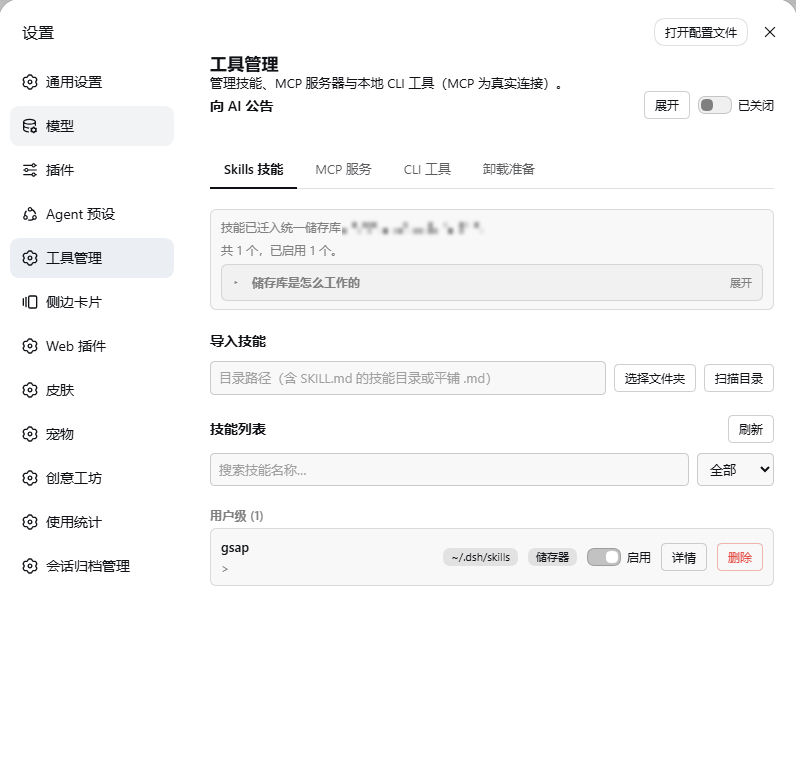
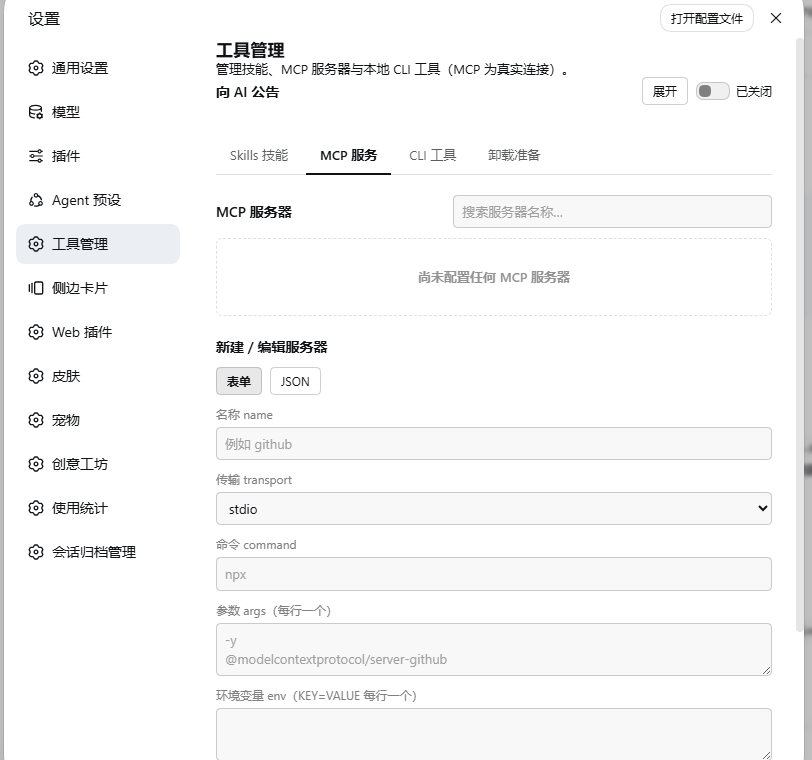
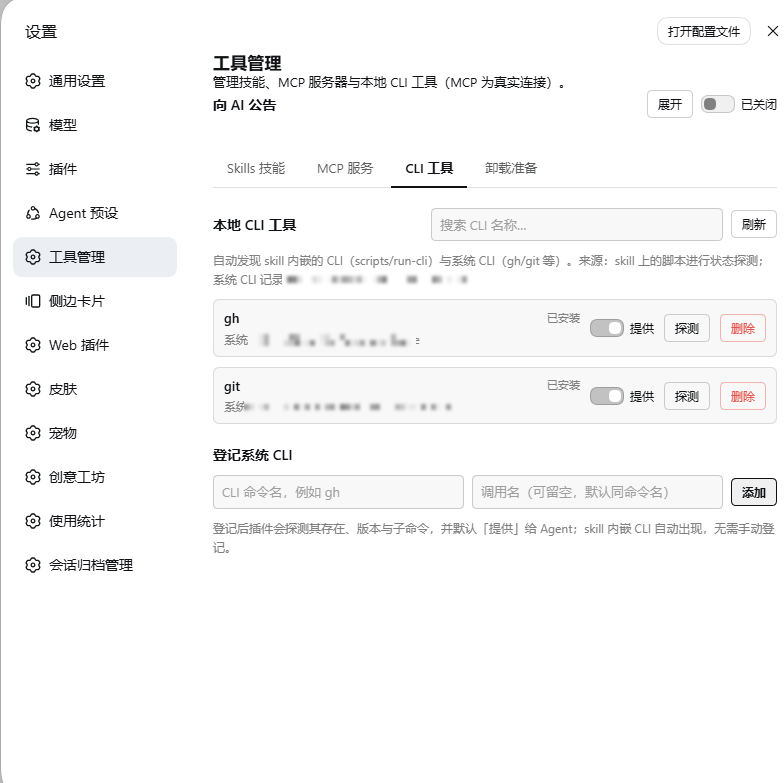
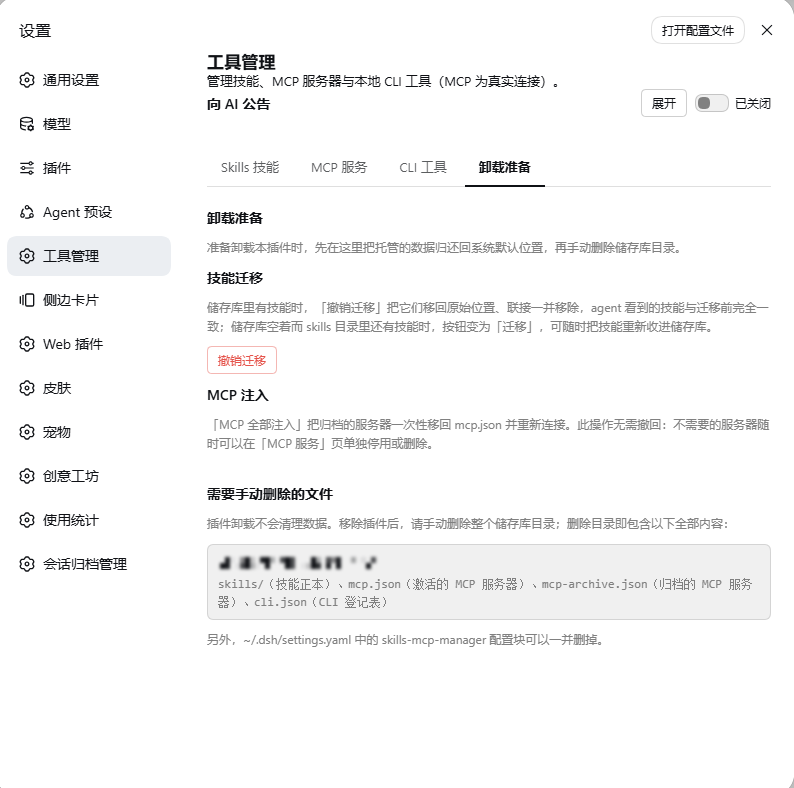
The four tabs: Skills (unified store + junctions), MCP (real connections), CLI (discover / probe / register), and Uninstall prep (reversible migration + the manual cleanup checklist). Personal paths are mosaicked.
🏗️ Architecture
Mounting & the two halves — the plugin is just an npm package plus one profile bundle patch line; zero changes to dsh source:
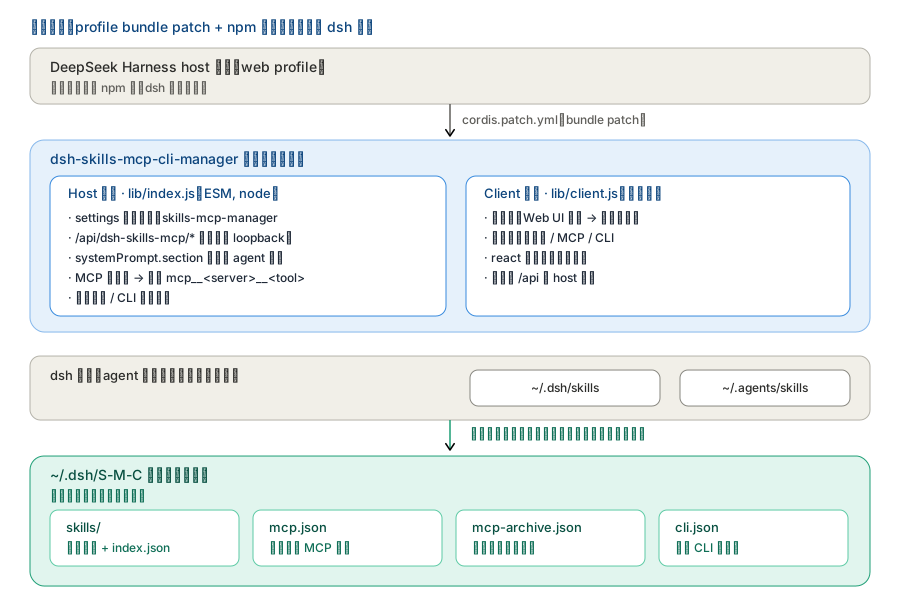
Labels are in Chinese (file names, routes and API paths are verbatim): the host half registers the routes, announces every agent and really connects MCP; the client half only renders the settings page. They talk over /api/dsh-skills-mcp/*.
Store layout — everything the plugin owns lives in ~/.dsh/S-M-C; the two directories dsh
scans deliberately stay outside it (the plugin only injects / removes links inside them):
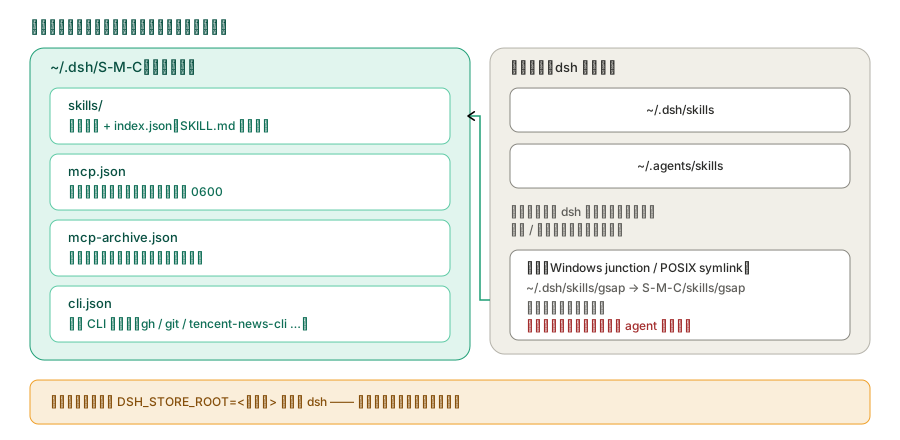
The canonical copy of a skill always lives in the store; the entry under ~/.dsh/skills is just a link pointing at it.
What the three switches actually do on disk — not a config field, but real file / connection changes:
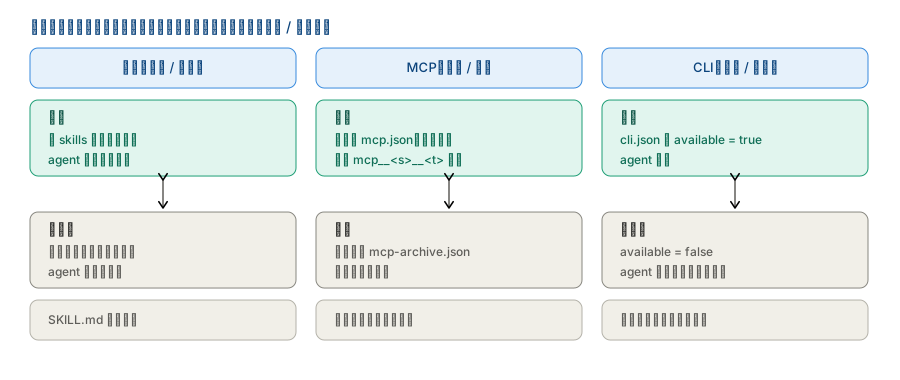
Skills = add/remove a link; MCP enable/archive = move the definition between mcp.json and mcp-archive.json; CLI = visibility only.
🚀 Install
Requires: DeepSeek Harness
>= 0.1.2-alpha.2(all@deepseek-ai/*packages are released in lockstep). Verified end-to-end on0.1.5-rc.2; every API this plugin uses was checked to exist with a matching signature from0.1.2-alpha.2onwards.
Install as a normal package — do NOT link it via a junction. A junction makes dependencies fail to resolve upward (e.g.
schemastery/react) and desyncs the package name fromcordis.patch.yml; both break DSH startup.
# From npm (published): https://www.npmjs.com/package/dsh-skills-mcp-cli-manager
dsh plugin --profile web add dsh-skills-mcp-cli-manager
# or: npm install dsh-skills-mcp-cli-manager

# From source (this repo / after cloning)
dsh plugin --profile web add <absolute path to this folder>

# Or the built tarball
dsh plugin --profile web add <path>/dsh-skills-mcp-cli-manager-<version>.tgz

# Or the convenience scripts
bash scripts/install.sh                                        # macOS / Linux / Git Bash
powershell -ExecutionPolicy Bypass -File scripts/install.ps1   # Windows
After installing, restart DSH and hard-refresh the browser (Cmd/Ctrl+Shift+R). Then open 「设置 → Web UI 插件 → 工具管理」 (Settings → Web UI Plugins → Tool Manager).
⚙️ Configuration
# This plugin's own settings namespace (dsh settings)
skills-mcp-manager:
  enabled: true        # master switch (routes, MCP connections, CLI probes)
  announceToAgent: true # announce the plugin to every agent's system prompt
Runtime state:
- Unified store: everything this plugin owns lives in
~/.dsh/S-M-C/(Skills / MCP / CLI) —skills/,mcp.json,mcp-archive.json,cli.json. Old locations are migrated on first start; the whole store can be relocated withDSH_STORE_ROOT(the plugin rebuilds the junctions for you). - MCP: active servers in
S-M-C/mcp.json, archived ones inS-M-C/mcp-archive.json(credentials/headers stored plaintext — keep both files at0600). - CLI registry:
S-M-C/cli.json.
🗂️ Repository structure
dsh-skills-mcp-cli-manager/
├── src/                # TypeScript source (host + client halves)
│   ├── index.ts        # host entry (plug-in load, settings namespace, agent announcement)
│   ├── skills.ts       # skills filesystem engine
│   ├── mcp.ts          # MCP config store + real connection manager
│   ├── cli.ts          # CLI discovery / probe / registry + cli-state parsing
│   ├── routes.ts       # /api/dsh-skills-mcp route family
│   ├── protocol.ts     # shared types + API paths
│   └── client/         # browser half (entry, SettingsCard, manager, api, locales, css)
├── lib/                # built plugin (host: index.js; client: client.js; types/*)
├── cordis.patch.yml    # DSH bundle patch (package name must match package.json)
├── dsh.plugin.json     # DSH plugin manifest (id / version / main / client.main)
├── package.json        # npm package (dsh.bundle.patch + dsh.client)
├── LICENSE             # MIT
├── README.md / README.zh.md
├── docs/
│   ├── 功能介绍.md      # full feature guide (zh)
│   ├── development.md  # dev notes (build, tests, store layout)
│   ├── arch-*.svg      # architecture diagrams (used above)
│   └── shots/          # UI screenshots (used above)
└── scripts/install.*   # one-click install into a DSH profile
🛠️ Development
See docs/development.md for the two-half build (tsdown, reconstructs
lib/index.js + lib/client.js), type-checking, and the test suite.
📄 License
MIT.
中文说明见 README.zh.md。
No comments yet. Be the first to write one.