Three-in-One Console · dsh-s-m-c-center
skills, MCP servers and local CLIs — plus per-conversation skill injection.
Skill linking · Session injection · Shadow catalog · Real MCP connections · CLI probes · Bilingual · Zero source patching




What it is · Screenshots · Features · Two channels · Agent tools · Architecture · Install · Configuration · Permissions · Development · License
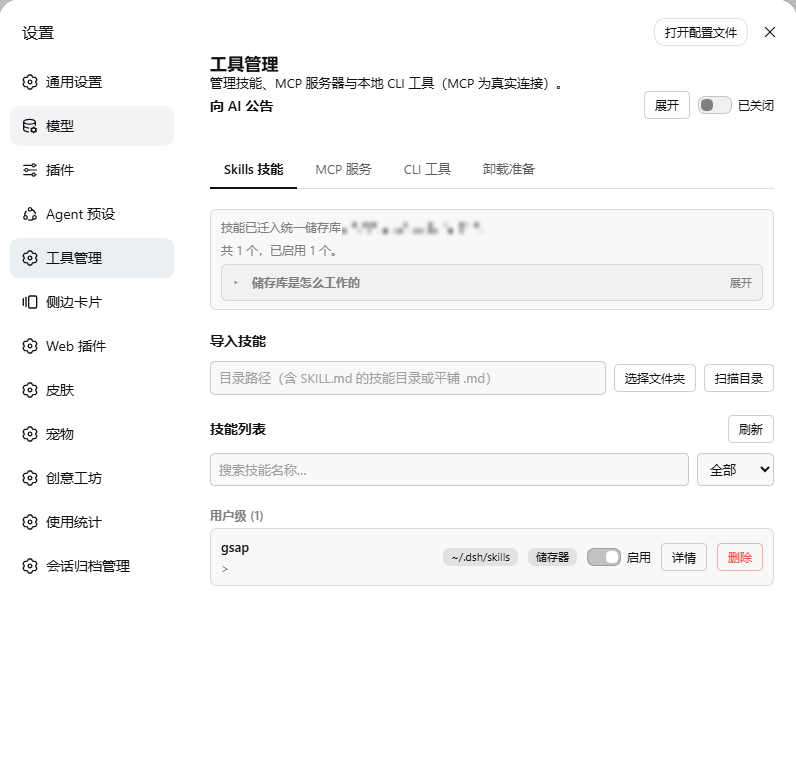
Settings → Web UI plugins → Tool manager: the unified store, skill linking and the session default, with one tab per tool family.
[!NOTE] As of 0.1.2 the skill catalog is served by this plugin (shadow catalog): catalog membership follows the conversation's injection selection exactly; a catalog change publishes one replacement frame instead of re-appending every step; container directories (DESCRIPTION.md only) are injectable and loadable. Verified by a three-round external test run (16/16 pass).
✨ What it is
Chinese name: 三合一工具台 (three-in-one console) | UI entry: Settings → Web UI Plugins → Tool Manager | Aliases: 工具管理, 工具中心, 技能管理, MCP 服务器管理, CLI 工具管理, Skills / MCP / CLI manager
A self-contained DSH web plugin: it adds one first-class settings page for the agent's three kinds of tool (skills / MCP servers / local CLI tools), plus a per-conversation skill injection layer; a guide tab explains how each of the three works and, at the bottom, hands everything back cleanly on uninstall.
| Capability | Native dsh web | With this plugin |
|---|---|---|
| Skill browsing / toggling | Edit skill directories by hand | One-click linking / unlinking in the settings page; canonical copies go into the store; SKILL.md is never touched |
| Per-conversation skill sets | — | Session default + sidebar panel + skill_select; each conversation stores only its difference from the default |
| Skill catalog (AI view) | Static directory scan | Shadow catalog: follows the conversation selection exactly, with one smc-skill-index index row |
| MCP servers | Hand-edit mcp.json |
Form / JSON creation + one-off connection test + activate / archive switches |
| Local CLIs | — | Auto-discovery of skill-wrapped CLIs, system CLI registry, probes for installed / version / subcommands / API key |
| Intrusiveness | — | Zero source changes: one npm package + one profile bundle patch line |
| Tab | Manages | Under the hood |
|---|---|---|
| Skills | Browse / enable / disable / delete / import skills; the session default decides what a new conversation starts with | User level: canonical copies in ~/.dsh/S-M-C/skills + directory junctions. Project level: frontmatter rewritten in place |
| MCP servers | Create / edit / test / activate / archive / delete MCP servers | Real @deepseek-ai/dsh-mcp-client connections (mcp__<server>__<tool>); archiving moves definitions into S-M-C/mcp-archive.json |
| CLI tools | Discover / probe local CLI tools; register system CLIs | Skill-embedded scripts/run-cli + S-M-C/cli.json |
| Guide | How each of the three kinds works, and what to do before uninstalling | Explanation lives here; the uninstall preparation sits at the bottom |
Full documentation:
docs/功能介绍.mdanddocs/架构.md(Chinese).
📷 Screenshots
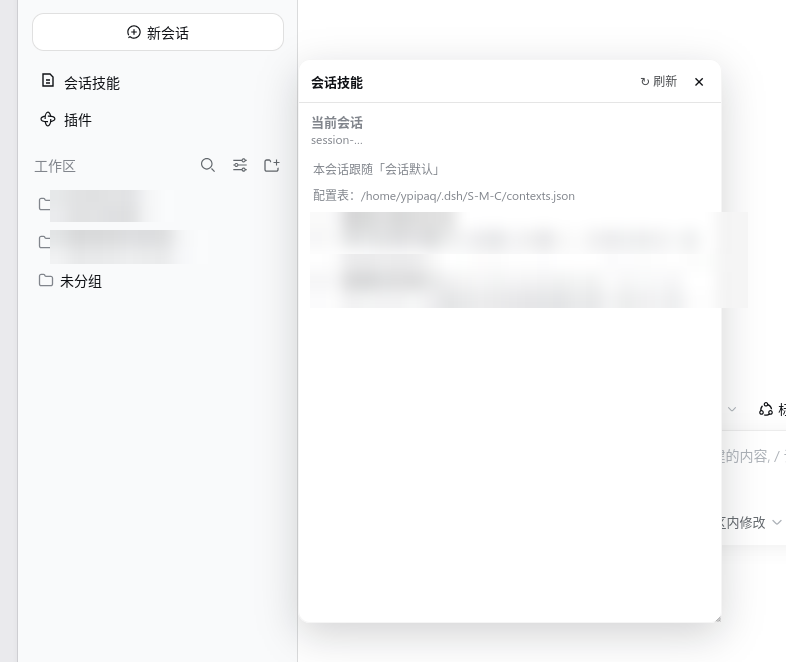
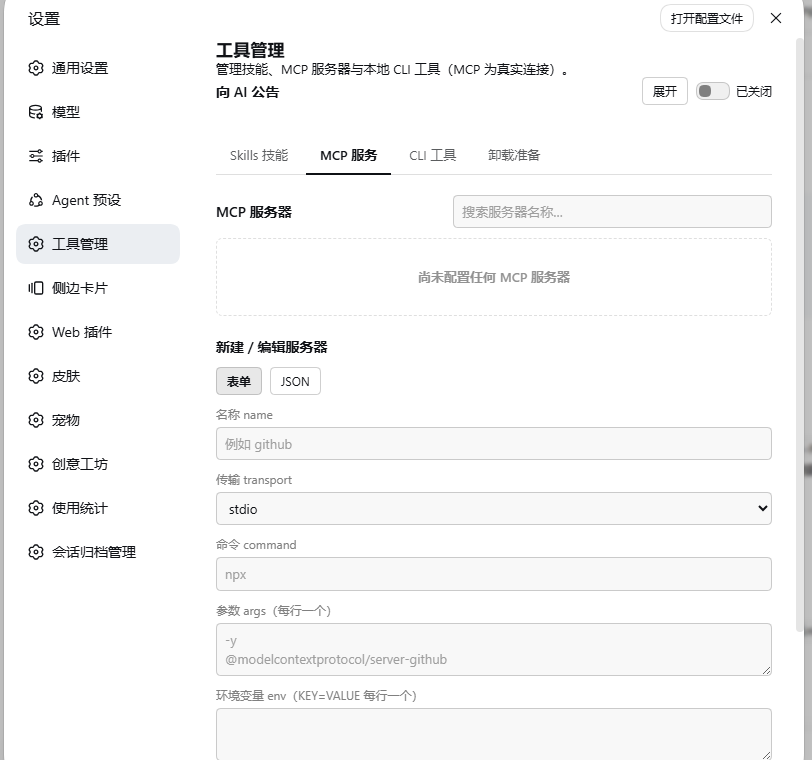
| Conversation skills panel | adjust this conversation's injection from the sidebar, under New Session | MCP servers | real connections, one activate / archive switch each |
 |
 |
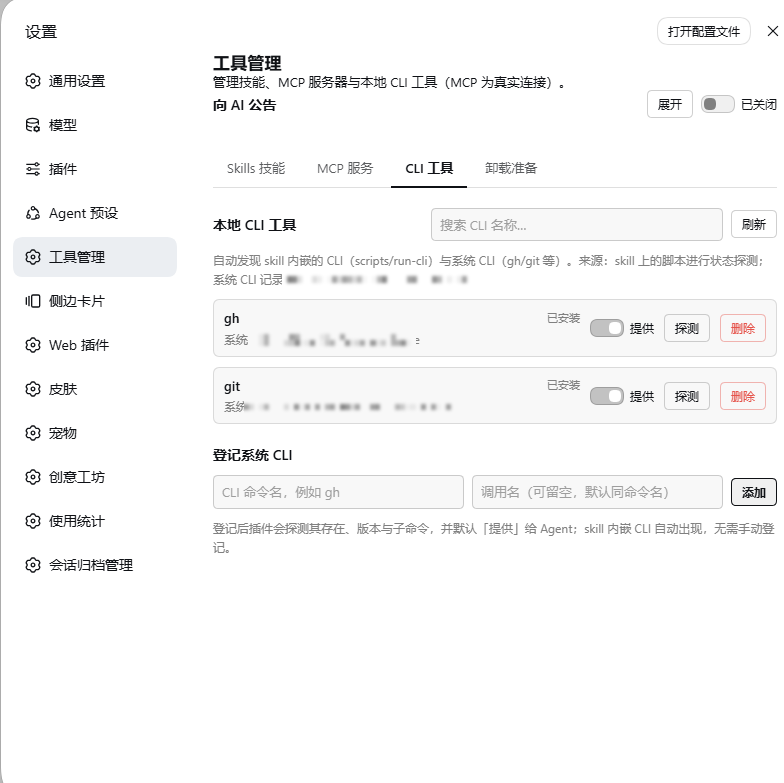
| CLI tools | discover / probe / register local CLIs | Guide | how the three kinds work + uninstall escape hatch |
 |
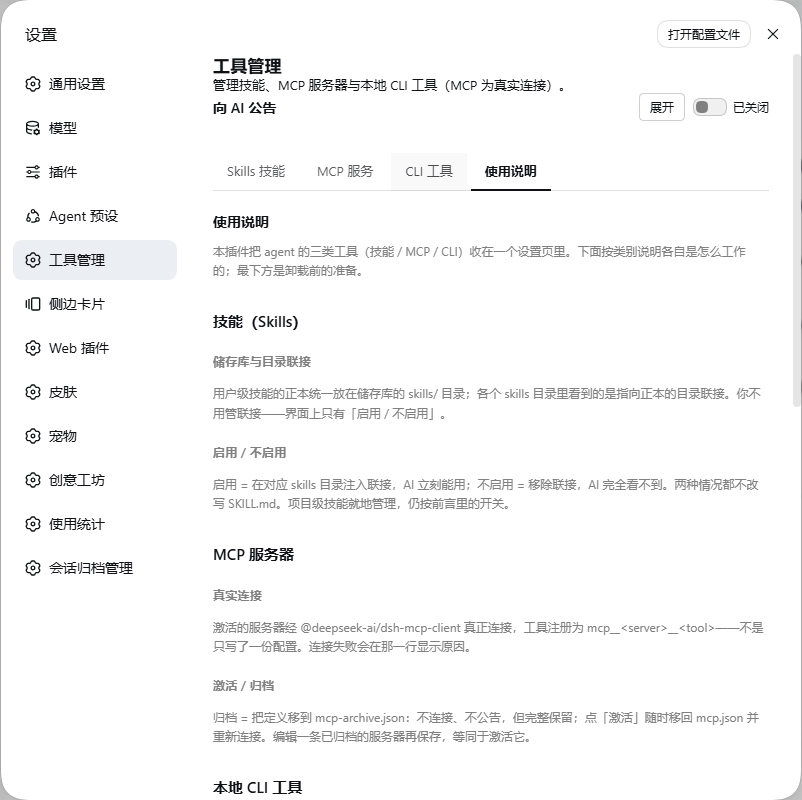 |
Skill names, descriptions and MCP server details are redacted in the screenshots.
💡 Features
Skills: grouped by project / user level and by source (
.dsh/skills,.agents/skills,~/.dsh/skills,~/.agents/skills). User-level skills are adopted into the unified store~/.dsh/S-M-C/skills; project-level skills are managed in place through their frontmatter. Deletion takes two confirmations. Open a row for details (description / whenToUse / body); import by scanning any directory.Action What happens underneath Enable / disable Inject / remove a directory junction in the skill root ( SKILL.mdis never touched)Delete Only the store's own canonical copy is deleted (see below); directories outside the store are never touched Every entry in a skill root is listed, including the ones that are not skills. A directory with no valid admission document (SKILL.md / DESCRIPTION.md) is flagged red as
not a valid skill, told why, and cannot be enabled:Situation Shown as Why it is not descended into Directory holds no admission document red not a valid skilldsh reads exactly one level of a root, so a skill buried in <root>/<category>/<skill>/does not exist as far as dsh is concerned; listing it would only suggest it is reachableA registered record lost its source ⚠ source gonesee the next bullet Traceable registry: "Refresh traceability" runs in two stages, because a useless record and a broken source call for different repairs.
Stage What it decides Outcome 1. Compare against the current skill list A row with no matching entry is an orphan (typically a project-level skill registered while another project was open) Dropped from the ledger outright — it can never be shown, linked or loaded, so keeping it would only bury the real problems 2. Trace the source Only rows that do appear in the list: does the path still exist, and does it still hold a skill? A failure is written onto the ledger row ( missing, with a timestamp and reason) and shown as⚠ source goneA traced failure stays visibly broken across reloads instead of looking healthy again and offering a link that cannot work. Orphans that get cleaned up are reported alongside the verdicts.
Session default and per-conversation injection: the session default is what a brand-new conversation starts with; each conversation can also carry its own differences (one skill turned off, another added). The agent can flip its own skills in-conversation (written to that conversation's own file), and a small "conversation skills" panel right under New Session in the sidebar lets you adjust them by hand at any time — both switches list linked skills only. The window re-checks itself once a second and redraws only when something actually changed, so switching conversations or renaming one is followed within a second — which is why it has no refresh button. A pointerdown outside closes it; the pin keeps it open (the pin governs dismissal only, never dragging or resizing). See the next section.
MCP: two sub-tabs — "manage" gives each server one activate / archive switch (plus delete), "create" offers a form or raw JSON with a one-off connection test before saving. Activating connects for real and registers
mcp__<server>__<tool>; archiving disconnects and moves the definition toS-M-C/mcp-archive.json, fully preserved. Live status: connecting / running / failed / stopped.CLI: discovers skill-wrapped CLIs (
scripts/run-cli.*/cli-state.*) and registers system CLIs (gh,git, … inS-M-C/cli.json). Each entry is probed for installed / version / needs-update / API-key state / subcommands, and the row shows where it came from and where it lives. The announce / hide switch only decides whether the CLI is written into the announcement handed to the agent — the plugin cannot start or stop a system-installed CLI, so entries default to hidden.Guide: explains all three kinds and holds the pre-uninstall escape hatch. "Undo migration" moves stored skills back to their original paths; when the store is empty and the skill roots still hold skills, the same button turns into a green "Migrate" — reversible both ways. "Inject all MCP" moves every archived server back and reconnects. The page also lists the directories and config blocks to remove manually after uninstalling.
Interface: fully bilingual zh / en (220 keys each; English UI renders no Chinese); destructive actions take two confirmations and reset when you click elsewhere.
🧠 Two channels: linking vs injection
| Enable (linking) | Injection (conversation selection) | |
|---|---|---|
| Carrier | A directory junction at ~/.dsh/skills/<slug> |
One row per conversation in the session table ~/.dsh/S-M-C/contexts.json |
| Scope | Global: every conversation, every workspace, sub-agents included | This conversation only |
| Maintained by | The "enable / disable" button on the skills tab | The session default, the sidebar panel, and the model's own skill_select |
| Seen by | dsh's own filesystem scan | This plugin's conversation injection |
How a conversation stores its choice: the file keeps the difference from the default (overrides: { on, off }), and the effective set is default ∪ on \ off. Editing the default therefore reaches every conversation that never configured itself, while a skill you turned off in one conversation stays off.
🤖 Two tools for the agent
| Tool | What it does |
|---|---|
skill_select |
Enable or disable one skill for this conversation; writes the conversation's own difference and applies immediately. Accepts every linked row — container directories too (their DESCRIPTION.md is the loadable body). |
skill_query |
Read-only view of the skills visible in this workspace (name / description / group / linked? / injected in this conversation?), computed at call time, with keyword and group filters. |
The skill catalog itself is also served by this plugin (shadow catalog): the catalog the AI sees is generated here and carries one extra line, smc-skill-index — an index skill whose body is the complete list of this workspace's skills in the catalog's own shape. Skills that are not injected cannot be loaded ("not enabled in this conversation"); the /skill-name gesture is unaffected.
The guide tab can also switch on announce to agent, which describes the plugin and the current state of all three tool families in every agent's system prompt —
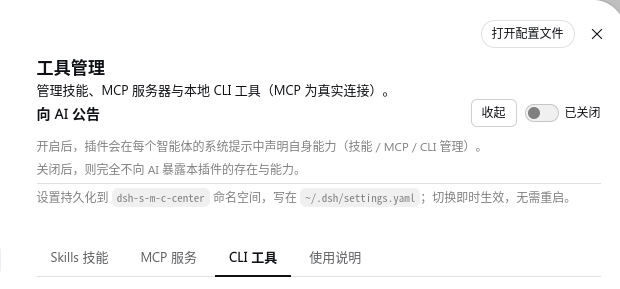
Announce to agent: expanded, it declares the plugin's capabilities; the setting persists in the dsh-s-m-c-center namespace and applies immediately.
🧱 Architecture
Mounting and the dual-face structure — the plugin is one npm package plus one profile bundle patch; dsh source is untouched:
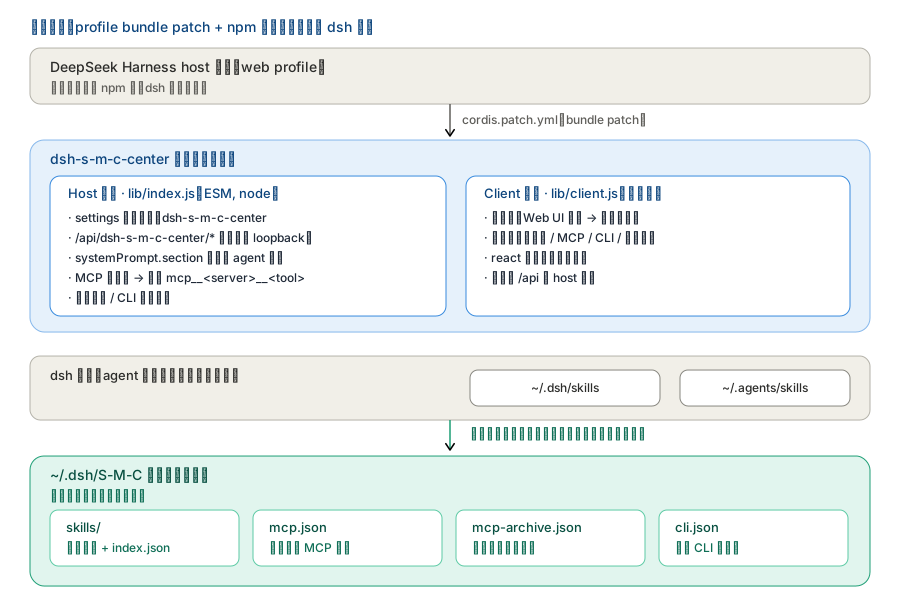
The host half registers routes, announces to agents and connects MCP for real; the client half only provides the settings page. They talk over /api/dsh-s-m-c-center/*.
Store layout — every artefact lives under ~/.dsh/S-M-C, while the two directories dsh scans deliberately stay outside it (the plugin only injects and removes junctions there):
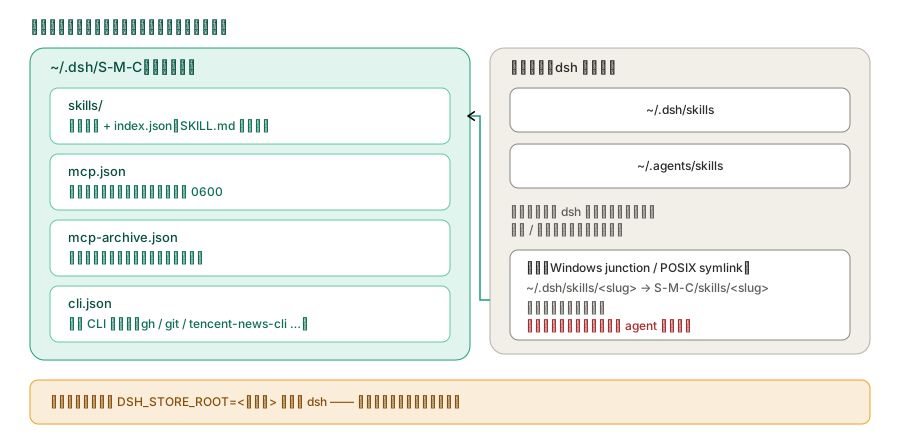
A skill's canonical copy always lives in the store; the entry under ~/.dsh/skills is only a junction pointing at it.
What the three switches really do on disk — not a config field, but files and connections that actually move:
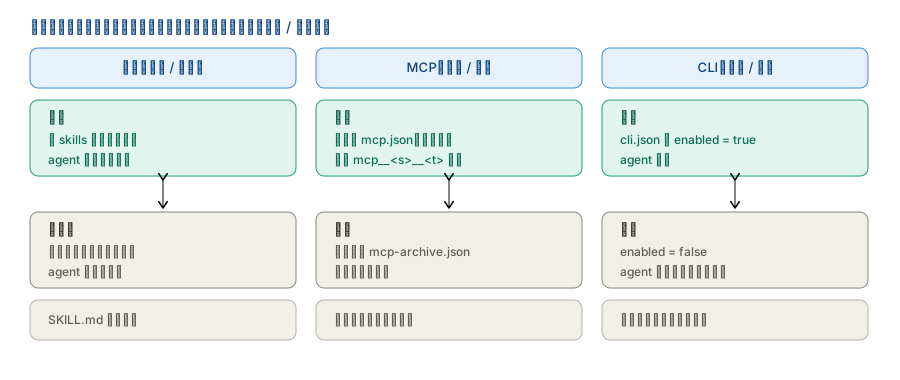
Skills: create/remove a junction. MCP activate/archive: the definition moves between mcp.json and mcp-archive.json. CLI: visibility only.
🚀 Install
Requirements: DeepSeek Harness
>= 0.1.2-alpha.2(all@deepseek-ai/*packages release together); Node^22.19.0 || >=24. Status: fully tested end-to-end on0.2.1-alpha.1(every plugin route, both plugin halves and the settings UI) as well as0.2.0-rc.1and0.1.7-rc.2(every plugin route, the injection chain and the UI) and0.1.6-alpha.1,0.1.6-alpha.2,0.1.5-rc.2; every API used has been checked for existence and signature since0.1.2-alpha.2. The desktop build is supported too — the plugin only uses dsh's host/client plugin interfaces and does not depend on the CLI form factor; verified working on the desktop build.
Install it as a normal package — never as a junction. A junction breaks resolution of dependencies (
schemastery/reactand friends) and makes the package name disagree withcordis.patch.yml; either one stops DSH from starting.
# From npm
dsh plugin --profile web add dsh-s-m-c-center
# or: npm install dsh-s-m-c-center

# From source (this repository / after cloning)
dsh plugin --profile web add <absolute path to this folder>

# Or from a packed tarball
dsh plugin --profile web add <path>/dsh-s-m-c-center-0.2.8.tgz

# Or the one-shot scripts
bash scripts/install.sh                                        # macOS / Linux / Git Bash
powershell -ExecutionPolicy Bypass -File scripts/install.ps1   # Windows
After the first install, restart DSH and hard-refresh the browser (Cmd/Ctrl+Shift+R), then open "Settings → Web UI plugins → Tool manager".
Upgrading: for UI-only changes, overwrite the files and hard-refresh. Changes on the host side (routes / engines / tools) need one DSH process restart.
🔧 Configuration
The config is fully self-managed in the store as ~/.dsh/S-M-C/settings.json — nothing is written into dsh's settings.yaml any more (dsh 0.1.7 archives that file on upgrade, wiping every third-party block in it):
{
  "enabled": true,        // master switch (routes, MCP connections, CLI probing)
  "announceToAgent": true // describe the plugin in every agent's system prompt
}
Runtime state:
- Plugin settings:
S-M-C/settings.json, living with the store; when upgrading from an older release the first mount carries the oldsettings.yamlblock (or its archive) over in one shot. - Unified external store:
~/.dsh/S-M-C/(Skills / MCP / CLI) —skills/(canonical copies plusindex.jsonmanifest),skills-links.json(junction ledger),skills-registry.json(registered external skills, plus themissingtraceability flag),mcp.json,mcp-archive.json,cli.json. The old locations are migrated in on first start; the whole store can move elsewhere withDSH_STORE_ROOT(the plugin rebuilds the junctions). - Conversation selections: one table for the whole machine at
~/.dsh/S-M-C/contexts.json—defaultis the session default andsessions.<sessionId>holds that conversation's difference from it (on/off). No workspace is involved: the key is the session id, so the settings page and the sidebar read the same document. An older version kept one file per workspace; those are folded in once, on the first mount with the table missing. - MCP: active definitions in
S-M-C/mcp.json, archived ones inS-M-C/mcp-archive.json(credentials and headers are stored in plain text — keep both files0600). - CLI registry:
S-M-C/cli.json.
🔒 Permissions and dependency disclosure
The plugin runs with the DSH process's privileges and uses four kinds of capability — files, network, commands and credentials:
| Capability | What it does | Scope and limits |
|---|---|---|
| Files | Reads and writes the store ~/.dsh/S-M-C/**; creates / removes directory junctions in the skill roots; reads and writes the session table ~/.dsh/S-M-C/contexts.json (plus any legacy <workspace>/.dsh/S-M-C/contexts/*.json, read once by the import); reads SKILL.md and skill-embedded scripts |
Only the store and the four skill roots dsh scans; in-place skills only get their frontmatter rewritten; no other paths are read or written |
| Network | Connects to the MCP servers the user configured (stdio through a subprocess, streamable-http over HTTP) | Only the addresses typed into the manager page; the plugin has no built-in external service, no telemetry, and reports nothing anywhere |
| Commands | Probes local CLI tools: runs their --help / --version or the command declared in cli-state |
Only commands inside the registry and visible on the manager page; nothing the user did not register is executed |
| Credentials | Stores MCP env / headers / API keys, reads CLI cli-state |
Plain text under ~/.dsh/S-M-C/*.json, local only, never sent out; keep those files at 0600 |
External dependencies: the only runtime dependency is schemastery (settings validation); @deepseek-ai/* and react are peer dependencies provided by DSH; no native modules, and no postinstall / prepare lifecycle scripts.
Failure boundaries: a failed scan or route degrades to an empty list and a placeholder; a failed migration is recorded in failures and ignored, never blocking DSH startup; a failed MCP connection only changes the status line and touches no files; a failed conversation injection never vetoes the conversation and only explains itself in the log. None of them can stop DSH from starting.
Known risks:
| Risk | Detail |
|---|---|
| Deletion is irreversible | Physical, and only the store's copy is ever deleted: a native skill must be migrated into the store first, a registered one is unregistered, and "delete junction" only unlinks and never touches its target |
| MCP credentials are plain text | Passwords / env are stored verbatim in mcp.json; file permissions are the user's to manage |
| Moving the store by hand breaks junctions | Enabling / disabling works through a directory junction; move it with DSH_STORE_ROOT instead and the plugin rebuilds them |
| Skills under a category directory cannot be loaded | dsh reads only one level of a root; the panel flags that directory as not a valid skill and says why, but does not list its children (they would not be reachable anyway). Loading them needs the skills moved up a level or adopted into the store |
dsh-s-m-c-center/
├── src/
│   ├── index.ts            # host composition root (mount, settings, announcement, tools)
│   ├── routes.ts           # route assembly (one entry per feature)
│   ├── setup.ts            # identity constants + the agent-facing guidance text
│   ├── shared/             # cross-cutting primitives: paths / fs-utils / frontmatter / http / protocol
│   ├── features/           # vertical slices, each owning manager + routes + index barrel
│   │   ├── skills/         #   roots / scanner / linking / links / registry /
│   │   │                   #   adopt / delete / migration / store-index / catalog
│   │   ├── mcp/            #   document / manager / routes
│   │   ├── cli/            #   probe / registry / manager / routes
│   │   ├── context/        #   engine / apply / tools / routes
│   │   ├── announce/       #   system-prompt announcement
│   │   └── settings/       #   the plugin's settings namespace
│   └── client/             # browser half
│       ├── shell/          #   settings-card shell, sidebar "conversation skills" panel
│       ├── shared/         #   api / ui / locales (zh+en) / format / css module
│       └── features/       #   one panel + hook per tab
├── lib/                    # build output (host index.js; client client.js; types/*)
├── tests/                  # vitest (18 files)
├── cordis.patch.yml        # DSH bundle patch (package name must match package.json)
├── dsh.plugin.json         # DSH plugin manifest (id / version / main / client.main)
├── package.json            # npm package (dsh.bundle.patch + dsh.client + compatibility)
├── LICENSE                 # MIT
├── README.md / README.zh.md
├── docs/
│   ├── 功能介绍.md / 架构.md / development.md
│   ├── arch-*.svg          # architecture diagrams (referenced above)
│   ├── social-preview.png  # repository social preview
│   └── shots/              # UI screenshots (referenced above)
└── scripts/install.*       # one-shot installers into a DSH profile
🧰 Development
See docs/development.md: dual-half builds (tsdown rebuilds lib/index.js + lib/client.js), type checking (tsc --noEmit) and the test suite (vitest, 20 files / 287 cases).
📄 License
MIT.
中文:README.zh.md.
No comments yet. Be the first to write one.