🔄 dsh-git-sync
Git Config Sync Center for DeepSeek Harness
Real-time config sync to GitHub · Conflict self-healing · One repo for every AI harness you use





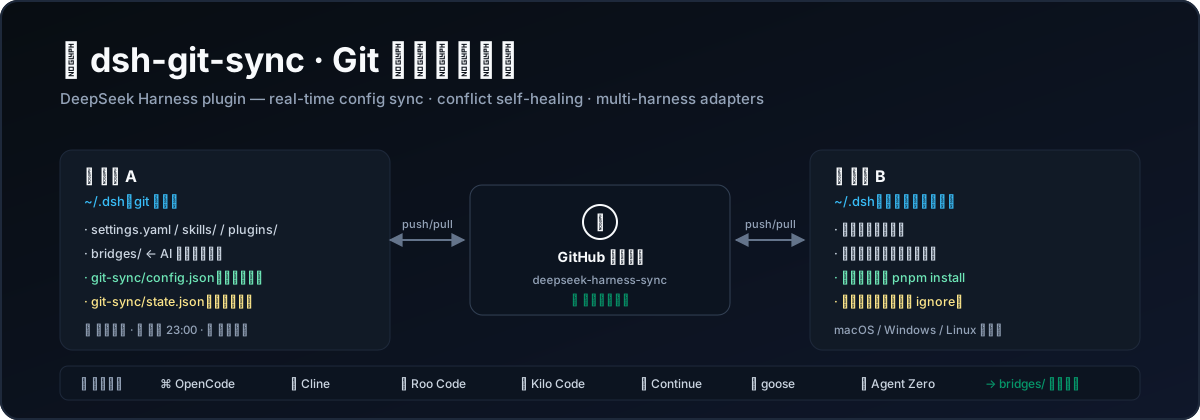
dsh-git-sync turns your ~/.dsh folder into a Git-backed config hub: every setting, skill and plugin is committed and pushed to your own private GitHub repo — in real time as you change them, on a daily schedule, or with one click. On a second machine, everything comes back down automatically.
It also bridges the user configs of other AI coding harnesses (OpenCode, Cline, Roo Code, Kilo Code, Continue, goose, Agent Zero) into the same repo, so all your AI tool setups travel together.
✅ v2 fixes the #1 pain of v1: a stuck
pull --rebase(unmerged files) that made every auto-sync fail forever. v2 detects and repairs it automatically — see Troubleshooting.
✨ Features
| Feature | Description | |
|---|---|---|
| ⚡ | Real-time sync | Watches the config repo and auto-commits + pushes your changes after a settle window (default 30s). Server-side, so it works even with the browser closed. |
| 🌙 | Daily scheduler | Missed a day? Sleeping laptop? A catch-up run fires after boot. Failed runs retry instead of being marked "done" (fixed in v2). |
| 🛠 | Conflict self-healing | Auto-recovers from stuck rebases/merges and orphaned conflict stages before pulling — no more eternal "Pulling is not possible because you have unmerged files". |
| 🧩 | Multi-harness adapters | Mirrors OpenCode / Cline / Roo Code / Kilo Code / Continue / goose / Agent Zero configs into bridges/ and syncs them with the same repo. |
| 🪞 | Smart copy-in | After a pull, only bridge files that actually changed are written back — your newer local tool edits are never clobbered. |
| 🔁 | Network retry | Transient SSL/DNS/connection errors during fetch/push/pull are retried with backoff instead of failing the run. |
| 🖥 | Four-state badge | A colored badge in the session header: 已同步 / 待上传 / 待拉取 / 分叉 / 冲突, with a one-glance panel: remote, branch, dirty files, adapters, recent log. |
| 📑 | Sidebar page | If dsh-better-sidebar is installed, a full Git Sync Center page is registered in the sidebar. |
| 🔐 | Secret-safe | .credentials.yaml, .env and state.json are auto-guarded in .gitignore (self-healed on every push). |
| 🤝 | Two-machine ready | config.json (schedule & adapters) is repo-shared; state.json (last run, log) stays machine-local. |
🧩 Supported AI harnesses
| Tool | What gets synced | Default location (macOS / Linux) |
|---|---|---|
| DeepSeek Harness | The ~/.dsh repo itself (native) |
~/.dsh |
| OpenCode | opencode.json, agent/, command/, theme/, plugin/ |
~/.config/opencode |
| goose | config.yaml, recipes/ |
~/.config/goose |
| Continue | config.yaml, config.json, rules/, prompts/, blocks/ |
~/.continue |
| Cline | VS Code globalStorage/.../settings/*.json |
~/Library/Application Support/Code/User/globalStorage/saoudrizwan.claude-dev/settings |
| Roo Code | VS Code globalStorage/.../settings/*.json |
.../globalStorage/rooveterinaryinc.roo-cline/settings |
| Kilo Code | VS Code globalStorage/.../settings/*.json |
.../globalStorage/kilocode.kilo-code/settings |
| Agent Zero | settings.json, models.yaml, prompts/ |
~/agent-zero (or $AGENT_ZERO_HOME) |
Every adapter can be toggled and re-pointed to a custom path from the panel (设置与适配器 tab) — overrides live in git-sync/config.json and sync with the repo.
📦 Installation
Option A — one line in your profile (recommended)
In ~/.dsh/profiles/web/package.json:
{
  "dependencies": {
    "dsh-git-sync": "github:Yiyang0659/dsh-git-sync"   // ← add this line
  }
}
Then run inside ~/.dsh/profiles/web:
pnpm install
Option B — clone into the plugins folder
cd ~/.dsh/profiles/web/plugins
git clone https://github.com/Yiyang0659/dsh-git-sync.git
# then add to ~/.dsh/profiles/web/package.json:
#   "dsh-git-sync": "file:./plugins/dsh-git-sync"
cd ~/.dsh/profiles/web && pnpm install
Option C — register the bundle
Make sure "dsh-git-sync" is listed in ~/.dsh/profiles/web/package.json → "dsh": { "profile": { "bundles": [...] } }, then restart DSH Web.
After any install/update, restart DSH Web (
dsh web) to load the new plugin code.
🚀 Quick Start
# 1. Create a PRIVATE repo on GitHub (e.g. deepseek-harness-sync), then:
cd ~/.dsh
git init && git branch -M main
git remote add origin https://github.com/<you>/deepseek-harness-sync.git

# 2. Authenticate once (macOS keychain / Windows credential manager):
git config credential.helper osxkeychain    # or manager / manager-core on Windows

# 3. Restart DSH Web and look at the header → "Git: …" badge
Open the badge panel:
- ⬆️ 本地 ➔ Git — first push of your configs.
- ⚙️ 设置与适配器 — enable ⚡ real-time sync, 🌙 daily schedule, and toggle the AI-tool adapters you use.
- On your second machine: clone the same repo into
~/.dsh, install the plugin the same way, done.
⚙️ Configuration
All settings live in ~/.dsh/git-sync/config.json (repo-shared across machines):
| Key | Default | Description |
|---|---|---|
localScanSeconds |
10 |
Header badge polling interval (5–300s) |
remoteFetchMinutes |
5 |
How often the server fetches remote refs (1–60min) |
realtime.enabled |
true |
Watch the repo and auto-sync on changes |
realtime.debounceSeconds |
30 |
Settle window after the last change (10–600s) |
autoSyncEnabled |
false |
Enable the daily scheduled sync |
dailyTime |
"23:00" |
Daily sync time (local) |
pullFirst |
true |
Pull (rebase) before pushing |
catchUpOnStartup |
true |
Catch up after boot if the last run is >20h old |
adapters.<id>.enabled |
false |
Enable bridging for a tool |
adapters.<id>.path |
"" |
Custom tool path (supports ~) |
Machine-local ~/.dsh/git-sync/state.json keeps the last-run stamp and the recent-sync log (never committed).
How bridging works
 Machine A                                   Machine B
┌──────────────────────┐   git push/pull   ┌──────────────────────┐
│ ~/.dsh  (git repo)   │ ◄───────────────► │ GitHub private repo  │
│  ├── settings.yaml   │                   └──────────▲───────────┘
│  ├── skills/         │                              │
│  ├── bridges/        │      copy-out (before push)  │
│  │   └── opencode/ ◄────────── ~/.config/opencode   │
│  │   └── continue/ ◄──────┐                        │
│  └── git-sync/          │   copy-in (after pull, only-changed files)
│      ├── config.json ───┼──► repo-shared         │
│      └── state.json ────┼──► machine-local       │
└──────────────────────┘  │
                          └── ~/.continue
❓ FAQ
Is my GitHub token safe?
The plugin never touches tokens — it shells out to your local git, so credentials live in your OS keychain. Use a private repo; .credentials.yaml is auto-ignored.
Does sync run when the browser is closed? Yes. The daily scheduler and the real-time watcher live in the DSH server process, not the web page.
Two machines edited the same file. What happens?
pullFirst rebases your local commit on top of the remote. If a real conflict remains, the pull is aborted cleanly and the badge turns red with a 一键修复 button — your working tree is preserved.
Which files get committed on a push?
Only the plugin-owned paths (TRACKED_PATHS): settings.yaml, skills/, profiles/web/plugins/, bridges/, … Missing paths are skipped (no more pathspec did not match failures from v1).
🩺 Troubleshooting
Badge shows 「Git: 冲突」 / every run fails with “unmerged files”This is the v1 killer bug — an interrupted pull --rebase left conflict stages in the index and every later pull refused to run. v2 fixes it automatically: click 🛠 一键修复 in the panel, or POST /plugins/git-sync/repair. The repair aborts stuck rebases/merges and clears orphaned conflict stages (git reset — file contents are preserved).
Transient network failures are retried (2× backoff). If your network needs a proxy, make sure git has it: git config --global http.proxy http://127.0.0.1:7897.
v1 bug: untracked machine-local files (e.g. git-sync/state.json) made the status look dirty forever. v2 computes dirty state over syncable paths only and auto-adds required .gitignore rules on push.
When a pull changes profiles/web/package.json or the lockfile, the plugin runs pnpm install (falls back to npm install) inside the profile automatically — on macOS/Linux and Windows.
🛠 Development
npm run check   # syntax check + all tests
npm test        # node:test — 29 tests incl. a two-machine git integration suite
The plugin is build-free: dist/core.js (logic), dist/index.js (server), dist/client.js (web UI) are plain ESM loaded directly by DSH.
📄 License
MIT © Yiyang0659
No comments yet. Be the first to write one.