dsh-latex


A native DeepSeek Harness
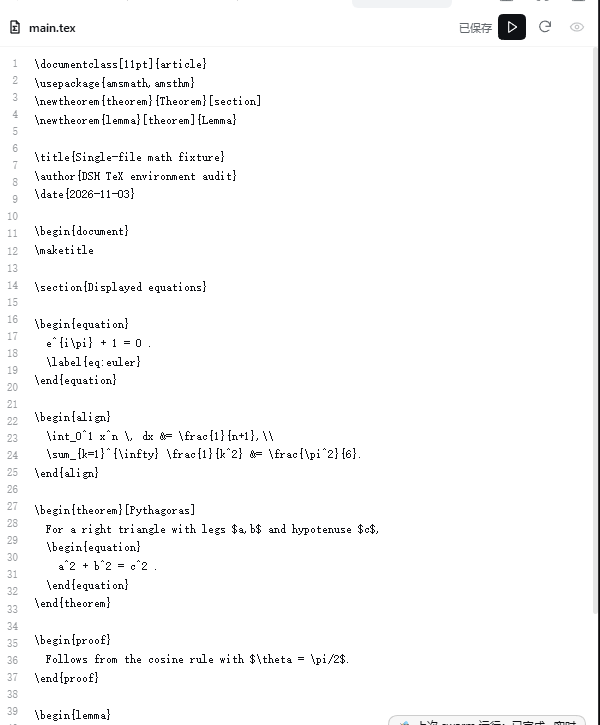
(dsh) plugin for the full local LaTeX loop: open a .tex file in the
sidebar editor → save and compile with TeX Live latexmk → read structured
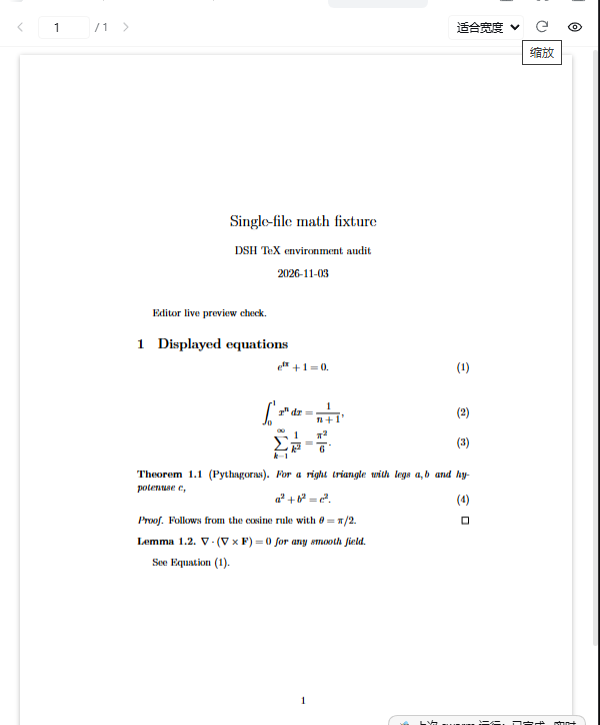
diagnostics → watch the PDF preview refresh in place.
It is a real DSH bundle with a Host half and a Web Client half, not a wrapper script. Install it through DSH's plugin manager; no build step or npm dependencies are required.
Features
- Edit
.texdirectly in the right sidebar. Opening any.texfile address claims it with an extension-priority tab type, so DSH opens the plugin's line-numbered editor instead of the read-only document preview. Chapter files resolve to their real main document on save. - Save = compile = refresh. The triangle button (or Ctrl+S) atomically writes
the source and runs
latexmk; an open PDF preview updates through DSH's SSE state stream. The first successful save opens a preview if none is open. - Structured diagnostics. Failures show the error count and the first
file:linemessage in the editor;latex_get_diagnosticsandlatex_get_statusreturn the full structured result to the agent. - Safe writes. Only existing
.texfiles, only inside the configuredallowedRootsfence, no UNC/network paths, realpath re-validation, 4 MiB cap, UTF-8 validation, BOM/EOL preservation, atomic replace and a revision compare-and-swap (external edits produce a conflict instead of being overwritten). - PDF preview. PDF.js viewer with page jump, fit-width and 25–200% zoom, lazy page rendering, stale-build banner, last-good PDF preservation, and double-click inverse SyncTeX (opens the editor at the corresponding line).
- Agent tools. Seven tools: compile, preview, diagnostics, status, clean, cancel, SyncTeX.
- Project detection. Explicit main file,
% !TEX root, the file's own\documentclass, reverse\input/\includegraph, and the session workspace. Multi-root projects are separate projects. - No shell, no default shell escape.
latexmkreceives an argv array; a project.latexmkrcis honoured by default andallowProjectLatexmkrc: falsepasses-norc.
Requirements
- DeepSeek Harness with the Web Client plugin system. Tested against 0.2.1-rc.5 on Windows 11. The POSIX code path is implemented but has not been end-to-end tested.
- TeX Live (or another TeX distribution) with
latexmkand at least one ofxelatex,pdflatex,lualatex; optionalbiber,bibtex,synctex. - Node.js 20+ for the Host half (DSH ships its own Electron runtime; this is only about the plugin code).
- PDF.js is vendored in
assets/(Apache-2.0); the plugin makes no network requests at runtime.
Install
From the marketplace
Once the plugin is listed in the DSH plugin catalog, search for dsh-latex in Plugins → Discover (or the dsh-market plugin) and click Install. The catalog entry points at the GitHub release tarball below.
From a GitHub release (recommended today)
dsh plugin --profile desktop add \
  https://github.com/Yaohua-Leo/dsh-latex/releases/latest/download/dsh-latex.tgz
The release asset is a prebuilt .tgz, so pnpm does not need to run a build
script. Use --profile web for a web profile.
From a checkout (development)
git clone https://github.com/Yaohua-Leo/dsh-latex.git
cd dsh-latex
npm test
Then install the absolute directory through DSH's Plugin Manager:
plugin_manager action=install_bundle target=/absolute/path/to/dsh-latex
or from a shell:
dsh plugin --profile desktop add /absolute/path/to/dsh-latex
A new bundle activates through HMR; refresh the browser page once if the tab
did not appear. Host-side source edits take effect after a plugin-manager
recomposition or a DSH restart. Disable/remove with plugin_manager action=set_bundle target=dsh-latex enabled=false or action=remove_bundle.
Quick start
- Open a
.texfile from the right-sidebar file tree (or double-click a PDF to jump to its source line). The TeX editor tab opens directly. - Edit the source and click the triangle save button or press Ctrl+S.
- The Host resolves the main document, runs
latexmk, and publishes the PDF. The PDF 预览 tab shows the new build, or opens automatically on the first successful save. - If the build fails, the editor shows the error count and the first
file:linemessage; ask the agent to calllatex_get_diagnosticsfor the full list, fix the source and save again.
Example requests to the agent:
- “修改这个定理的证明,然后重新编译并打开 PDF。”
- “编译
main.tex,检查所有 LaTeX 错误并修复,直到能成功生成 PDF。” - “从
sections/intro.tex第 12 行定位到 PDF 第几页。” - “清理这个项目的辅助文件,保留 PDF。”
Configuration
Defaults live in cordis.patch.yml; override any field from the profile patch
layer, for example:
- override:
    - id: latex
      config:
        engine: lualatex
        timeoutMs: 300000
        texBinDir: 'C:\texlive\2024\bin\windows'
| Key | Default | Meaning |
|---|---|---|
texBinDir |
'' |
Directory containing latexmk and the engines. Empty discovers latexmk from DSH_LATEX_TEX_BIN or PATH; set it when TeX Live is not on PATH. |
latexmkPath |
'' |
Explicit latexmk executable; empty means <texBinDir>/latexmk or PATH discovery. |
engine |
xelatex |
xelatex, pdflatex or lualatex; a % !TEX program directive can override it. |
buildDir |
build |
Output/aux directory relative to the main .tex directory. |
autoBuild |
true |
Watch project sources and rebuild after saves (debounced and coalesced). |
debounceMs |
800 |
Quiet window before an automatic build. |
timeoutMs |
180000 |
Hard build timeout; the latexmk/perl/engine process tree is terminated. |
preserveLastGood |
true |
Publish only successful PDFs; a failed build keeps the previous preview. |
autoOpenPreview |
true |
Open/focus the preview after an explicit successful build. |
previewSurface |
native |
native = plugin PDF.js tab; document = DSH built-in document preview. |
allowedRoots |
[] |
Optional entry allowlist for project main files. Empty allows any local project. This is an accidental-operation fence, not a sandbox. |
extraLatexmkArgs |
[] |
Extra argv elements appended to latexmk (never shell-interpreted). |
maxConcurrentBuilds |
2 |
Global process cap (1–8). |
respectLatexmkrc |
true |
With a project .latexmkrc, do not force the configured engine flag. |
allowProjectLatexmkrc |
true |
Honour project/user rc files. Set false to pass -norc. |
allowShellEscape |
false |
When false, pass -no-shell-escape; \write18 must be explicitly enabled. |
maxPrintLine |
2000 |
max_print_line for the TeX child; reduces wrapped log lines. |
DSH_LATEX_TEX_BIN is an environment-variable fallback for texBinDir; an
explicit texBinDir wins. texBinDir is prepended to the child PATH, so a
TeX Live installation does not have to be on the Host's system PATH.
Tools
| Tool | Purpose |
|---|---|
latex_compile |
Build the detected project (latexmk; engine override, force, timeout, open preview). path may be a .tex file or a project directory. |
latex_preview |
Open/focus the in-app preview (page, `surface: native |
latex_get_diagnostics |
Structured errors/warnings with file:line from the last build. |
latex_get_status |
Main file, engine, build/preview state, stale flag, toolchain, auto-build/watcher state. |
latex_clean |
Remove recognized auxiliary files only; refuses while a build is running. |
latex_cancel |
Terminate the latexmk process tree; also works while queued. |
latex_synctex |
Forward (source → PDF page/x/y) and inverse (PDF → source file/line), including CJK and space paths. |
Root-document resolution order: explicit main file → % !TEX root = ... → the
file's own \documentclass → reverse \input/\include graph (preferring
main.tex, paper.tex, …) → a single root document under the session cwd.
Multiple root documents in one directory are separate projects with separate
published previews.
How it works
- Host (
index.js,src/*.js): project resolver, project registry, build queue with a global semaphore, recursive source watcher with debounce and auto-build coalescing,latexmkargv construction, log/BibTeX/Biber parsing, last-good PDF publication, SyncTeX, seven tools and the loopback HTTP/SSE surface. - Client (
client.js): a.tex-claiming resource tab (line-numbered textarea editor with save/compile/reload/preview controls), a PDF.js preview tab, and compact tool-result cards. No external JS dependencies; React is provided by DSH's module table. - State: build queue and diagnostics are kept in the Host process; the last
successful preview version is persisted in
<buildDir>/.dsh-latex/last-build-<fingerprint>.jsonand restored after a restart. Full build history is not persisted. - HTTP surface (same-origin, loopback):
GET /latex/health,/state,/events(SSE),/file?path=,/pdf?project=,/log?project=,/assets/*,POST /file,POST /action(includingcompile-file),GET /synctex,POST /synctex-inverse. Everything excepthealthuses the Harness connection admission; the PDF route serves only a registered project's published preview.POST /fileis not a general filesystem API.
Security
TeX compilation is not a sandbox: a project can execute code through
.latexmkrc and TeX's file primitives, and the editor write API runs with Host
permissions. The full threat model and reporting process are in
SECURITY.md. In short:
- no shell interpolation; argv arrays only;
-no-shell-escapeby default;- project
.latexmkrcis executable Perl and is honoured by default — setallowProjectLatexmkrc: falsefor untrusted projects; allowedRootsis an entry fence, not a filesystem boundary;- build untrusted documents in a low-privilege container/VM.
Limitations
- The editor is a plain
<textarea>plus line numbers: no syntax highlighting, autocomplete, multi-cursor or automatic save. Ctrl+S / the triangle button is the only compile trigger. - Closing an editor tab discards unsaved text; switching tabs does not
(
keepMounted). - Only UTF-8
.texfiles up to 4 MiB can be edited; new files and directories cannot be created from the editor. - Build history and diagnostics live in Host memory; a restart restores the last successful preview version but not historical diagnostics.
- PDF preview state (page/zoom) is kept per project for the session; the preview tab itself is one per session.
- The browser half is tested on DSH 0.2.1-rc.5/Windows 11; other platforms and older/newer DSH releases should be treated as untested.
.latexmkrcand TeX file I/O are documented security boundaries, not bugs.
More detail: docs/limitations.md.
Development
npm test          # node:test, no dependencies
npm run check     # node --check index.js client.js src/*.js
npm pack --dry-run
Examples that exercise the editor and PDF preview are in
examples/: hello/, chinese/ (ctex + XeLaTeX) and
multi-file/ (\input + cross-reference). Build output is ignored by Git.
The repository also carries the original engineering records:
docs/architecture.md,
docs/acceptance.md,
docs/api-cheatsheet.md,
docs/limitations.md,
docs/security-audit.md,
docs/synctex-notes.md, and the review notes under
docs/. They contain absolute paths and commands from the development machine;
they are notes, not installation instructions.
CI runs the syntax check, unit tests and npm pack --dry-run on Ubuntu and
Windows with Node 22.
License
MIT. PDF.js (assets/pdf.min.mjs, assets/pdf.worker.min.mjs) is
Copyright 2024 Mozilla Foundation, Apache-2.0; see
assets/licenses/PDFJS-NOTICE.txt and the
license headers retained in the files. The plugin performs no downloads at
runtime.
No comments yet. Be the first to write one.