deepseek-peak
A drop-in dsh-plugin for the
deepseek-ai/deepseek-harness
web UI that shows the DeepSeek V4 API's current peak / off-peak pricing
state, lets you pause the LLM during peak hours with a queue that drains
on its own, watches your account balance, and warns you when the
balance drops below a threshold you set.
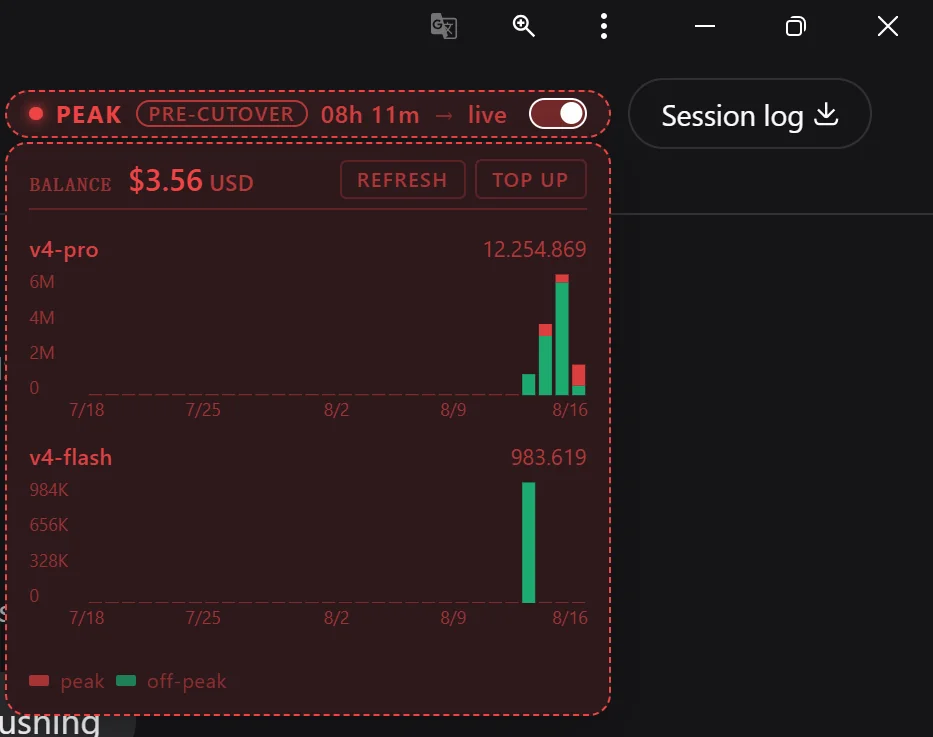
The PEAK pill in the session header, the BALANCE row with the
REFRESH and TOP UP actions, and the per-model 30-day peak/off-peak
bar charts (v4-pro and v4-flash). The pill is amber when the
balance drops below the configured lowBalanceWarningUsd
threshold.
What it does
Pill (always visible, in the session header next to the Session log button). Reads the current phase from the browser clock against a baked-in UTC schedule:
- Green during off-peak windows
- Red during peak windows (2× the off-peak rate)
- A
PRE-CUTOVERbadge while the new schedule is being previewed - A live countdown to the next phase boundary
- A
→ livetarget arrow while pre-cutover, or a→ next phase HH:MMarrow after the cutover - A pause toggle at the right edge of the pill: when on AND the phase is peak, the LLM stream is gated and user messages queue instead of running
- Amber border + dot + label when the account balance drops below
the configured
lowBalanceWarningUsdthreshold (default $1.00). Overrides the phase color so a low balance is visible at a glance.
Tooltip (on hover, while the pill is open). Expands under the pill:
- A BALANCE row showing the current DeepSeek account balance
(host-routed through
/api/peak-hours/balanceso the API key never leaves the harness process). Two action pills on the right:- REFRESH — bypasses the 5-min host cache AND the browser cache so a user who just topped up sees the new number without waiting for the natural refresh tick.
- TOP UP — opens
https://platform.deepseek.com/top_upin a new tab.
- A per-model chart card for each model the user has run in the trailing 30 days (v4-pro, v4-flash). Each card has a tiny inline SVG daily bar chart, 30 days wide, with peak (red) on top of off-peak (green). The split is computed from each event's UTC timestamp against the schedule.
- A small legend so the peak/off-peak split is legible without a tooltip.
- When the LLM is gated and the queue has items, a queue card appears under the chart with one row per queued message and a per-row send arrow that dispatches that single message immediately (bypasses the global pause).
- A BALANCE row showing the current DeepSeek account balance
(host-routed through
Settings (registered on the existing
peak-hoursnamespace in the host's settings plane, exposed throughSettings → Plugins → Plugin configuration → Peak hours):paused— boolean, the same value the pill toggle writes. Two write paths into the same field; last write wins.lowBalanceWarningUsd— number, the threshold below which the pill switches to amber. Default$1.00. Zero is allowed (always warn); negatives are rejected by the schema.
Background refresh:
- The state poll runs every 2 s on the browser (Pill's
usePeakHoursStatehook), so toggle / threshold / queue / balance changes propagate in under two ticks. - The balance is fetched server-side and cached for 5 min, with a 30-s fast retry on transient errors so a brief blip doesn't poison the cache.
- The chart's per-day buckets come from the host's
/api/peak-hours/usageroute, which walks the session persistence log. The in-browser trajectory walk is a fallback for the harness-not-running case.
- The state poll runs every 2 s on the browser (Pill's
Source of truth:
api-docs.deepseek.com/quick_start/pricing/. The schedule windows and the cutover date are baked in as constants insrc/client/domain.ts. ThePRE-CUTOVERwindow is the period between "the new schedule is announced" and "the new schedule is enforced"; the pill shows it for the duration and the gate is engaged wheneverpaused && peakregardless of cutover state.
This repo ships two things:
harness-plugin/— adsh-pluginCordis client package for the harness web UI. This is the real integration.widget.html+serve.js— a self-contained browser widget you can pin as a tab in any browser, no harness required. Useful as a fallback for users who don't run the harness. It does NOT include the pause / queue / balance features; it's a phase + countdown display only.
The harness plugin is the rich one. The standalone widget is a "schedule on a second monitor" display.
Install (harness plugin)
Requires:
- A checked-out
deepseek-harnessworking tree (any recent commit) node≥ 22.19pnpm≥ 11 (install once withnpm i -g pnpm)
# Clone this repo
git clone https://github.com/YMRYMR/deepseek-peak.git
cd deepseek-peak

# One-liner installer: takes your harness clone as the argument
./install.sh /path/to/deepseek-harness
What the installer does (each step is idempotent and skipped if already done):
- Copies
harness-plugin/→<harness>/packages/client/ui-peak-hours/ - Adds the
ui-peak-hoursrow topackages/bundle/web-app/cordis.patch.yml - Adds the workspace dep to
packages/bundle/web-app/package.json - Adds the project reference to
tsconfig.client.json - Adds the path mapping to
tsconfig.base.json - Runs
pnpm installin the harness - Runs
pnpm run build:lib:host(required for the generated Typert contracts) - Runs
pnpm --filter @deepseek-ai/dsh-client-ui-peak-hours run bundle - Runs the harness verification gates (warnings only)
Then start the harness:
cd /path/to/deepseek-harness
pnpm dsh web
Open http://127.0.0.1:3080/. The pill appears in the top-right of the
session header, left of the Session log button.
Hard-refresh the browser (Ctrl+Shift+R) the first time so the new
__DSH_BOOT__ roster loads.
What you should see
A compact pill, ~180 px wide, with this shape (left to right):
[●] PEAK PRE-CUTOVER 08h 11m → live [pause-switch]
[●]is the colored dot — green for off-peak, red for peak, amber when the balance is below the configured threshold (overrides the phase color)- The phase label and the
PRE-CUTOVERbadge (only during the pre-cutover window) - The countdown to the next phase boundary (1 Hz tick)
- The target arrow:
→ livewhile pre-cutover,→ next phase HH:MMafter the cutover - The pause switch at the right edge (red when on, gray when off)
Hover the pill
The card expands under the pill:
- BALANCE row — your DeepSeek account balance, with the REFRESH and TOP UP actions on the right
- Per-model chart card for each model you've used in the trailing 30 days (typically v4-pro and v4-flash). Tiny inline-SVG daily bar chart, 30 days wide, peak (red) on top of off-peak (green). Day totals shown in the top-right of each card.
- A small legend under the chart: red = peak, green = off-peak
- If the queue has items, a queue card with one row per queued message and a per-row send arrow for manual dispatch
Pause-during-peak workflow
- Click the pill's pause switch to the right of the countdown.
- While the switch is on AND the phase is peak, the next LLM stream (user message or subagent tool call) is gated. The harness shows the request as queued, and the tooltip expands to show the queue card.
- The queue is FIFO. Each item is dispatched the moment the switch flips off or the phase leaves peak.
- To dispatch a single item without flipping the global pause, click the row's per-row send arrow in the queue card.
Low-balance warning
Open Settings → Plugins → Plugin configuration → Peak hours and set
lowBalanceWarningUsd to your preferred floor (default 1.00). The
pill switches to amber the moment the live account balance drops below
the value. Override the same field directly in ~/.dsh/settings.yaml:
peak-hours:
  paused: false
  lowBalanceWarningUsd: 1.5
The next 2 s state poll picks up the new value automatically.
Uninstall
./uninstall.sh /path/to/deepseek-harness
The script removes the plugin directory and prints the four small
wire-up entries you need to delete by hand (one line each in
cordis.patch.yml, package.json, and the two tsconfig files).
Install (standalone widget)
No harness needed. Just a Node server that serves a static HTML page.
cd deepseek-peak
node serve.js
Opens http://127.0.0.1:3737/ in your default browser. Pin the tab.
Press Ctrl+C in the terminal to stop.
The standalone widget includes a 24-hour timeline of peak windows, a V4-Flash / V4-Pro model selector, and the actual $/1M-token rate for each tier. Useful on a screen that doesn't have the harness open. Pause / queue / balance features are NOT in the standalone widget — they live in the harness plugin only.
Why a plugin AND a standalone
The harness pill is the right answer inside the harness. The standalone is the right answer everywhere else (a second monitor, a tablet, a phone browser). Both compute the same numbers from the same authoritative schedule, so they never disagree.
Host routes exposed by the plugin
| Route | Method | Purpose |
|---|---|---|
/api/peak-hours/state |
GET |
Current pause / phase / queue / balance / threshold (2 s polled by the browser) |
/api/peak-hours/state |
POST |
Toggle the global pause (writes through the host's settings service) |
/api/peak-hours/balance |
GET |
Live DeepSeek account balance (5 min host cache) |
/api/peak-hours/balance?fresh=1 |
GET |
Force a fresh upstream fetch (bypasses both the host and the browser cache; the in-tooltip REFRESH button calls this) |
/api/peak-hours/usage?rangeDays=N |
GET |
Per-day, per-model token / cost buckets for the trailing N days (default 30, max 365; 5 min host cache) |
/api/peak-hours/usage?fresh=1&rangeDays=N |
GET |
Force a fresh host walk of the session persistence log |
/api/peak-hours/queue/dispatch |
POST |
Manually dispatch the front queued item (the per-row send arrow in the queue card calls this) |
The API key is held by the host's credentials seam and never reaches
the browser — the host routes read the key, fetch from
api.deepseek.com, and return the parsed JSON envelope.
Verified
The plugin passes every harness gate I could run on a Windows dev tree:
| Check | Result |
|---|---|
pnpm run constraints |
220/220 packages conform |
pnpm run verify-cordis-config |
120/120 config files passed |
pnpm run verify-package-invariants |
220/220 hand-owned companions conform |
tsc -b tsconfig.client.json |
clean |
pnpm --filter ... run bundle |
~78 kB client.js |
pnpm run build (host + client + web) |
clean |
Live runtime smoke (curl /plugins/.../client.js) |
200, ~78 kB, slot registered |
What the source layout looks like
deepseek-peak/
├── README.md               # this file
├── LICENSE                 # MIT
├── .gitignore
├── install.sh              # one-line installer for the harness plugin
├── uninstall.sh            # rollback helper
├── package.json            # standalone-widget package
├── serve.js                # standalone-widget Node server
├── smoke.js                # standalone-widget self-test (5/5 passes)
├── widget.html             # the standalone widget
├── docs/
│   └── pill-preview.png    # the screenshot at the top of this README
└── harness-plugin/         # the in-harness plugin (copied to a harness
                            #   clone by install.sh)
    ├── package.json
    ├── tsconfig.json
    ├── tsdown.config.ts
    ├── README.md
    └── src/
        ├── index.ts                        # host face — routes, settings,
        │                                   #   LLM gate, 1 Hz phase ticker
        ├── invariant.ts
        ├── css-modules.d.ts
        └── client/
            ├── index.ts                    # browser apply() — registers the pill
            ├── domain.ts                   # pure peak/off-peak math, schedule,
            │                               #   pre-cutover computation
            ├── phase.ts                   # phase types, currentPhase(), labels
            ├── peakHoursState.ts          # state hook — 2 s poll, paused toggle
            ├── balance.ts                 # balance fetch + 5 min cache, REFRESH support
            ├── usage.ts                   # host usage fetch with host-side fallback
            ├── pricing.ts                  # model display names
            ├── PeakHoursPill.tsx           # the always-visible React component
            ├── PeakHoursPill.module.css
            ├── PeakHoursHost.tsx           # hover-state host; renders the tooltip + queue
            ├── PeakHoursHost.module.css
            ├── UsageTooltip.tsx            # the tooltip card (balance + chart + queue)
            ├── UsageTooltip.module.css
            ├── QueueCard.tsx               # per-row dispatch card
            ├── QueueCard.module.css
            ├── PauseSwitch.tsx             # the pill's right-edge toggle
            ├── PauseSwitch.module.css
            ├── PeakHoursDock.tsx           # legacy input.dock variant, kept for
            │                                #   reference; the current pill lives
            │                                #   in the session header instead
            └── PeakHoursDock.module.css
Notes
- The schedule and the pre-cutover date are baked in as constants in
src/client/domain.ts. If DeepSeek changes the windows or the cutover date, edit the constants there and re-bundle. - All times are computed in UTC; only the display is localized to the browser's IANA zone.
- The pill trusts the browser clock against the baked-in UTC
schedule. A user with a mis-set system clock will see a misleading
status. A future iteration can sanity-check via
worldtimeapi.org. - The pause toggle on the pill and the
pausedfield in the Plugin configuration page are two write paths into the same persisted setting. The 2 s state poll reconciles whichever wrote last. - The pill's REFRESH button invalidates the browser cache (so a
rapid second click still reaches the host) and calls the host with
?fresh=1(so the host bypasses its own 5 min cache and re-fetches fromapi.deepseek.com). Both must be running the latest code for REFRESH to work end-to-end; the host change requires a dsh web restart.
License
MIT. See LICENSE.
No comments yet. Be the first to write one.