dsh-model-groups
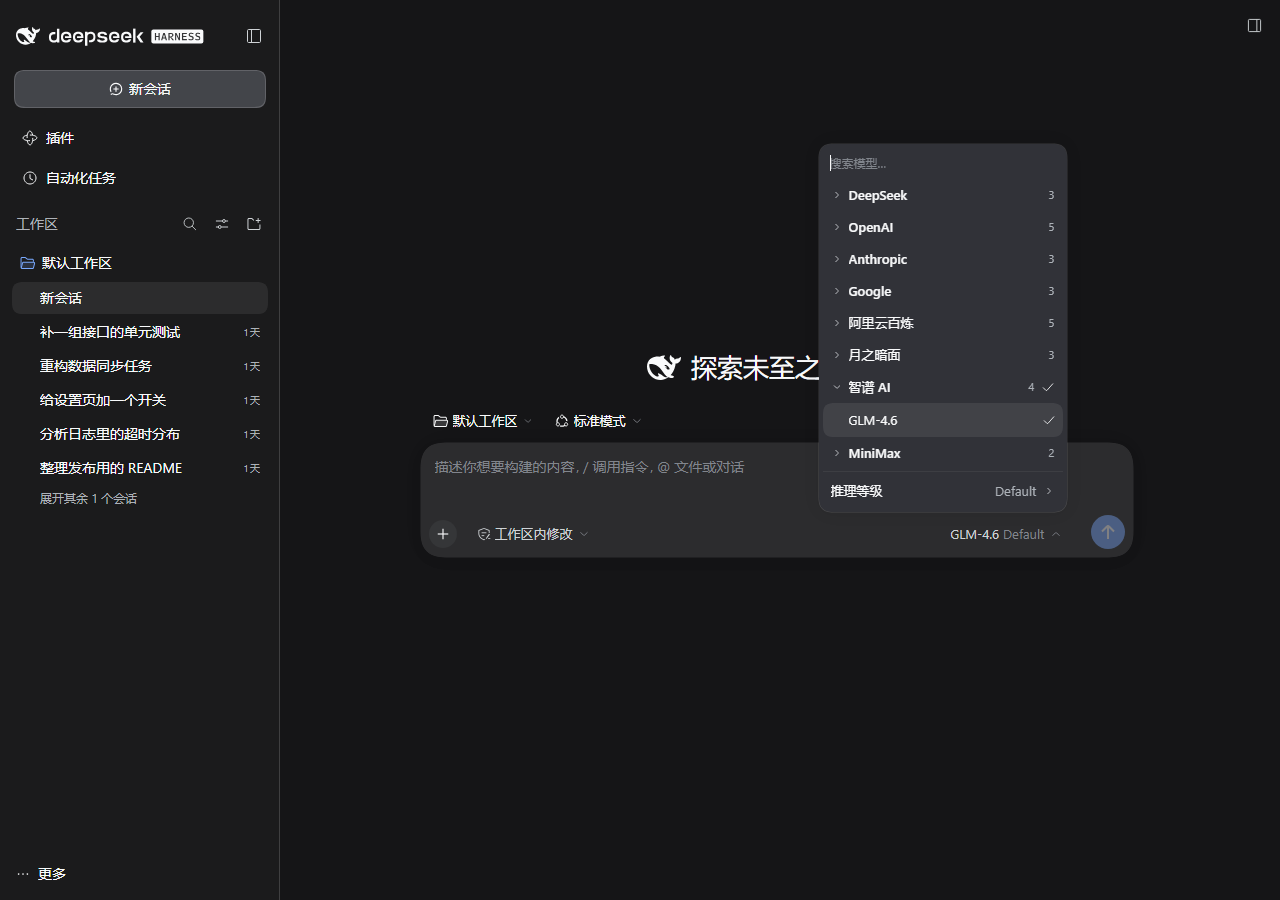
DeepSeek Harness 的模型选择器:按供应商折叠,一次只展开一组。
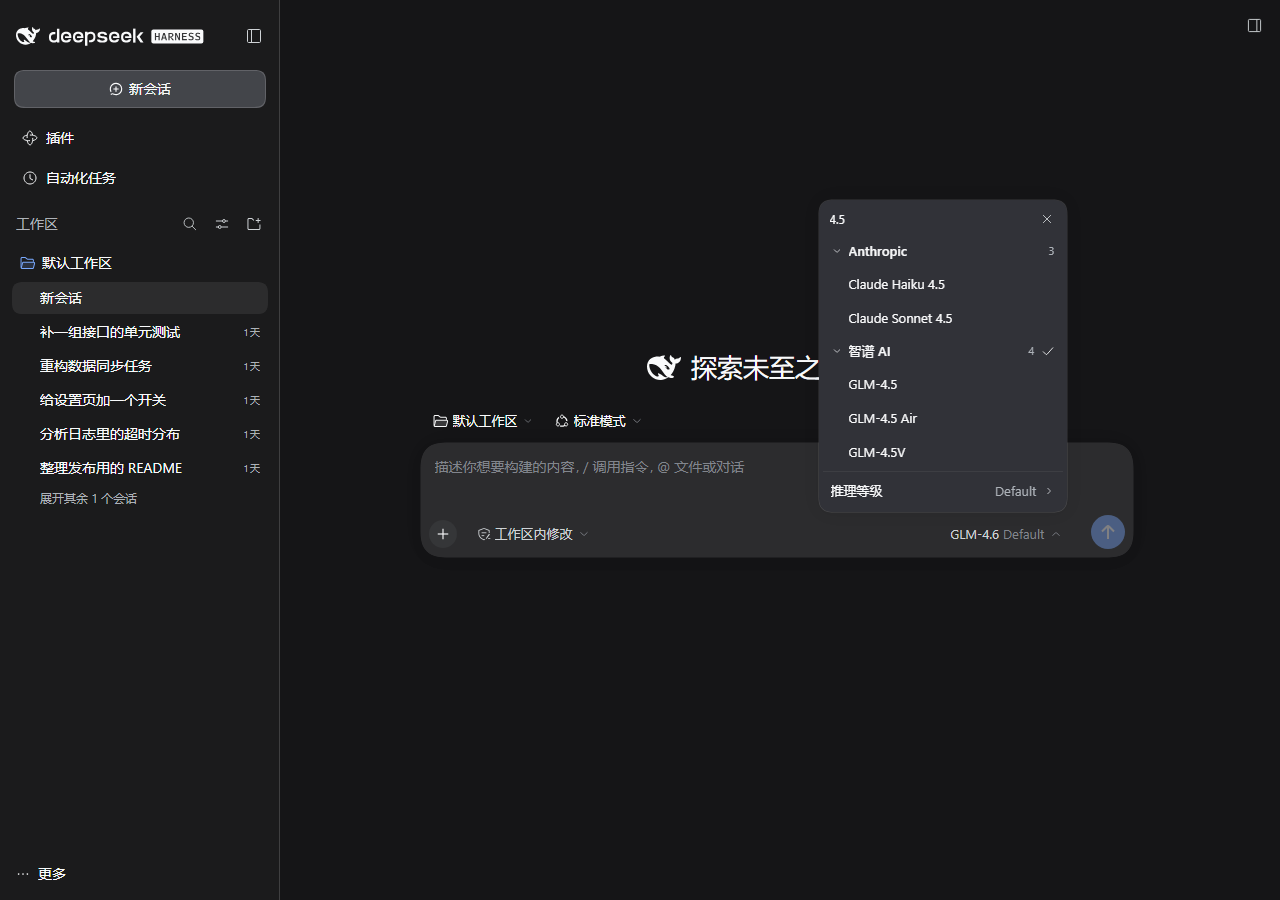
把「一个几十行的平铺模型列表」变成「几个供应商 + 按需展开的模型」。composer 的模型菜单和 /model 命令都换成同一套手风琴,搜索框常驻。
命令汇总(复制粘贴即可)
Windows PowerShell:
# 1) 克隆到用户目录(放哪都行,但不要放进 profile 的 node_modules)
git clone https://github.com/YMC521/dsh-model-groups.git "$env:USERPROFILE\dsh-plugins\dsh-model-groups"

# 2) 链接进 profile:web = 网页端 profile,桌面端换成 ~/.dsh/profiles/ 下你在用的那个目录名
$p = "$env:USERPROFILE\.dsh\profiles\web"
New-Item -ItemType Junction -Path "$p\node_modules\dsh-model-groups" -Target "$env:USERPROFILE\dsh-plugins\dsh-model-groups"

# 3) 关掉官方入口 + 插入本插件
Add-Content "$p\cordis.patch.yml" "`n# dsh-model-groups:官方模型选择是它的上游,同开会重复注册`n- id: ui-model-selection`n  disabled: true`n`n- insert:`n    - id: dsh-model-groups`n      name: dsh-model-groups`n"

# 4) 浏览器里 Ctrl+F5 刷新即可(不必重启进程)
如果链接已存在(重装/升级),先删旧链接:Remove-Item "$p\node_modules\dsh-model-groups"。
macOS / Linux:
git clone https://github.com/YMC521/dsh-model-groups.git ~/dsh-plugins/dsh-model-groups
PROFILE=~/.dsh/profiles/web          # 桌面端改成你在用的 profile 目录
ln -s ~/dsh-plugins/dsh-model-groups "$PROFILE/node_modules/dsh-model-groups"
cat >> "$PROFILE/cordis.patch.yml" <<'YAML'

# dsh-model-groups:官方模型选择是它的上游,同开会重复注册
- id: ui-model-selection
  disabled: true

- insert:
    - id: dsh-model-groups
      name: dsh-model-groups
YAML
装好怎么确认:cd "$p" && node -e "console.log(require.resolve('dsh-model-groups'))" 能打印出插件目录;刷新后模型菜单应该变成按供应商折叠的样子。
想反悔:删掉 cordis.patch.yml 末尾那两段、删掉 node_modules 里的链接,刷新即回到官方界面(不动任何数据)。
解决的痛点
供应商加到七八家、每家有 2~10 个模型之后,官方的模型菜单会变成一条四十多行的长列表:
- 所有模型平铺在一起,只有吸顶小标题做视觉分组,不可折叠;
- 每次打开都从第一家开始扫,想找第三家的第二个模型要滚很久;
- 官方搜索框在模型数 > 4 时才出现,在它出现之前那段路只能靠眼睛;
- 换供应商的次选模型时,得先在几十行里定位那一家,再在它下面找。
供应商越多,这个列表越难用——它没有层级。本插件给它加上层级:一级是供应商,二级是该供应商的模型,默认全部收起。
功能
| 能力 | 行为 |
|---|---|
| 供应商手风琴 | 一级行 = 供应商名 + 模型数量 + 当前选中标记;点开就地展开该供应商的全部模型,再点收起 |
| 打开即定位 | 打开菜单时全部收起,只有当前模型所在的供应商自动展开,并且只显示当前选中的那一个模型(不是整家全展开) |
| 搜索常驻 | 搜索框始终显示,打开菜单自动聚焦;输入即筛,命中模型的供应商自动展开、只显示命中模型、无命中的供应商整行隐藏 |
| 键盘可达 | ↑↓ 在可见模型间移动、Enter 选中;搜索框按 ↓ 直接进入列表;Esc 三级阶梯:收等级面板 → 清搜索 → 关菜单 |
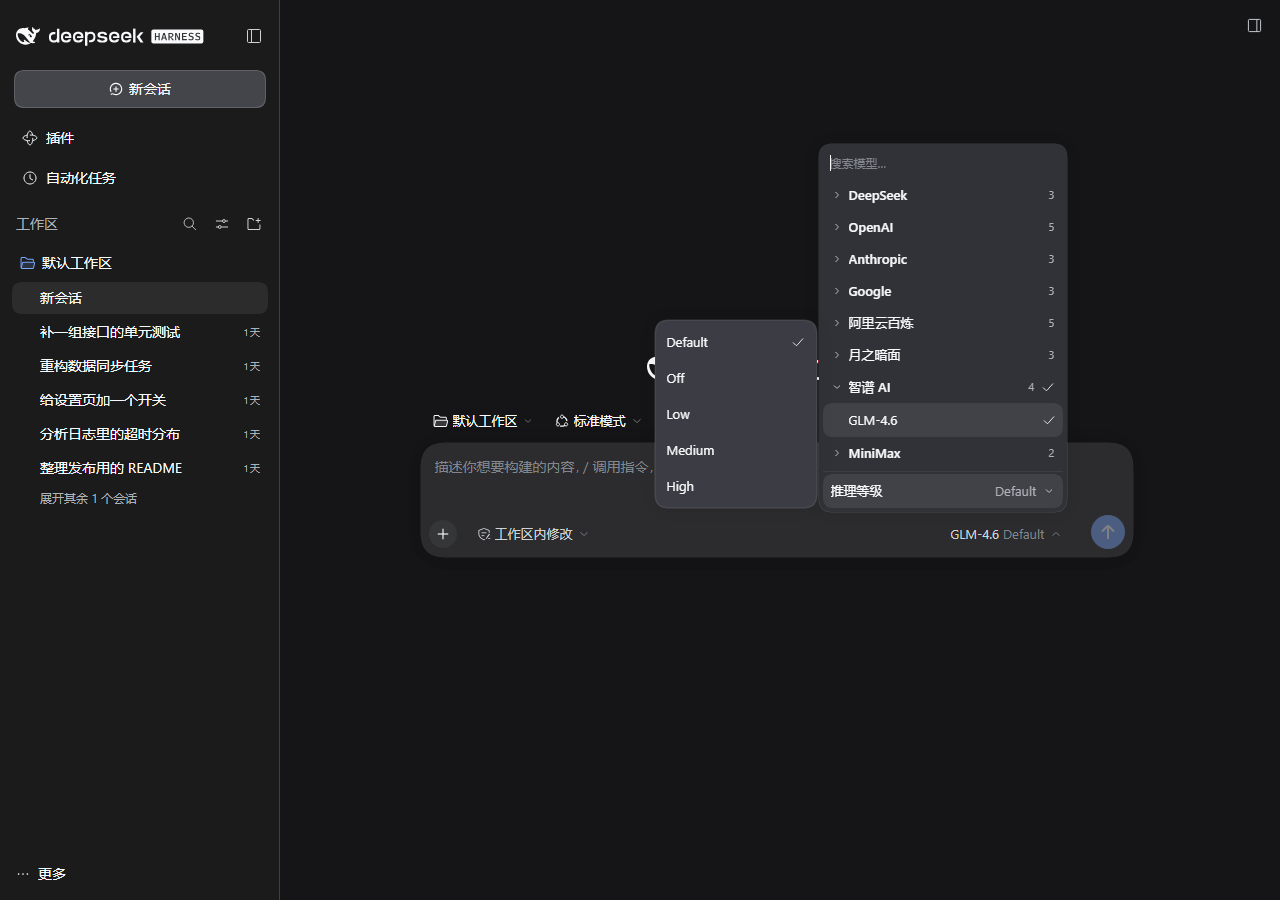
| 推理等级不挤占列表 | 等级从列表里抽出来,固定在列表下方(不随列表滚动);鼠标移上去在菜单外侧弹出面板,点一下即切;右侧空间不够时自动翻到左边;面板同样是实心卡片 |
| 两个入口一致 | composer 的模型位与 /model 命令打开的是同一个手风琴 |
与官方行为的差异
官方 ui-model-selection |
本插件 | |
|---|---|---|
| 打开时的默认状态 | 全部模型平铺 | 全部供应商收起,仅当前供应商展开且只显示当前模型 |
| 搜索框 | 模型数 > 4 才显示 | 常驻 + 自动聚焦 |
| 搜索行为 | 过滤平铺列表 | 展开命中供应商、只显示命中模型、隐藏无命中供应商 |
| 分组 | 吸顶标题,不可折叠 | 可折叠的供应商行(名称 + 数量 + 当前标记) |
| 推理等级 | 菜单内的一段行 | 固定条 + 菜单外侧栏面板 |
/model |
官方 popupSelect 弹窗 |
同一套手风琴 |
安装
前置:已经能跑起来的 DeepSeek Harness(Web / 桌面端均可),以及 git。上面的「命令汇总」是这条路的完整命令;下面是每一步在做什么。
方式 A:挂到现有 profile(推荐,改动最小)
克隆到一个常用目录(不要放进 profile 的
node_modules,那里会被依赖工具清理):# Windows:克隆到 D:\plugins\dsh-model-groups New-Item -ItemType Directory -Force D:\plugins | Out-Null git clone https://github.com/YMC521/dsh-model-groups.git D:\plugins\dsh-model-groups# macOS / Linux mkdir -p ~/dsh-plugins && git clone https://github.com/YMC521/dsh-model-groups.git ~/dsh-plugins/dsh-model-groups已经有压缩包/别的拷贝也行,把它放到目标目录即可(
Move-Item D:\下载\dsh-model-groups D:\plugins\或mv)。链接进 profile 的
node_modules(软链,不改 lockfile、不复制代码,之后git pull就能升级):# Windows(cmd 用 mklink /J 也行) New-Item -ItemType Junction -Path "$env:USERPROFILE\.dsh\profiles\web\node_modules\dsh-model-groups" -Target "D:\plugins\dsh-model-groups":: Windows(cmd) mklink /J "%USERPROFILE%\.dsh\profiles\web\node_modules\dsh-model-groups" "D:\plugins\dsh-model-groups"# macOS / Linux ln -s /path/to/dsh-model-groups ~/.dsh/profiles/web/node_modules/dsh-model-groups把
profiles\web换成你实际在用的 profile 目录(~/.dsh/profiles/下的目录名)。在
<profile>/cordis.patch.yml末尾追加(关掉官方入口 + 插入本插件):# 官方模型选择:本插件是它的 fork,注册同一组入口,同开会重复声明 - id: ui-model-selection disabled: true - insert: - id: dsh-model-groups name: dsh-model-groups刷新页面(
Ctrl+F5)。profile 的 patch 由宿主监听,加完即生效,不需要重启进程;但浏览器端要重新拉一次插件 bundle。
验证:
cd ~/.dsh/profiles/web && node -e "console.log(require.resolve('dsh-model-groups'))"
能解析到插件目录即接线正确;再看模型菜单是否变成按供应商折叠,或控制台里 document.querySelector('style[data-plugin="dsh-model-groups"]') 是否有值。
方式 B:作为可切换的 bundle
把 dsh-model-groups 加进 profile 的 package.json → dsh.profile.bundles 列表,并确保依赖可解析(dsh plugin --profile web install)。本包自带的 cordis.patch.yml 会自动禁用官方行并插入自己,因此不要再手动改 profile 的 patch。
方式 A 与方式 B 二选一,同时启用会重复注册。
回退
删掉 cordis.patch.yml 里那两段(disabled: true 与 insert)和 node_modules 里的链接,刷新页面即可回到官方界面。没有其它副作用,也不动任何数据。
Remove-Item "$env:USERPROFILE\.dsh\profiles\web\node_modules\dsh-model-groups"
原理
- 本插件是官方
@deepseek-ai/dsh-client-ui-model-selection的 fork:scripts/build.mjs取官方lib/client.js,把//#region lib/types/client/ModelSelect.js整段替换成src/region.js,再改写包名、CSS module id、组件名与/model注册点,产出lib/client.js。 - 注册点沿用官方:slot
conversation.input.model(composer 模型位)+commandUi的/model贡献项。官方那一行被disabled: true关掉,所以不会重复渲染。 /model的贡献项从popupSelect改成action:官方弹窗外壳(PopupSelectView)只支持平铺 + 吸顶分组,做不出折叠,所以命令只负责「请求打开手风琴」,UI 复用同一个组件。- 表面填充:官方菜单是一层毛玻璃材质(
background: var(--dsw-menu-surface-fill)≈rgba(67,69,74,0.45)+backdrop-filter: blur(40px)),底下的内容会透上来。本插件在菜单打开时用 inline!important把材质层display:none、给菜单根写实色,等级面板也用写死的实色 + 描边 + 投影,不依赖主题令牌是否奏效。
目录结构
dsh-model-groups/
├── package.json           # 包声明:dsh.client / dsh.bundle / exports
├── cordis.patch.yml       # 禁用官方行 + 插入自己(bundle 路线用)
├── lib/
│   ├── index.js           # host 半边,空 apply(纯 UI 插件)
│   └── client.js          # 构建产物:官方 client.js + src/region.js 拼接
├── src/
│   └── region.js          # 唯一需要手改的源码:手风琴 UI + CSS + 交互
├── locale/{zh,en}.json    # 插件在插件列表里的标题/描述
├── scripts/
│   ├── build.mjs          # 构建:拼接官方区域
│   ├── smoke.cjs          # 冒烟:不需要浏览器,校验注册与导出
│   ├── publish.mjs        # 发布到 GitHub(设备码授权 / PAT,git 不通时回退 API)
│   └── e2e/               # 端到端:accept(手风琴) / effort(等级面板)
├── docs/                  # README 截图 + 演示档案配置(demo-profile.cordis.patch.yml)
└── PUBLISH.md             # 发布说明
开发
# 重新构建(升级 DSH 后也要重跑一次)
MG_SOURCE=/path/to/@deepseek-ai/dsh-client-ui-model-selection/lib/client.js node scripts/build.mjs

# 冒烟(无浏览器)
node scripts/smoke.cjs

# 端到端(需要本地 DSH 已在 http://127.0.0.1:3080 跑着)
npm i -D puppeteer-core
node scripts/e2e/accept.cjs      # 手风琴:默认态 / 展开收起 / 搜索 / Esc / /model
node scripts/e2e/effort.cjs      # 等级条:自动聚焦 / 固定位置 / 侧栏面板 / 键盘 / 不透明
可用环境变量:MG_SOURCE(上游 client.js 路径)、MG_URL(默认 http://127.0.0.1:3080/)、MG_CHROME(默认指向 Edge)、MG_PUPPETEER(指定 puppeteer-core 位置)。
改 UI 只改 src/region.js,然后重新构建;lib/client.js 是拼接产物,不要手改。
已知限制
- 依赖官方内部结构(
ModelSelect区域标记、MenuSurface的 CSS module 类名、slot 名、commandUi贡献项形状)。DSH 大版本升级改到这些地方时,构建会直接报错(如region markers not found),按报错同步src/region.js即可。 - 只接管 composer 的模型位与
/model命令;设置页里的模型列表仍是官方实现。 - 界面文案随 DSH 的中英文 locale 切换(本插件只补了插件标题与描述)。
许可
MIT。lib/client.js 由官方包的区域 fork 后拼接生成,分发与再发布请一并遵守上游许可;docs/ 下截图是本插件的运行界面。
No comments yet. Be the first to write one.