READMESource: master@3f31f8fc
dsh-commandcode-usage-monitor
中文 | English
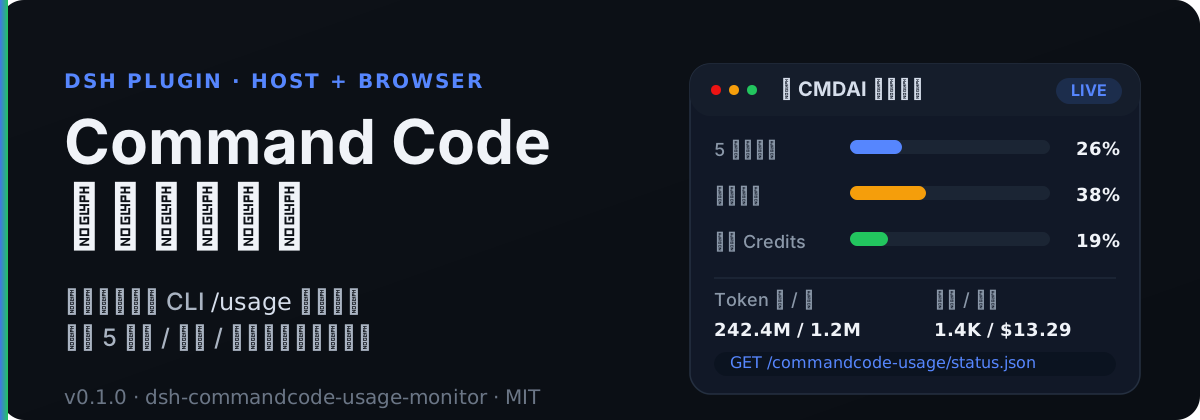
DSH(DeepSeek Harness)插件:Command Code 实时用量监测系统。
本插件运行在 DSH Host 侧,通过调用官方 CLI /usage 同源的 Command Code 账号接口(/alpha/*),实时抓取:
- 5 小时 / 每周滚动窗口用量与重置时间(个人 Usage 余量)
- 月额度 / 已购 / 赠送 Credits
- 累计请求数、花费、Token
- 套餐信息
- 每轮对话消耗(基于 session 事件中的真实 usage)
并暴露为 DSH Web 同源 HTTP JSON 查询接口,供前端挂件、设置页与聊天节点消费。
🚀 快速开始
方法一:通过 npm 安装(推荐)
插件已发布到 npm,可直接用 DSH 官方插件命令一键安装:
dsh plugin --profile web add dsh-commandcode-usage-monitor
方法二:克隆项目本地开发编译
# 1. 克隆仓库
git clone https://github.com/XingPeng-Pixel/dsh-commandcode-usage.git

# 2. 进入项目目录
cd dsh-commandcode-usage

# 3. 安装依赖并构建(首次需要,生成 lib/)
npm install
npm run build

# 4. 使用 DSH 官方插件命令添加本地源码
#    link:$(pwd) 会自动展开为当前仓库的绝对路径
dsh plugin --profile web add "link:$(pwd)"
配置 API Key
通过环境变量(默认引用名 COMMANDCODE_API_KEY):
export COMMANDCODE_API_KEY=user_xxx
也可以在 DSH 设置页的 CMDAI 监控 页面填写;浏览器侧只调用 Host 凭据路由,不会接触明文 Key。
验证接口
curl http://127.0.0.1:3099/commandcode-usage/status.json
curl http://127.0.0.1:3099/commandcode-usage/turn-cost.json
curl http://127.0.0.1:3099/commandcode-usage/health
✨ 功能特性
🔭 Host 数据抓取
- 实时用量快照:归一化
/alpha/whoami、/alpha/usage/summary、/alpha/billing/credits、/alpha/billing/subscriptions四类数据。 - 滚动窗口余量:5 小时 / 每周窗口的
used / cap / exceeded / resetAt。 - 保守查询策略:默认 60s 轮询、多账户串行、单请求 15s 超时、网络 / 5xx 最多重试 1 次。
- 错误兜底:单端点失败独立降级;全失败按
invalid-key/service-unavailable/network分类。 - 多账户支持:每个账户独立抓取与失败隔离。
- 多种 API Key 解析:config 字面量 →
ctx.credentials→ 启动环境变量 → 官方 CLIauth.json。
🖥️ 浏览器端
- 侧边栏小挂件:自适应 sidebar footer 宽度,显示 5 小时 / 每周 / 月度用量条、Token 与请求统计。
- 设置页仪表盘:圆环用量图 + 三档窗口横条 + 累计统计卡片;颜色随使用率从蓝 → 橙 → 红平滑过渡。
- 零密钥接触:浏览器只消费同源 Host 路由,不接触明文 API Key。
- 中文 / English 语言包:
src/client/locales.ts提供完整双语键集。
🔌 查询与消费
- 同源 HTTP JSON 接口:
status.json、turn-cost.json、health、credential.json、refresh.json等。 - 聊天斜杠命令:
/commandcode-usage直接展示当前快照用量仪表盘。 - 每轮消耗推送:监听
session/event的assistant/messageusage,turn/end结算,并通过递增seq通知前端。 - 官方套餐额度表:
src/plan.ts内置套餐月度 / 每周 / 5 小时额度,可计算“本月已用”。
🧭 工作原理
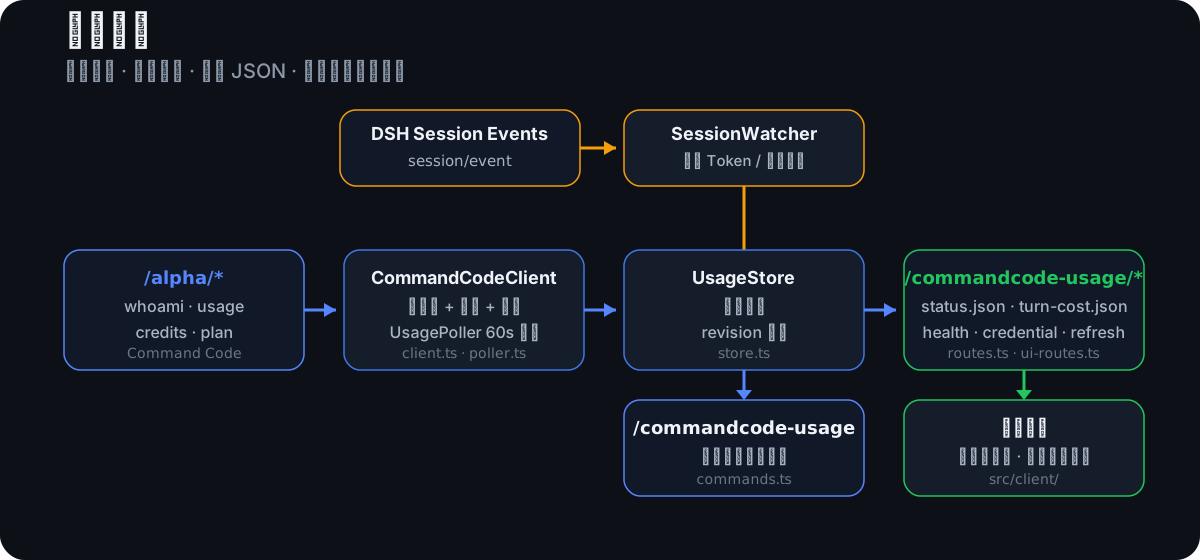
UsagePoller按配置间隔调用CommandCodeClient抓取/alpha/*。- 抓取结果归一化后写入
UsageStore。 routes.ts将UsageStore暴露为同源 JSON 路由。- 浏览器端
src/client/通过 JSON 路由读取数据并渲染挂件 / 设置页。 SessionWatcher监听session/event,聚合每轮消耗并发布到turn-cost.json。
关键边界:所有解析、抓取、错误分类都在 Host 侧完成;浏览器端只拿聚合后的 JSON,API Key 永远不会离开 Host。
🔌 API 接口
所有路由均为同源 JSON,Cache-Control: no-store,并带 Access-Control-Allow-Origin: *。
| 路由 | 方法 | 说明 |
|---|---|---|
/commandcode-usage/health |
GET | 健康检查 |
/commandcode-usage/status.json |
GET | 完整用量快照 + revision + lastError |
/commandcode-usage/turn-cost.json |
GET | 最近一轮消耗 + seq(前端轮询判断新轮) |
/commandcode-usage/credential.json |
GET / POST / DELETE | 查询 / 写入 / 清除 Host 侧凭据状态 |
/commandcode-usage/credential-test.json |
POST | 测试当前解析到的 API Key 是否可用 |
/commandcode-usage/refresh.json |
POST | 立即触发一轮 Host 抓取并等待完成 |
status.json 中的核心字段:
| 字段 | 说明 |
|---|---|
updatedAt |
最近一次成功抓取时间(ms) |
stale |
最近一次抓取是否有失败;true 表示数据可能不是最新 |
accounts[].configured |
该账户是否解析到 API Key |
accounts[].mark |
ok / rate-limit / invalid-credential / unknown |
accounts[].report.failures |
各端点失败信息 |
accounts[].report.blocked |
全失败原因:invalid-key / service-unavailable / network |
credits.fiveHour/weekly |
个人 Usage 余量核心:used、cap、exceeded、resetAt |
完整示例与字段说明见 API 文档。
⚙️ 配置
插件配置由 Schemastery schema 定义在 src/config.ts。
| 配置项 | 类型 | 默认值 | 说明 |
|---|---|---|---|
apiKeyEnv |
string | COMMANDCODE_API_KEY |
凭据引用名(环境变量 / credentials ref) |
apiKey |
string | 空 | 组合配置字面量 API Key(优先) |
apiBase |
string | https://api.commandcode.ai |
Command Code API 地址 |
pollIntervalMs |
number | 60000 |
轮询间隔(ms) |
errorBackoffMs |
number | 15000 |
失败后退避间隔(ms) |
requestTimeoutMs |
number | 15000 |
单请求超时(ms) |
accountConcurrency |
number | 1 |
每轮多账户并发抓取数(保守默认 1) |
accounts |
array | [] |
额外账户列表 |
activeAccount |
string | 空 | 固定活动账户 slot id(预留,尚未参与运行时选择) |
enableSessionCost |
boolean | true |
是否启用每轮消耗聚合 |
enableRoutes |
boolean | true |
是否注册 webServer JSON 路由 |
storagePath |
string | 空 | 可选状态持久化路径(尚未实现,预留) |
多账户示例
config:
  accounts:
    - label: Account A
      apiKeyEnv: COMMANDCODE_API_KEY
    - label: Account B
      apiKeyEnv: COMMANDCODE_API_KEY_2
API Key 解析顺序
config.apiKey(组合配置字面量)ctx.credentials服务(若 profile 提供)- 启动环境变量(
apiKeyEnv指定的名字) - 官方 CLI 登录文件
~/.commandcode/auth.json
实现见 src/credentials.ts。完整配置说明见 配置文档。
🔒 安全
- 浏览器端永远不会接触明文 Command Code API Key。
- 凭据写入通过 DSH credentials 服务完成;未挂载 credentials 服务时 UI 为只读。
- Host 侧解析顺序为:
config.apiKey→ctx.credentials→ 启动环境变量 → 官方 CLIauth.json。 - 仓库中不提交真实 Key、Token 或个人账户数据;示例数据均为占位符。
更多细节见 安全文档。
当前限制
turn-cost.json的amount目前为null(尚未内置价格表);tokens为真实 token 数。后续可通过SessionWatcher注入costFor价格换算。storagePath与activeAccount为预留配置,尚未参与运行时行为。/alpha/*接口与官方 CLI/usage同源,不属于公开 Provider API 合同;上游接口变化时插件可能需要同步更新。
🛠 开发
- 环境要求:Node.js
>=22
npm install
npm run typecheck
npm test
npm run build
typecheck:TypeScript 类型检查test:Node built-in test +tsx运行单元测试build:tsc生成类型声明 +tsdown生成 Host / Browser bundle
📚 文档
- 项目设施与维护手册(完整技术栈 / 工作流 / 上游快速拾取)
- DSH 破坏性更新适配审计
- 0.1.2-comp 分支修改计划
- 安装
- 配置
- API 接口
- 开发
- 测试
- 架构
- 安全
No comments yet. Be the first to write one.