dsh-plugin-calendar-clock

A DeepSeek Harness web GUI plugin: a clock button in the sidebar foot, next to Settings. Clicking it opens a card with a live digital clock, an analog dial, and a month calendar.
一个 DeepSeek Harness Web GUI 插件:在侧边栏底部、设置按钮旁加一个时钟按钮,点开是实时数字时钟 + 模拟表盘 + 月历。
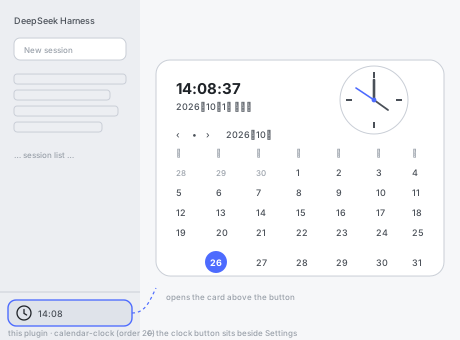
The preview is a schematic of the layout, not a screenshot of the running app. Visual appearance still needs a human check on a live page — see Verification.
Features
- Live digital clock —
HH:MM:SS, repainted once per second, aligned to the second boundary so it never drifts. - Analog dial — hour, minute, and second hands, honest to the second; respects
prefers-reduced-motion. - Month calendar — a stable 6×7 Monday-first grid, today highlighted with
aria-current="date", previous / next / back-to-today controls. - Fits both sidebar widths — the seat passes
wide: falsein the 56px rail, so the button degrades to an icon-only control and keeps its accessible name. - Bilingual — Chinese and English dictionaries registered under the plugin's own locale namespace; switching the app language repaints the card immediately.
- Fails quietly — the occupant is wrapped in an error boundary, so a render fault degrades to a plain time string instead of taking the sidebar down.
Install
Install as a profile bundle from GitHub:
dsh plugin --profile web add 'github:XZT1118/dsh-plugin-calendar-clock'
Or through the Settings → Plugins manager in the GUI, by entering the same repository spec.
Installing a new bundle requires a restart before it joins the boot composition. After that, edits to this plugin's lib/client.js hot-reload.
Manual equivalent, if you prefer to edit the profile yourself — add both of these to $DSH_HOME/profiles/<profile>/package.json, then run pnpm install in the profile directory:
{
  "dsh": { "profile": { "bundles": [
    // ... existing bundles, official ones first ...
    "@dsh-external/dsh-calendar-clock"
  ] } },
  "dependencies": {
    "@dsh-external/dsh-calendar-clock": "github:XZT1118/dsh-plugin-calendar-clock"
  }
}
The bundle list order is the patch-layer order; keep official bundles ahead of third-party ones.
Usage
- Find the clock button at the sidebar foot, next to Settings. In the collapsed rail it is icon-only; expand the sidebar to see the current time beside the icon.
- Click it (or focus it and press Enter) to open the card.
‹/•/›move to the previous month, jump back to today, and move to the next month.Esc, a click outside, or clicking the button again closes the card.
The card anchors itself above the button using position: fixed coordinates measured from the trigger's own bounding box, so it escapes the sidebar's scroll container and any clipping. It re-measures on window resize and on ancestor scroll, which keeps it glued to the button while the sidebar is dragged wider.
Package layout
| Path | Role |
|---|---|
package.json |
Manifest: dsh.bundle.patch inserts the host row, dsh.client declares the browser half |
cordis.patch.yml |
Inserts this plugin's one row; replaces nothing that ships with Harness |
lib/index.js |
Host half: deliberately empty — every value comes from the browser clock |
lib/client.js |
Browser half: the lazy __ModuleLoader__ bundle (UI plus the calendar math) |
locale/en.json, locale/zh.json |
Display title and description for plugin-manager cards |
icon.svg |
Plugin icon |
test/calendar.test.mjs |
Unit tests for the calendar math |
test/bundle.mjs |
Loads the bundle the way the page does: as a classic script |
tools/check.mjs |
Manifest, dictionary, patch, and registration-contract checks |
tools/identity-check.mjs |
One-shot guard on bundle identity and script kind |
tools/rollback.mjs |
Offline emergency rollback from a profile |
No runtime dependencies: the bundle only require('react'), which comes from the client's frozen platform module table. There are no install-time scripts.
How it works
- Seat —
sidebar.footer.action, the additive list slot the sidebar owner declares at its foot. The entry registers withid: 'calendar-clock'andorder: 20; a fresh id is added beside the shipped entries rather than replacing one. - Owner prop — the seat passes exactly one prop,
wide.falsemeans the 56px rail. - Timekeeping — a self-correcting
setTimeoutchain re-arms at1000 - (Date.now() % 1000)so ticks land on second boundaries. It only runs while the card is open. - Formatting —
Intl.DateTimeFormatwith the browser's resolved locale, so 12/24-hour convention and date wording follow regional settings without a separate toggle. - Localization — dictionaries live in the
plugin.calendar-clocknamespace. The component subscribes tolocalethroughuseSyncExternalStore, so a language switch (or a late dictionary registration) repaints mounted text instead of freezing the first dictionary. - Isolation — the seat occupant is wrapped in a React error boundary.
Verification
node --check lib/client.js        # the browser half must parse as a classic script
node tools/identity-check.mjs     # bundle identity and script kind
node --test test/calendar.test.mjs   # 9 calendar-math tests
node tools/check.mjs                 # 6 manifest / contract tests
Because the running GUI cannot be driven from here, automated coverage stops at the calendar math, the registration contract, and the script-kind guard. Confirming the rendered appearance and the popover geometry still requires a human on a live page:
- The clock button appears at the sidebar foot beside Settings.
- Opening it shows a ticking digital clock, a dial whose hands track it, and today highlighted in the month grid.
- Month navigation and today return work;
Escand outside clicks close it. - Switching the app language updates the card's text.
A module-level check that needs no screenshot: the host Loader row reads include:calendar-clock with fiberPhase: active, and the sidebar.footer.action slot lists an occupant id: "calendar-clock".
Troubleshooting
The app reports "could not start" / a boot failure after installing. Read the newest crash log:
%APPDATA%\@deepseek-ai\dsh-desktop\logs\crash-*-web-boot.log
A message like 1 entry did not activate naming this package, together with Uncaught SyntaxError: Unexpected token 'export', means the browser half contained ES module syntax. See The classic-script rule. To recover without a working GUI:
node tools/rollback.mjs            # strips the bundle and dependency from the profile
# then run `pnpm install` in the profile directory and restart
tools/rollback.mjs edits only the profile manifest. Add --profile <dir> to target a profile other than $DSH_PROFILE_DIR.
The classic-script rule
lib/client.js is concatenated into a plugin combo and executed as a plain <script> — it is not an ES module. Any top-level import or export raises Uncaught SyntaxError: Unexpected token 'export', and because a combo is one concatenated script, the failure takes down the entire web boot, not just this plugin.
This plugin's first draft did exactly that, by adding export { build as buildFactory } for the unit tests. import() cannot catch it, because Node accepts ESM syntax in an imported file. Two things now prevent a repeat:
- the bundle ends with no
exportat all, publishing its factory asglobalThis.__dshCalendarClockBuild__(inert in the browser), and exposing the pure helpers for tests through aninternalproperty that the Loader never reads; test/bundle.mjsloads the bundle throughnode:vmwith classic-script semantics, andtools/identity-check.mjsasserts the absence of module syntax.
Uninstall
Remove @dsh-external/dsh-calendar-clock from both dsh.profile.bundles and dependencies in the profile package.json, run pnpm install in the profile directory, and restart. Or use the plugin manager's uninstall action.
To disable without uninstalling, add a row to the profile's cordis.patch.yml:
- id: calendar-clock
  disabled: true
That file is hot-reloaded, so no restart is needed for the disable itself.
Limitations
- Uses browser-local time and time zone; there is no time-zone or UTC switch.
- The month grid does not show lunar dates or solar terms.
- No persistence: the browsed month and the open/closed state are per-session.
- Compatibility is declared for DeepSeek Harness
0.2.0-rc.2, the version it was built and verified against. NopeerDependenciesrange is declared, so installers will not block it on other DSH versions — but other versions are untested.
Development
The package ships hand-written source halves; lib/ is source, not build output, and is committed on purpose. There is no build step and no bundler.
git clone https://github.com/XZT1118/dsh-plugin-calendar-clock
cd dsh-plugin-calendar-clock
node --test test/calendar.test.mjs
node tools/check.mjs
node tools/identity-check.mjs
To develop against a live profile, point the profile at this checkout with link: instead of the GitHub spec, and re-run pnpm install in the profile directory.
No comments yet. Be the first to write one.