dsh-pi-tui
English | 简体中文


基于 Pi TUI 的 DeepSeek Harness 终端前端。
dsh-pi-tui 作为独立的 dsh bundle 安装到 profile 中,提供流式对话、工具调用、会话管理、Subagent、历史搜索、Shell、审批与设置等终端交互。模型、工具、Session、权限、Skills、Plan、Goal、Subagent 等运行时能力仍由 DeepSeek Harness 提供。
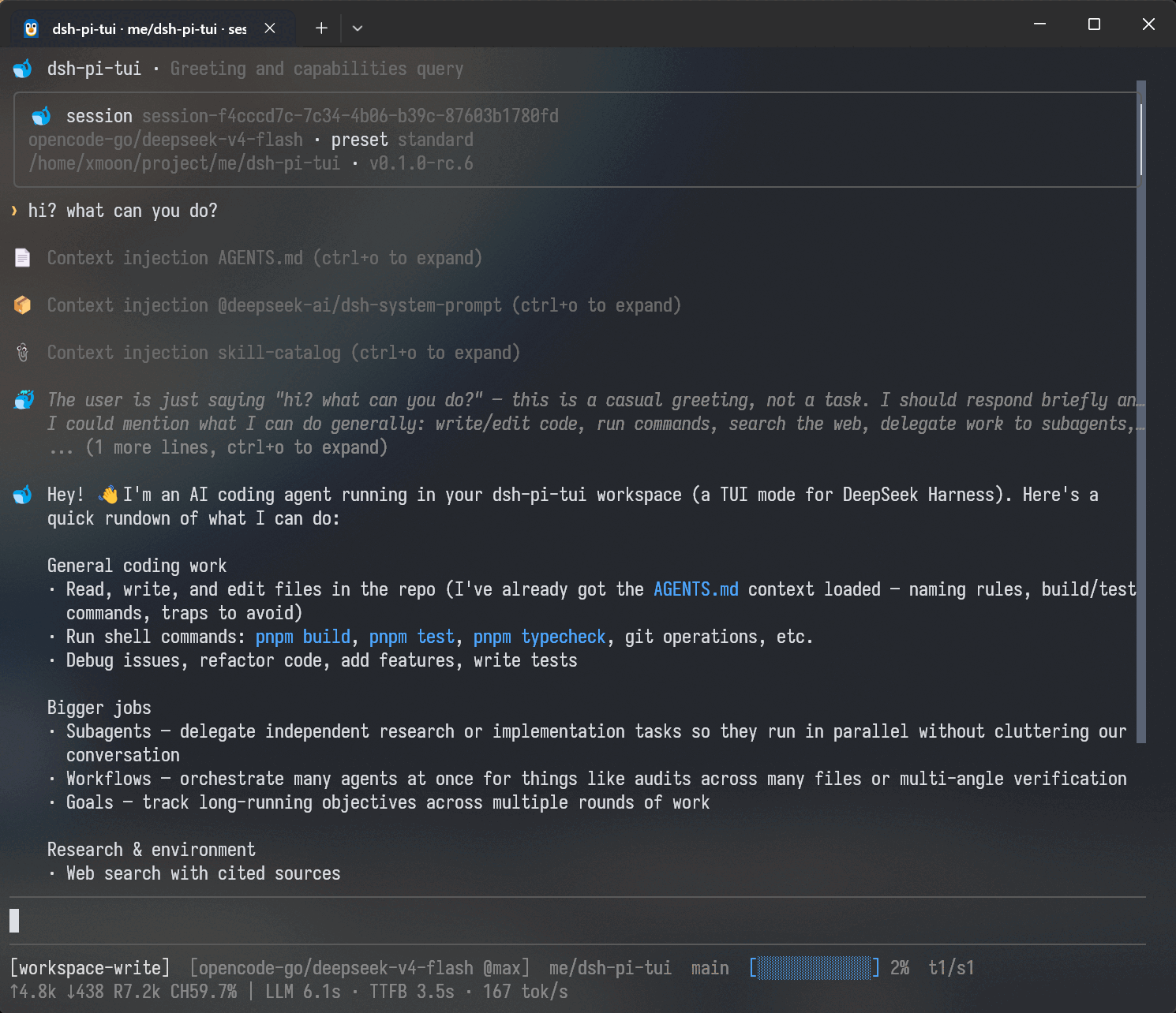
安装到 DSH Profile
Stable / latest
稳定版是普通用户的推荐渠道。请先安装 DSH,再将 TUI 添加到 pi-tui profile:
npm install -g --allow-scripts=@deepseek-ai/dsh-subprocess-local,koffi,node-pty,@google/genai,protobufjs,fs-ext @deepseek-ai/dsh@latest
dsh plugin --profile pi-tui -- add @xmoon76/dsh-pi-tui@latest
dsh --profile pi-tui
Next / npm 线(验证)
预览安装使用 DSH 的 alpha channel 与 TUI 的 next channel;安装 DSH
时需要显式允许其原生安装脚本:
npm install -g --allow-scripts=@deepseek-ai/dsh-subprocess-local,koffi,node-pty,@google/genai,protobufjs,fs-ext @deepseek-ai/dsh@alpha
dsh plugin --profile pi-tui -- add @xmoon76/dsh-pi-tui@next
dsh --profile pi-tui
隔离的 npm 驱动仍按本 checkout 声明的精确 DSH 版本运行,并执行完整的 build/test/package 路径:
pnpm compat:dsh:npm
具体的稳定版最低版本、next 兼容范围和回退路径见兼容性文档。
环境要求
- DeepSeek Harness
- Node.js
^22.19.0 || >=24
DSH 与 TUI 版本对应(重要)
| TUI 包版本 | 对应的官方 DSH tags | 说明 |
|---|---|---|
0.4.5(已发布 @latest) |
dsh-v0.1.5-rc.1、dsh-v0.1.5-rc.2 |
当前稳定版;最低 rc.1,兼容 rc.2 |
当前 next npm 线(本 checkout;版本 0.4.5) |
dsh-v0.1.5-rc.1、dsh-v0.1.5-rc.2 |
当前 next 线 |
不要把稳定线与 next 线混装。当前 next checkout 的 peer floor 是
>=0.1.5-rc.1,旧 runtime 会在正常的不兼容边界以非零状态失败。完整的
历史兼容矩阵和 fallback 命令见 兼容性文档;
要查看 next 的最新集成状态,请看 next 分支 README。
新的 Agent preset 使用当前 roster 中选定的 id。DSH 允许合法的自定义
code preset;只要当前 roster 存在它,显式输入和持久化状态都会保留 code。
DSH V3 migration 负责历史 session header/selection 的 code -> ptc 转换;
当前 projection 会原样保留合法的自定义 code。只有省略请求的 legacy
settings default code 才会在确认 roster 不含 code 后回退到 ptc。
Profile management
更新已安装的 TUI:
dsh plugin --profile pi-tui -- update @xmoon76/dsh-pi-tui
查看已安装插件:
dsh plugin --profile pi-tui -- list
卸载:
dsh plugin --profile pi-tui -- remove @xmoon76/dsh-pi-tui
恢复已有 Session:
dsh --profile pi-tui --session <session-id>
功能
对话与工具
- 流式 Markdown 输出
- Thinking 折叠与展开
- Tool Call 卡片及运行状态
- Tool / System 详情折叠
- Transcript 全文搜索
- 长会话历史折叠
- Context、Token、模型和运行状态显示
- Approval 与
ask_user_question交互 - Plan Review
- Todo / Goal 状态展示
- 可读的终端窗口标题
- 长会话按有界窗口浏览,并保留翻页与实时跟随位置
- Compaction / prune 后不会出现重复的幽灵 Tool Card
Ctrl+O 控制工具和系统详情;在全屏 Focus 下它整体展开最近几个 Thought root,或全部收起。Alt+T 单独控制 Thinking。
Focus Mode
/focus 可以把运行中的 Thinking、Tool Call 和中间回复聚合为一个实时更新的 Thought 区块。
需要查看过程时可以展开,关闭 Focus 后恢复普通 Transcript 展示。全屏 Focus 中可以按 Thought root 批量展开/收起,也可以单独点击卡片;切换或缩放时会保留 viewport。Focus 只影响界面投影,不修改 Session 中保存的事件。
Session
支持 DSH 持久化 Session,包括:
- 新建和恢复 Session
- Session 切换
- 重命名
- Fork
- Rewind
- Session lineage
/export— 完整 Session 归档(含子代理与附件),保存到 Client 本地目录/transcript— 可读 Markdown 对话记录,保存到 Client 本地目录
使用:
/sessions
/fork
/rewind
/export
/transcript
空闲且编辑器为空时也可以快速按两次 Esc 打开 Rewind。
Rewind 会从选中的历史 User Turn 创建新的 Child Session,并把对应 Prompt 放回编辑器。原 Session 不会被修改。
输入历史
Ctrl+R 打开输入历史搜索。
支持三个范围:
- Current session
- Current directory
- All directories
历史结果包含 Prompt、工作目录、时间和 Session 信息。选中历史后只恢复到编辑器,不会立即发送。
普通的 ↑ / ↓ 仍用于快速浏览最近输入。
Subagent 与后台任务
/tasks 打开完整 Task Center(当前 Session 的所有后台工作);Footer 的 ↓ 直接打开轻量 Quick Tasks(只看正在运行的工作)。
Subagent 按完整 lineage 显示,包括嵌套创建的 descendant:
main
├─ subagent A
│  └─ subagent B
└─ subagent C
浏览器会区分:
continuableone-shot- running / inactive
- nested descendant
- 后台 Job
两个视图共享同一份运行时状态:A 切换 Active / All scope,Tab 切换类型过滤,/ 进入搜索,S(确认后)停止所选任务,N / Shift+N 在运行中的任务间跳转,Quick 内 T 或底部 "View all" 行进入完整 Task Center,Esc 逐层返回。
已经结束的 one-shot Subagent 仍可以打开并查看持久化 Transcript。
对于当前 Session 的直接 continuable Child,可以进入交互式 Viewer,并直接向该 Subagent 发送后续消息(走 DSH 官方 subagents.prompt() 人类输入通道——按顺序排队为 Child 自己的下一个 turn,并保留 user 来源)。Child 使用自己的 Transcript、Draft 和运行状态,不会修改主 Session 的输入。
更深层的 nested Subagent 默认以只读方式查看。
官方 Subagent 模型选择(DSH subagent-model-selection 设置)可在 /settings
中开关并维护 allowlist:开启后新建 Session 的官方 subagent 工具可以按调用
选择子 Agent 的 provider/model(受 allowlist 限制)。设置在 Session 组合时采样,
不会改写已在运行的 Session 的工具。
Shell
编辑器支持两种 Shell 模式:
! git status
执行本地命令,并把输出提交到当前 Session。
!! git status
只在本地执行,输出不会进入模型上下文。
! / !! 是独立的编辑器模式,而不是普通文本前缀。进入 Shell 模式后 Prompt 和补全行为会同步切换。
Shell 卡片默认只显示有限的输出预览,Ctrl+O 可以展开完整保留内容——全屏 Focus 除外:那里 Ctrl+O 负责 Thought root 的整体开关,Shell 卡片保持折叠。
文件引用与图片
输入 @ 可以搜索和补全工作区文件:
@src/index.ts
@"path with spaces/file.ts"
/attach <path> 是统一的 Client-local 图片/文件入口;/image <path> 保持图片专用兼容语义。两者都支持文件与目录补全;带空格、引号或 Windows 分隔符的路径会保留输入方言,目录可以继续展开。
能够解析的相对路径会在提交时转换为明确的文件路径。
支持通过 Ctrl+V 添加剪贴板图片,并使用 DSH Attachment 能力保存到 Session。
模型与运行设置
TUI 使用 DSH 提供的模型和设置服务。
常用入口:
/model
/settings
/login
/permission
/plan
/goal
/compact
/footer
/statusline
模型切换、Reasoning Effort、权限 Preset、Plan 和 Goal 都沿用 DSH 对应的运行时语义。
/settings 中的 Icon style 可切换 TUI 结构图标的风格:Emoji(默认,
彩色)、Symbols(紧凑的单格终端符号)、Minimal(隐藏装饰性图标,只
保留状态/交互标记);切换立即生效并持久化。
其他插件注册到 ctx.commands 的 Slash Command 也会被自动发现。
Footer 自定义
/footer 提供交互式 Footer 编辑器。你可以组合内置状态条目,调整左右位置、顺序、Style、Tone、Prefix/Suffix 和 Importance,也可以创建自己的 Footer 条目。
支持四类条目:
- Builtin Item:Model、Context、Token、Tasks、Git branch 等内置状态;
- Custom Text:用户创建的固定文本;
- Custom Command Item:用户创建的动态命令输出,可和其他条目一起排列;
- Extension Item:插件通过 Stable Extension API 提供的 Footer 条目。
在窄终端中,支持 compact 的内置条目会先自动缩短;空间仍不足时再按 Importance 隐藏低优先级内容。运行时 compact 不会修改你保存的 Style。
/footer 的 Custom Command Item 和 footer: command 是两种不同能力:前者只是一个可以与 Model、Context 等混排的动态条目;后者把整个 Footer 状态表面交给一个用户命令。
完整的 /footer 使用方法、Custom Text / Command、YAML 配置、安全模型和排错说明见:
/statusline 是 /footer 的别名。
常用按键
| 按键 | 功能 |
|---|---|
Enter |
提交输入 |
Ctrl+Enter |
与 Enter 的忙碌行为相反(默认 steer,busyEnter=steer 时入队) |
Shift+Enter |
换行 |
Esc |
取消当前交互 / 中断运行 |
Esc Esc |
空闲时打开 Rewind |
Ctrl+C |
键盘退出确认;首次清空草稿 |
Ctrl+D |
空草稿时键盘退出确认;有内容时向前删除 |
Ctrl+S |
Steer:把队列消息和草稿一起发送到正在运行的回合 |
Ctrl+T |
切换 Todo 面板 |
Ctrl+R |
搜索输入历史 |
Ctrl+F |
搜索 Transcript |
Ctrl+End |
全屏时跳到最新 Transcript 输出 |
Ctrl+O |
展开 / 折叠工具和系统详情;全屏 Focus 下整体切换 Thought root |
Alt+T |
展开 / 折叠 Thinking |
Ctrl+G |
使用 $VISUAL/$EDITOR 编辑输入 |
Ctrl+V |
粘贴图片 |
Tab |
补全斜杠命令与文件路径 |
@ |
文件补全 |
! |
进入 Shell 模式 |
!! |
进入 Local-only Shell 模式 |
完整按键和命令以 TUI 中的 /help 为准。表中的快捷键是默认值;用户自定义后,以 /help 和 /keybindings 显示的生效键位为准。
自定义快捷键
Host 快捷键是语义 action(app.*),通过 context-aware keymap 解析——
UI(页脚提示、/help、/keybindings)始终显示生效的按键,因此
改键后所有提示自动更新。在 dsh-pi-tui settings 命名空间中配置,
然后用 /keybindings reload 应用(显式 reload——改设置后执行 reload
即生效,无需重启):
dsh-pi-tui:
  keybindings:
    app.input.steer: ctrl+s          # 单个按键
    app.permission.cycle: [shift+tab, ctrl+shift+p]   # 多个按键
    app.history.search: ctrl+r
    app.transcript.toggleThinking: false   # 禁用该 action 的按键
    leader: ctrl+x                    # M6:leader 序列
    bindings:
      app.tasks.open: <leader>t
- 普通可打印键永远不能绑定到 Host action(会吞掉输入);坏配置只是 警告,绝不会导致启动失败(fail-soft)。
- 任何用户声明都会替换该 action 的内置默认键:
app.input.steer: ctrl+x让 Ctrl+X steer、Ctrl+S 不再 steer;仅 leader 的app.todo.toggle: <leader>t让 Leader T 成为唯一切换触发(Ctrl+T 失效);['ctrl+z', '<leader>s']同时保留两个用户触发;false移除该 action 的全部触发。若 effective editor-owned submit key 会在 leader machine 之前消费某个 completion(例如<leader>enter),该死序列会被 拒绝而不会被展示。 DSH_PI_TUI_SAFE_KEYBINDINGS=1忽略所有用户覆盖(仅使用内置默认)。Safe mode 开启时整个/keybindings编辑器只读,避免保存只会在关闭 safe mode 后才发现的 冲突配置。- 编辑器中未自定义 action 且仍然 effective 的默认按键可选择。
Add shortcut会把 这些仍生效的默认键与新键一起写入;已被 shadow 的 definition default 仅作参考,替换 或删除一个仍生效的默认键会保留其余 sibling。action 已有用户声明后,仍按上文规则 替换内置按键集合。 /help仍是按键优先的只读帮助;/keybindings是按 action 优先的 可编辑 Keyboard Shortcuts Editor:按类别分组,搜索 action ID/描述/当前键和 默认键,并标记 customized、conflict、Unbound、Disabled 和 fixed 状态。 独立的 Leader key 行还可设置全局 leader key。/settings只有一个Keyboard shortcuts入口,打开与/keybindings相同的 编辑器和持久化控制器。- 录制器读取真实终端按键,通过
parseKey规范化为KeyId;保存前会拒绝 无法匹配、吞输入、终端歧义或已知冲突的按键。普通录制器按Esc立即取消; Host interrupt action 的 direct recorder 使用短暂双击窗口:一次Esc取消, 两次Escpress event 才录入物理 Escape。repeat/release 不算第二次,不再有单字母 快捷方式;物理 Escape 保留给 Host 生命周期路径。 - 条件 affordance 会在编辑器中单独标注(例如空编辑器任务浏览器的
Down (conditional)),不会伪装成普通已配置快捷键。 /keybindings conflicts列出冲突(同键 + 作用域重叠 + 同优先级——绝不 静默 last-write-wins);/keybindings reload重新读取设置(fail-soft:坏配置会 被诊断并跳过,读取异常才会给出错误提示——都不会崩溃,keymap 保留 last-known-good 配置);/keybindings reset通过 settings 服务清除覆盖,并 立即重建运行中的 keymap。- 子代理查看器按 action id 阻止父级 action,因此改键后的父级快捷键 在查看器内依然被阻止。
- 条件 affordance 是累加的:绑定
app.tasks.open: ctrl+x是增加 一个触发——空编辑器的↓任务浏览器仍然有效;只有false才会 移除某 action 的全部触发。
从源码运行
git clone https://github.com/XMoon/dsh-pi-tui
cd dsh-pi-tui

pnpm install
pnpm build
使用 file: 安装:
dsh plugin --profile pi-tui -- add @xmoon76/dsh-pi-tui@file:$PWD
file: 会在安装时复制当前构建结果。修改源码后需要重新 build 并重新 add。
持续开发可以使用 link::
dsh plugin --profile pi-tui-dev -- add @xmoon76/dsh-pi-tui@link:$PWD
dsh --profile pi-tui-dev
之后重新执行:
pnpm build
即可让开发 Profile 使用新的构建结果。
DeepSeek Harness 集成
dsh-pi-tui 只实现终端交互层。
以下能力由 DeepSeek Harness 提供:
- Agent Loop
- LLM / Provider
- Session Persistence
- Tools
- Skills
- Approval
- Permission Presets
- Plan Mode
- Goal
- Jobs
- Subagents
- Credentials
- Settings
因此 TUI 不需要维护独立的模型配置、Session 格式或 Agent Runtime。
它可以和其他 DSH Surface 使用同一套运行时数据:
dsh --profile web
dsh --profile headless
dsh --profile pi-tui
Extension API
除作为 TUI 使用外,dsh-pi-tui 还提供版本化的 Extension API,供其他 Cordis / DSH 插件扩展终端界面。
目前分为三个入口:
| Entry | 用途 | 稳定性 |
|---|---|---|
@xmoon76/dsh-pi-tui/extensions |
常规扩展 | Stable |
@xmoon76/dsh-pi-tui/extensions/advanced |
高级交互能力 | Advanced |
@xmoon76/dsh-pi-tui/extensions/unstable |
Low-level 能力 | Unstable |
可扩展的内容包括:
- Header / Footer
- Input Widget
- Slash Command
- Theme
- Setting
- Autocomplete
- Keybinding
- Message Renderer
- Tool Renderer
- Overlay
- Interactive UI
- Editor Control
- Replacement Editor
插件只需要依赖公开入口,不需要 import TuiApp、TuiMainScreen 等内部实现。
简单示例:
import {
  PI_TUI_EXTENSIONS_SERVICE,
  type PiTuiExtensionService,
} from '@xmoon76/dsh-pi-tui/extensions'

export const name = 'my-plugin'
export const inject = ['tuiStartup', PI_TUI_EXTENSIONS_SERVICE]

export function apply(ctx: Context): void {
  const service = ctx.get(
    PI_TUI_EXTENSIONS_SERVICE,
  ) as PiTuiExtensionService

  if (!service.api().capabilities.has('slot.chrome.header.badge')) {
    return
  }

  service.register(
    'chrome.header.badge',
    {
      id: 'my-badge',
      order: 100,
    },
    {
      text: 'my-plugin',
      tone: 'info',
    },
  )
}
详细文档:
开发
pnpm install
pnpm build
pnpm typecheck
pnpm test
测试包括 Pi TUI fork、自身 TUI 行为以及 Extension API 的 fixture / smoke test。
终端渲染和输入路由使用 @xterm/headless 做自动化验证,因此大部分 UI 测试不依赖真实 TTY 或模型连接。
性能基线:
node --expose-gc scripts/bench.mts
项目日常开发使用单独的 pi-tui-dev Profile 进行自测:
dsh plugin --profile pi-tui-dev -- add @xmoon76/dsh-pi-tui@link:$PWD
dsh --profile pi-tui-dev
DSH 兼容性与验证
以下内容仅介绍 DSH 兼容性与 CI 验证细节;普通用户无需了解即可安装 TUI。
npm 模式(当前 next)
当前 next 线是 npm 模式:以本 checkout 的 package.json 声明、冻结
lockfile 解析的已发布 dsh-v0.1.5-rc.1 family 为兼容目标。隔离的 npm
驱动从公共 registry 安装该精确 family,并跑完整 build/test/package 路径:
pnpm compat:dsh:npm
Source Mode(仅验证)
Source Mode 是面向未发布 DSH checkout 的验证专用 distribution,用于本地
兼容性检查与显式的 source 边界工作。它从 test/compat/dsh-source.json 的
完整 commit SHA 构建官方 DSH tarball family,通过临时 pnpm overrides 安装,
并在完成后清理临时状态。不要把 DSH 源码路径、file: 依赖或 workspace
symlink 写入发布 package。
安装包已经包含运行所需的 Pi TUI fork,不需要额外安装内部的 TUI package。
CI 验证策略
CI 对 push 到 next 以及目标为 next 的 PR 遵循跟踪的 test/compat/dsh-mode.json 策略;main 和所有 tag 使用 npm Mode。Source Mode 从 test/compat/dsh-source.json 读取 source target 并验证完整的官方 DSH tarball family、TUI 预设和旧 runtime 边界;npm Mode 则使用 checkout 的 package.json/冻结 lockfile 中声明的 DSH 版本运行 registry lane。对于尚未发布的 source family,已发布 pi2dsh 的生态检查会明确标记为 skipped。详细流程见 docs/dsh-compatibility.md。
项目结构
仓库根目录是发布到 npm 的 @xmoon76/dsh-pi-tui bundle。
Pi TUI fork 位于:
packages/pi-tui/
它作为内部依赖参与构建,并随根 package 一起打包,不单独要求用户安装。
具体的 upstream 来源、版本和本地差异以:
packages/pi-tui/package.json
packages/pi-tui/AGENTS.md
为准。
贡献者相关的仓库结构和开发约定见 AGENTS.md。
文档
| 文档 | 内容 |
|---|---|
| docs/README.md | 文档索引 |
| docs/architecture.md | 架构和模块职责 |
| docs/input-history.md | 输入历史 |
| docs/surface-decisions.md | TUI 交互设计决策 |
| docs/concurrency.md | Session 并发 |
| docs/failure-model.md | Async failure / cancellation |
| docs/perf-baseline.md | 性能基线 |
| docs/local-development.md | 本地开发环境与 worktree 约定 |
| docs/extension-api.md | Extension API |
| AGENTS.md | Contributor operating manual |
Changelog
中文:
English:
No comments yet. Be the first to write one.