DSH Intelligent Router
Intelligent LLM routing for DeepSeek Harness (DSH) — Multi-model Routing Strategies, Automatic Failover, Cache-affinity Staying, Data Anonymization and a Visual Settings UI.






The router registers itself as the auto provider in DSH. Pick AUTO – Intelligent Router as your model and every request is routed to the best member of your configured route group — with rules, strategies, failover, and prompt-cache-aware staying working under the hood.
Architecture
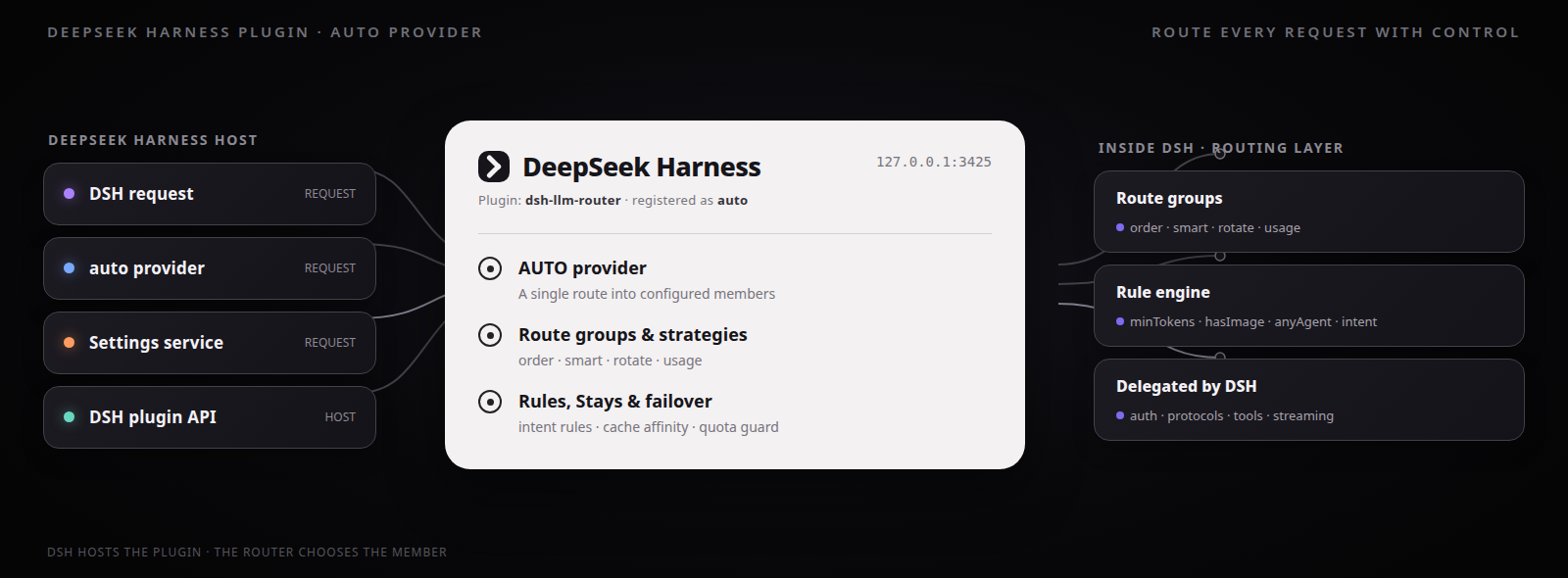
DSH Intelligent Router registers as the
autoprovider in DeepSeek Harness and routes each request through configurable route groups, strategies, intent rules, cache-affinity Stays, and automatic failover.
Usage demo
The screenshot below shows a real DSH chat flow with AUTO - Intelligent Router: the request is classified, matched against routing rules, and served by the selected provider/model member.
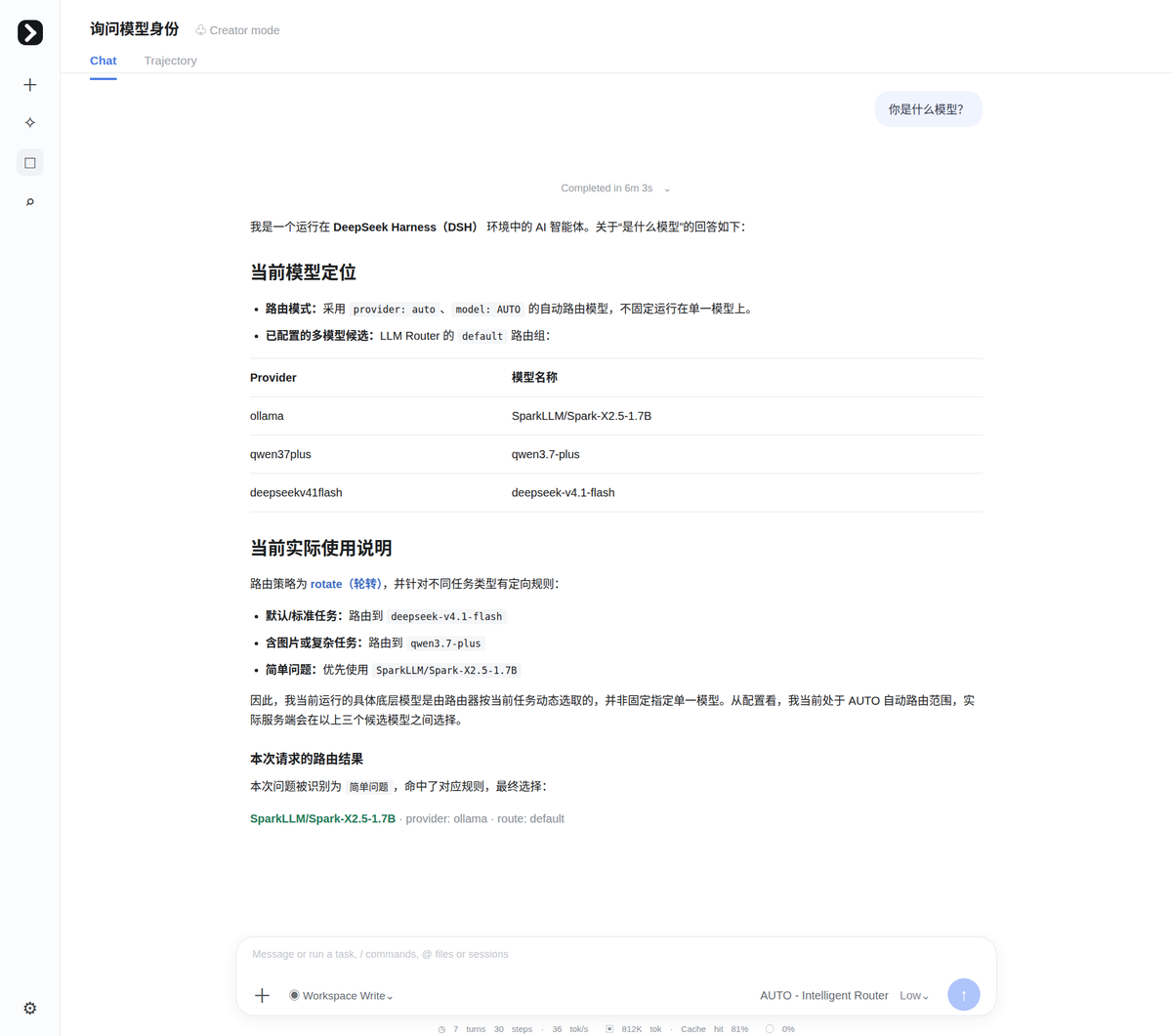
Routing details
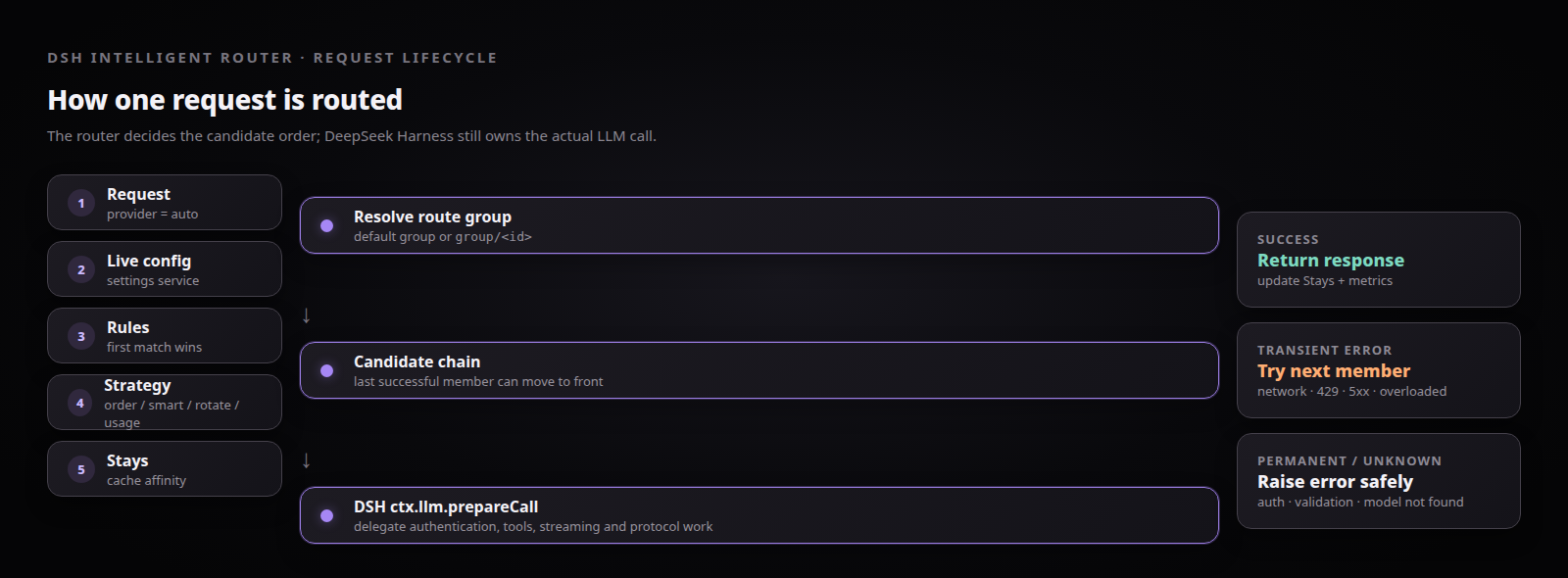
Request lifecycle
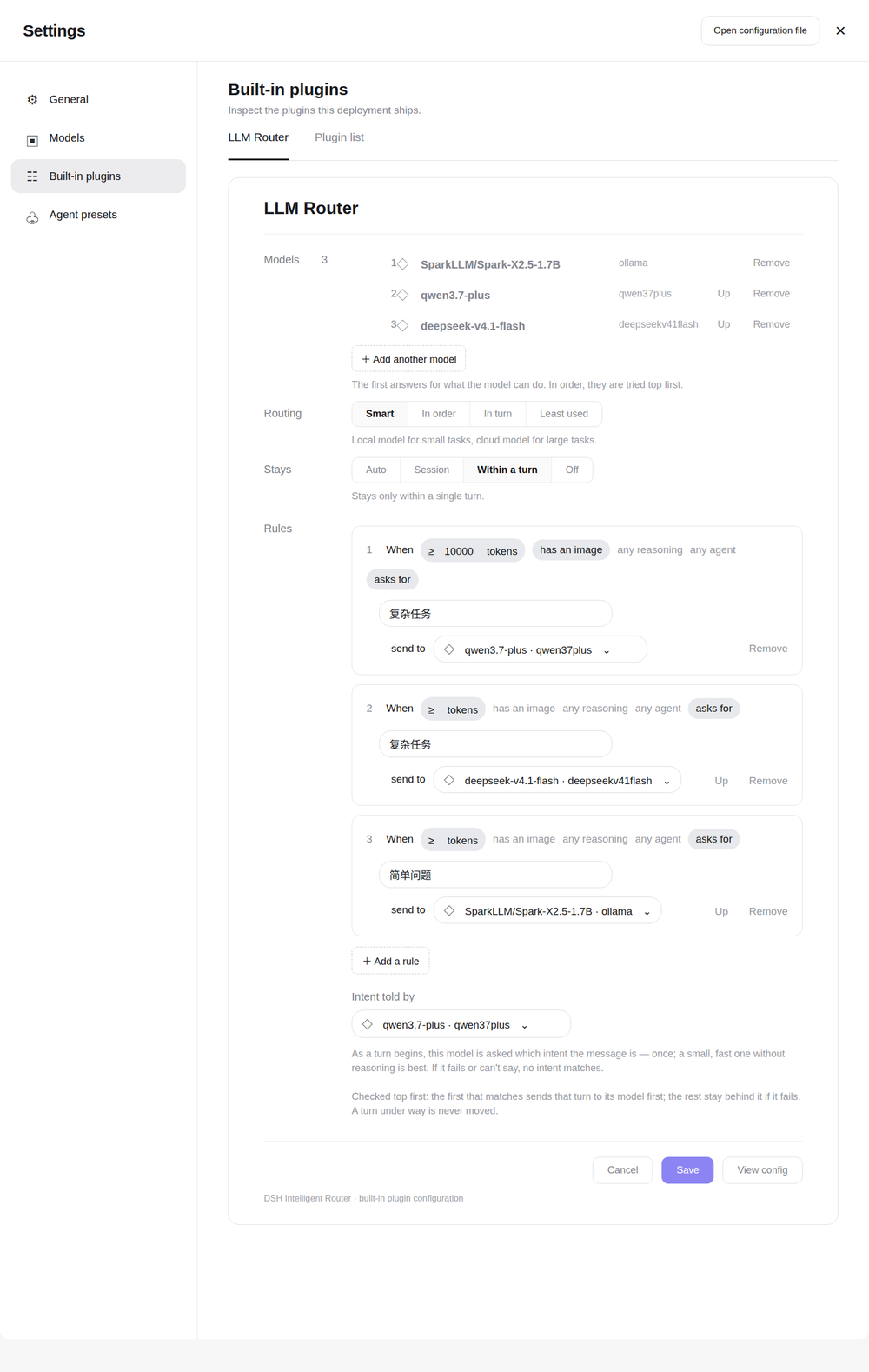
Settings and live persistence
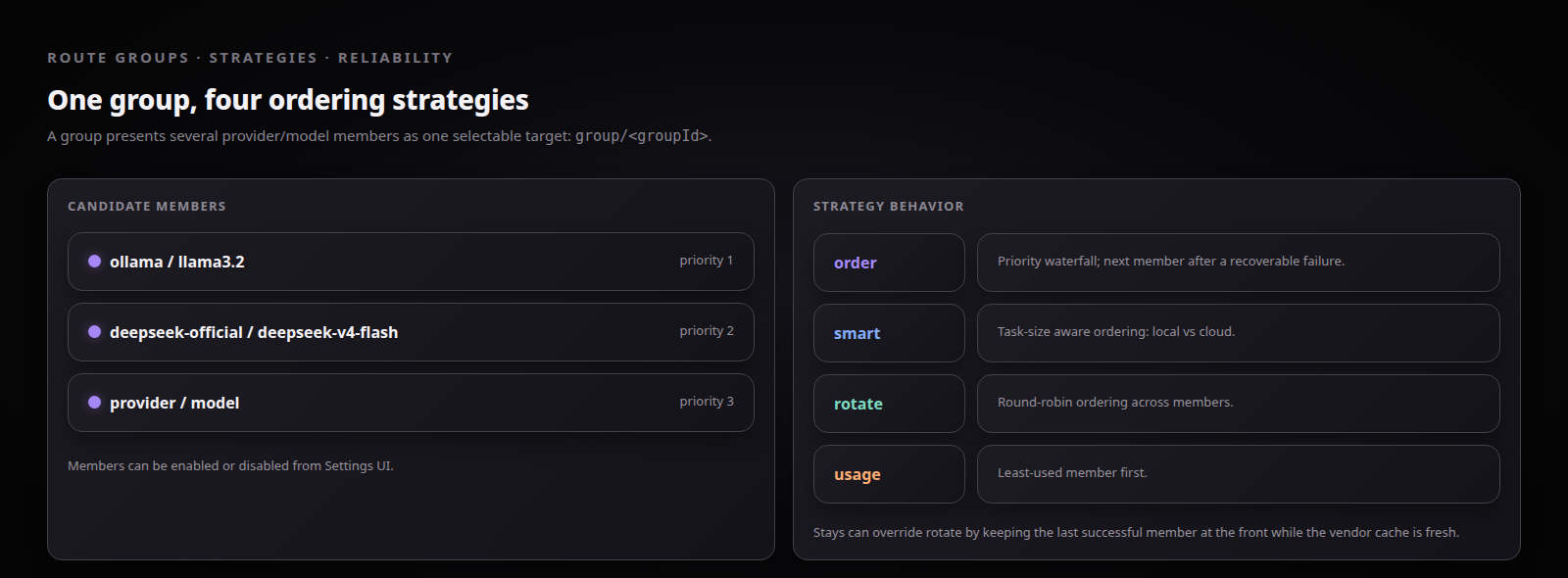
Strategies, route groups, and Stays
Features
Routing
- Route groups — organize members (provider + model) and manage them from the Settings UI
- Four routing strategies —
order(priority) ·smart(task-size aware: local vs cloud) ·rotate(round-robin) ·usage(least-used first) - Rule engine —
minTokens/hasImage/anyAgent/intentconditions; the first matching rule pins its target model to the front of the candidate chain - Intent routing — a lightweight classifier model (your choice) labels the message intent; rules route on it
- Stays (cache affinity) —
off/turn/auto/session(defaultsession): keeps the last successful member at the front while the vendor prompt cache is worth keeping, keyed per DSH session
Reliability
- Automatic failover — three-tier error classification (TRANSIENT / PERMANENT / UNKNOWN), no false positives: auth and validation errors never burn retries; connection, rate-limit, and 5xx errors fall through to the next candidate
- Quota guard — members that exceed limits are skipped without consuming a retry
Experience
- Settings UI (Magpie-style, zh/en) — model picker fed from DSH's configured models, strategy pills, rule builder, intent-classifier selection, save-time validation, live persistence via the DSH settings service
- Observability — per-group/per-member metrics, latency tracking, cost estimates, and
router/fallbackevents (host side)
Requirements
- DeepSeek Harness
>= 0.2.0-rc.2(declared incompatibility.json) - Node.js
>= 18(DSH runtime), pnpm for development
Installation
# Via DSH (recommended)
dsh plugin --profile web add github:XHToken/dsh-intelligent-router

# Or build from source
git clone https://github.com/XHToken/dsh-intelligent-router.git
cd dsh-intelligent-router
pnpm install && pnpm build
cp -r dist/* ~/.dsh/profiles/web/node_modules/dsh-llm-router/dist/
cp cordis.patch.yml compatibility.json ~/.dsh/profiles/web/node_modules/dsh-llm-router/
[!WARNING] First-time install requires a DSH restart. The plugin's loader entry and client bundle are composed into the boot graph at server startup. If DSH is already running when you install, it will not notice the new package — the Settings UI (and the
autoprovider) will be missing until you restart. Stop the runningdsh webprocess and start it again; a browser reload alone is not enough. Subsequent changes to routing config (Save in the Settings UI) or rebuilt plugin bundles are picked up live via HMR — only package-level install/remove needs a restart. Waiting for DSH support in the future.
Start DSH from the profile directory with the local binary (
cd ~/.dsh/profiles/web && ./node_modules/.bin/dsh web --port 3082). Launching vianpxcan load a duplicate module tree and break settings writes.
Quick Start
- Start DSH and open Settings → Built-in plugins → LLM Router
- Click + Add model to pick members from your DSH-configured providers
- Choose a strategy (default:
order); optionally add rules - Click Save (persists immediately via the DSH settings service)
- In chat, select AUTO – Intelligent Router — done
Use a specific group with provider group/<groupId>.
Configuration Reference
Persisted by the Settings UI into the profile's cordis.patch.yml (id: llm-router). A minimal example:
- id: llm-router
  name: 'dsh-llm-router'
  config:
    enabled: true
    defaultGroup: 'default'
    routeGroups:
      - id: 'default'
        name: 'Default'
        strategy: 'order'          # order | smart | rotate | usage
        stays: 'session'           # off | turn | auto | session
        enabled: true
        members:
          - provider: 'ollama'
            model: 'SparkLLM/Spark-X2.5-1.7B'
            priority: 1
            enabled: true
            protocol: 'openai-responses'
          - provider: 'qwen37plus'
            model: 'qwen3.7-plus'
            priority: 2
            enabled: true
            protocol: 'anthropic-messages'
          - provider: 'deepseekv41flash'
            model: 'deepseek-v4.1-flash'
            priority: 3
            enabled: true
            protocol: 'openai-responses'
        classifierModel:            # used by intent rules
          provider: 'ollama'
          model: 'SparkLLM/Spark-X2.5-1.7B'
        rules:
          - minTokens: 10000
            hasImage: true
            intent: '复杂问题'
            target: { provider: 'qwen37plus', model: 'qwen3.7-plus' }
          - minTokens: 2000
            intent: '复杂问题'
            target: { provider: 'deepseekv41flash', model: 'deepseek-v4.1-flash' }
          - intent: '简单问题'
            target: { provider: 'ollama', model: 'SparkLLM/Spark-X2.5-1.7B' }
    fallback:
      enabled: true
      maxRetries: 3                 # total attempts per request
      retryDelay: 1000
    quotaTracking:
      enabled: true
See cordis.patch.yml.example for the full annotated schema.
Documentation
- Routing Strategies & Rule Engine
- Magpie Integration Design
- Settings UI Design
- DeepSeek Harness Architecture Analysis
- Usage examples — reproducible cases with screenshots (agent-teams, coding, document pipeline, data anonymization, image redesign), indexed by the
dsh-router-examplesskill
Development
pnpm install
pnpm run build        # tsup + ModuleLoader wrap
pnpm run typecheck    # tsc --noEmit
pnpm run lint         # eslint
pnpm test:run         # vitest (194 tests)
pnpm run doctor       # self-check a DSH installation (host version, plugin tree)
CI runs the quality pipeline on every push, and an E2E workflow installs the plugin into a real DSH host afterwards (boot → restart → Settings UI bundle contract → doctor).
Roadmap
pace/weighted/intentstrategies are declared in the schema but not implemented (they silently degrade toorder) — implement or prune- Stays windows (
turn≈ 2 min,auto≈ 5 min) are hardcoded approximations — make configurable - Quota limits are hardcoded (1M tokens/day, 1k requests/day) and never auto-reset — wire up
quotaTracking.limits - Monitoring data has no UI channel yet (panel shows mock data)
- Middleware system is implemented but not wired into the request path
- Prune the legacy dual call path (
route()waterfall /llm-client.ts)
Contributing
Contributions are welcome — see CONTRIBUTING.md. Please read the Code of Conduct first. For security issues, see SECURITY.md.
References
- magpie — the Settings UI and routing strategy design of this project were inspired by and reference this project. Many thanks to the author.
License
Licensed under the XHToken community license. See LICENSE for the full text.
No comments yet. Be the first to write one.