DSH Explorer 插件



[!IMPORTANT] 让 DSH 变成 VS Code 和浏览器的形状 —— 更适合新手,更简洁易懂。
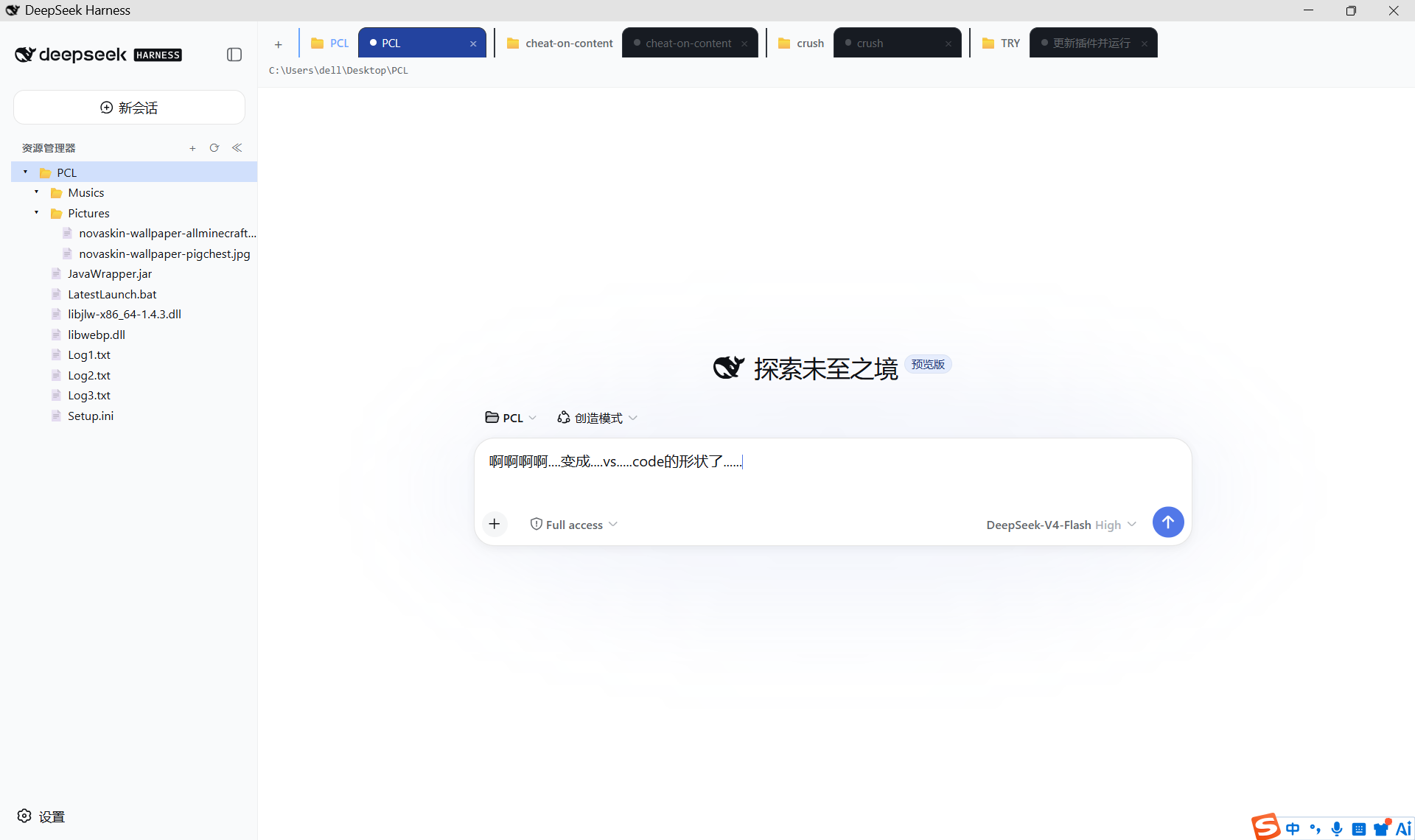
一个 DeepSeek Harness (DSH) 静态 bundle 插件,给 Web 界面加上两个增强:
- 🗂️ VS Code 风格资源管理器(侧边栏文件树)
- 🌐 按工作区分组的会话标签页(浏览器式标签)
安装后常驻生效,不需要每次会话重新加载。
✨ 功能
🗂️ 1. 资源管理器(sidebar.workspaces)
- 树形文件浏览:目录可展开/折叠,文件夹优先排序
- 点击文件在底部预览面板显示文本内容
- 右键文件/文件夹弹出菜单:打开(在资源管理器中显示)、复制名称、重命名、复制文件位置
- 新建文件夹、刷新、全部折叠
- 侧边栏收起时显示为一个图标按钮(rail),点击展开
🌐 2. 会话标签页(conversation.session.header)
- 会话标签按工作区分组:每个工作区(📁 + 标题)作为分组头,其下紧跟属于它的会话
- 当前工作区、当前会话高亮
- 点击标签切换会话;「+」新建会话(继承当前工作区)
- 每个标签右侧「×」直接归档该会话(不删除会话日志)
- 归档当前会话时自动切到下一个已有会话(右边优先,否则左边),不会卡在「新会话」空态
- 未归入任何工作区的会话归入「未分组」
- 标签过多时支持鼠标滚轮横向滚动;切换会话后当前标签会自动滚入视野,不会「点不到后面的标签」
[!TIP] 「+」的语义是打开该工作区的空闲会话:已有空闲会话时直接切过去(不会堆出一串空会话),没有才会真正新建。所以当前就在空闲会话上时,点「+」看不出变化是正常的。
📦 文件结构
| 文件 | 说明 |
|---|---|
index.js |
Host 半端:自包含(用 Node node:fs),通过 ctx.connection.rpc.handle('/explorer', …) 注册 list / read / mkdir 三个 RPC 端点 |
client.js |
Client bundle:window.__ModuleLoader__.load({ id, factory }) 格式,注册两个 slot 并渲染 UI |
cordis.patch.yml |
bundle patch:把插件行插入 cordis 配置 |
package.json |
声明 dsh.bundle.patch(bundle)与 dsh.client(浏览器 bundle) |
verify-client.mjs |
开发用验证脚本:mock __ModuleLoader__/react/ctx,离线验证 bundle 结构与渲染 |
screenshot.png |
README 顶部的运行效果截图 |
🚀 安装
从 GitHub 安装
dsh plugin --profile web add github:WuTong1213/dsh-explorer-plugin
[!NOTE] 本插件是纯 JS、无构建步骤,所以 Git 安装不需要
prepare脚本,也不需要allowBuilds放行。
从本地目录安装(开发时)
# 在插件目录的上一级执行(相对路径会锚定到当前目录)
dsh plugin --profile web add ./dsh-explorer-plugin
验证挂载:
dsh --profile web --dump-config | Select-String explorer
应看到:
# == dsh-explorer-plugin
- id: explorer
  name: dsh-explorer-plugin
[!TIP] 如果提示
dsh不是可识别的命令,说明 dsh 没在 PATH 上——改用它的完整路径(例如<DSH 部署目录>\node_modules\.bin\dsh.cmd),或先把该目录加入 PATH。
重启才生效
[!WARNING] DSH 的 host 插件树和 client module graph 都在启动时组装,不支持插件级热插拔。安装后必须重启:
# 1) 停止当前服务器
.\dsh-window-stop.cmd
# 2) 重新启动
.\dsh-window.cmd
(若用 dsh web 直接启动,Ctrl+C 后重新运行即可。)
🗑️ 卸载
dsh plugin --profile web remove dsh-explorer-plugin
重启后即恢复官方默认的侧边栏与会话头部。
🏗️ 架构
Browser (client.js bundle)                    Host (index.js)
┌──────────────────────────────┐              ┌─────────────────────────┐
│ slot: sidebar.workspaces     │              │ self-contained          │
│ slot: conversation.session…  │              │ (no DSH service dep)    │
│                              │  RPC call    │ rpc.handle('/explorer') │
│ connection.rpc.call(…)   ────┼─────────────▶│   list  → node:fs       │
│                              │              │   read  → node:fs       │
│                              │              │   mkdir → node:fs       │
└──────────────────────────────┘              └─────────────────────────┘
- 两个半区不共享内存,只通过
/explorerRPC 通道通信。 - Host 返回
{ok:true,value}/{ok:false,error};业务错误(路径无效、二进制文件)放在value.error里,由界面就地渲染,不当成传输故障。 - Client 使用 slot 的标准 props(
useSessions、useWorkspaces)与 owner props(wide、expandSidebar),不额外拉数据。 - 会话的切换/新建/归档走 client 侧已有的
sessions/workspaces服务,不占用额外 RPC。
为什么 Host 半区不注入 DSH 的 fs 服务
[!NOTE]
fs服务(ctx.fs)的唯一提供者dsh-fs-local挂在 agent preset 里(config/agent-presets/*/agent.cordis.yml),不在 profile 顶层;profile 顶层同时也没有browsecapability。
本插件挂在 profile 顶层,如果写 inject: ['fs'] 就会永远停在 PENDING 而完全不加载。因此 Host 半区直接用 Node 自己的 node:fs:
- 全部操作只读(
readdir/readFile),唯一写操作是显式的「新建文件夹」(mkdir,且拒绝含路径分隔符的名称)。 - 因为不注入任何 DSH 服务,插件是自包含的,也不受 agent realm 的服务可用性影响。
会替换官方 UI
[!IMPORTANT] 这两个 slot 都是
single类型(一人独占)。注册即替换官方实现——官方头部整条(标题、视图标签、模式/Subagent/Task 按钮、日志导出等)都不会再渲染,这是有意的设计。
sidebar.workspaces—— 会话浏览区conversation.session.header—— 会话头部
替换的实现方式:官方 UI 以默认优先级 0 注册这两个 slot,本插件以 priority: -10 注册(更低优先级渲染,同优先级会直接抛错)。因此官方注册仍然存活,插件卸载后官方 UI 立刻回到渲染位。
🧪 开发与验证
改完代码后,先跑离线验证(不需要重启):
node --check index.js
node --check client.js
node verify-client.mjs
verify-client.mjs 会 mock window.__ModuleLoader__、react 和 Cordis client 服务,实际执行 bundle 并渲染两个 slot 组件,能提前发现语法错误、注册失败和渲染崩溃。之后仍需重启才会在页面上生效。
Host 半端也可以离线 smoke:
node --input-type=module -e "const m = await import('./index.js'); const ctx = { inject: (d, cb) => cb({ connection: { rpc: { handle: (ch) => console.log('channel', ch) } } }) }; m.apply(ctx)"
⚠️ 已知限制
- 仅支持 Web(
dsh.client.platform: "web")。 - 资源管理器根目录跟随当前会话的
cwd;没有会话/工作区时显示提示。 - 会话标签只展示工作区记账内的会话;已归档会话隐藏(归档保留日志,不删数据)。
- 文件预览为纯文本,二进制文件会显示「无法预览」。
- 不显示文件大小(避免为每个文件额外
stat)。
📤 发布到 GitHub(作者备忘)
cd dsh-explorer-plugin
git init
git add .
git commit -m "feat: DSH explorer plugin (file tree + workspace-grouped session tabs)"
# 先在 github.com 新建空仓库(不要勾 README/.gitignore)
git remote add origin https://github.com/<用户名>/<仓库名>.git
git branch -M main
git push -u origin main
📄 许可证
MIT License
No comments yet. Be the first to write one.