dsh-pet-desktop-linux
A desktop pet for DSH (DeepSeek Harness) on Linux: a small transparent, always-on-top GTK3 window that floats over your desktop and animates according to what your DSH sessions are doing — idle, working, waiting for an answer, failed, or finished and awaiting review. It is not click-through: the window keeps its input region, so clicks on the pet land on the pet.
Platform: Linux with X11 or XWayland only. Windows, macOS and native Wayland (no XWayland) are not supported. See Requirements.
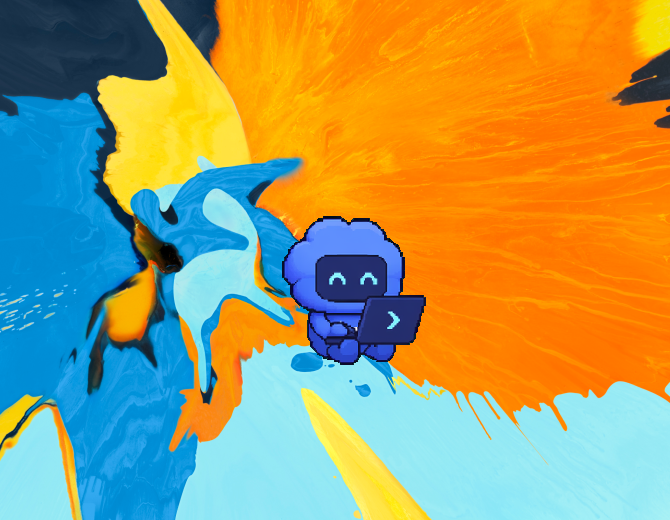
The window has no background and no border — the wallpaper shows through, and the pet stays on top of ordinary windows. The sprite follows your DSH sessions:
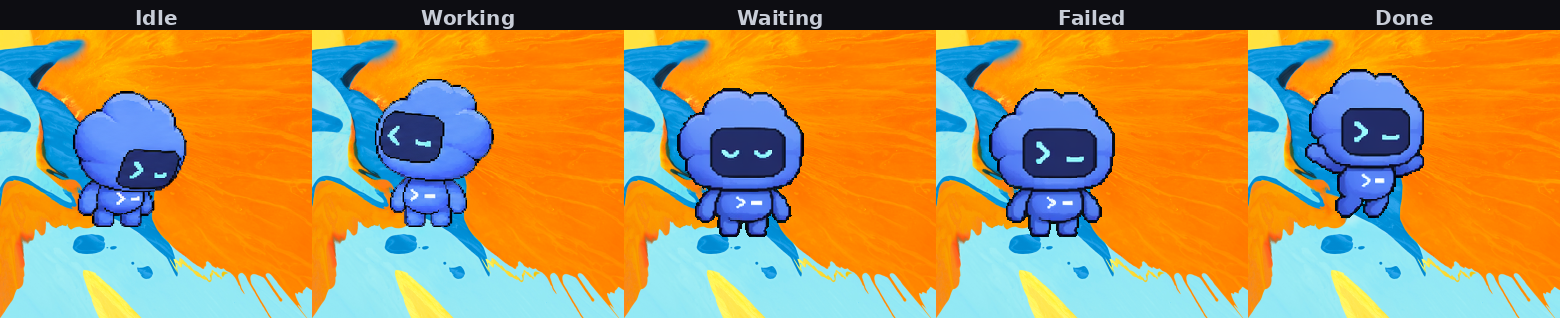
Canonical copy: this plugin is only published as
dsh-pet-desktop-linux(no scope) under theWlaegaccount. Any other package with this name is not ours.
This is not a meta-package
This plugin ships its own working program; it is not a bundle that only re-exports somebody else's dependency list:
| Part | File | What it does |
|---|---|---|
| Desktop program | desktop/pet.py |
The pet window itself: GTK3 transparent window, spritesheet animation, right-click menu, work-status dialog |
| Host half | lib/index.js |
Probes system dependencies, spawns/stops the Python program, exposes the HTTP routes, reads and writes the config file |
| Browser half | client.js |
The Desktop Pet panel in DSH Settings, with the packaged locale/{en,zh}.json manifest strings |
The single dependency, @michengai/dsh-codex-pet, is used only to read the pet
sprite sheets. This plugin deliberately does not copy that artwork into its own
repository: store rules require a bundle's dependencies to resolve to the original
author's published package, so this plugin depends on the upstream npm package
and resolves the artwork path at runtime
(require.resolve('@michengai/dsh-codex-pet/package.json')). See
Artwork and licensing.
The upstream plugin draws a pet inside the DSH web page. This plugin draws a separate always-on-top desktop window that works while the page is in the background, minimized, or closed. They are different things, not duplicates.
Requirements
| Item | Requirement |
|---|---|
| Platform | Linux with X11 or XWayland. Verified on Manjaro GNOME (Wayland session, pet runs through XWayland) |
| DSH | Any DSH build with the Cordis plugin system that provides webServer and the settings.section slot |
| Node | >= 22 (DSH's own requirement) |
| Desktop session | A GTK3-capable session. Under GNOME/Wayland the pet is an XWayland client — a pure Wayland session with XWayland disabled will not work |
| npm dependencies | @michengai/dsh-codex-pet (artwork lookup only) |
System packages
The Settings panel probes five of these — Python 3, PyGObject, GTK3, GdkPixbuf
and xdotool — and shows the matching install hint for your distribution when
one is missing. The other two rows (the WebP loader and zstd) are not probed;
check them yourself with the commands below if the pet starts but looks wrong.
| Component | Arch / Manjaro | Debian / Ubuntu | Fedora |
|---|---|---|---|
| Python 3 | python |
python3 |
python3 |
Python 3 + PyGObject (import gi) |
python-gobject |
python3-gi |
python3-gobject |
| GTK3 typelib | gtk3 |
gir1.2-gtk-3.0 |
gtk3 |
| GdkPixbuf typelib | gdk-pixbuf2 |
gir1.2-gdkpixbuf-2.0 |
gdk-pixbuf2 |
| WebP loader for GdkPixbuf | (built into gdk-pixbuf2) |
webp-pixbuf-loader |
webp-pixbuf-loader |
zstd CLI (only if Python < 3.14) |
zstd |
zstd |
zstd |
| xdotool | xdotool |
xdotool |
xdotool |
# Arch / Manjaro
sudo pacman -S python python-gobject gtk3 gdk-pixbuf2 zstd xdotool

# Debian / Ubuntu
sudo apt install python3 python3-gi gir1.2-gtk-3.0 gir1.2-gdkpixbuf-2.0 webp-pixbuf-loader zstd xdotool

# Fedora
sudo dnf install python3 python3-gobject gtk3 gdk-pixbuf2 webp-pixbuf-loader zstd xdotool
The session event files are zstd-compressed. Python 3.14 and newer decode them
with the standard library (compression.zstd); on older interpreters the plugin
falls back to the zstd command-line tool, so install zstd if your python3
is older than 3.14. Without either, the pet still runs but never leaves idle.
The sprite sheets are WebP files, so GdkPixbuf must be able to decode WebP.
Depending on your distribution's GdkPixbuf version this may need the separate
webp-pixbuf-loader package (Debian/Ubuntu, Fedora). You can check yours with
the command below; if it prints False, install the loader package:
python3 -c "import gi; gi.require_version('GdkPixbuf','2.0'); \
from gi.repository import GdkPixbuf; \
print('webp' in [f.get_name() for f in GdkPixbuf.Pixbuf.get_formats()])"
The plugin's dependency probe checks GTK3, GdkPixbuf and xdotool by name but
does not decode a WebP sprite itself; if the loader is missing, the pet window
appears and the sprite fails to load, which shows up in the log tail.
xdotool is used for the two EWMH window hints GTK3 cannot set by itself:
_NET_WM_STATE_ABOVE (keep above) and _NET_WM_STATE_STICKY (show on every
workspace). Without it the pet still appears, but it will not stay on top of
other windows or follow you across workspaces.
Decoding goes through GdkPixbuf.PixbufLoader and frames are drawn as
Gtk.Image pixbufs, so Pillow is not needed, and because no drawing goes
through a cairo.Context, pycairo is not needed either.
Installation
This is a DSH Cordis plugin bundle. Install it through DSH's plugin manager
(plugin_manager, action install_bundle), pointing target at either:
- the Git repository —
https://github.com/Wlaeg/dsh-pet-desktop-linux - or a local checkout — the absolute path to this directory
Equivalently, from a DSH shell:
# once published to npm
dsh plugin --profile web add dsh-pet-desktop-linux

# straight from the repository
dsh plugin --profile web add github:Wlaeg/dsh-pet-desktop-linux

# from a local checkout
dsh plugin --profile web add /absolute/path/to/dsh-pet-desktop-linux
The bundle declares its own patch in package.json:
{
  "dsh": {
    "bundle": { "patch": "./cordis.patch.yml" },
    "client": {
      "platform": "web",
      "immediately": true,
      "inject": ["@deepseek-ai/dsh-client-locale", "@deepseek-ai/dsh-client-ui-renderer"]
    }
  },
  "icon": "./assets/icon.png"
}
(dsh.client.inject is a client-module load-order declaration: DSH loads the
listed packages' browser bundles before this one. It is not Cordis service
injection. The browser half declares the services it actually needs itself:
return { inject: ['slots', 'locale'], apply }.)
and that patch is a single insert that mounts the host half:
- insert:
    - id: dsh-pet-desktop-linux
      name: 'dsh-pet-desktop-linux'
      config: {}
The browser half is declared by dsh.client and bound to the row whose name is
the bare package name — subpath rows do not carry a browser half.
After installing, reload the DSH Web UI page so the browser half registers its
Settings panel. Nothing else is required: DSH starts the pet window by itself
as soon as it boots (autostart defaults to true — see “Configuration”). The
pet process stops when you stop it or uninstall the bundle.
Replacing an already-installed copy (for example after editing the source) needs a restart of the DSH host process — the running process keeps the JS module generation it loaded at startup. A page reload is not enough.
Features
Window
- Borderless, transparent GTK3 window — only the pet is visible, the window background is fully transparent
- Always on top (
_NET_WM_STATE_ABOVE), so it stays above normal windows - Sticky across workspaces (
_NET_WM_STATE_STICKY, viaxdotool) — no API for this exists in GTK3, and GTK rewrites the hints shortly after the window is mapped, so the plugin re-applies them and self-heals if they get dropped - Draggable; the position is persisted as normalized 0–1 coordinates
- Size is adjustable (64–224 px) from the right-click menu and in the Settings panel
- Click-through is not implemented: the window keeps its input region, so clicks on the pet land in the pet (they are not passed to the window behind it)
Animation
- The pet is drawn by cropping 192×208 cells out of the upstream spritesheet and
scaling them with
InterpType.NEAREST, which keeps the pixel-art edges sharp - Each work state has its own animation row, with per-frame durations (idle, working right/left, waving, jumping, failed, waiting, running, review)
- The pet looks toward the cursor (16 directions) when it comes near, but only within a 420px radius; beyond that it faces front again. Without the limit it tracks every corner of the screen and feels like it is locked onto you. On a multi-monitor setup it only follows within the pet's own monitor — otherwise a pet on screen A would turn toward screen B, which is nonsense
- Long session titles are shortened up front: measured in columns (CJK counts as
two), keeping both head and tail with
…in between; the full title is on the tooltip
Session bubble — a pixel-art bubble beside the pet that lists every busy DSH session, one row each:
- Every row reads
state · session title · age, e.g.working · add gaze tracking and a bubble · 3 minutes ago. The task name is shown by default rather than collapsed into a bare count - Sorted by priority (waiting → running → failed → review), up to 8 rows; only
when more remain does it append
…and N more sessions - Titles adapt to the available width (capped at 560px); the state and the age are always complete, and only the title is ellipsized
- Clicking a row jumps DSH straight to that session: the host side holds a
single-slot
POST /dsh-pet-desktop/api/focus, which the browser half drains every second and feeds touiWorkspace.openSession(id). When the host is unreachable it falls back togdbus … org.freedesktop.Application.Activateto raise the DSH window. The clicked row briefly changes colour as feedback - Clicking empty bubble space (4px above and below the rows) toggles expanded/collapsed. Expanded, waiting sessions also show their questions and options so you can see what is being asked
- A new waiting session auto-expands the bubble once and outlines it in yellow; if you collapsed it by hand it will not pop open again
- The bubble hides itself when no session is busy
Work states — five states, inferred from your DSH session event files
($DSH_HOME/sessions/*/*/session.v4.jsonl.zstd). No DSH API access — endpoints
such as /api/sessions answer 401 to an outside process:
| State | Meaning |
|---|---|
idle |
No session is busy |
running |
A session is working on a turn |
waiting |
A session is blocked on you — a pending ask_user_question or exit_plan_mode call |
failed |
The last turn of a session ended with an error (or max-tokens) |
review |
A turn has finished and has not been looked at yet |
Multiple sessions are resolved by priority: waiting wins, then running, then
failed, then review. (The desktop build ranks running above failed, so a
long-running session stays animated as working rather than showing an older
failure.)
Right-click menu
- A read-only status line showing the current state (and detail, when there is one)
- View work status details… — a dialog listing the sessions behind that state
- Switch pet — pick any pet found under the upstream
assets/codex/directory - Bigger / Smaller — resize in 16 px steps, clamped to 64–224
- Hide desktop pet — hides the window; the process keeps running
- Open DSH UI — opens the DSH web UI in your browser
- Quit desktop pet
Settings panel — a Desktop Pet section in DSH Settings:
- Status line: running or stopped, the PID, and the selected pet id
- Start / Stop / Restart buttons (restart is stop, wait for exit, start)
- Pet picker, whose options come from
GET /api/state - Size slider (64–224) and a hide the pet on the desktop switch
- A start with DSH switch — turn it off and DSH will not launch the pet window on boot; you then use the Start button instead
- Missing-dependency notice: shown only when something is missing, listing the missing items together with the install command for them
- A collapsible log view of the recent lines from
GET /api/state, with a refresh button, so a failed start is diagnosable from the UI
The panel is bilingual (English / Chinese) through the client locale registry.
It does not offer a position input (drag the window itself — see above), it
does not register a startup entry with your OS (that is an operating-system
level thing, unrelated to the in-DSH autostart), and it does not run
several pets at once.
Host HTTP routes (prefix /dsh-pet-desktop), used by the Settings panel and
usable by local scripts:
| Method | Path | Purpose |
|---|---|---|
| GET | /dsh-pet-desktop/api/state |
{running, pid, startedAt, lastExit, port, config, configPath, petScript, pets, assets, dependencies, log[]} |
| POST | /dsh-pet-desktop/api/start |
Start the desktop pet |
| POST | /dsh-pet-desktop/api/stop |
Stop it gracefully |
| GET/POST | /dsh-pet-desktop/api/config |
Read / write the config |
| GET | /dsh-pet-desktop/api/deps |
Dependency probe result plus install hints |
Writes require the header x-dsh-pet-desktop: 1 and
content-type: application/json. Requests from outside the local host and
private address ranges are refused with 403, since these routes can start and
stop a real process.
If the config file does not exist yet, the defaults are used in memory
(selected: "codex", size: 104, hidden: false,
position: {x: 0.94, y: 0.70}, autostart: true); the file itself is only
created on the first write, i.e. when you change a setting. Config writes are
atomic (temp file + rename) and serialized, so a reader never sees a
half-written file.
autostartis read by the Host half when DSH boots. After deciding to launch the pet it waits 1.5 seconds before spawning, so it does not compete with DSH's own startup. A failure there never affects DSH itself; the reason shows up in the Settings panel log (most often a missing GTK3 / GdkPixbuf /xdotool).
Configuration
The config file is independent from the upstream web plugin's file, so the two never fight over each other's settings:
~/.dsh/codex-pet-desktop/config.json
{
  "selected": "codex",
  "size": 104,
  "hidden": false,
  "position": { "x": 0.94, "y": 0.70 },
  "autostart": true
}
| Field | Type | Meaning |
|---|---|---|
selected |
string | Pet id — any directory name under the upstream assets/codex/ |
size |
number | Pet width in pixels, clamped to 64–224 |
hidden |
boolean | Whether the desktop window is hidden at startup |
position |
object | null | Normalized position (0–1) of the window; null puts it in the bottom-right corner |
autostart |
boolean | Whether DSH launches the pet window on boot (default true) |
Everything reachable from the Settings panel (selected / size / hidden /
autostart) is written back to this file, so editing it by hand and using the
UI are equivalent. position is the exception: it has no input control and
is written by dragging the window — but a hand-edited position is picked up
and applied within a few seconds (hot reload), no restart needed. autostart is
only editable from the Settings panel — though the pet program itself recognizes
the field and passes it through unchanged, so dragging the window, which rewrites
the position, never drops it.
Artwork and licensing
- The plugin's own code is MIT (see LICENSE).
- The pet artwork is not distributed with this plugin. At runtime the plugin
resolves the upstream npm package
@michengai/dsh-codex-petand reads<root>/assets/codex/<pet>/spritesheet.webpfrom there. No sprite sheet is included in this repository or this package. - The upstream package's
NOTICEstates that the pet artwork underassets/codexoriginates from OpenAI Codex and is not covered by that project's Apache License 2.0 — those rights remain with their owners. assets/icon.png(the plugin icon shown on the card in the Plugins manager page, referenced by theiconfield inpackage.json) is a single frame cropped from that same artwork, so it is third-party material too, not original work of this plugin.- This plugin is a community project. It is not affiliated with, and is not an official product of, OpenAI or DeepSeek.
See NOTICE for the full text.
Troubleshooting
| Symptom | Cause and fix |
|---|---|
| Settings panel lists a missing dependency | Install the package from the table above, then press Refresh in the panel |
| Pet does not stay on top, or disappears when switching workspace | xdotool is missing, or the window manager does not honour EWMH hints |
| Pet window does not appear at all | The session is native Wayland without XWayland; the pet is an X11 client. Check the log tail in the Settings panel |
Pet always shows idle |
It reads DSH session files; make sure DSH is actually writing sessions for the workspace you are watching |
| Pet shows the wrong workspace's activity | It watches the sessions under $DSH_HOME; use View work status details… to see exactly which sessions it picked up |
Uninstall
Remove the bundle through DSH's plugin manager
(plugin_manager, action remove_bundle). The Host half stops the Python
process when the plugin unloads. Your config file at
~/.dsh/codex-pet-desktop/config.json is left in place; delete it by hand if you
want a clean slate.
License
MIT © 2026 Wlaeg — for this plugin's original code only. Third-party artwork is covered by NOTICE, not by the MIT grant.
No comments yet. Be the first to write one.